❄️ Stay cool, stay ahead — the future of thermal pads is here!
Thermal Grizzly KryoSheet is a premium graphene-based thermal pad engineered in Sweden, delivering ultra-high thermal conductivity that rivals liquid metal without the mess or risk. Designed for CPUs, GPUs, and gaming consoles, it offers maintenance-free, long-lasting cooling with multiple size options to fit your hardware perfectly. Ideal for professionals and enthusiasts seeking superior, hassle-free thermal management that keeps systems running cooler and more stable under load.


| ASIN | B0CQZ6KKH7 |
| Best Sellers Rank | #4 in Thermal Pads |
| Brand | Thermal Grizzly |
| Color | silver |
| Computer Memory Type | DIMM |
| Customer Reviews | 4.4 4.4 out of 5 stars (2,538) |
| Date First Available | December 26, 2023 |
| Department | All Ages, Unisex |
| Item Dimensions LxWxH | 0.94 x 0.47 x 0.07 inches |
| Item Weight | 0.705 ounces |
| Item model number | TG-KS-24-12 |
| Manufacturer | Thermal Grizzly |
| Product Dimensions | 0.94 x 0.47 x 0.07 inches |
T**R
Nearly Liquid-Metal Performance — The Ultimate Long-Term Thermal Solution
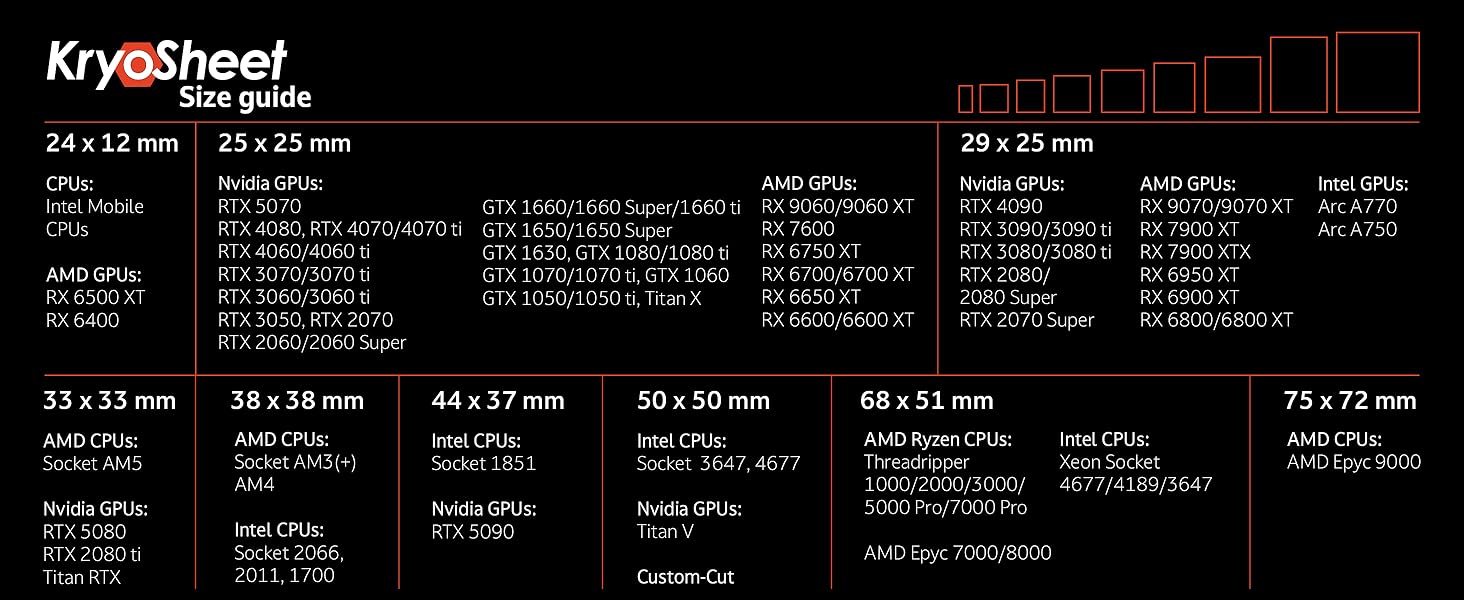
Earlier this year, my 2020 MSI GE75 Raider (10SFS-226) started running hot—both while gaming and even at idle. I decided it was time for a full deep clean and repaste of the thermal interface materials. Since the system is older and runs unusually hot, I wanted something far more efficient than traditional thermal paste—but without the risks associated with liquid metal. After thorough research, I decided to try Thermal Grizzly KryoSheet, a graphene-based thermal pad designed for ultra-high conductivity and long-term stability. I was excited to test it after hearing that it had been massively improved from the original carbon sheet version. It’s said to perform almost on par with liquid metal, and now I can confirm—that’s absolutely true. The packaging is top-notch: compact, well-designed, and protective. The KryoSheet comes in a separate small box, resting on a soft, pliable mat and sandwiched between two plastic sheets for added protection. Installation tips: Make sure you order the correct size for your CPU and/or GPU die. Avoid cutting, touching, or flexing the sheet—it’s very thin and delicate. Because KryoSheet is electrically conductive, I also used Thermal Grizzly Kapton Insulation Sheets to cover the exposed SMDs around the CPU and GPU, and a small amount of viscous silicone oil to help it stay perfectly in place during installation. Both precautions paid off—the process was smooth and trouble-free. Performance results: Idle temps dropped from 50–60°C to a rock-solid 40–50°C (often holding steady in the low 40s). Under full gaming load, the CPU never exceeds 80°C and the GPU stays below 70°C. Performance is nearly identical to liquid metal, but with lower power draw—about 10 watts less from both CPU and GPU—with zero thermal throttling under sustained load. The only difference I noticed was slightly higher clock speeds when using liquid metal, but given the thermal efficiency here, that’s negligible. The best part? You’ll never have to replace it. KryoSheet doesn’t dry out, pump out, or degrade over time, as long as you leave the heatsink undisturbed. After using PTM7950 previously, I can confidently say KryoSheet outperforms it in every way—temperature, stability, and longevity. This is, without exaggeration, the best investment I’ve ever made in my gaming laptop since buying it in 2020. If you’re serious about cooling performance and long-term reliability, Thermal Grizzly KryoSheet is second to none.
Q**N
100% Worth it. If your careful.
Any reviews complaining about how fragile and easily damaged these pads are from clumsy impatient people who can not be bother to slow down and take their time in order to use it properly. I had no issues handling and applying this pad with no damage and used the method of using the absolute teeniest tiniest little dot of thermal paste on each corner with a light tap in order to keep the pad in place while delicately lowering and screwing down a massive cpu air cooler with zero issue. Take your time, take it slow, and do it right the first. As for performance and ease of use. i can safetly say i will never use thermal paste again as long as i can get these as it surprisingly dropped all of my temps and average temps on a 5950x by around 5c. Not much change on the minimum temps but i am very happy to not have this cpu spike as much into the red and happily remain in the mid 70 to low 80's under heavy load with the benefit of not having a massive mess of paste to clean just to repaste it again if anything is wrong and risk damaging the cpu pins or socket since certain paste's love to act like glue even when the cpu is hot and refuse to let the cpu go which results in you ripping the cpu out of the socket because the paste fused it to the cooler which is just another step to worry about trying to pull them apart without any damage. This pad is a absolute life saver for cleanup as well as reducing temps, even if the temp reduction is not by very much if any for the benefit of not having to use paste or dismantle your system again for quite some time. The instructions also recommend that you really should replace it after use rather than reuse it due to damage from the first initial install and i dont mind that since i will rarely be taking my systems apart, and if i do then i will gladly buy another pad or two when the time comes for me to take it apart, rather than risk any issue. Yes they are pricey but in my opinion they are extremely worth it for those who will rarely remove their cpu cooler for long periods of time and want a simple no mess solution that matches or even outperforms paste (in my case) if your lucky, etc. Highly recommended!
C**R
Top
F**D
This should be the new standard for CPU cooling I'm using it on My Ryzen 9 9950X and Ryzen 9800X3D with Noctua NH-D15 G1 and Noctua NH-D15 G2 the temps are so great probably 2c to 3c degrees lower than a standard quality thermal paste. Pros: - No more thermal paste mess - easy to use - Covers the entire CPU perfectly AM5 CPUs are 33cmx33cm - You don't need to change it or clean it or replace it it's stays there as long as you wish unlike thermal paste - Reusable just be careful when taking it off. Cons: * Be Careful when handling it the material is fragile so handle it with care. * Electrically Conductive "Nothing to worry about unless you are blind and put it somewhere else other than on top of your CPU lol" * Expensive "kinda worth it for me, but understandable" 100% Recommened over thermal paste.
A**R
ペラペラの紙に見えるが、これがよく熱を通す。 CPU周りが、汚れない。 ただ、CPUと水枕等の接地が均等ならよく熱を通します。 接地面に隙間が出来るようなら、シリコングリス等が良いかも。
R**N
Good thermals on my itx build
I**.
Quite expensive. But worth it, especially that you can re-use it (I assume) and saves you the mess of thermal paste
Trustpilot
1 month ago
2 weeks ago