Buy anything from 5,000+ international stores. One checkout price. No surprise fees. Join 2M+ shoppers on Desertcart.
Desertcart purchases this item on your behalf and handles shipping, customs, and support to USA.
🚀 Elevate your IoT game with the NodeMCU ESP8266 — where connectivity meets creativity!
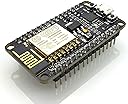
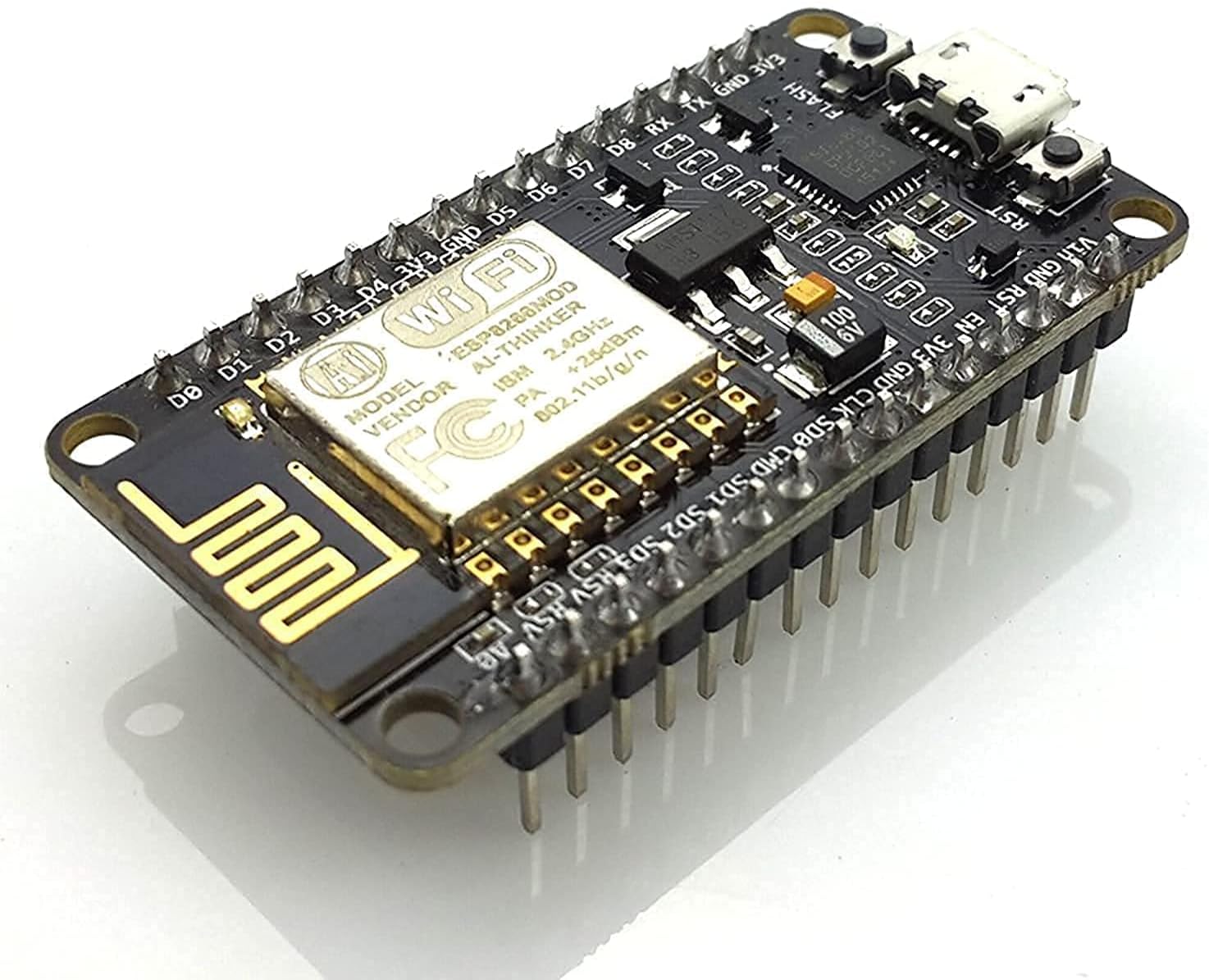
The Lolin NodeMCU ESP8266 CP2102 is a compact, lightweight Wi-Fi development board featuring an integrated CP2102 USB-to-UART bridge, full I/O port access, and compatibility with popular platforms like Arduino IDE and MicroPython. Designed for rapid prototyping and IoT automation, it supports 802.11 b/g/n wireless standards and includes built-in flash and reset switches, making it a top choice for millennial professionals seeking seamless connectivity and smart device control.
| ASIN | B010O1G1ES |
| Box Contents | Lolin NodeMCU ESP8266 CP2102 NodeMCU WIFI Serial Wireless Module |
| Brand | eleduino |
| Brand Name | eleduino |
| CPU Model | A Series A9 |
| CPU Speed | 8.5 GHz |
| Compatible Devices | Arduino, Personal Computer, Smartphone |
| Connectivity Technology | Wi-Fi |
| Country of Origin | India |
| Customer Reviews | 4.2 out of 5 stars 2,983 Reviews |
| Importer Contact Information | MARKSON TRAD INDIA G.F., PLOT NO 363A 364A KHASRA NO 61/11,, STREET NO.17, ANANDPUR DHAM VILLAGE KRALA, NEW DELHI, 110081 (INDIA) mo.- 7477-070728 |
| Item Dimensions L x W x H | 5L x 5W x 5H Centimeters |
| Item Type Name | Programming, prototyping, projects, hobby, industrial components. |
| Item Weight Unit of Measure | 9 Grams |
| Manufacturer | Sound Land Corp, Sound Land Corp. No.32.Keji 1st Rd.,Guishan Township,Taoyuan County 33383 Ph- 886-3-396-1958 Taiwan R. O. C. |
| Manufacturer Contact Information | Sound Land Corp. No.32.Keji 1st Rd.,Guishan Township,Taoyuan County 33383 Ph- 886-3-396-1958 Taiwan R. O. C. |
| Manufacturer Part Number | 3-01-0268-1 |
| Memory Storage Capacity | 4 MB |
| Model Name | Node MCU |
| Model Number | 3-01-0268-1 |
| Network Connectivity Technology | Wi-Fi |
| Operating System | NodeMCU |
| Packer Contact Information | Sound Land Corp. No.32.Keji 1st Rd.,Guishan Township,Taoyuan County 33383 Ph- 886-3-396-1958 Taiwan R. O. C. |
| Processor Count | 1 |
| Processor Speed | 8.5 GHz |
| RAM Memory Technology | LPDDR4 |
| Total USB Ports | 1 |
| UPC | 710824985499 712866303101 715120173885 710824986076 |
| Unit Count | 1 Count |
| Warranty Description | no Warranty |
| Wireless Compability | 802.11b |
S**R
Nice board for IOT projects
Had to get some drivers installed, but now works like a charm.
⚡**⚡
ESP8266- Compact, Light, Featured, Breadboard Friendly Board for IOT & Automation | REVIEW | GUIDES
ESP8266 is very common name now a days. When I saw this board, I was like wow. After researching a lot about which one to order, plain ESP8266 or NODEMCU one, I was on for NodeMCU. But even in case of NodeMCU, there are many different manufacturers implementing the firmware on board e.g. Lolin & Amica. Product title mentions Lolin but display pictures are of Amica. Lots of confusion. But I went on & ordered one from cloudtail seller. To my surprise, my board came in poly packaging having Lolin sticker with Amica board sealed in antistatic packet. :D So it’s a hit or miss kind of thing. Got it two times from cloudtail & both times it was Amica board. So not an issue. ••••••••••••••• INSIDE BOX ••••••••••••••• NodeMCU board inside antistatic packet with hard foam to protect pins. Board Dimensions: L x B x H, 49 x 25 x 13mm (including pins, w/o header pins height is just 4mm) Weight: 8g (wrongly mentioned as 50g in listing) ••••••• PROS ••••••• 1. Breadboard friendly. 2. Pins come soldered & not separate. 3. Neatly made, lightweight and compact board. 4. Arduino compatible & easy to program. 5. CP2102 chip for USB to UART. Old version had CH340 chip. 6. Full Blynk support (Believe me, it will mean a lot to you). 7. 4 screw holes at each corner of the board for easy installation. •••••••• CONS •••••••• 1. Some pins were literally bent on arrival. I had to make them straight using mini plier. Not a big deal, but a hassle. Supplier should take care of it. 2. I got two boards at 2 different times and both had same issue of pin layout not perpendicular to board, rather spread outward by few degrees. I had to make them perpendicular for easy setup on breadboard. (Reducing 1 star for these two cons. Although being breadboard friendly, you can’t install it directly on breadboard unless you straighten up the pins and make them perpendicular to board. This act may damage board even. So risky.) ••••••••••••••••••••••••••••••••••••••••••••• SETTING IT UP WITH ADRUINO IDE ••••••••••••••••••••••••••••••••••••••••••••• 1. Download latest Arduino IDE from official site as per your system configuration. 2. Install software in preferred location. 3. It will also install necessary USB drivers including one for our board i.e. CP2102 USB to UART bridge. 4. Visit ESP8266’s github page (Google it) and copy board manager link from there. (Screenshot attached) 5. Open Arduino IDE. By default Arduino does not come with ESP8266 support. So we need to manually specify link for ESP8266. 6. Go to File → Preferences and paste above ESP8266 board manager link under “Additional Boards Manager URLs”. Click on ok. 7. Now go to Tools → Board → Board Manager & search for esp8266 by ESP8266 community. 8. Click on install. It will download several related board definitions and install them. Once installation is successful, close the window. 9. Now when you will go to Tools → Boards, you will find all of ESP8266 related board listed. •••••••••••••••••••••••••••••••••••••••••••••••• GETTING READY FOR PROGRAMMING •••••••••••••••••••••••••••••••••••••••••••••••• 1. Open Arduino IDE 2. Go to Tools → Boards and choose your board. Here in our case it’s NodeMCU 1.0 (ESP-12E Module) 3. Now in Tools → Port, choose communication port on which board is connected. To find it go to windows device manager & under ports (com & lpt) locate CP210x to UART Bridge. In my case it’s COM3. 4. Specify upload speed in Tools → Upload Speed. 115200 works good in general and with large code sketches also. While 9600 will also work but may fail in some large sketches & is very slow. 5. Leave other options in Tools as such. 6. You are all set now. Code a sketch, upload it to board via Sketch → Upload. 7. While sketch or code is getting uploaded to board, blue LED near Wi-Fi antenna blinks continuously indicating transfer. 8. Enjoy the endless world of ESP8266. ••••••••••••••••••••••••••••••••••••••••••••••••••••••••• BLINK ON BOARD LED (Initial check of board) ••••••••••••••••••••••••••••••••••••••••••••••••••••••••• There’s a program to blink on board led in examples after you add ESP board in previous step. 1. Open Arduino 2. Go to → File → Examples → ESP8266 → Blink 3. Go to → Sketch → Upload (indicator led will blink while it’s being uploaded) 4. Soon after sketch is uploaded, other led near USB port will start blinking as per delay in sketch/code. ••••••••••••••••••••••••••••••••••••••••••••••••••••••••••••••••••••••••••••••••••••••••••••••••••••••••••••••• BLYNK SUPPORT & EXAMPLE TO SWITCH ON/OFF ONBOARD LED USING SMARTPHONE ••••••••••••••••••••••••••••••••••••••••••••••••••••••••••••••••••••••••••••••••••••••••••••••••••••••••••••••• Blynk app is free to use with 1800 free recyclable energy with each account, which is more than sufficient for general projects or unlimited energy if local server is used. Energy is used by each widget you add to project. You can always purchase more energy for bigger projects or recycle used ones. Visit Blynk website and go to “getting started” page. Follow the steps i.e. 1. Install Blynk app from store & register. 2. Create project & get auth token. 3. Download library zip from link provided. 3. Install Blynk library manually by copying unzipped folders to mentioned paths of your sketchbook folder for Arduino IDE. 4. After libraries are installed, another entry with Blynk is created in examples. 5. Open Arduino IDE & Go to → File → Examples → Blynk → Boards_WiFi → ESP8266_Standalone. 6. Enter auth token from email, ssid and password of your Wi-Fi in sketch. 7. Upload sketch to board. 8. Now in app add two buttons to project created above, by clicking on + and selecting button 9. Open each button and specify D0 & D4 pin with 1 → 0. 10. Click on Play button on top. 11. Press buttons & your on-board LEDs will switch on off. 11. Enjoy the endless world of IOT and automation. Control everything from your smartphone via Blynk server or local server. ••••••••••••••••••• FINAL VERDICT ••••••••••••••••••• Initially i was sceptical about purchasing board from this listing after reading reviews. But after receiving I am in no doubt that it’s a wonderful board. It’s compact, neat and works great without any big trouble. You can definitely go for it. With Blynk support for this board, it’s really easy working with any of mobile controlled automation projects without much of coding. P.S. Amica one is better and compact board. While name mentions Lolin, pictures display Amica board. So in case you receive Lolin board and are not satisfied, you can always ask for replacement board under "Product not as displayed" category.
A**A
A very great board
Great, product using it for a rc car, wifi and pins work great, a suggestion for the seller please sell a cable with it too as it will save a lot of time of the customers, the size is very small so it fits in a bread board easily , help for the other costumers and people wanting to buy, buy it with a good quality cable , and it has to be a data cable or the code form your programming device will not transfer
V**C
Good low cost microcontroller
Works well. I am using it to read input from sensors and display the output. I am using the microcontroller as a server to which my cell phone / laptop can connect to and read the output. It connects to WiFi seamlessly and is not slow to process. All these features at such a low price is impressive!
R**U
Good for learning, bad for interfacing higher(12V!) signals as those detroy it. Works with 3.3V.
Since this is costly board by indian standards, i write cons first: (*)Quality isn't that great. (*)esp 12 module is soldered, so once you program it, i don't know you can use the same board to program other modules or not. (*)CAUTION: 3.3V ONLY. 12V definitely will destroy it. For sure. I learned it the hard way. There is no protection. If you have to use 12V, use optocoupler or add some diodes. (*)There is no level shifter 3.3V/5V/12V (*) No onboard relays/MOSFET/sensors/opto coupler. This is why we use this esp chip, and using this board, we have to add all of them manually.... I haven't tried it yet, but this board claims to provide all of them-->http://www.amazon.in/ESP8266-Black-cloud-features-Board/dp/B0148HKRPS/ref=pd_sim_sbs_23_5?ie=UTF8&dpID=515it1WwXxL&dpSrc=sims&preST=_AC_UL160_SR160%2C160_&refRID=0J8ZE8R9HY1ENKJGMNDN Will try when i get time. I couldn't get this thing to work to drive 5V nMOSFET gate. This will definitely add to cost. Pros: (*) Very easy to work with, just attach micro usb mobile cable, and we are good to go. download ESPLORER java application. Now, download ESP flasher from the link in that application. After that this device can work with LUA scripting language (very easy). Now download samples from the web, this chip esp-12e will act as standalone web server, find out ip address, type it in your browser and you can control all its GPIO pins from web! (*)This devkit is really small (*)Very easy to flash the soldered esp-12 chip with Nodelua/NodeJS. earlier used to be a headache. However, i would recommend to buy it only to learn basics of esp12 and not for real interfacing as 12V destroys this for sure! and we don't want our 800/- to go in drain.
V**A
Good
Ok ok
A**H
IOT Device project with this Nodemcu
It helped me to build a great iot device , with python code integration in it only in ₹305 , it has seemless connection with wifi, it is very good, i faced only one or issue is that it got very little heat over time and if my wifi is turn off some how and then on i need to restart the device and wait to connect again, overall i like the product, also i uploaded many codes in it then also it works, also easy to use and fast code upload, i Loved it
H**J
Defective product
Too bad quality, I am late for checking this product on same days bcz me were not present in home town, then after a week I will check then this item was not working.... I am ordered 2 pic and those products were not working, full waste of money, don't buy, and buy then u check on same day, don't try to late check
H**S
Non-existing quality assurance
I ordered six of these boards yesterday. They arrived quickly, but two out of six were not working (one not flashable at all, one not able to connect to WiFi). Lots of the soldering is shoddy and connections between components weak or non-existing.
M**O
Best ESP8266 dev board out there!
July 25th Review Update ============ I ordered 6 more pieces last night, and I got all of them following day. I installed Micropython on all of them and activated WebRepl, and I have no issues so far. All of them worked! I'm attaching new screenshots (the one with a fleet of NodeMcu's). Included in this screenshots are some of the projects I have done with this board: 1. Thermal camera sensor 2. Motion detector 3. Robot car 4. Laser tripwire system with RFID-based card access 5. Stepper motor with DRV8825 driver integration 6. Micro servo with OLED screen / Hall Sensor switch All of these are programmed with Micropython. I have also attached screenshots of my frontend and backend Raspberry-based data collector and analytics program (my own platform). The point of these screenshots is to show what's possible with this board. So far out of my 19 NodeMcu boards, 17 are perfect. The other two were failure because one of them was never delivered and the other one won't allow any firmware installation. Amazon has refunded those two by the way. July 10th Review Update ============ So I ordered two more. However one of them was missing. Amazon only delivered one! The other one isn't accepting firmware updates. I wasted a week of waiting for the delivery and talking to support. The good thing is Amazon refunded both, and HiLetGo email tech support is able to provide "moral" support. At least they are responsive. So at the end the delivery part was Amazon's fault because what HiLetGo does is they delivery the items to Amazon and Amazon is the one who fulfills the order. Now the other board that's malfunctioning seems to HiLetGo's fault. I am at odds whether I should reduce my rating from 5 stars to 4 or 3 stars. I looked for alternatives but I can't find any reliable sellers with reliable reviews. So I still went with HiLetGo. I ordered an extra 5 boards again. And they all worked fine. It took 2 mins to flash the firmware. So 10 good boards versus 1 missing and 1 malfunctioning (which both got refunded) I think should offset the bad experience I had. Comment below if you agree or not. As part of my research why this other board isn't flashing correctly because of "espcomm_sync failed" errors, it seems it's a hardware misconfiguration. There were suggested workarounds but they didn't work for me. Google "nodemcu espcomm_sync failed" for solutions since I am not allowed to post a URL here. Also Google "Comparison of ESP8266 NodeMCU development boards" to get more information on various NodeMcu boards. I say get the Amica-based NodeMcu board. It's the easiest and most reliable. The good thing is HiLetGo carries the Amica-based NodeMcu. So far the projects I have made with this board are: * Robot car * Magnetic reed switches for door and mailbox * Joystick controllers * Rfid controller * Weight sensors * Neopixel controllers I still prefer this board over the Adafruit Huzzah and Wemos. Recently I've dabbled with Ultrasonic Sensors and Relay. This board also worked flawlessly but the Olimex board seems better but pricier because it has integrated relay. I guess that's not really better because you can buy an extra relay and put it with the NodeMcu. Jun 29th 2017 Review Update ============ So I ordered two of these again since they are the most reliable ESP8266 dev board out there (for the cheapest price). Oh I've tried them all (Huzzah, Olimex, Wemos etc). If you think I haven't, send me a message and I will order it. Today I had a hiccup with uploading Micropython. It won't flash. The same commands that worked on my previous two NodeMcus worked flawlessly from these same vendor. But now it won't. I figured I have to use special flash mode when using esptool. Now it's working again. So for those who are using Micropython and flashing the firmware with esptool, here's the commands that I'd suggest you try 1. Erase first. This assumes you update the PORT accordingly esptool.py --port /dev/tty.SLAB_USBtoUART erase_flash 2. Upload the firmware. This assumes you went to Micropython and downloaded the firmware! The "-fm dio" is CRITICAL for these latest two dev boards I ordered. Previously I didn't need those. I read from the docs, most NodeMcu boards use this mode. So I guess I got lucky on my first two. esptool.py --port /dev/tty.SLAB_USBtoUART --baud 115200 write_flash -fm dio 0x00000 esp8266-20170526-v1.9.bin 3. Reset and connect to your terminal to verify. Bonus content: Upload a NodeMcu LUA-based firmware: =============================== esptool.py --port /dev/tty.SLAB_USBtoUART write_flash -fm dio 0x00000 nodemcu-master-21-modules-2017-06-09-04-48-50-float.bin Note: This assumes you went to NodeMcu and downloaded their firmware. And you browse to the directory where you have this firmware. Upload a NonOS firmware from Espressif: =============================== esptool.py --port /dev/tty.SLAB_USBtoUART --baud 115200 write_flash --flash_mode dio --flash_size detect 0x00000 boot_v1.7.bin 0x01000 at/512+512/user1.1024.new.2.bin 0x3fc000 esp_init_data_default.bin 0x7e000 blank.bin 0x3fe000 blank.bin Note: This assumes you downloaded the ESP8266_NONOS_SDK-2.1.0 sdk from Espressif's website. After downloading browse to ESP8266_NONOS_SDK-2.1.0/bin directory. Screenshots from my projects ======================= I've done a couple but I think these two robots I've made are notable and shows you can control these with NodeMcu. The joystick is controlled by a mini NodeMcu (same code I used for the standard NodeMcu). Whoemever is saying this dev board is fake doesn't know a thing. Original Review ============ I ordered two of this, so I can play around with Micropython firmware (Python-based language) and the Nodemcu firmware (LUA-based language). Pros: * Solid build like a rock (compare to other ESP8266 boards) * It has everything you need. No need for a separate FTDI cable or breakout board * No need to pull down GPIOs to do a firmware flash update. It's all automatic. Firmware update with Micropython is pure magic. * No need to solder pins since they are presoldered. Of course you might need to solder the unit itself with your projects but that's a different discussion. * 4MB memory. That's 32Mbit * Price is reasonable compare to Ebay Cons * None. It just works. That's why I ordered a second one.
M**F
Good quality
Best Buy for the money. No problems and works perfect.
A**N
Arduino kompatibel mit integriertem Wifi, günstig
Der NodeMCU basiert auf einem ESP8266 controller mit integriertem Wifi. Die Komponenten sind so günstig, das sich damit perfekt Projekt Rund um das Thema Internet of Thing (IoT) realisieren lassen, ohne gleich den Geldbeutel zu sprengen. Ich nutze ihn aktuell zusammen mit einem Temperatur- und Luftfeuchtigkeit-Sensor zum loggen der Daten in Richtung [.....] Mit dem gesammelt Daten steuere ich im Anschluss die Thermostate in meiner Wohnung. Die Version auf Amazon habe ich damals bestellt, da sie sofort lieferbar war. Beim Chinesen des Vertrauens bekommt man die gleichen Mikrocontroller für ca. 6€, aber mit Lieferzeit von 2-3 Wochen.
J**K
Board different to advertised
Board received is completely different from standard NodeMcu boards. I was unable to find specs nor the proper pinout for this board. Supposed manufacturer HiLetgo, doesn't list any similar boards on their website.
Trustpilot
3 weeks ago
2 weeks ago