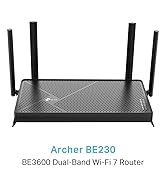
Desertcart purchases this item on your behalf and handles shipping, customs, and support to USA.
๐ Upgrade to Archer BE230 โ Where speed meets seamless security!
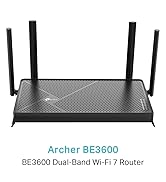
The TP-Link Archer BE230 is a cutting-edge WiFi 7 router delivering ultra-fast 3.6 Gbps dual-band speeds, equipped with dual 2.5G WAN/LAN ports and three 1Gbps LAN ports for superior wired performance. Featuring 4 external antennas with Beamforming and EasyMesh compatibility, it guarantees expansive, reliable whole-home coverage. Enhanced with VPN client/server support, USB 3.0 for personal cloud storage, and user-friendly Tether app management, itโs designed for professionals demanding speed, security, and seamless connectivity.


| ASIN | B0D74N5PM8 |
| Antenna Location | Business, Gaming, Home |
| Antenna Type | Fixed |
| Best Sellers Rank | 8,590 in Computers & Accessories ( See Top 100 in Computers & Accessories ) 74 in Routers |
| Box Contents | Archer BE230 |
| Brand | TP-Link |
| Brand Name | TP-Link |
| Colour | Black |
| Compatible Devices | Personal Computer, Security Camera, Smart Television, Smart Thermostat, Smartphone |
| Compatible devices | Personal Computer, Security Camera, Smart Television, Smart Thermostat, Smartphone |
| Connectivity Protocol | Wi-Fi |
| Connectivity Technology | Wi-Fi |
| Control Method | App |
| Country of Origin | China |
| Coverage | Whole House Cover |
| Customer Reviews | 3.9 out of 5 stars 66 Reviews |
| Data Transfer Rate | 3.6 Gigabits Per Second |
| Frequency | 5 GHz |
| Frequency Band Class | Dual-Band |
| Frequency band class | Dual-Band |
| Global Trade Identification Number | 04895252507997 |
| Has Internet Connectivity | Yes |
| Has Security Updates | Yes |
| Is Modem Compatible | No |
| Item Dimensions L x W x H | 27.3L x 14.7W x 4.2H centimetres |
| Item Weight | 0.55 Kilograms |
| LAN Port Bandwidth | 2500 Mbps |
| Manufacturer | TP-Link |
| Manufacturer Part Number | Archer BE230 |
| Maximum Upstream Data Transfer Rate | 2500 Megabits Per Second |
| Model Name | BE3600 Dual-Band Wi-Fi 7 Router |
| Model Number | Archer BE230 |
| Model name | BE3600 Dual-Band Wi-Fi 7 Router |
| Number of Antennas | 4 |
| Number of Ports | 5 |
| Operating System | Sistema operacional da TP-Link |
| Other Special Features of the Product | Beamforming, Guest Mode, Internet Security, Parental Control |
| Router Network Type | wired |
| Security Protocol | WPA3 |
| Special feature | Beamforming , Guest Mode , Internet Security, Parental Control |
| Wi-Fi Generation | Wi-Fi 7 |
| Wireless Compability | 802.11.be |
| Wireless communication standard | 802.11.be |
O**Y
Amazing at this price
Amazing router at this price. Replaced my ISP router as it kept dropping out and so far I have had no more issues with the WiFi. The WiFi range is also much better Vs my old one so very happy.
P**R
Simply Brilliant!
I have a large Victorian house, with lots of big rooms and plenty of solid brick walls, and the equipment supplied by my ISP was unable to provide WiFi throughout my property. The ISP persuaded me to upgrade to their top-of-the-line equipment, complete with three boosters. However, that was no better, possibly worse. So I purchased my own equipment and based my new mesh WiFi on this router. What a difference! This unit is very powerful and together with just two boosters provides excellent coverage throughout my home. It provides me with two great bonuses. One is that I now have detailed control and reporting that was impossible with the ISP supplied equipment. The other is that when I change ISPs I will only need to edit two lines in my admin dashboard and will never again have to reconnect my 31 networked devices!
E**.
*2.4GHz Faulty Router | BE230 router - KNOWN ISSUE, BE AWARE!**
TP-Link Archer BE230 Router WiFi 7 BE3600Mbps I loved the features of this router. Was affordable and packed with features, but sadly has a bug that hasn't been fixed for years of TP link router history. I bought this router to upgrade my current one, but after a few days, the 2.4GHz Wi-Fi stopped working. At first, I thought it was just a faulty unit, so I requested a replacement. However, the replacement also had the same issueโ2.4GHz Wi-Fi disappears, but the 5GHz works fine. A quick search on Google reveals this is a common issue with TP-Link routers. It seems to be a widespread problem that's been affecting their routers for years. There are countless posts on forums, Reddit, and other online sources about it. Iโve tried everythingโresetting the router, adjusting the channels, updating firmwareโbut nothing fixes it. The issue persists across TP-Link's models, as many users have shared similar experiences over the years.
T**N
Fast speed and easy install
As an old codger I was concerned about setting this up. It was so easy and got 4 times the speed of my original router straight away whilst retaining passwords. Brilliant!
T**E
I wouldnโt recommend as a standalone router
As a standalone router I had nothing but trouble getting it to stay connected to the internet the Wi-Fi would drop out every other day I couldnโt get it to work until I turn the device on and off and this happened quite frequently. Though its functionality as a wireless access point has been fine thus far when connected through my ubiquiti cloud gateway max only then did it work properly. As a standalone router I wouldnโt buy this from my opinion I would spend a little bit more to get something a little bit better. And for clarification. The amount of devices that were connected to the router was about five devices not all weโre working at the same time when I had the network issues.
L**K
Excellent device with easy to use interface
Easy to install with the tp link application. Easy to also install nord VPN to it, though this needs a bit more understanding as there are two different ways to do the setup. Make sure to add devices to the VPN client, if you want them to use it. It can be used if needed as a second WiFi, connected to the router provided by the internet provider.
J**.
good
good
D**N
Better than VirginMedia superhub but has issues
Review is for BE3600 Dual-Band Wi-Fi 7 Router It is not a true Wifi 7 router as there is no 6ghz band. There is only 2.4 & 5ghz bands- hence the dual band name. (Proper Wifi 7 routers are all tri-band) I mainly bought this as it has 2 x 2.5 Gigabit ports (1 in, 1 out) which is useful as my PCs both have 2.5G LAN ports which makes networking between them much faster. 2nd reason I bought this was that the VirginMedia Superhub (5 I think) could not handle the number of smart home devices I have so connections would drop off the network often. This router has resolved that issue but occasionally the 2.4Ghz network will just disappear and I have to go in to the router settings and change the 2.4Ghz band (leaving it on auto does not help). Not sure why this happens as when using a Wifi scanner the traffic on the band does not seem to be the problem. It is easy to find and change settings as well as set up port forwarding etc. I have not had chance to try the USB for setting up a cloud server/NAS but in theory it sounds like a good feature I have a 1 Gigabit internet package and with the 2.5 Gigabit LAN ports I do get slightly faster speeds- my previous router maxed out at about 980Mbps while this one I get 1150Mbps so about 15% faster Overall quite happy with the router but only 2 stars as they should make it clear that this is not a true Wifi 7 router more of a 'Wifi 7 lite' router
F**I
ู ุชู ูุฒ
ู ู ุชุงุฒ ุฌุฏุง ูุณูู ุงูุชูุตูุจ ูุงูุงุณุชุฎุฏุงู
Trustpilot
2 weeks ago
1 month ago