


โ๏ธ Stay cool, game hard, and glow up your setup!
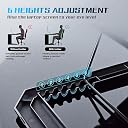
The NAVAZIP Laptop Cooling Pad 5 features a powerful thermoelectric cooler and four ultra-quiet 11-blade fans that rapidly reduce laptop temperatures in just 3 seconds. Designed for 14-18 inch laptops, it offers 6 adjustable height levels, RGB ambient lighting with 10 effects, and an LCD display for easy control. Crafted from durable ABS and aluminum alloy, this cooling pad enhances gaming performance by preventing frame drops and extends hardware lifespan through efficient heat dissipation.



| ASIN | B0C1N986MY |
| Brand | NAVAZIP |
| Brand Name | NAVAZIP |
| Colour | Laptop Cooling Pad 5 |
| Cooling Method | Fan |
| Cooling method | Fan |
| Customer Reviews | 4.0 out of 5 stars 32 Reviews |
| Enclosure Material | Acrylonitrile Butadiene Styrene (ABS) Aluminum |
| Item Dimensions L x W x H | 41.1L x 27.6W x 4.6H centimetres |
| Item Weight | 100 Grams |
| Item weight | 100 Grams |
| Manufacturer | NAVAZIP |
| Manufacturer Part Number | NAVAZIP-NZ001 |
| Material | Acrylonitrile Butadiene Styrene (ABS) Aluminum |
| Model Number | Laptop Cooling Pad 5 |
| Number of Fans | 4 |
| Number of Items | 1 |
| Product dimensions | 41.1L x 27.6W x 4.6H centimetres |
| UPC | 717110680496 |
N**N
Not suitable for 18 inch laptops
Works well but nowhere near adequately sized for an 18 inch laptop
C**R
The cooling is not in the airflow but direct contact with the laptop
I may have misread this, but I thought the cooling was in the airflow from the fans. No, there is a panel that when depressed by the weight of the laptop cools the case by direct contact. Because my massively heavy Lenovo P17 Gen.2 does not fully depress the cooling unit, I need to add weights to get the cooling benefit. I am still not sure this will do the job. It is doing the job. Getting the CPUs below 90 C is decent.
R**A
Love it
Noticed that it works best when elevated at least one notch up vs. laying flat. Better airflow that way and the cold mat in the middle is super chilly. Relatively quiet when running. The lights are great for those who like to game in the dark.
M**E
Different than the others out there
Update: 4 months later. Very loud noises emitting from fan and cooling pad. I have to maneuver the laptop into a specific angle otherwise the sound is ridiculously loud. Not sure if something came loose but it's a bit annoying. Still, it helps keep my laptop from overheating so I'm mostly happy. The fan in my laptop just gave out in the middle of editing photos for a wedding. My computer kept shutting down so I had this cooling fan overnighted. I already had a cooling fan but it was a cheap $15 one with 2 measly fans. Not cutting it anymore. So thankfully bought the upgraded model. There is an actual cooling pad between the fans. If you touch it, it is cold to the touch. I don't know how it works but it does. 3 separste level settings for the cooling pad as well as for the fans. There are four large fans. The sound isn't noisy but they're not entirely silent. It's a mid range tone, not an annoying high pitched fan sound. There are several flashing light pattern settings for the LED feature. I found them pretty obnoxious and since they're not customizable I just turned them off. The pad itself has an adjustable tilt like my old model. It is about 20% larger so my 13 inch laptop is a little small for it but it doesn't matter really. I'm just really happy someone invented this and it's under a hundred bucks. Totally worth it and a great solution until I can repair my laptop fan.
J**E
Only best part is the peltier plate part
I'm on the 2nd one now and the central Peltier broke again -- when it's the core part of the cooling equation. The central fan is mounted on very thin plastic cone underneath the Peltier plate. Whether due to heat from the Peltier, or just poor design, the cone will break, fan starts rubbing against sides or jams making grinding noises, and it's game-over for the central-peltier fan. The folding joint area breaks easily. Had two of these and that plastic joint easily broke under any stress. The fan feels weak even at level 3, especially when trying to cool this Razer 15 Advanced laptop. The Peltier plate at level 3 struggles to dissipate the thermal load, but at least it feels like it works vs the fans. It's quiet mostly, unless you're sitting in front of it in a quiet room. Then it's relatively noisy on par with laptop-fans at 'normal', but nothing noise-canceling headphones can't handle.
Trustpilot
1 month ago
1 month ago