Buy anything from 5,000+ international stores. One checkout price. No surprise fees. Join 2M+ shoppers on Desertcart.
Desertcart purchases this item on your behalf and handles shipping, customs, and support to USA.
⚡ Stream Smarter, Buffer Never! Upgrade Your Entertainment Setup Today
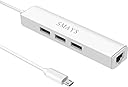
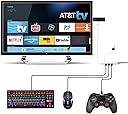
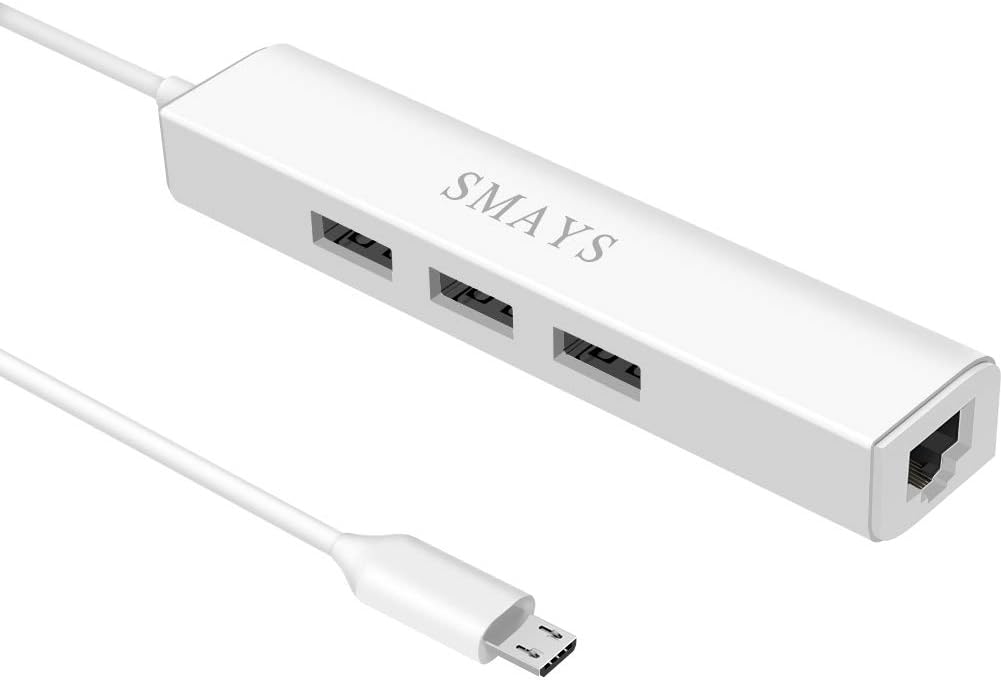
The Smays Wired Ethernet Adapter is a compact, plug-and-play micro USB OTG cable with a 3-port USB 2.0 hub and 5V DC power input. Designed for Fire Stick (Basic, 2nd, 4K, Lite, Cube), Google Chromecast Ultra, Roku, and Echo Show devices, it delivers stable 10/100 Mbps wired internet to eliminate buffering and lag. It also supports multiple USB peripherals like keyboards, mice, and external storage, making it a versatile upgrade for seamless, high-speed streaming and multitasking.


| ASIN | B078MNW25Q |
| Additional Features | For Amazon Fire TV Stick, For Amazon Firestick with Alexa Voice 2017 |
| Best Sellers Rank | #345 in USB Computer Network Adapters |
| Brand | Smays |
| Color | White |
| Compatible Devices | Fire TV 3rd Gen, Fire TV Cube, Fire TV Stick 2nd Gen, Fire TV Stick 4K, Fire TV Stick Lite |
| Customer Reviews | 4.3 out of 5 stars 3,228 Reviews |
| Data Transfer Rate | 480 Megabytes Per Second |
| Enclosure Material | Plastic |
| Hardware Interface | Micro USB 2.0 Type B |
| Item Dimensions L x W x H | 4.1"L x 1"W x 0.7"H |
| Item Weight | 1.12 ounces |
| Manufacturer | SMAYS |
| Mfr Part Number | 872-ETHERNET-MICRO-HUBS-F |
| Model Number | SMAYS-MICRO-ETHERNET-FIRETV |
| Number of Ports | 3 |
| Operating System | Android, Chrome OS, Linux, Windows 8/7/XP/10, macOS |
| Special Feature | For Amazon Fire TV Stick, For Amazon Firestick with Alexa Voice 2017 |
| Total USB Ports | 3 |
| Total Usb Ports | 3 |
A**R
Works as intended.
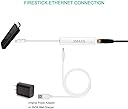
I did not expect this product as easy to setup as it was. As a matter of fact, there is no setup required (at least for the Fire Stick). I simply unplugged the power cord going to the Fire Stick and replaced it with this Ethernet adapter, and then plugged the USB end into the factory Fire Stick charging adapter. When I turned on the television and went to Settings > Network, it showed that it was connected via Ethernet and a network test passed successfully and showed a speed of 98 MB/s. I was having some issues with buffering Netflix movies over Wifi, mainly because the Fire Stick is upstairs and my wireless router is downstairs - and because my Wifi is used regularly by the wife's Echo, my work laptops, etc. Using 5G on the router helped quite a bit but because my router does not have external antennas, its connection can still be somewhat unreliable. In any case, this Ethernet adapter remedied those issues. All apps on the Fire Stick load immediately and there are no buffering issues any more. Moreover, I chose this adapter because it has additional USB ports that allow one to listen to music, view pictures and watch movies put on a USB drive which is extremely convenient. Additionally, I have read a few posts that stated one must enable USB Debugging first for this to work, but I can say that I did absolute nothing in the Fire Stick's settings to get this to work - I simply plugged it in. I did not have to disable wireless or anything. Conclusively, usually things like that that say they are plug-and-play are never truly plug-and-play and require fiddling in the hardware settings to get working properly. In the case of this Ethernet adapter, it truly is just plug-and-play.
S**S
Easy to use, tons of uses, extremely fast.
I have been pleasantly amazed by this little device. It does exactly what it says, in a manner that is amazingly easy to apply. It works on my laptops, desktops, tablets (android), cell phones (android, have not tested apple yet), and streaming media players (Amazon fire, fire HD, etc). It even worked to allow me to connect my cell phone to my pc via wired connection, then enable network sharing, thus my pc used my cell phones 5G internet. While the network tool could be powered by me cell phone adequately, I opted to plug in the adapter using a standard cell phone 5v power, and it even charged my phone while in use. On a side note, this is a mini-USB adapter and in order to use it with my cell phone, I had to get a micro-USB to USB-C adapter. It acts as not just a wired network adapter, but also a USB repeater allowing you to plug in further card readers, flash media, keyboards, mice, etc. The only limit is whether the device you are plugging in has drivers that can be used on the tablet, pc, cell phone, etc, and whether the device plugged in consumes more power than the adapter you are using to power this thing. I used it with a 5v 2amp adapter (10 watts) just fine with all my devices. I love this device so much I have purchased 3 more and have directly wired all my media streaming devices. No more wifi lags or interference at all.
A**T
Works fine with Fire TV Stick 4K
I bought this OTG (On-The-Go) hub for my Fire TV 4K device so that I can use Ethernet internet connection for it. I was having issues with wireless connection and the Fire TV Stick 4K, despite Fire TV being almost next to the wireless router. Fire TV would show "Home screen not available" often and would have to be rebooted. After using this OTG Hub I haven't seen any connectivity issues. The Hub measures at: 3.74 x 0.94 x 0.59 in and has three USB ports, one Ethernet port, and one power port for connecting the power adapter. One end of the hub contains small micro USB cable that needs to be connected to the device. The Hub also has LEDs inside the body which light up when ethernet cable is plugged in. THINGS YOU SHOULD KNOW BEFORE BUYING THIS HUB 1. Though I am happy with this product and this hub has been working fine so far, the build quality of the device doesn't seem to be really sturdy. The micro-USB cable was attached at an weird angle to the Hub and doesn't really show a fine craftsmanship on this product. 2. I really wish that the power cable and the micro-USB cable attached to the hub were longer so that the hub can be placed conveniently. 3. Since this is a OTG hub, the USB ports are USB 2.0 only and the Ethernet data transfer rates would be limited to 10/100M. This has caused no problems for me so far while watching the streaming videos on the Fire TV. 4. You would need your own ethernet cable (in case you want to use the ethernet connection) and a USB power adapter, though USB power cable is provided with this hub. SETUP Setup for this Hub was relatively straightforward with only three connections needed. 1. Power: This hub came with a USB power cable but you would need a USB power adapter. One end of the cable is the coaxial power connector that goes plugs int the Hub. The other end of the cable is normal USB connector that goes into a USB power adapter. 2. Micro USB: On one end of the hub there is a micro USB cable that connects to the micro USB port of the USB device you are trying to connect. In my case, I connected the micro USB cable to the Fire TV's micro USB port. This cable also provides the power to the device (Fire TV) 3. Ethernet: You would need your own Ethernet cable. There is an Ethernet port on one side. Connect the one end of the ethernet cable to the hub and other end to the WiFi router, modem, switch that provides the internet connectivity. There are LEDs inside the hub that light up and show through the plastic body when the ethernet cable is connected properly.
J**S
Newer Model, works with Fire TV Stick 4k with the original included power supply!
updated review 2019-07-12: on 2019-06-27 SMAYS asked me if I would test a replacement model they were considering selling in place of the original on this page that did not work for me. on 2019-07-11 I received this replacement and plugged it in and within a few seconds the Fire TV Stick 4k showed signs of life, already I'm smiling to see this, this replacement model works beautifully. warning: the red/orange port only supplies power to devices according to the seller. I highly recommend this replacement device my kudos to SMAYS. thank you for letting me be one of those to test your newer model of this device ___________________________________________ this is My original review on 2019-06-26 leaving this here to show the value of the updated review as this is an updated device I have please only use the below as a reference to show the seller SMAYS is very fast to communicate when and correct issues and it shows. I would love to be able to give this a rave review but, the seller of this item recommended this specifically for the Fire TV Stick 4k. I could not get this thing to do anything but light up. it would not power on the Fire TV Stick 4k. The OTG Hub itself is probably okay if you can find a device to work with it but if you have a Fire TV Stick 4k I recommend you steer clear of this.
N**S
Not enough power delivery
The adapter works as intended an in im able to use external usb devices such mouse, keyboard, and storage on the firestick the only issue is that there isnt enough power to be able to use my keyboard and mouse without turning the backlight off also rendering the power only port useless when the back light is on the firestick shuts off due to lack of power if the adapter could accept 15 watts insted of only 12 it would make the device much better another thing is the ethernet only offers 100mbs which is slower than the wireless also wish it used a standard port like micro b or type c (for power not data) but despite that the adapter is easy to use and makes streaming devices such as a pc better due to the low latency ethernet offers
M**R
Worked with Roku Express 4K
Worked great for my Roku Express 4K. I did use a higher powered USB adapter (that came with an older iPad) since other users mentioned some issues. No problems here.
B**)
Works with the Amazon Show Generation 2 like a charm!
Hi, Earlier this week I tried the sister product ("OTG Micro USB to HUB and Ethernet Network Adapter for Raspberry Pi Zero, Google Nexus Player, Windows Android Tablet - Powered") and got nowhere with getting it to work. Amazon customer support accepted it back for a full refund and I ordered this product as a replacement. This device works with the Amazon Show 2nd generation without any issue at all. I'm able to have it perform home automation, look up weather, answer questions, well, basically, everything an Amazon Show is suppose to do for you. I have yet to try the 3 USB ports on the device with the Amazon Show 2nd generation, but I'll get around to it - someday. I'm not sure why this device worked and its sister product (see above failed). Maybe the earlier product simply was bad from the factory or something with the Amazon Show and the other adapter. In any case, this adapter and the Show work great together. For those wondering why, I'm wanting to use a wired connection with my Amazon Show gen 2: The simple answer is I'd like to turn my router on and off using home automation. There are more complex issues, too, but the simple reason is turning the router (which has the WIFI access point) both off and then back on. Of course another big advantage is -- should the WIFI network be down, the Show will continue to work. The WIFI being down does happen from time to time and the RCN solution is to power cycle the router / WIFI access point. (My hub allows the wired network to function without the router, BTW.)
T**H
Quality Control Lacking..Defective Item
I took a chance on this adapter,primarily because it had what I was looking for, namely, it had 3 usb ports integrated into the adapter for a price similiar to a plain basic ethernet adapter..The unit arrived quickly and when opened the package, the box inside was unsealed and opened with the item and its cord loose and exposed..In other words it looked like a preopened item that was hastily repackaged...I noticed it came with a long 6 ft cord, which was different than the 9 inch one that people were complaining about in reviews ,so i was pleased, no complaints...When i connected it and tried to power on the firestick, there were no signs of power, no internel lights on the adapter and my firestick did not power on either...I also tried a better power supply and it still was dead ,no life.....What a pity! i was looking forward to this to get Off wireless and now i will have to reorder something else..I will Not be going with this company,even though their customer service looked good in the reviews, i want something built well and functioning from the start and dont want to go thru the wait again..the item DID have a cheap feel to it, light and flimsy, but i didnt reallly care as long as it did what it was designed to do..This item was dead as a doornail and i cant recommend it....I saw reviews where people were complaining about quality control and lots of defective units ect and they were RIGHT... cant recommend this..
R**A
Produto compatível com minha fire stick amazon recomendo
Produto veio certinho recomendo
J**E
Port ethernet
Expédition longue, mais fait parfaitement le job, sur un firestick, possibilité d'augmenter l'espace de stockage avec une clé USB, une connexion filaire stable avec le port ethernet, et les ports USB, permettent en plus de connecter clavier et souris, un must have pour contrôler sa tele de feu, du bout des doigts, je recommande.
A**E
Parfait pour Firestick
Fonctionne bien.
B**A
A great adapter to connect a mouse, keyboard, storage device, or ethernet to your FireTVstick.
The SMAYS OTG ethernet/USB adapter gave me the means to connect a 2.4G keyboard, mouse and a USB storage device to the Firetvstick. They all work fine and I'm very happy with the purchase. I'm using WiFi to connect the FireTVstick to the internet, so I'm not using the ethernet port on the adapter. A new power cable is supplied with the device to replace the original one. The OTG adapter plugs into the micro USB port on the FireTVstick. The new power cable plugs into the OTG adapter and supplies the power to both adapter and FireTVstick. I have purchased 3 of the SMAYS adapters to connect to my 3 FireTVsticks (one of these is a 4K and the other 2 are the Lite models).
S**C
funktioniert einwandfrei mit FireTv Stick 2. Generation
Der Ethernet-Adapter und USB 2.0 Hub funktioniert einwandfrei mit dem FireTv Stick 2. Generation. Ich habe ein Ladestecker mit 2 A Leistung angeschlossen um den Adapter und den FireTV mit Strom zu versorgen. Bei meinem DSL-Anschluss 100 Mbit/s kommen beim Netflix-Speedtest 90 Mbit/s an. Streaming in allen Apps (Netflix, Amazon Prime, Youtube, 7TV, Watchbox, Kodi etc.) völlig ruckelfrei. An den USB 2.0 Hubs funktionieren FAT32 formatierte USB-Sticks und USB-Empfänger für externe Tastaturen/Game-Controller etc. Kodi lässt sich so auch völlig easy installieren: 1. FireTV Stick: im Menü "Einstellungen" bei "Mein FireTV" unter "Entwickleroptionen" auf AN stellen: "ADB-Debugging" und "Apps aus unbekannter Herkunft". 2. mit dem FireTV Stick aus dem Amazon Appstore installieren die App "Total-Commander". 3. Kodi mit PC von der offiziellen Seite laden in der Android-Version ...armeabi-v7a.apk , auf FAT32 USBstick kopieren und den Stick in einen USBport des Adapter stecken. 4. Total Commander starten und auf den Usbstick navigieren. Dort die Kodi apk Datei kurz anklicken, es erscheint das Installationsmenü, hier installieren wählen, das wars. Fazit: Dieser Kombi Lan/USB-Hub Adapter ist weit funktionaler als der Original Amazon Lan-Adapter. War diese Rezension hilfreich, dann bitte ein klick auf hilfreich. So sehen Andere diese Rezension auch einfacher. Danke.
Trustpilot
5 days ago
3 weeks ago