Desertcart purchases this item on your behalf and handles shipping, customs, and support to USA.
🎨 Elevate your art game with precision and freedom—where creativity meets speed!
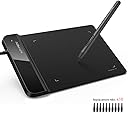
The XP-Pen G430S is a slim, portable 4x3 inch graphics tablet featuring 8192 levels of pen pressure sensitivity and a battery-free stylus for uninterrupted creativity. With a 266 RPS report rate and 5080 LPI resolution, it delivers smooth, accurate input ideal for digital artists and OSU! gamers alike. Compatible with Windows and Mac, it supports major design software and offers plug-and-play ease via USB connection.


| Active Surface Area | 12 square inches |
| Asin | B079BQ1BKH |
| Best Sellers Rank | 4,354 in Computers & Accessories (See Top 100 in Computers & Accessories) 9 in Graphic Tablets |
| Box Contents | 1 x G430S graphic tablet, 1 x P01 battery-free stylus, 10 x replacement nibs, 1 x USB cable, 1 x pen clipper, 1 x quick start guide |
| Brand Name | XP-Pen |
| Colour | Star G430S |
| Compatible Devices | Laptop |
| Country Of Origin | China |
| Customer Reviews | 4.2 4.2 out of 5 stars (2,067) 4.2 out of 5 stars |
| Display Type | LCD |
| Item Dimensions L X W | 130L x 107W centimetres |
| Item Weight | 0.2 Kilograms |
| Manufacturer | XP-PEN |
| Manufacturer Part Number | XP-Pen |
| Model Name | Star G430S |
| Model Number | G430S |
| Native Resolution | 1920x1080 |
| Network Connectivity Technology | USB |
| Number Of Items | 6 |
| Number Of Packs | 1 |
| Operating System | Mac OS X 10.10 (or later), Windows 7 (or later) |
| Pressure Sensitivity | 8192 Levels |
| Product Features | 8192 Pressure Levels, Battery-free Stylus, Portable |
| Product Warranty | 2 year manufacturer |
| Screen Size | 4 Inches |
| Specific Uses For Product | Designing, Drawing, Painting |
| Target Audience | Artists in training or fans of drawing and games like OSU |
| Upc | 758232357224 742010910305 |
User
A really nice little tablet
A really nice little tablet. Mine did originally develop a fault after about a year, but the manufacturer replaced it with no fuss, and since then I've had no further trouble with it. No discernable lag. Maybe not so useful for artists, but for general desktop usage it's perfect (give it a try, mouse users!)
User
Plug and play - tick!
Needed this for a work computer where I am not able to install any drivers, so it had to be plug and play. Has worked brilliantly for me and I am delighted. Would like a bigger one but it does work very well for my purposes.
User
Great Casual Drawing Tablet
It's alright. If you're a professional artist this is probably crap but I only need this for texturing my models in blender when I use G.I.M.P. also started using it for notes when I'm coding with the windows whiteboard thing which is pretty cool. I have noticed that it is a bit laggy so if you need really good response times and you care about all that then you probably have to spend in the regions of £100. But, for the price, it suits my needs pretty good. Also, installing the software can be a bit of a headache but once running you can set the buttons and stuff. I have set one of the buttons to precision mode and the other one to a switch to a rubber/pen mode. Again, all helps with simple art but not if you really try hard with extra layers on layers with all technical art stuff etc. Simply put, a great casual drawing tablet.
User
Brilliant
My daughter absolutely loves this
User
This was made for signing signatures, not drawing pictures
If you’re getting this to start drawing on a computer don’t.I think the main purpose of it is as a signature signing machine for the businesses that might need it? If that’s not? You? Do not buy this it’s pretty crap otherwise but for its purpose yeah it probably works pretty good.Main reason why is because it’s tiny and the responsiveness is pretty bad
User
Ease of use
Ease of use
User
Graphics tablet
My step granddaughter had one for her birthday and she loves the pad as she can do all the drawings she wishes
User
xp-pen graphics pad with pen
likes about this graphics pad-the ability to move the cursor with easy-the ability to select and move files and folders withdislikes about this graphics pad- the cursor seems to be out of sync with the pen for an odd reason and I have tried to find settings in the OS for both windows 10 & 11 but nothing- the ability to click with primary is also hard to do as it keeps moving the bloody file or folder when not neededother than that it gets 4*'s from me as it is virtually fast as moving around and dragging files and folders to different locations within the system or even wireless sharing
User
Perfecta para OSU!
Compré esta tableta hace ya un par de meses y la verdad estoy muy conforme. Aclaro que no la he utilizado para dibujar, sino para jugar al osu!Ventajas:+ La lapicera es muy liviana ya que no trae pilas, casi con el mismo peso que una lapicera normal.+ No he detectado ninguna clase de lag al jugar.+ El tamaño es perfecto, ya que se necesita un área pequeña para jugar.Desventajas:- La superficie se raya un poco al "escribir".- Es un poco complicado reducir el área en la aplicación de la tableta, ya que no se puede setear manteniendo la relación original. Igualmente se puede solucionar fácilmente haciendo un par de cuentas (regla de 3 simple).Adjunto un par de imágenes de la tableta y de mi configuración por si a alguno le resulta útil. La verdad, recomiendo esta tableta a cualquiera que juegue osu, tenga el nivel que tenga.
User
Très bien
Super top merci
User
Fiyatına göre gayet iyi
Fiyatına göre kullanışlı. İnternetten Xp-Pen Drivers'tan girip tabletin uygulamasını indirmeniz ve ayarlamanız gerekiyor. Oldukça sade ve basit bir sistemi var. MacBook'ta kullanıyorum. Fiyatı nedeniyle öneririm.
User
Griffe facilement mais si non correcte, ça fait le job pour une urgence
Elle est pratique, on peut la trimbaler partout, le stylet fonctionne bien ( je l’ai utilisé environs 4h en tout peut-être ) il est un peu trop sensible mais j’imagine que ça se règle dans le petit logiciel à installer. Les deux seuls bémols c’est [ 1 ] après la première utilisation elle est déjà griffée de partout ( par mon passage avec le stylet ), je ne sais pas si c’est à cause de la mine du stylet qui n’est pas top ou tout simplement si c’est normal [ 2 ] la partie de gauche s’abîme très facilement, j’ai recouvert de vernis transparent pour éviter que ca ne s’abîme trop, mais comme ça vous savez.
User
Easy install and setup
I bought it as a present. The person has a bit of an experience from before and they easily started using it. It is found really compact, and a good start for someone that doesn't yet know how much time and effort they want to put into the hobby (drawing and not OSU). As a minus can also be the size. If someone quickly wants to evolve they will most likely have to change it because the small size makes it uncomfortable for the position of the hand and the size of the drawing.Really good sensitivity.
Trustpilot
2 months ago
1 month ago