Buy anything from 5,000+ international stores. One checkout price. No surprise fees. Join 2M+ shoppers on Desertcart.
Desertcart purchases this item on your behalf and handles shipping, customs, and support to USA.
๐ป Keep your cool, stay ahead of the heatwave!
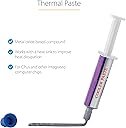
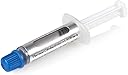
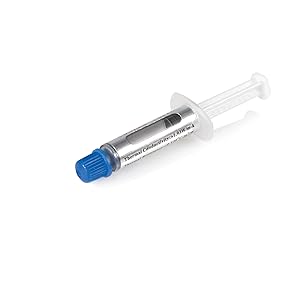
StarTech.com Thermal Paste is a high-performance metal oxide compound designed to maximize heat dissipation between CPUs/GPUs and heat sinks. With a thermal conductivity of 3.195 W/m-K and a wide operating temperature range (-30ยฐC to 180ยฐC), it ensures reliable cooling for desktop workstations. The 1.5g resealable syringe offers 4-6 precise applications, making it ideal for IT pros and tech-savvy users maintaining mid-range CPUs (up to 65W TDP). CE and RoHS certifications guarantee safety and quality, helping prevent overheating and extend hardware lifespan.


| ASIN | B00006B8DX |
| Best Sellers Rank | #80 in Silicon Grease |
| Brand | StarTech.com |
| Brand Name | StarTech.com |
| Compatible Devices | Desktop |
| Cooling Method | Air |
| Customer Reviews | 4.5 out of 5 stars 2,570 Reviews |
| Global Trade Identification Number | 00031111763942, 00065030788847, 00115971579766 |
| Included Components | 1 - 1.5g tube of thermal grease |
| Item Weight | 0.02 Pounds |
| Manufacturer | Startech.com |
| Material Type | Metal |
| Maximum Rotational Speed | 0.01 RPM |
| Noise Level | 0.01 Decibels |
| Power Connector Type | 4-Pin |
| UPC | 883697345452 031111763942 115971579766 021112262001 065030787680 023942521181 650307888476 065030788847 803982998200 172304232262 778888151625 331608264014 780746683100 012302290959 151903682029 683728089542 086000435714 132018238226 163121380540 807320177005 |
| Unit Count | 1.0 Count |
| Voltage | 240 Volts |
| Warranty Description | 2 year warranty |
| Wattage | 2000 |
K**N
Chillin like a Villan
I had a computer that was shutting down with no warning randomly. There was no error message either, very strange. I downloaded a heat monitor program and it seemed to be running hot. So, I took a chance and ordered this and took it apart carefully. Cleaned the heat sink and cpu carefully with rubbing alcohol and queue tips (easy.) And, SHAZAM! It now works flawlessly, faster and seems to be running about 30 degrees cooler possibly 40 thought it bounces around. I was a bit skeptical but it works remarkably well. The scariest part is taking the laptop apart. My advice take a piece of paper and put the screws on the paper where they were on the lap top. So you know where to put them back. Double check all your ribbons and connectors before screwing it back together and test it before putting in all the back screws. (I forgot one connector. And couldn't get a ribbon back in without removing the keyboard.) While you are in there blow out the dust in the fan in the correct direction and vents etc with a can of air or an air compressor. Note it is normal for the factory thermal compound to break down in maybe 5 years or less. So this is normal maintenance but should last longer. Yes it really does work. I got the small tube and could probably do 2 PCs with it, since I don't do this often and would buy again rather than hunt down where I put the tube in 5 years.
K**E
Grease that works. Good quantity
My Toshiba Satellite lap-top was restarting without warning. Figured out it was because of over-heating. I hated the constant re-starting but i think it actually saved my chip from frying due to heating. Great technology! Thanks Intel and M$ for standardizing this! Anyways the thermal grease comes in a no-nonsense easy to apply syringe. There was enough quantity in the tube to more than sufficiently cover the chip. In fact, i used less than a quarter and had to remove some to ensure it didn't spread over to the pins. I don't think instructions are needed for this! spread like butter and ensure an even coat with no air pockets... used a butter knife for the complex operation ;) Happy to report that laptop is working great after using this!
S**D
Works and Applies well
This applies cleanly unlike the paste that came with my heatsink, and worked well. My CPU temp is below my chipset temp which is all one can really ask for. Oh since it doesn't come with directions you will either need to know how to apply it or look up how to apply thermal grease. It is all over the web, but a fairly basic to do it is: Clean both surfaces as best as you can with something plastic, then to draw a line with the grease like with icing horizontally (well in general with the USB stuff pointing out back to the left, or if you want to be technical orient so that the notched corner is on your lower right). Just a single line from about 15% in to 85% from the edge (or valley) of the top. That won't give you the lowest temps but it should cover even intel quad cores fine, and give you decent temps. Your mileage ma vary of courese. See the web for more precise details.
L**E
It is good.
It is working nicely in an old notebook PC. Heat is being conducted more efficiently. Applying a small amount of paste was easy. The small cap was easy to remove, and there was no need to puncture the open plastic tip. The syringe gave plenty of control. I'm glad I started on the larger GPU heat spreader first, since the paste flowed so well (more like lotion than toothpaste). This was the first thermal paste I've ever purchased or used. I'm glad it worked out so well and helped a machine with old, glopped on thermal paste from the factory work as intended. The system fan is less active since the change, so it is definitely accomplishing something.
W**R
Maybe the best thermal compound out there
I tried other thermal pastes in the past and this one truly transfers the heat to the heat sink. My wife's laptop was powering down randomly (or so I thought) and it finally dawned on me it was when she was taxing the video GPU. I took it apart and the factory goop they used was dried up and I guessed it was not able to transfer the heat effectively. I tried some stuff I got at the hardware store to no avail. I tried some dielectric paste used in automotive applications and it did improve things a little, but eventually it would power down again. I figured I would try this as one last attempt so I cleaned everything so there was no evidence of remaining paste and applied a little dollop to the CPU and the GPU and she's been streaming videos like there's no tomorrow for a month now. The fan isn't even running at half the speed it did when it was new. This stuff works. The only thing I'm wondering is how long will the remaining stuff last in the tube but that remains to be seen.
O**E
Good "Value for Money" Performance.
The packaging was AWESOME , It was small tube of thermal compound in a HUGE box so kudos to that. I used this on an old Sony Vaio laptop that had heating issues and did notice a change in the CPU temps of about 15 C. Applies well and did not gunk up or separate inside the tube like some of the cheap ones I've used before.
S**M
Excellent (used on iMac G4)
I used this for a repair on my iMac G4 (sunflower guy). The heatsink wicks heat from the processor to the base of the unit's internal metal housing. This is critical, if you don't scrape the old stuff off and apply a dab of the new stuff you'll fry the machine or at least see unexpected shut downs when things get too hot. This has worked perfectly for a couple months. (BTW, be sure to get some spudgers (AKA black sticks) so you can properly scrape all the old paste off. These are my favorite deal: 10 Pieces Universal Black Stick Spudger Opening Pry Tool Kit for iPhone Mobile Phone iPad Tablets Macbook Laptop PC Repair
F**N
Review for VIO 1.5G Thermal Grease
This is the first time I have bought thermal grease, and because of that I can't really say how well it works compared to other greases out there. It does work though, I bought it so I could use it on a celeron 2.4ghz that I bought used on amazon. As the cpu was used I didn't really want to spend a lot for thermal grease, and this was the cheapest I could find. After cleaning the cpu and the heatsink and adding this grease, it brought the temperature from around 51c-54c idle to around 39c-41c idle, depending on how many background tasks it was doing. I currently have it overclocked to 3.0ghz and it stays at around 46c while idle. So it's worked pretty well.
Trustpilot
2 weeks ago
1 week ago