Buy anything from 5,000+ international stores. One checkout price. No surprise fees. Join 2M+ shoppers on Desertcart.
Desertcart purchases this item on your behalf and handles shipping, customs, and support to USA.
🔥 Power Meets Precision — Game Like a Pro, Anywhere 🎯
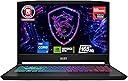
The MSI Katana 15 is a powerhouse 15.6” gaming laptop featuring a 13th Gen Intel Core i7-13620H CPU and NVIDIA GeForce RTX 4070 GPU, delivering desktop-grade performance in a portable form factor. Its 165Hz QHD display ensures ultra-smooth visuals, while Cooler Boost 5 technology maintains optimal temperatures for sustained high performance. Equipped with 16GB DDR5 RAM and a 1TB NVMe SSD, it balances speed and storage for gaming and productivity. Running Windows 11 Home, it’s designed for gamers and professionals seeking cutting-edge hardware with reliable cooling and fast connectivity.


| ASIN | B0CT4BHS2M |
| Audio Output Type | Headphones, Speakers |
| Audio Recording | Yes |
| Audio features | Speaker, Microphone |
| Available M2 Slot Count | 1 |
| Battery Average Life Standby | 10 Hours |
| Battery Cell Type | Lithium Polymer |
| Battery Life | 10 Hours |
| Best Sellers Rank | #16,009 in Computers & Accessories ( See Top 100 in Computers & Accessories ) #2,321 in Traditional Laptop Computers |
| Bluetooth Version | 5.3 |
| Bluetooth support? | Yes |
| Brand | msi |
| Built-In Media | Charger, Manual |
| CPU L2 Cache | 12 MB |
| CPU L3 Cache | 24 MB |
| CPU Model | Core i7 |
| CPU Model Generation | 13th Generation |
| CPU Model Number | i7-13620H |
| CPU Model Speed Maximum | 4.9 GHz |
| Camera Description | Front |
| Color | Black |
| Compatible Devices | External displays, keyboards, mice, storage devices, printers, and other USB/HDMI/BT/Wi-Fi enabled accessories |
| Connectivity Technology | Bluetooth, Ethernet, HDMI, USB, Wi-Fi |
| Customer Reviews | 4.2 out of 5 stars 580 Reviews |
| Display Resolution Maximum | 2560x1600 Pixels |
| Display Technology | LED |
| Display Type | LED |
| Form Factor | Clamshell |
| Graphics Card Ram | 8 GB |
| Graphics Coprocessor | NVIDIA GeForce RTX 4070 |
| Graphics Description | RTX 4070 |
| Graphics Ram Type | GDDR6 |
| Hard Disk Description | 1 |
| Hard Disk Size | 1 TB |
| Hard-Drive Size | 1 TB |
| Hardware Interface | Ethernet, HDMI, Headphone, USB 3.2 Gen 2 |
| Has Color Screen | Yes |
| Human-Interface Input | Keyboard |
| Item Dimensions L x W x Thickness | 14.13"L x 0.98"W x 10.2"Th |
| Item Weight | 4.96 Pounds |
| Keyboard Description | Gaming |
| Keyboard Layout | QWERTY |
| Lithium-Battery Energy Content | 52 Watt Hours |
| Manufacturer | MSI |
| Memory Slots Available | 2 |
| Memory Speed | 5200 MHz |
| Microphone Form Factor | Built-In |
| Model Name | Katana 15 B13VGK-2000US |
| Model Number | KATANA15132000 |
| Model Year | 2024 |
| Native Resolution | 2560 x 1600 pixels |
| Number Of Cells | 1 |
| Number of Ethernet Ports | 1 |
| Number of Ports | 4 |
| Operating System | Windows 11 Home |
| Other Special Features of the Product | Backlit Keyboard, HD Audio |
| Processor Brand | Intel |
| Processor Count | 1 |
| Processor Series | Core i7 |
| Processor Speed | 2.4 GHz |
| RAM Memory Installed | 16 GB |
| RAM Memory Slot Total Count | 2 |
| RAM Memory Technology | DDR5 |
| RAM Type | DDR5 RAM |
| Ram Memory Maximum Size | 64 GB |
| Resolution | 2560 x 1600 pixels |
| Screen Finish | Matte |
| Screen Size | 15.6 Inches |
| Speaker Description | Built-In Stereo Speakers |
| Specific Uses For Product | Developer, Gaming, Student |
| Supported Monitor Maximum Quantity | 3 |
| Total Number of HDMI Ports | 1 |
| Total Usb Ports | 4 |
| Touchpad Feature | Standard Touchpad |
| UPC | 824142357620 |
| Unit Count | 1.0 Count |
| Video Output | HDMI |
| Video Processor | NVIDIA |
| Virtual Reality Ready | Yes |
| Voltage | 230 Volts |
| Warranty Description | 1 Year Manufacturer Limited |
| Warranty Type | Limited |
| Webcam Capability | Yes |
| Wi-Fi Generation | Wi-Fi 6E |
| Wireless Compability | 802.11ax, Bluetooth |
| Wireless Technology | Bluetooth, Wi-Fi |
T**T
Desktop performance in a laptop
I bought the Katana 15 B13V with 16 GB of DDR5 Ram, RTX 4070 gpu, and i7-13620H cpu on Prime Day marked down to $1349 from $1599. I primarily bought this because my desktop's motherboard uses DDR4 and is becoming dated and I wanted to play Baldur's Gate 3 at max settings. I'd like to build another desktop, but want to drop that kind of money until DDR6 is a thing instead of building it in the middle of the DDR5 Lifecycle. That's still a few years out. So this was a great purchase for my needs. It is literally desktop performance in a laptop at a mid-range price. Let's start with the cons and why I don't care The display isn't the best. Don't get me wrong, its great, but not anything special. That doesn't bother me, because its connected to my 4k monitor. Who cares about laptop screens anyway. 4k resolution doesn't make much of a functional difference on a small screen. Costs were cut there for sure. Costs were probably also cut on the battery. It doesn't last long not plugged in on normal loads, and its probably not even feasible to use it unplugged while gaming. This would suck if I planned to use it unplugged, but again, this matters not to me. There is also a technology implemented called CoolerBoost 5. Its pretty necessary to run when gaming newer games at max settings. It gets PlayStation loud. If you're an audiophile, then you're going to need some good noise-canceling headphones to really enjoy anything on this machine. This doesn't bother me, because I'm not an audiophile, and even if I was, I have a couple great sets of noise-canceling headphones. It also doesn't bother me because without it, all of the great things about this thing wouldn't mean squat.... let me explain... Now for the Pro's This thing runs great without load on balanced power settings (No CoolerBoost). Without CoolerBoost, its about as quiet as it comes. I only use it for browsing and playing music outside of gaming. It does great. I haven't tried watching any 4k videos on it yet, but I imagine it would handle that well on balanced power settings as well. Remember when I mentioned the noise level from the CoolerBoost 5 as a con. Well, Coolerboost is probably just as important of a feature as any of the hardware this machine packs. Gaming laptops get a bad rep, mostly because they literally burn up a lot faster than a desktop and are difficult and expensive to fix when they do. The reason being is inadequate cooling. This is a tiny box to fit all of those extreme heat producing components in. Getting desktop-like cpu temps and gpu temps in a laptop should be a pipedream. Seeing temps in the 85-90 degree Celsius range or higher is just part of the territory. With CoolerBoost on, this thing hangs in the 60-75 degree range with BG3 running max settings. That's as good or better than my desktop. Have you heard of temp-throttling? Yeah, that's only a thing if you let it be a thing with this machine. That said, without CoolerBoost active while running BG3 at max settings, I watch those temps move to the Upper 80s and low 90s, like one would expect with this kind of hardware in such a small box. It is well worth the noise to have a machine packing an i7 13th gen chip and RTX 4070 gpu that can sport desktop temps while actually using the hardware at its potential. Final Thoughts This machine is fantastic if you're looking to replace a desktop with a laptop that will likely last. All of the right corners have been cut. Due to the temps sitting at desktop level, I anticipate the hardware components to potentially last indefinitely. This will still be a very serviceable and more portable machine when I do get my desktop built. The potential issues I see are needing to replace fans at some point due to the CoolerBoost. They could also last too, its just a possible logical consequence of running the fans at high RPMS. I imagine the most important fix that I'll run across is replacing the battery. Those things will always go bad eventually, but more quickly if there are periods of high humidity in your gaming area. Think about spring or fall days where the AC isn't running. Years of that will kill a battery.
A**Y
An excellent gaming laptop for the price
I purchased this laptop to replace my 2021 ASUS ROG Strix G15 gaming laptop, and I am not disappointed. Pros: - Not too heavy. Definitely lighter than the ASUS! - Not as loud as my ASUS when the fan kicks on - For the price, it is pretty snappy! I got 1TB of SSD space, and 16GB RAM, and so far, I've played games like Starfield at high or higher settings. - The Gaming Mode is intelligent enough to clock down when the laptop is under light load, and clock up when a game starts, which is nice Cons: - The battery life sucks. I expected that, so I'm not upset about it. Kinda par for the course for gaming laptops - The screen is 1080p. It looks fine, not the nicest I've seen, but it is decent and has a good refresh rate, so it isn't a *big* deal. - The fan does get loud when playing game. Once again, I kind of expected that. - When playing a game, and the fan spins up, the left side of the laptop gets pretty warm, so watch your hand! Overall I am very pleased with this purchase!
S**Y
CHANGE FACTORY SETTINGS!!!!
LISTEN UP! You MUST go into the hidden bios and turn down the power limit from P1 and P2 to 80w and 120w. Also, you need to enable overclocking so it will actually get benefits from these power limits. It was factory set to disable overclocking AND maintain a power draw of 200w???? This laptop got EXTREMELY hot, and i understand why because of these settings, but the average Joe isn’t gonna know to deep dive into a bunch of settings to fix things. Since I’ve made these changes, the laptop runs sooooooo much cooler, quieter, and faster! It was really sluggish at first because of thermal throttling, I legit started a return and packed it up to be sent back. But then I gave it another chance and deep dived into the intimidating settings and fixed the poor thing, and it’s sooooo snappy! It responds and loads applications wildly fast, I actually feel like I got this thing for an absolute STEAL at $1,000!!!
N**S
It's a good laptop but...
Honestly, this laptop is pretty good. I did upgrade the ram and added another m.2 drive (hardware not included...really?) If you contact support they will give you the hardware plus a thermal pad, make sure when you are putting the m.2 in that the thermal pads are on the top of the m.2 and not on the bottom. Then remove the protective film from the bottom chassis of the laptop. Some complaints I have, this may be a personal preference though. The charging port on the left side really doesn't work for me. I feel that the charger is always laying on top of your feet or laptop. The charging port is also quite loose as well. The other thing is, is the FN keys are to the left why are you putting FN command key on the right? The volume control buttons could also be FN and the arow keys instead of it being F3. I use the volume control more often than fan control and a crosshair for FPS games. Other than that, it is a good laptop. Update: I have been using this laptop for some time now, and can get over some of the cons that I noticed when I first bought it. However, 1 thing that I will say is the charging port needs to be improved. The charger keeps popping out of the charging port, all the time. I know one reason is, that it is on the left side but it is EXTREMELY loose. I have never had a laptop with such a loose charging port and is a real inconvenience. Every time I have this laptop charging, the power cord constantly falls out of the port. Gets really annoying that most of the time I end up having to hold the plug into the port to keep it charging. Second update: Well the charger no longer stay plugged in, it's very loose. I can not recommend this laptop at all.
D**E
Capable gaming laptop, decent battery life, room to upgrade
If you are looking for a laptop to play the latest games at high fidelity and not wanting to spend a fortune look no further... When I travel, I use this laptop for both work and play... Battery life is decent... but bring the power brick with you if going to a meeting lasting more than a couple of hours... or doing any gaming... Wifi is much better than my previous laptop... get more bars further away... Screen is FHD, I prefer 2K but on a 15" screen I can't see the difference. I have hooked up to 2K monitors at home and it still produces decent frame rates. There is room to upgrade. Easy to replace memory with either 2 -16GB or 2 - 32GB SODIMM DDR5 memory sticks, and there is a slot for second NVMe SSD drive (though no mounting screw, so you have to work around that. Seems to cool fine even under load, but you will hear the fans... form factor is decent, but you can find better... just a question of dollars. So again, looking for high end gaming laptop for minimun dollars this is a good choice. I have had a number of MSI laptops over the years and they have performed well with little or no issues.
P**X
Decent laptop. Both purchased had gaping flaw
TLDR; both were missing heatsink grease causing overheating. Two laptops same model/specs bought 3 months apart, both had shoddy assembling and overheating out of the box. see photos. Purchased two of these, one for my wife, one for me to replace our older GT72/GT62 laptops, and immediatelly right away while gaming or doing anything with heavy processor load, we encountered full-on lock-ups. Freezing, BSoD, whether it was Windows 10 or Windows 11, both encountered same issue, with same load conditions/same symptoms. I finally got sick of it and opened them up. My wife's first, once open, showed that part of the CPU had *NO* heatsink grease. The nVidia GPU was done correctly, but the CPU chip (which has a longer rectangular die and a smaller square die) had part of the chips (Small square, maybe northbridge?) Completely devoid of any heatsink compound. I put Arctic Silver MX-5 on it, and put the laptop together (along with some memory upgrades and an SSD Upgrade). I wanted to see if this was endemic, or isolated, and did the same to mine (Same model/specs, older purchase by 3 months, same upgrades) and my shock and horror as I found the same thing. I attached two pictures showing each CPU. Both are different machines, with slightly different coverages. This is unacceptable, and MSI, if you are reading this: You have some serious quality control issues. I shouldn't find this on two laptops 3 months assembly apart, with the same fatal flaw. This is the flaw that can KILL these laptops. Even if it's the northbridge, anything reminiscent of high bandwidth transfers on the bus could in essence, kill the soldered-on CPU. I implore you to change how you do grease, because if it was done with pre-made pads of grease, it's not covering everything. I found no grease on either the CPU die part, nor the copper block that mates with it, and it shows that more than my laptops are afflicted by this. Please review quality control methods, and redo your manufacturing to fix this issue. This is how you end up with dead laptops. Anyone who has purchased this, Please, at minimum, redo your heatsink compound if you wish for the laptop to live longer than 6 months. I can't imagine this being a small issue, considering the chiplet die and what it's used for. This is very shoddy assembly, and I've seen this stuff kill computers before, when they eventually overheat and scorch a hole right through the chip. For reference, when I was playing Diablo IV, I could only play by setting the GPU to be primary without passing through CPU, unless I wanted it to crash. I was able to get 76FPS at 2560x1280 on an Ultra-Wide LG (External HDMI) with GPU direct (no hybrid GPU), and once the CPU was properly cooled, that number shot up to 98-102fps, with all settings on high. Gone were lags and tearing, and gone was small stutters that would affect game play. Even did a speedtest with SSD-> SSD transfer, and it went from 788MB/s -> 1280MB/s transfer on even random IO of 64-Byte/8KB Blocks. So this is a huge issue and seriously affects performance, let alone reliability. That said, I'm happy with the performance, the fact it has another SSD slot available, and two upgradeable memory slots, but I'm docking a star as this is a huge quality control issue capable of killing what is otherwise a decent laptop. I'm not concerned about audio (It's a bit tinny sounding), and the screen is nice, the ports are Ok-ish, number wise, and the trackpad is usuable, plus kudo's for allowing you to switch to 100% dedicated GPU option for GPU-> display without going through CPU (You can control this) and keyboard is decent, but for the love of god, PLEASE fix this issue, or your warranty center is going to see a LOT of dead laptops that will die for no good reason other than junk assembly quality control.
S**N
Seems to be fast and efficient
I have only had this a short time but this has really been a nice machine. I have even used it for VR games and it doesn't bog it down a bit. I haven't decided yet if the problems I'm seeing with it are garbage installed by MSI or garbage from Windows. I don't care for the pop up adds for the junk I don't want or need. Oh I will get it all weeded out eventually, I just miss the days when you all the crap was offered elsewhere and didn't come force installed at new. The laptop itself looks great the display is clean and amazing to look at and use. I'm very pleased with the small weight of this machine, I think its predecessor is 3x heavier. I'm not pleased by the lack of USB ports found on this machine, but I did find a reasonably priced hub that turns one Type C port into 4 USB3 ports so I can get all the dongles plugged in and still have room for the important things. The laptop does seem to put out a lot of heat, but once I got it elevated on my laptop stand it doesn't seem as bad. (Perhaps the vents aren't large enough to allow the heat to escape properly when it's close to the desk) I would even suggest a laptop cooling pad. But I think that would be good in any situation.
H**R
Can run almost anything. GREAT BUY! The fans aren't as loud as others suggest
Good build quality. Can run 98% plus of games at higher graphic settings. Really good value for what you get. The fans do get loud during heavier tasks, but then are relatively quiet. The are quieter than my old xbox one and older laptop. I upgraded the ram to 64gb and I'm looking to upgrade and add an extra SSD for extra storage. The motherboard has 2 spots total for an extra storage drive which is awesome. The screen looks great with vibrant color, sharp, and great contrast. Keyboard keys feel great and are silent and have an ideal weight for my personal preference. I'd recommend a fan stand to put the laptop on to elevate and give better air flow. Great Buy!
F**D
Best value
Really good value laptop with RTX 4070 GPU !!
F**.
Calidad Precio del bueno
Me encanta que tenga una 4070 en su interior... vamos puedo jugar a juegos no tan exigentes a 4k sin problema conectandola a una tv simplemente hermoso Elegi esta lap y esta marca porque siempre he sabido que MSI tiene productos de calidad y no me defraudo la vdd Con esta laptop puedo jugar sin dudas hasta a cyberpunk a muy buena calidad y frames sin problema... la vdd me sorprendio porque no pensaba que una laptop pudiera correr cyberpunk simplemente supero mis espectativas. Lo que mas me gusto fue que es una computadora relativamente compacta y no se calienta tanto como otras marcas tiene buena disipacion... lo que pudiera mejorar quiza seria el cuerpo de construccion osease sus materiales y la pantalla quiza seria mejor una 2k pero la vdd asi estamos muy bien por el precio Excelente producto
أ**ر
ممتاز
ممتاز ذات مواصفات رهيبة مقارنة بالسعر
A**T
Buen equipo para jugar
Chulada puedo jugar warzone a 165 fps sin problema alguno
H**D
جهاز رائع كمواصفات
جهاز قوي لكن لا ادري ليه تحسه بطيء بعض الشيء مع ان التخزين m.2 غريب عندي pc ب SSD عادي سرعة 540Mb بحجم 240gb اسرع منه في التشغيل
Trustpilot
2 days ago
2 weeks ago