Buy anything from 5,000+ international stores. One checkout price. No surprise fees. Join 2M+ shoppers on Desertcart.
Desertcart purchases this item on your behalf and handles shipping, customs, and support to USA.
🚀 Triple Your Screen, Triple Your Impact!
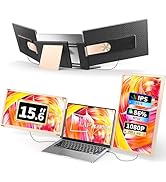
The S3 Laptop Screen Extender is a 14-inch triple portable monitor setup featuring Full HD 1080p IPS displays with 300 nits brightness and 72% NTSC color gamut. Compatible with laptops from 13'' to 16.5'' (excluding M1/M2/M3 Macs), Windows, Chrome OS, Switch, and more, it offers plug-and-play connectivity via USB-C and HDMI. Designed for professionals on the move, it boosts productivity by up to 300% with a lightweight, foldable design and includes a carrying case and comprehensive 1-year warranty.


| ASIN | B0CRNY6HW1 |
| Additional Features | Portable |
| Aspect Ratio | 16:9 |
| Best Sellers Rank | #31,255 in Electronics ( See Top 100 in Electronics ) #818 in Computer Monitors |
| Brand | Laptomo |
| Brightness | 300 nits and above |
| Color | Space Grey |
| Color Gamut | 72 |
| Compatible Devices | Windows, Chrome, Mac excluding M1/M2 chip models, Switch, tablets, PS5, and laptops with width between 11.2in-14.7in |
| Connectivity Technology | HDMI, USB Type C |
| Contrast Ratio | 1000:1 |
| Customer Reviews | 4.2 out of 5 stars 447 Reviews |
| Display Resolution Maximum | 1920 x 1080 Pixels |
| Display Technology | LCD |
| Display Type | LCD |
| Hardware Connectivity | HDMI, USB 3.1 Type C |
| Has Color Screen | Yes |
| Image Contrast Ratio | 1000:1 |
| Item Dimensions D x W x H | 12.7"D x 8.1"W x 0.25"H |
| Manufacturer | Shenzhen Baijiayoupu Technology Co., Ltd. |
| Model Name | S3 |
| Model Number | S3 |
| Mounting Type | Desk Mount |
| Native Resolution | 1920x1080 |
| Number of Component Outputs | 1 |
| Picture Quality Enhancement Technology | IPS, 72% NTSC color gamut |
| Pixel Pitch | 0.1815 |
| Refresh Rate | 60 Hz |
| Resolution | FHD 1080p |
| Response Time | 2 Milliseconds |
| Screen Finish | Glossy |
| Screen Size | 14 Inches |
| Screen Surface Description | Glossy |
| Shape | Flat |
| Specific Uses For Product | Business |
| Total Number of HDMI Ports | 1 |
| Total Thunderbolt Ports | 2 |
| Total Usb Ports | 1 |
| Viewing Angle | 180 Degrees |
| Voltage | 5 Volts |
| Warranty Description | 1 Year |
| Warranty Type | 1 Year Manufacturer Warranty |
B**D
Must-have Screen Real Estate
First Impressions - Plug and Slay Ever wish you had more screens but your desk is already bursting at the seams? This Laptop Screen Extender - my laptop’s new best friend! With not just one, but two extra 14" monitors, my laptop has gone from 'meh' to 'multi-tasking maniac' in minutes. Display Delight - Crisp and Clear Plug and play? More like plug and slay. Setting up was as easy as ordering takeout, and the 1080P FHD IPS display is crisp enough to make your Zoom meetings feel like HD blockbusters. Whether I'm working, gaming, or pretending to do both, this triple setup handles it all like a pro. Connections And talk about options - this thing comes with every cable you could dream of: 2 USB-C to USB-C cables, 2 USB-C to HDMI cables, and 2 USB-C to traditional USB cables. A full tech arsenal to meet the varying connection needs of my M2 and HP laptop. Secure Setup - Built to Fit Both monitors come equipped with USB-C and Thunderbolt ports, making connectivity a breeze no matter what laptop you’ve got. The best part? Your laptop sits securely in the center of both monitors, opening up to fit laptops up to 17 inches. When you’re done, it all folds up neatly, ready for the next on-the-go productivity marathon. Oh, and there is a carrying case! The Thunderbolt Surprise But here's the kicker - I only just discovered that my M2, despite its dual external display support, needs a special Thunderbolt adapter to run both monitors at once. Checked with a popular YouTube content creator (because, of course, they know everything), and promptly ordered the adapter. Once my order arrives, I will be all set to use this mobile monitor on those long school days when I need all the screen space I can get. Final Verdict So, if you’re tired of flipping between tabs and want to bring some serious screen real estate to your life, this monitor extender is the way to go. Just remember the Thunderbolt! Warning: May cause extreme levels of productivity and screen-envy from colleagues.
B**K
I am glad I got the additional displays
I’ve really been missing having multiple displays while traveling, so I finally decided to get one, and I’m so glad I did! The build quality is solid, and the display is sharp. It came with all the cables and a decent bag, so it's easy to set up and carry if I’m heading to a friend’s place for a few days. Having two USB-C ports is a game-changer for this setup, cutting down on cables. The auto power-down feature is nice too—it turns off automatically after 10-60 seconds of inactivity and only powers back on when you hold the multifunction button. Just remember that it resets to off when it powers down. Having 2-3 USB-C ports on the laptop is really helpful, especially since the HDMI port needs another USB cable for power. The displays work flawlessly with no extra drivers needed, and gamers who love single-player shooters will definitely appreciate this multi-display setup. It’s great for mobile workers too—perfect for financial work, software coding, and more. The IPS panel is a nice touch with less reflection, and I’m looking forward to connecting it to my Xbox via HDMI next. The display is fantastic for reviewing videos straight from the iPhone 15—no lag, and the video is super crisp!
S**R
Excellent Quality Screen Extender for Gaming, Multitasking and Browsing!
I'm very happy with this screen extender! With the laptop, it makes 3 large screens that work great for work or play! Some reviews have expressed concerns over the weight of the screens on the extender, and I understand that. If you have an expensive laptop, you really don't want anything touching your screen or adding weight to the laptop itself. I use my laptop on a rack on a standing desk converter, making stability important. To solve the weight issue, as good quality screens weigh something, I set the screen extender on a shelf behind my laptop so there is no weight/pressure on my laptop screen while it is in use, and it isn't likely to tip over by being out of balance when the desk is elevated. The quality of the screens on the extender is as good as the quality on my high-priced gaming computer. The screen extender is portable and comes with a nice case with a handle for easy carrying. As you can see by the photo, I have 3 different websites up on the 3 screens. Transferring info screen to screen is easy, and the directions they provide in the pamphlet that comes with the extender are easy to follow. There are also YouTube videos that show you how to hook things up, if you have any questions. All cords for all possible hookups were included, so you don't have to worry about buying extra cords. This is a great, affordable screen extender, and I'm excited to use it with panoramic games such as flight simulator, until I can afford my 3-55" screens ;).
K**E
Don’t waste your money if your laptop is old
Not sure where to begin. First I bought the S2 model, followed instructions, used the cords it came with and had no choice to choose option 2, since my laptop doesn’t have two type C ports. Only got one screen to work, then switched methods to try the other screen. Both screens works but however they don’t function at the same time. So, apparently I can ONLY used left side or the right side but, NOT both. I even tried settings but only two screens showed but not the 3rd one. Tried restarting my laptop, checked connections but still no luck on making both extended screens to work. Then I bought the S3 model’ because of only needed one cord to work. Guess what! same issue. I tried also using type c-2 hdmi splitter to see. Granted My laptop is about 3-4 years now and doesn’t have DP ports nor 2 type c ports. So, IF your laptop is old and doesn’t have Two fully functioning type C ports. DON’T BUY. Oh, another thing. BEWARE the S2 monitors will fit 17.3” However, S3 monitors will NOT fit 17.3” the fittings are about 1/4inch off. I had to take off the S2 monitors from the supporting frame and take off the S3 monitors from the supporting frame and switch frames Just to make the S3 model to fit my 17.3” gaming laptop. Maybe after I buy a new laptop with two fully functioning type c ports, then I’ll update this complaint. Hopefully this helps you.
A**C
Very practical and easy to carry
Love the product and everything about it, easy setup, easy to use, plug and play and comes with carrying bag. Super clear picture and works for any laptop. It’s a little bit heavier than expected but still great product for the price paid.
K**G
Excellent Laptop Screen Extender!
I must have been living under a rock these past few years because I never knew (or bothered to look into at least) that these screen extenders exist for laptops! I work from home a few days a week and am currently using my main PC to connect to work. I'm not too thrilled about having to connect to my work PC using my home PC (hello big brother) or potentially opening up my home PC to my employer, so I've been thinking about using my laptop (doesn't contain much) for work. Unfortunately, that means I would be limited to 1 screen only on the laptop vs. the two on my home pc or the three at work. Thankfully, I came across this screen extender for laptops and it is a GAME CHANGER/eliminates most of these concerns! The screen extender comes neatly packed and has a leather-like bag for you to carry the extender in (a huge plus). The extender itself is very well built and I personally like the carbon-fiber look found on the backside of the screens/extender (car enthusiast here who loves CF). Setting up the screen is EXTREMELY easy (though you'll have to watch out to avoid having your fingers pinched). The instructions provided were easy to follow and straightforward. The picture quality is fairly good and definitely gets the job done (depending on your use of course). Users can also tweak the picture quality/color via screen settings to their liking. Despite most of the above, however, there are a few personal complaints (imo). The support stand on the back of extender, while firm and sturdy, is not able to be adjusted vertically up and down the height of the laptop. If the user wants to move their screen up or down the height of the laptop screen, the weight of the extender may tilt the laptop screen forwards or backward until contact is made between the extender stand and the surface of the table in order to support this position. This limits the number of positions a user can have when the screens are extended and connected to the laptop. If you're OCD like me and you want your screens to sit at the same height, doing so might cause the laptop to not have the support it needs (due to the stands not making contact with the surface of the table) or you're just not able to have it positioned the way you want it. Another nice to have would be the ability to tilt the screen towards or away from you...or even lessen the space between the extended screens and your laptop screen, though that might require an engineering change to the product. All in all, however, this product is perfect for my use (to be used during my WFH days), and for the price, quality, and build...is a good buy!
J**D
Major Multitasking Upgrade!
If you are like me and have a lot of multi-tasking responsibilities, or if you're constantly having to bounce between reports and spreadsheets, you know you need either larger or more screens. I have three screens at the office, but if I am remote or at a different location, I am stuck to the one. But not anymore! This is perfect, because it easily connects to my laptop and gives me two extra screens! First, this feels like a premium device. It comes with all the cables you will need for a normal laptop that has sufficient ports. It works on Windows, Mac, and Chromebook (I know, because I tested all three). It also comes with a handy case for it, and it helps prevent the screens from being damaged while you are remote with them. Set up is incredibly easy and depends on the ports for your laptop, but the instructions are very easy to follow. I had it up and running flawlessly on my windows laptop in less than 30 seconds, and it easily formated to my screen and new which was left and which was right. I got this to work easily with my wife's Mac, but we needed a separate adapter so we could plug it up (since the Mac uses one of the ports as a charging port and doesn't push enough juice without also charging--an issue with the Mac and not the S3). I also managed to get it to work for 1 additional screen on an old Surface Pro, but my Pro doesn't have enough USB power to push 2 screens, regardless of charging. I am incredibly happy with this purchase, and if you're needing or contemplating a way to have additional screen space for work or leisure, this is what you need.
P**.
Excellent, well-built and very handy screen extender for the Mobile warrior
I’m here reviewing the S3 Laptop Screen Extender, 14'' Triple Portable Monitor for Laptop Plug and Play, 1080P FHD IPS Laptop Monitor Extender for 13’’-17'' Let’s quickly go over all of that tech babble. First, I have to slightly disagree with the wording of the title. It is NOT a Triple Monitor - it only has 2 monitors, and of course, counting your laptop screen, you get the full 3 screens. Secondly, the 1080p FHD, stands for Full High Definition. This means the aspect ratio is 16:9, which is a really nice format to work with. At this size monitor, the resolution remains tight, and images sharp. There are a full 3 resolutions each monitor wing is capable of: The highest resolution is 1920x 1080p, followed by 1600x900, then 1344x756. If your eyesight is aging, you might want to try the smaller resolutions as this will “magnify” the elements you are seeing. Finally, I’ve used it with my 2020 13” MacBook Pro. My setup uses the USB C cables that came with the product - they have multiple cable variations for most setups one can imagine. And all the cables seem to be of good quality. The right angle USB C’s are a great idea and helps keep the setup nice and compact. If anything, the cables are *too* long, but better to have length and not need it than to need it and not have it. Also included in the package is the extender itself. It looks to be of carbon fiber make, but I’m thinking that’s just a plastic pattern effect they’ve achieved in the making of the product. Despite that, it seems to be really sturdy and well made, with some definite heft to it. It just feels solid. The extender seems to have plenty of travel going from a closed position 11” to a full 14.5”, so this should be able to accommodate most 13” laptops. In fact, it almost seems custom made for MacBooks like mine. Read the instructions carefully to make sure you extend, and collapse the “wings” smoothly. If you push the top part faster than the bottom, because of sheer engineering principles, you may damage the extender. On the left and right edges of the extender, there are small nubs of plastic that serve as grippers to grab onto and hold the laptop. As I say above, my MacBooks’s monitor fits perfectly underneath these plastic nibs, so when you close the extender fully seated against the monitor sides, it literally turns the extender into a “piggy-back”. By doing it properly, now, when you raise and lower the monitor, the side monitors moves with the laptop. I’m wondering how this will hold up over time, but for now, the effect is very good. I used the two USB C -> USB C cables (1 is right angle), and then turned the laptop on. Instantly, the monitors were recognized by the MacBook, and I was off and running. Of course, you have to go in and setup the monitors in whatever way you want. I wanted the left monitor to literally be to the left of the MacBook monitor and the right to the right, with the mouse extending into either monitor from the center. I have to say, and this is to complement the monitors, they look really good for 1080p monitors. From the view, they almost look like they are more in a higher resolution with same aspect 16:9 ratio range. The colors look to be very similar to the Retina colors on my MacBook, not that that is even expected. I’m guessing most users will be business users and not photographers or videographers, but it’s good to know their colors look good. I’ll leave the color experts to test these out, but these are rated as IPS (In-Plane Switching) and the colors look great. How they compare, again, with reference images will require a fully, highly technical review with tools beyond those I have here. If you are interested in photography, I would use the jogwheel to go into the monitor settings and choose sRGB. By going into USER, you can set each individual value of Red Green or Blue and so can use it to match your center monitor to a high degree of accuracy. In my side by side comparisons, comparing photos of my daughter on the Retina and the extended monitor, the colors came close, after some finagling with the color settings. Each screen has a thumbwheel on the top of the monitor where the user can access the brightness, contrast, and other settings found in most monitors. I wouldn’t go too vivid, but a Natural setting will do good for business graphics and family pictures. So how is the sound? Well, these clearly don’t have the engineering team of Apple, and so it lacks a bit. I have intention of using the side monitors for sound output, so this is a moot point, but it’s interesting to know it is there for people who need. On the back of each monitor are 3 USB-C plugs. 2 are straight out USB-C’s and the 3rd is for running it to HDMI. Note that these are not pass-through charging ports and so you can’t plug in your iPhone and expect it to be charged. Which makes me wonder why they have a full 3 outputs for video. I suppose you could have two laptops hooked up to this setup, with only 1 using the extender? An odd, rare setup but who knows. It takes a couple trial setups, but eventually, one can put this together and have it ready to go in under a minute. The more I worked with it, the more I liked it, and this is coming from a user who runs a M2 Mac Studio with 2 large full monitors - 1) 34” (3440x1440) and 27” (2560x1440). It’s not quite wraparound like, but you’re almost enveloped in screens and with the right angle, this would really boost my productivity. I’m already thinking of additional ways to put this product’s strength’s to good use. All in all, I’m quite impressed with the quality, portability and expandability of this excellent screen extender. And it will most likely prove to be a VERY low cost way to boost one’s productivity and overall comfort level. 5 out of 5 stars. My overall summary This is a Great laptop Screen extender and with the right laptop, it becomes a seamless whole. The two wings that hold the 2 monitors are sturdy and well constructed with good quality materials. This is important because the extender has the important role to play of the “framing” behind the setup. In particular, it works extremely well with the 13” line of MacBooks (newer, thinner models). It almost seems to have been designed for it. The color is decent, the device instantly recognized, and it works perfectly with Apple desktops, or what they are calling “Spaces”. WIth these extra monitors, and using multiple spaces, the possibilities are endless and especially benefit users like myself. I love working on multiple projects at once and being able to quickly toggle back and forth makes this laptop extender the icing on the cake. I give it, 5 out of+ 5 stars.
Trustpilot
3 weeks ago
2 weeks ago