

Buy anything from 5,000+ international stores. One checkout price. No surprise fees. Join 2M+ shoppers on Desertcart.
Desertcart purchases this item on your behalf and handles shipping, customs, and support to USA.
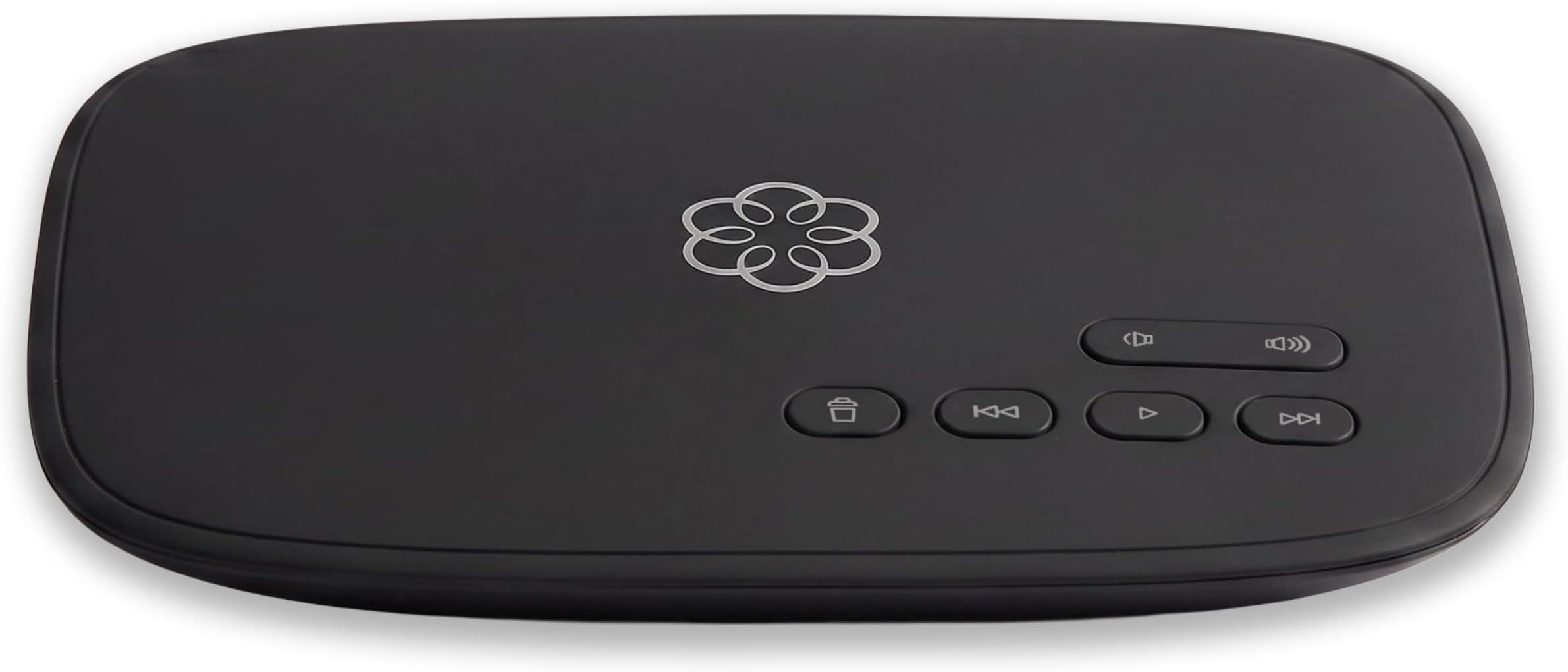
📞 Elevate your home phone game—smart, wireless, and wallet-friendly!
Ooma Telo Air is a top-rated VoIP home phone system with built-in WiFi, offering crystal-clear nationwide calling in the US. It supports number porting, unlimited calling, voicemail, caller ID, and emergency 911 services, all accessible via a sleek mobile app. Designed for flexibility and savings, it replaces costly landlines with a modern, wireless solution that fits seamlessly into any home or lifestyle.


| ASIN | B078Z4HBFG |
| Answering System Type | Digital |
| Brand | ooma |
| Built-In Media | Power Adapter for Telo, Telo base station, Ethernet Cable, Quick Start Guide |
| Color | Black |
| Compatible Devices | Telephone, iOS Devices, Android Devices |
| Customer Reviews | 4.2 out of 5 stars 2,260 Reviews |
| Dialer Type | Single Keypad |
| Enclosure Material | Plastic |
| Global Trade Identification Number | 00811008021450 |
| Is there Caller ID | Yes |
| Item Dimensions | 5.9 x 7.8 x 1.7 inches |
| Item Type Name | Ooma Telo Air |
| Item Weight | 1.2 Pounds |
| Manufacturer | Ooma, Inc. |
| Material | Plastic |
| Mfr Part Number | 811008021450 |
| Model Number | 811008021450 |
| Multiline Operation | Multi-Line Operation |
| Phone Standby Time | 1 hours |
| Power Source | Corded Electric |
| Recording Capacity | 22 Minutes |
| Smart Home Compatibility | Smart Home Compatible |
| Telephone Type | Cordless |
| UPC | 811008021450 |
| Unit Count | 1.0 Count |
| Warranty Description | 1 Year Warranty |
M**G
Works well, cost-effective, WiFi provides flexibility in placement
Highly recommended if you're looking for a low-cost landline replacement with advanced calling features. I've been using a wired Ooma at my house since 2016 and just purchased this wireless one for my Mom. We're using cordless Panasonic DECT phones with the Ooma at both locations ... the setup works great. Service cost is ~$5/month without Ooma Premier service and ~$15/month with Premier. Get the Premier, which gives you a second line, caller ID, spam blocking, call forwarding, conference calling, free calling to Canada and Mexico, etc., etc. Previously, I was paying ATT ~$35/mo for basic local service and another $10/month to a budget long-distance service. With Ooma, I'm paying about 1/3 of that for a service with many more features. Pros: - Simple installation - With Ooma Premier, all the features mentioned above and more. Spam blocking is particularly great and almost completely eliminates nuisance calls - Fax compatible, prepend *99 to outgoing fax numbers - You can keep your existing landline number. Ooma will "port" it for you and give you a temporary number in the meantime. Porting takes 1-4 weeks. I've done trouble-free ports of Pacific Bell (CA) and CenturyLink (CO) numbers - Sends standard voicemail waiting signals to connected phones -- just like phone company voicemail -- so that you can be notified of, and pick up, Ooma voicemails on connected phones that support this signaling - Reverse powers wired jacks in your house if you want multiple phones or fax machines connected (disconnect your house from the phone company's lines to do this safely and *don't* try this if you have DSL Internet ... it'll likely disable your Internet connection) - Smartphone app allows you to send/receive calls from your Ooma number, pick up Ooma voicemail and monitor incoming/outgoing calls from anywhere; the app isn't amazing, but it works. - Informative browser/web interface for monitoring and configuration of the service. - Sends address information to public safety when calling 911. Be sure to configure your address correctly during setup Cons and things to be aware of: - Requires a reliable Internet connection with a few 100 kbps of bandwidth for the Ooma. You can set up Ooma to automatically forward calls to another number if your home Internet goes out. Otherwise, your Ooma voicemail will record incoming calls, which can be retrieved after your Internet comes back (or from the app or the browser interface). - Sound quality of voicemails recorded by the Ooma is muddy. If your home phone has a built-in answering machine, try using that instead (just set the phone answering machine to pick up after a smaller number of rings than the Ooma). - If you wire the Telo in your house, rather than connecting via WiFi, note that you have the options of (a) installing it between your Internet modem and router or (b) behind your router on your home network. While Ooma recommends (a) for wired Telos, note that the Telo will limit throughput to your home network to 100 Mbps in this configuration, slower than many of today's Internet plans. My $0.02: connect a wired Telo behind your home router. - The "flower" light on top of the Telo is very bright by default. It's brightness can be adjusted by logging in to the Telo (not your Ooma dashboard) or with the Telo rewind button (see https://support.ooma.com/home/ooma-telo-basic-functions-and-faq/)
J**L
This is a Telo Air 2
Do not mistake this for the Telo Air 1. This can be taken anywhere and set up wirelessly as only the second version can. The 1 & 2 look identical. Be careful with the description because if it does not say Air 2 it is not the true wireless version. I think some other people selling the original Telo honestly don't understand the difference. And it's truly the manufacturer's fault because the company should have made the upgraded version the (Telo Air 2) look different in some kind of way so that it could be easy to recognize. I had the (Telo #1) and sent it back and order this (Telo air 2). The first version (the 1#) has to be connected to a Wi-Fi box or modem to get service. The second version this device (the Telo air 2#) does not have to be connected into a WiFi box or modem. The benefit of having the second version is that you can connect to any Wi-Fi anywhere so you can take your setup anywhere. Also, some people are saying on other sites and blogs that if you get (Telo 1#) you will not be able to pick which plans you want to stay on. Both Telo devices offer a 60 day free trail with there premier service. Premier service is awesome do your research I'm not going to explain everything here. After the 60 days is up you have to decide if you want to keep it or not. You do have to pay the taxes on your free service, that fee for your state is mandatory no matter what. So that's about $6 a month or $7.27 a month if your in NYC like me. You cannot get around paying taxes but the premier service is optional it's an additional charge that you can choose to not have after your 60 day free trail is up. The premier service cost $9.99 a month. So if you keep the premier service in total you will be paying about $16 or $17.27 a month if your in NYC like me. And it's worth it to me because I get to have two phone numbers if I want them and I do. Friends and family get one number.. business related stuff get the other number. I now have the (Telo air 2) and I plan on keeping the premier service. I did ask the customer service representative at Telo if I could have a basic package of free service by paying the taxes only and no premiere service on the (Telo 1#) and he said yes it's possible. But I wouldn't know because I returned mine. But you can try it at your own risk but I have seen a lot of other people who have purchased the (Telo 1#) reviews and they are saying that they are being forced to pay state taxes and the premier fee together. Me, I have a choice with the (Telo air 2#) I brought mines on Amazon for $99. My personal opinion. If you have teenagers like me and I homeschool one of them at his request because he has a disability and I'm also Christian.. having home phone service could be golden. I can limit my kids screen time whenever I want and I can still allow them to talk on the phone with their friends and of course contact them if I'm not home. No smart phone at night = no looking up porn. And parental controls on laptops and smart TVs also helps me to filter out unwanted content. Having a (Telo air 2 #) means I get to take my same *in the house wholesome values* on the road to hotels, camping trips, grandmas house or anywhere WiFi is available and phones are needed. Both devices are also answering machines. They have a flashing light to let you know you have a message waiting. I brought a 3 piece phone package from Amazon refurbished home phones sets for $35 and the phones work great and look new. All in at $135 for peace of mind and structure. My kids are allowed to have there cell phones and Hulu or whatever during the daytime after school work is done because I can monitor what they're doing but not overnight when I'm sleeping or not home.
S**E
Phone over WiFi
Works good. No wires. Works off the WiFi. And able to get a local number. Has call waiting. Build in answer machine. And is clear. And once you buy the unit. Just pay the taxes ever month. Simple. Easy to set up.
A**B
Alexa support is worthless. Setting up bluetooth is insanely difficult.
The service is fine, but the software is garbage. Upgraded to this version of the Telo to get built-in bluetooth and wireless support. Wireless setup is easy, though you need to install a special Ooma-setup app on your phone (not the normal Ooma app) to do that. Bluetooth setup is insanely difficult. You can't do it through the app. Instead, you need to actually hook up your computer directly to the telo with a wire, then connect to the telo's built-in web server (which it does not expose to the wireless network). If you try that and follow the directions in the ooma tech note (which tells you to go to http://setup.ooma.com in a browser), it won't work. Instead, you need to type the IP address for the telo itself into the browser. Don't know how to find that on a PC, but on a mac, turn off wireless just to make sure you're talking over the wire, connect the telo to your computer with a wire using the "home" port on the telo, bring up the Network preferences on your mac, click on the active network connector (it will have a green dot next to it) and the Router address is on the resulting page. Type that into your browser with an http:// in front of it (e.g. http://172.27.35.1) Those numbers may or may not be different in your device. The Alexa skill is completely worthless. It gives you no real control over voice mail (all you can do is listen to everything. You can't skip, for example.). It does not recognize names in my contacts (which have been uploaded to the Oooma site—I checked, and it helpfully pronounces the name perfectly when it tells me that it can't find it.) When it fails to make the call, it asks "is there anything else I can do for you." I say "no" and it tries to find the name "no" in the address book. You need to let it time out to get the skill to give up control of Alexa. You cannot tell Ooma to answer calls and use the Alexa as a speakerphone. Worthless. Tech support is marginal. Nobody can answer or do anything on chat, and when you call, the person who answers the phone can't answer technical questions. The online instructions for doing things are not aligned with current version of the web software or the app, so are also not very helpful.
G**H
Works great to replace a landline phone
This product works great! I am using it to replace my landline service that I have had forever but was getting increasingly expensive. This was a good solution as I was able to port my landline number to Ooma and save the monthly expense. It's easy to set up by connecting to wifi, and works with my old phone. I estimate that the initial cost will be paid out in 4 months based on the landline savings. And since it connects with wifi you can move your phone anywhere you want it to be, not only where the jack happens to be. Ooma also offers voicemail and other optional features.
H**H
Great product, reasonable price.
Great landline phone interface. The audio quality is spectacular, system works very well. The voicemail system works great also. Warning, it is not completely free to use, as you still have to pay various fees and taxes, in my area its about $6.94/month. There are two ways to do the initial setup: 1 - Install the "Ooma Setup" app on your phone. 2 - Plug a computer directly into its "HOME" Ethernet port. Do not connect the HOME port to your network, it may cause problems. I prefer using the "INTERNET" Ethernet port to connect it to my network, as opposed to using my WiFi, but I know wired connections are not convenient for everyone.
W**N
Best VoIP provider on the market
About my original unit in 2018 this is intended to be a hardware upgrade with a built-in wireless function to consolidate it was easy to change over my existing account to the new device. The service has been useful since I've had it had no problems customer service is very responsive during the week Monday through Saturday weather phone number. The device also has nomorobo support and touchdown on spam calls the service for the premier package was very easy to sign up for and I got a free year upon immediate sign up when I was reporting an existing magic number I'd use the magicJack in the past but the quality dropped even when our DSL went to fiber optic cable this device is very responsive and the only time you have an issue is if you have power outages which means your internet would not work service gym will responds quickly when the router resets and comes back online and once set up very seldom has to be done they also offer flat rate international calling to 80 countries and tends to be very beneficial for elderly adults then I'm on One service is right you don't receive a conventional bill and the only fees generally tend to be 911 taxes and applicable regulatory fees the premier package was my taxes as of this date 2024 for a monthly total if you tie it up my cost is only $17.30 a month this will vary by ZIP code for the 911 fees and taxes but doesn't have the caveats of a MagicJack which can block some area codes like Alaska which is 907 assuming you're dialing a 900 number some area codes in Arizona are still blocked not to mention magicJack has the problem of a 2-hour call limit to prevent abuse at least with Uma you have 5,000 minutes a month of unlimited calling which is approximately 83 hours before you're even considered abusing the service typically in most cases that is taking on a case-by-case basis and I've never had an issue I've had calls where they have had to last for an hour or more depending on if I was put on hold or not with certain agencies or government services the services reliable and well worth the investment because you did not receive a conventional monthly bill and don't have to worry about anything once you're initially set up and no how to handle the dashboard and add services that you may need I would encourage you to sign up for the premier package the limit robocalls and include the US Canada and Mexico in your calling package that alone is worth the investment and protects your privacy and prevent spam calls fairly efficiently it's not to say that you won't have any that don't come through but it is beneficial for the consumer to help limit the number of robocalls youreceive plus you have personal block list and you get an instant second number for your charge which I use for faxing and there is faxing support with the premier package.
D**N
Ooma phone
This unit works well and sounds good. I bought the one with the wireless handset.
B**D
Love it-but Installation isn't easy
When I received this Ooma device I went to work setting it up- turns out the one I had was set up for a US system. I attempted to set it up with my Lap Top- advice- Don't. Once I used a cell phone- scanned the code and waiting about 45 minutes - it was up and running. It has great sound quality. My problems setting up the system was more Shaw related than Ooma. I'm not who Shaw is hiring for Tech Support but the one lady I spoke with didn't even know what an Ethernet Cable was.
F**S
Pour telephone
Fonctionne parfaitement en autant que l internet est stable la moindre variation de l internet et le téléphone coupe
I**R
Excellent value And excellent customer service,
I have saved hundreds of dollars using the Ooma voip telephone system.since 2012. I have had one unit fail after the warranty period, and the Speaker fail on another Unit which was replaced under warranty without a problem. I have found their Customer Service to be excellent. the Telo Air 2 wi-fi is excellent and the hds 3 handsets are very nice and efficient . I especially like the portability of the Ooma system. I use it in Florida and in Canada. Sound quality could use improvement for me to give 5 Stars. but I am more than satisfied with this product..
"**"
I do not recommend
1/ I had problems with settings and factory reset 2/ I sent it back in june as Ooma told me to do and Ooma always spam me (even by phone) to make me pay service from june. Now they even threaten me this faulse balance being turned over to their collections department. SCAMMERS!
T**S
Can't activate as Canadian unit
Unlike the Telo non-Air unit on Amazon, this one can't be activated in Canada (as others have said) without using a US address. However, that won't work if you want a Canadian phone number. I purchased a Telo Air directly from Telo, and it (like the Telo non-Air from Amazon) both activate with Canadian addresses and permit Canadian phone numbers. The product is fine, I'm sure, but I can't imagine why you'd come to amazon.ca to buy a US unit.
Trustpilot
1 month ago
1 day ago