Buy anything from 5,000+ international stores. One checkout price. No surprise fees. Join 2M+ shoppers on Desertcart.
Desertcart purchases this item on your behalf and handles shipping, customs, and support to USA.
❄️ Stay Cool, Stay Ahead — Because overheating is so last season!
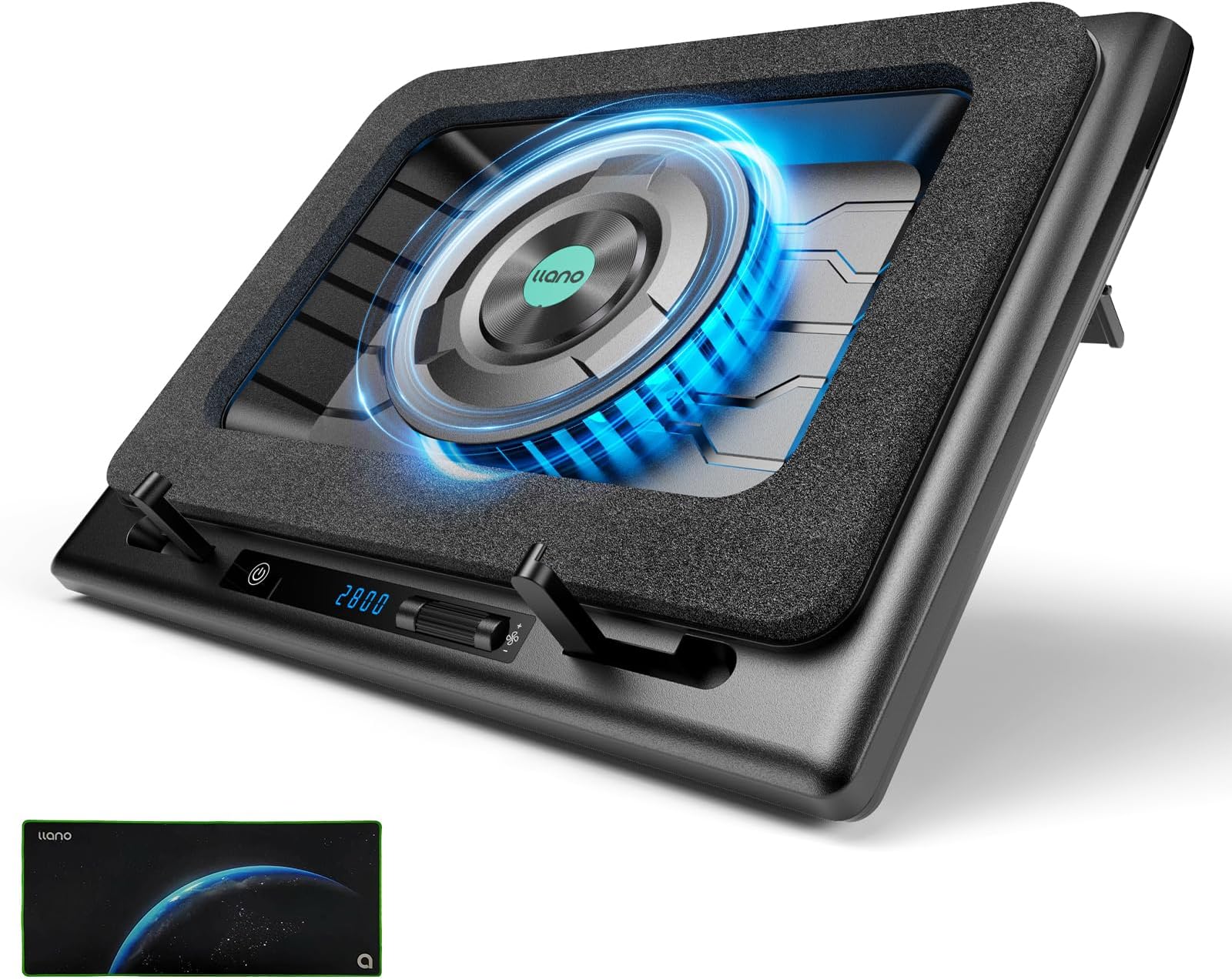
The llano Gaming Laptop Cooling Pad features a powerful 5.5-inch turbo fan that rapidly reduces laptop temperatures by up to 44℃ within 90 seconds. Equipped with a real-time LED display and touch controls, it offers precise fan speed adjustments to balance cooling and noise. Its ergonomic adjustable height and non-slip baffles provide stability and comfort, while an advanced dust filter protects your laptop from harmful particles. Compatible with 15-19 inch laptops, this cooling pad is a must-have for gamers and professionals seeking reliable, efficient temperature regulation.


| ASIN | B0CMTCB8Q6 |
| Best Sellers Rank | 8,850 in Computers & Accessories ( See Top 100 in Computers & Accessories ) 16 in Laptop Cooling Pads |
| Brand Name | llano |
| Colour | Black |
| Cooling Method | Air |
| Country of Origin | China |
| Customer Reviews | 4.5 4.5 out of 5 stars (981) |
| Enclosure Material | Plastic |
| Item Dimensions L x W x H | 30.5L x 6.9W x 40.6H centimetres |
| Item Weight | 2.54 Kilograms |
| Manufacturer | llano |
| Product Warranty | 2 Year Limited Warranty |
| UPC | 749757387285 |
D**N
A must buy if you struggle with temperature issues
Before using this cooler, under heavy sustained loads my temps usually sat at around 90°C+ in the CPU, and around 82-86°C in the GPU. Once I started to use this cooler at only half speed, these temps dropped by around 15-20°C on both, especially so in the GPU. I have never once seen my GPU get near 80°C since I started using it! On the CPU side, it works great in most situations, but certain laptops such as mine still pull in a lot of power, so depending on exactly what you're doing, results may vary. There is nothing any cooler on the planet can do for sudden power spikes under 100% capacity loads on 12700H laptops such as mine! In these cases, unless it is necessary, reduce the load on your laptop if you want to avoid this. As an example of how good this cooler is, Elden Ring on max settings in 4k is extremely CPU intensive, and would be stay at 99-100°C without the cooler, as my laptop would be pulling the absolute maximum power at all times. However with the cooler, it stays between 80-90°C. Games like COD won't go above 65°C in game with the cooler, but when it's pre-loading shaders, temps can still go up towards 95°C. Overall, I feel that half speed is the perfect mix between noise and cooling, as the only difference between max speed and half speed is only around 2-5°C in temp reduction, but the noise is much, much louder. The biggest issue for most will be the noise. At max speed, it is around 70db, almost like a hoover. At half speed, it still sounds like a PS4 that someone hasn't cleaned since they bought it. Still, at half speed, this shouldn't be an issue if you wear headphones like I do. Just be wary if you're using it when someone is trying to sleep! All in all, this is a fantastic cooler that is currently the best on the market. It may seem quite expensive for a cooler at first glance, and can be loud depending on the fan speed, but it's resounding results make it fully worth the cost in my opinion!
A**M
This cooler is like me; Big, noisy, but it works really well!
The cooler is a sizeable and can be a touch bulky on first impression, but the cooling perfomance is MORE than worth it. It feels a little cheap when you take it out of the box, but it actually sits very well and I have confidence that it wont spontaneously collapse under my laptop. I have an HP OMEN Gaming Laptop with a very power hungry (and by extension, VERY toasty) GPU and CPU, most games would typically cause the GPU to hit the thermal limit of the chip. Since getting this, I'm looking at about a 15%-18% drop in temps depending on the game. Worth noting that the noise can be significant beyond ~1200rpm but with headphones on you do not hear it unless it is set above 2000rpm. I've found that manually setting my laptop fans for a specific speed (typically they'd be maxed @5900rpm, now between 4000-5000rpm based on what I'm doing) and setting the cooler to run between 800-1200rpm; 500-800rpm works perfectly for general day-to-day use for most laptops. Honestly, I wish I'd been able to snag this for a little bit less money, but if you are looking to preserve your multiple-thousand pound laptop, dropping ~£100 on this, worth it. I would genuinely recommend it.
M**S
Laptop "Air Con"
So I recently purchased a new laptop:- MSi Stealth 16" core i9 Ultra 9 rtx4070 (GPU). I have mainly utilised the laptop with balanced all round performance settings and found it to be an excellent all-round system. However, whilst carrying out a variety of benchmark tests (3DMark, Furmark2, UserBenchmark, CinebenchR24), the system was, whilst getting respectable results, consistently claimed to be underperforming in comparison to other ultra 9 rtx4070 laptops. Research suggested that most modern Laptops with highpowered CPU & GPU can experience "Heat Dissipation" issues, whereby they draw power to perform well, and switch on their fans to cool down, when overheating. So the issue is one of Temperature Management. My laptop fans can be switched permanently on (if I so wish), though that adds 6000rpm +20dB fan noise to an otherwise extremely quiet & well performing system, & potentially increases wear & tear. Given a choice between changing my preferred laptop settings, or seeking an alternate remedy for temperature management, I decided to look at alternatives. This cooling pad gadget will easily gain 5 Star reviews from many people. I have deducted a Star from my rating, for a combination of 3 things:- Size/Design- it's bigger & uglier than my sleek ubercool designed laptop. Noise - 800RPM adds +20dB (equivalent to the noise of "cooler boost" permanently "on" internal fans). There is very little performance gain above 1500RPM (+25db). Cost - The cost of this particular Brand's device is 3x the cost of most of its competitors. So how did it gain 4 Stars in the first place? Build quality - I'm satisfied that the build quality is good. Temperature Management - I'm satisfied that this device provides beyond excellent temperature management for my laptop. Performance gains - the video I provided above is after having run CinebenchR24 When compared to my earlier CinebenchR24 numbers The GPU points gain with Llano was +2000 The CPU multi-core points gain was +200 The CPU single core points gain was +10 I've had similarly increased results in 3DMark, Furmark, UserBench. Instead of having an underperforming core i9 Ultra 9 with rtx4070 (laptop). The results pendulum has swung, whereby the benchmark comparisons are placing my Laptop results in the better than average, best performing realms of benchmark software results for my system specifications. In day to day usage, the benchmarks indicate that people using a laptop in combination with a Llano Cooler Pad for Temperature Management would see themselves effortlessly experiencing their system at its best. In the review I wrote for my laptop, I stated a belief that's its best use is as a laptop. If your intention is to use such a laptop as a home base station for e.g. gaming, then you really should consider a cooler pad, & whilst this one is costly, I'm satisfied that the Temperature Management System it provides is BRILLIANT.
T**R
It really works
It fit nice with my laptop and it really reduce temperature around 10 to 15 degrees on 3d rendering on 1200 rpm slightly noisy but do it's job properly easy to use. Build quality is good come with proper packing. Performance is exceptional. Price is higher but worth it. Big but really lightweight
L**L
Superb Performance!
I have an MSI Raider 18HX with the i9 14900HX and RTX4090. Although I don't do it often, when running handbrake I would very easily hit thermal throttling, and the CPU package temp frequently hit 99C whilst encoding. With MSI Center set to Extreme Performance and a custom fan curve to bring the laptop fans right now (as they're noisey with not a huge amount of benefit above 3.5krpm) and the Llano cooler, I've gotten the cpu down as low as 79C under sustained 100% load. This is also after allowing the temperatures to creep into the 90's before turning the Llano up to about 1600rpm. On normal usage, I can have the Llano on about 400rpm, the laptop fans will turn off and it's near enough silent with temperatures in the 40's. 600rpm and above is where it's really doing its job and it is loud then, but my god it does a better job than I expected. The most important thing is getting a good seal. On my particular laptop, the rear vents are quite far back, so the front of the laptop actually sits over the controls. However, I get about a ~10C improvement over if it was sat how you'd expect it to sit with the front hooks on. During gaming where the load is less sustained, I sit around 65-75c with the llano set to about 800rpm. Perfect!
S**B
Great for gaming, but in steady state your laptop fan speed will be zero, reducing wear
Lots of other reviews stating the advantages of this cooler in gaming (and this cooler works well—temps for my Asus Predator RTX3080 laptop go from 80-something to 60-something for the GPU), but there's another big advantage of this cooler... When you are engaged in productivity or simply just have the laptop on, the fans will still be turning and wearing out over time. With this cooler set to low, a good laptop will simply turn its own fans off on temps, giving you zero wear. And because this cooler has better air filtering than your laptop (most laptops don't have any filter for one thing!), there will also be zero dust buildup. It works differently to most other coolers. Instead of attempting to blow air through the laptop (which always fails because most of the laptop bottom is a solid barrier), the Llano creates a pressure differential below the laptop, forcing air through any openings in the laptop base, irrespective of how small they are. You can see this simply by leaving the laptop off and turning the Llano on. You will feel significant air coming through the laptop exhaust vents even though the laptop's fans are not turning. This often means your laptop fans stop turning outside gaming, because the Llano is doing all the work! I've included a screenshot of my computer's fan control (Asus Sense) showing zero CPU and GPU speeds. This works really well for productivity and things like locally running AI image generation; your laptop fans are not constantly running and/or changing speed rapidly and often. Yes, this cooler is expensive, but so is your gaming laptop, and this cooler will save your laptop wear via constantly running fans, dust buildup and of course heat. Downsides? If you leave the Llano off underneath your laptop (because for example, you are just web browsing), and then start gaming without turning the Llano on, the Llano works against you and actually makes the laptop hotter because now the laptop has to push air through the cooler as well as itself. Not something you hear on ANY of the fawning Youtube review videos, and actually quite easily done! Remember to always turn the Llano on! Edit - Forgot to mention, I got a very nice mouse mat with this. It's one of the bigger ones that cover half of your desk, and I'd guess it's worth about 20 pounds. It's not advertised as an accessory, though, so you may or may not get lucky. Also, lots of comments about the build quality. Mine is solid and is made of good APS plastic and not the brittle cheap MSI stuff(!) that cracks on the slightest drop. I also ordered the non-LED one. Fewer holes in the body to accommodate the LED bling nonsense, so I'd guess that leads to more structural solidness.
E**D
Worth the price and does its job!!!
I could say it is the best profuct that I have ever purchased and it is worth the price, especially if you are using high end laptop that’s hot like an oven. Before,I used cheap cooling pad and it doesn’t help at all!! My temperature was always 90+ when playing flight simulator. Then I have decided to give Llano a try and it is a life changing, with now 78-80 temperatures maximum with below 70 degrees minimum with 1700-2800rpm. It helped reduced the temperature significantly and the build quality was amazing worth the price. However, I am using Asus strix g18 the air input from latop was a bit off and blocked by the form sheet, but it was only a little bit. Overall it is the product that worth its price and does its job.
D**B
Too damn noisy for office/work use.
Ok, after 2 years I have finally parted way with the llano cooling pad and swapped it for a cheaper/less performance orientated KLIM Ultimate - Why? The llano is just too damn friggin loud ... at the lowest available rpm (300rpm) it audible jet engine blast become very irritating if you're using it for office/work. This issue could be mitigated if they allowed finer rpm steps below 300rpm.... for example 50rpm, 100rpm, 150rpm. The KLIM Ultimate I have replaced it with is wonderfully quiet... I love it. If all you care about is pure thermal performance then yes the llano will deliver, no issue. If your an office worker, I'd walk away.
R**N
Excellent, with some caveats.
This cooling pad does indeed work as advertised. I'm seeing similar temperature reductions as those advertised in the listing and am thrilled with the performance. The chamber design is brilliant and does seem to work better for me than past cooling pads that I've owned that are just simple flat designs. Build quality is fine overall. The plastic does feel a little cheap, but it seems to be well constructed and I'm confident it will hold up to general wear and tear. I will say that the pad isn't really a universal fit for all laptops. I'm using it with an Alienware m16 R1, and when placing it where it should be on the pad (i.e. the chassis aligned with the foam ring and the front clips raised in place) a good portion of the intake panel on the bottom of the machine is completely covered up by the foam. At best, this prevents the pad from doing its job and at worst can worsen your temps by reducing airflow. I'm not taking any stars off for this, as I realize that it's impossible for the manufacturer to make a truly "one size fits all" product, but it's something to keep in mind. I have my laptop sitting with the front of the chassis hanging an inch or so off the front of the cooling pad to prevent the intake issue, which makes the clips useless and also blocks the RPM display on the pad. This isn't a huge deal, and the laptop still sits perfectly secure. I don't have any issues with it slipping off the front, even with the cooling pad raised to its highest position. The foam ring does a good job at preventing any slipping. This could very well be a problem specific to this generation of Alienware machines given the design choice with the large rear I/O panel, I'm not sure, but again, it's something to keep in mind. If you do decide to buy this pad (and I do recommend it despite this issue) just study the bottom of your laptop to make sure that no intake vents are blocked.
C**N
Cumple con creces mis expectativas
Llevo un mes usando este enfriador con un portátil de 15,6" (es compatible con portátiles de 15" a 19"). Estas son mis impresiones: Diseño y construcción El ventilador principal de 14 cm está bien integrado: no vibra, no se sale del marco y no molesta en absoluto en el uso. El acabado es en gomaespuma con dos ganchos en la parte inferior, lo que hace que el portátil quede bien encajado y que el aire se aproveche mejor. Sí deja alguna ligera marca en la base de la gomaespuma, pero nada preocupante. Trae un filtro antipolvo extraíble en la parte inferior, algo que agradezco para mantenerlo limpio. También incluye dos patas ajustables en dos posiciones; yo lo uso siempre en la máxima altura porque me resulta más cómodo y mejora la entrada de aire. También tiene un filtro extra por si al tiempo quieres cambiarlo. Puertos y conectividad Al principio pensé que los puertos USB no funcionaban, pero el problema se soluciona fácilmente conectando la base al portátil mediante el cable que viene incluido en la caja. Una vez hecho esto, los puertos funcionan correctamente, dándole un plus de utilidad a la base. Rendimiento y refrigeración Este punto es donde más brilla el enfriador. He notado reducciones de hasta 20 °C en juegos exigentes, lo cual me parece una barbaridad comparado con otras bases que apenas bajan unos grados. El ventilador tiene un rango de 300 a 2800 rpm: A 300 rpm es prácticamente inaudible (se escuchan más los ventiladores del propio portátil). Entre 800-1000 rpm es el rango que más uso para jugar: se oye, pero nada molesto incluso sin cascos. A 2800 rpm el ruido es altísimo, tanto que incluso con auriculares se escucha, pero la capacidad de enfriamiento es brutal. Lo uso solo de forma puntual para bajar rápido la temperatura y luego vuelvo a 800-1000 rpm para mantenerla. La base en sí no se calienta con el uso, y el diseño está pensado para que el aire atraviese directamente el portátil, acelerando mucho más la disipación que en bases planas tradicionales. Comodidad y uso diario Al principio me costó adaptarme a la altura extra comparado con otros elevadores, pero una vez me acostumbré, cuando no lo tenía lo notaba demasiado bajo. En mi experiencia, sí mejora la postura. El portátil no se desliza nada gracias al encaje y a la espuma. Precio y valoración final Lo compré por 95,59 €, y a ese precio me parece una compra excelente, mucho más ajustado que los más de 130 € que había visto en otros momentos. No he probado otras bases para comparar, pero este modelo me parece válido para cualquier persona que use portátil, desde gamers hasta usuarios de oficina, siempre que entre en el rango de tamaño soportado. Como detalle añadido viene con una alfombrilla grande para la mesa algo que es de agradecer para el uso del ratón.
Z**U
Works with MacBook too
Works great with my MacBook.
A**1
runs on its own power, filters dust, vaccuum seal, manual fan control, very powerful airflow
drops both cpu and gpu temps considerably (i9 14900hx cpu and rtx 4090 laptop gpu), CPU of course will try to draw more power as it cools so it will seem less effective on cpu when looking at the maximum temperature spikes, but the averages while idle and under load will drop heavily nonetheless. very impressive results on GPU, raytraced 1440p gaming & large resolution stable diffusion use never saw it above 70 in the ~10 hours i've so far used it, compared to mid-high 80's when simply raised at the back. have been running this at 600RPM, it goes up to 2800, so if you're okay with more noise you can get even better results. i live in a dusty environment, so the vaccuum seal & dust filtration are a huge plus, and the primary reason i chose this cooler, everything else has just been a pleasant surprise. if you have the rare laptop that vents heat out the bottom, then this is definitely not for you, otherwise absolutely yes, 160 AUD to help insure a 5000 AUD purchase is well worth it.
W**T
Best laptop cooler!
Best cooler ever. If you have a high end laptop which overheats due to cooling issues, buy this!
Trustpilot
5 days ago
1 month ago