Buy anything from 5,000+ international stores. One checkout price. No surprise fees. Join 2M+ shoppers on Desertcart.
Desertcart purchases this item on your behalf and handles shipping, customs, and support to USA.
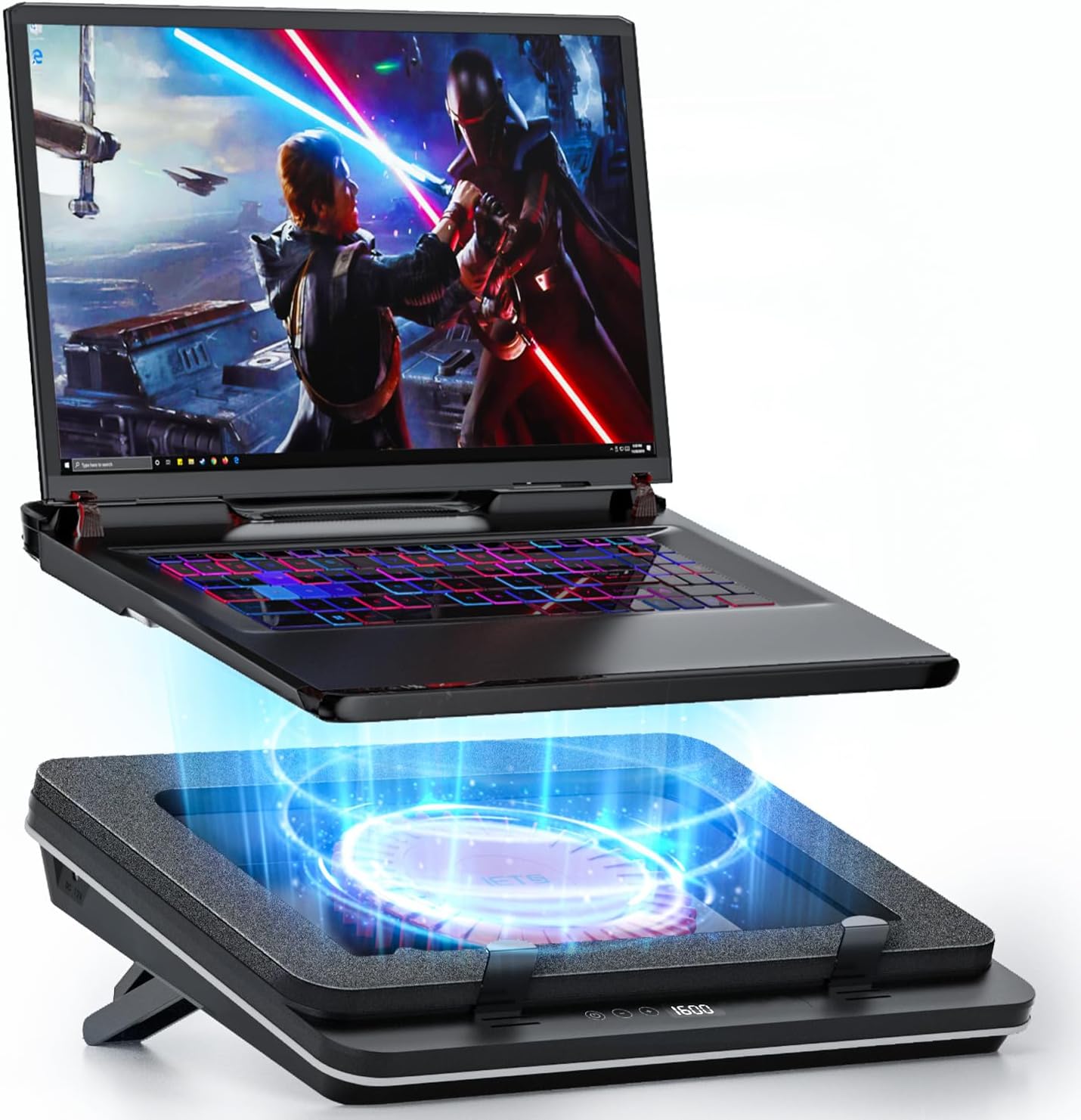
❄️ Stay Cool, Stay Ahead: Turbocharge Your Laptop’s Chill Game!
The IETS GT600 Laptop Cooling Pad features a powerful 5.5-inch industrial-grade turbo fan with 47.3 MmH2O wind pressure, combined with magnetic sealed foam for airtight 360-degree cooling. Designed for laptops between 14.1 and 19.3 inches, it offers seven adjustable height brackets, a dust filter, and a touch-start panel. Its metal body ensures durability, while the bottom air intake design prevents heat backflow, making it ideal for rear-exhaust gaming laptops. With noise levels up to 55 dB at max speed, it balances performance and user comfort for serious gamers and professionals alike.


| ASIN | B0CDC1SWFT |
| Best Sellers Rank | #4,710 in Electronics ( See Top 100 in Electronics ) #17 in Laptop Cooling Pads |
| Brand | IETS |
| Color | B0(Basics) |
| Cooling Method | Air |
| Customer Reviews | 4.5 out of 5 stars 626 Reviews |
| Enclosure Material | Metal |
| Item Dimensions L x W x H | 15.75"L x 12.28"W x 2.76"H |
| Item Weight | 1.8 Kilograms |
| Manufacturer | IETS |
| Material | Metal |
| Mfr Part Number | GT600B0 |
| Model Number | GT600B0 |
| Number of Fans | 1 |
| Product Dimensions | 15.75"L x 12.28"W x 2.76"H |
| Warranty Description | 2 |
V**T
THIS IS INCREDIBLE!!!
I’ve seen some people complain about the noise level, but honestly — come on, guys. This is a cooling pad, it has fans. Of course, it makes some noise, just like any cooling device would. But here’s the truth from real testing. I’m using this pad with a laptop that has an RTX 4060 and an Intel Core i5-12500H, and I’ve included screenshots showing how it performs at different power levels: Screenshot 1: Cooling pad turned off – my laptop’s normal temperature without the pad. Screenshot 2: Pad at 1000 power level – temperatures drop noticeably, and the noise level matches the laptop’s own fans at full speed. Performance stays stable. Screenshot 3: Pad at 1800 power level – this is my recommended setting for gaming. The cooling is very effective, while the noise stays comfortable for home use. Screenshot 4: Pad at maximum power – the temperature difference compared to 1800 is very small, but the noise is almost twice as loud, so there’s really no reason to go higher. Optimal gaming range: 1600–2000 power level, with 1800 being my personal sweet spot. Yes, it connects to a power outlet, not just USB — and that’s exactly why it’s so powerful. You can’t expect this level of performance from USB power alone. After all, your laptop itself also runs on wall power for maximum performance. In another room, the sound is about twice quieter than a hair dryer. If you play with headphones, the fans don’t bother you at all — it’s completely fine for gaming. However, if you don’t use microphone noise suppression, the mic will still pick up some fan sound, just like it would without the cooling pad — it’s simply the normal airflow. The build quality is excellent: sturdy frame, solid materials, and the laptop sits perfectly flat with no gaps or air leaks. The foam layer helps direct airflow right into the laptop’s intake vents, keeping cooling efficient and even. Because of that, the laptop’s own fans spin slower, reducing wear over time. Overall, this is a perfect choice for home use, especially for gaming laptops. Don’t pay attention to the negative comments — this pad works exactly as intended and outperforms most others in its price range.
K**G
Cools a Scorcher of a Laptop
I have an MSI Raider that has been overheating and shutting off. It was getting too hot to touch the keyboard. I did my research and purchased this cooling pad with crossed fingers. I had never heard of the brand, and I was skeptical, especially given that my mainstream branded cooling pad was not up to the task of keeping my laptop cooled off. Installation instructions were somewhat lacking. I had to search online to figure out what order the white and black filters were supposed to be in on the intake. And the English instructions has a minor typo where text from one section appears at the end of another. Number 1 thing is this works. The fan speed is easily adjustable from a few hundred rpm to 2600 rpm, but even at 1800 rpm my laptop is staying relatively cool. It used to be too hot to touch; now it is slightly warm when playing power hungry games. At 2600 rpm it is definitely loud, but at 1000 rpm it is pretty quiet, softer than my laptop's built-in fans. At 1800 I can hear it, but it's at about the same volume as the laptop's own fans, and I don't find it distracting. I got the model with the LEDs because it was just a few dollars more at time of purchase. Arguably, it's worth the few extra dollars, but I am not finding the LEDs to be an elite version of this kind of feature. They're a little 'Temu' in quality. They look fine and are bright, but their spacing makes individual diodes stand out; they don't blend together, and the programmed patterns are more Christmas-tree lighting style than elite gaming machine style. So, worh it for a few extra bucks, but something you can easily pass on if the price difference is significant. The rear of this pad has legs so that you can lift the back anywhere from a few degrees to about 45 degrees. That gives space for air circulation and allows you to adjust the angle for different uses. I don't use the laptop's own keyboard so I keep the legs maximally extended. They are very stable. Look, I'm going to tell it like it is for what could be better on this product, but the bottom line is this is doing something I was beginning to think was impossible. It's keeping my laptop cool, and for that, I wholeheartedly endorse it. This is a good buy.
R**N
Really effective cooler
I always wanted one of these but didn't know if it would fit well with my setup due to the height. I took a chance and use this on my laptop daily. I have an over the chair desk and I use a wrist rest for comfort so the height is no problem. This cooler instantly cools off your system. You can watch the temps drop in your monitoring app when you turn it on. The lowest fan setting is 400 and I keep it on that about 90% of the time and kick it up to 600 sometimes. I've never had to use it on a higher fan speed. It is really quiet at 400 and 600. At the highest setting of 2000 it is pretty damn loud but I can't imagine a scenario where you would need that much fan.
R**S
It's a Beast! Highly Recommend!
Very powerful fans! I love the height it gives my laptop. It helps make it more comfortable to type on and use daily, all day. The fans get noisy at 1200+ if you are recording videos, but is quiet below 1200. I use it with the lights off because I like my dark space...it's easier on the eyes. The lights are still cool, regardless. They match my back-lit keyboard and that makes them ultra cool. This does a great job keeping my laptop cool while under heavy use, which I desperately needed because my gaming laptop was shutting down due to heat before I got this. I do not give this product a five star because the buttons can be challenging. They do not respond every time you push them, and some seem out of alignment from where they are supposed to be. So, if you fat finger it, you may land perfectly square on where the buttons actually are, rather then where they are supposed to be. That is my only complaint. Otherwise, this is a beast of a laptop cooler and I would definitely recommend it and buy it again, myself. Oh, It is worth mentioning that I have a 19" laptop (measuring from top left corner down to the bottom right corner with it closed) and this fits it perfectly. It is 15" across from left to right, 11" straight from top to bottom if that helps. My screen surface from top left corner to bottom right corner measures 17.5". That is important to know! You do not want to buy something that will not fit your laptop!
S**O
Worth It, Genuinely
I’m using the IETS GT600 RGB Laptop Cooling Pad with my Lenovo Legion 7i, and the difference in temperature is honestly very noticeable. This cooling pad actually works. My laptop runs much cooler compared to the cheap cooling stands I’ve used before. Everything is adjustable, which I really like. You can change the stand height, adjust the stopper so the laptop doesn’t slide, control the RGB lighting (brightness, speed, and modes), and adjust the fan speed as well. The RGB lights are a fun extra touch. I absolutely love this cooling pad and think it’s worth the investment. After using this, I’m definitely done buying cheap laptop cooling fans.
M**K
A laptop cooler that definitely will cool your laptop (please dust your laptop first though)
This is the only brand I trust with laptop cooling. This cooler forms a minor seal with its foam forces a large amount of airflow through the exposed vents on the underside of the laptop. Unlike many scammy laptop coolers on the market, this one has managed to noticeably cool laptops I've handled that have swelling battery, inappropriate screw tightening of the motherboard by technicians after opening the laptop, or old hot chips. Since this does work by shoving lots of airflow through the underside of the laptop, please make sure your laptop has good amount of bottom vents. You will still need to dust the inside of your laptop very 6 months if you haven't already prior to purchasing this, but since this comes with a dust filter, it helps with reducing dust accumulation for your laptop. The removable dust filter is not that easy to wash, but this brand does sell replacement dust filter for an overpriced fee.
T**R
Awesome
Can get a bit loud, but what do you expect. Right about 1000-1200 rpms its just as loud as my laptop fans and cools more than enough. No issues after a few months of use
J**M
5 star BUT "no matter where the cooling hole of your laptop is" is not correct, it matters
sorry this is so long... UPDATE: Everything below stands but with more testing, I got it working. It's cooling my laptop significantly, it appears. But it's just barely resting on the foam on the back edge, on the left side it's not on the foam at all. I expect over time the foam will deform but it's a keeper. It kills me that I'm probably going to return this. It's a GT600 V1 (no lights), which is the super duper fan. It's a work of art, I'm serious, this thing is heavy in the box and beautiful. I was so excited to get this cooling solution on my MSI Pulse GL 76 laptop. I really hate to return it but unless I engineer some solution for my laptop, I will send it back. This will work BEAUTIFULLY if your laptop vents on the bottom a decent distance away from the edges of the laptop. Then there's MSI, and I don't know how many other laptop makers, who design their computers to deliberately (apparently) not work with these types of cooling pads. The basic idea of this pad is that you place your laptop on it and this makes a seal at the edges. The fan will be able to force air up into your laptop and cool it well. According to all the great reviews, and having held one in my hands, I believe it works really well. The funny thing is, to make a proper seal, you need about 1/2" minimum distance between your vents and the edge of the bottom of your laptop. Again, there needs to be enough laptop sitting on the foam to make seal. But additionally, you really need enough of your laptop on the foam so that it won't deform the foam over time, that's a consideration too. My MSI GL76 laptop vents on the bottom go nearly to the edges on two sides, on two important copper cooling tubes inside, it must be a heat release point. So I can't have at least 1/2" of my laptop base sitting on the foam properly. I did rig it up to test it out, where I barely had maybe 2mm of laptop base touching the foam on two sides. It was enough to make a seal. I was surprised how quiet the fan is compared to some reviews, I ran it right up to 2400 and it's not much louder than my laptop (which gets quite loud on full fans). I actually run it on 1400 now. It was surprising, I had mixed results, I only ran my computer for a short while because it appeared that at idle, just starting up with no apps, I was already running HOTTER with the cooler on. So something is amiss here, I am very sadly sending it back. Last note, when I ran it the first time, recently had my laptop apart to clean out dust and replace fans. When I ran it, a big poof of dust came out a vent on the top of my laptop, I missed it in the cleaning. Now my laptop run hotter even on my old pad. I'm afraid the force of this cooler might have blown some dust around in my laptop in a way that affects cooling. The end.
P**K
Very good
Must have for gaming laptop it really cools your laptop like 10-15 degrees
A**M
Good
Good
J**E
So far laptop able to cool down and expecting longer product life
Wish to have slimmer type but to maintain same efficiency in future
E**A
Muy buena
Muy buena to compré la v1 hub es excelente no me molesta el ruido aunque si está muy bien el sellado de 80 grados que llegaba mi laptop está n 30 o 40 Y me van mucho mejores los juegos solo el detalle que las calcomanías venían un poco desgastadas y con un dedaso pero está muy bien la recomiendo si no te molesta el ruido
S**E
Excellent
It came a little late but that's alright. It works as advertised. I noticed a significant decrease in GPU and CPU temps (10-20°C) when playing newer games at high/max settings. Excellent quality.
Trustpilot
1 week ago
1 month ago