Buy anything from 5,000+ international stores. One checkout price. No surprise fees. Join 2M+ shoppers on Desertcart.
Desertcart purchases this item on your behalf and handles shipping, customs, and support to USA.
🚀 Elevate your network game with Flint 2 — speed, security, and control in one sleek package!
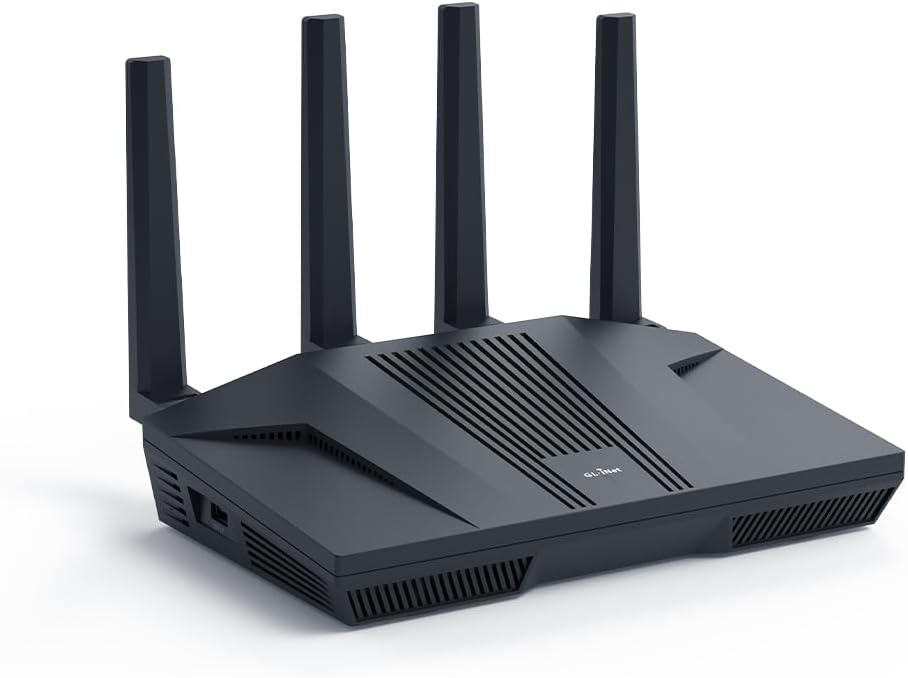
The GL.iNet GL-MT6000 (Flint 2) is a high-performance WiFi 6 router delivering up to 6 Gbps speeds with 8-stream technology, dual 2.5G ports, and robust VPN support. Designed for gamers, streamers, and professionals, it supports over 100 devices, integrates AdGuard Home for ad-blocking, and offers a user-friendly OpenWRT-based interface with regular firmware updates, ensuring long-term reliability and security.


| ASIN | B0CP7S3117 |
| Antenna Location | Business, Gaming, Home |
| Antenna Type | Retractable |
| Best Sellers Rank | 2,847 in Computers & Accessories ( See Top 100 in Computers & Accessories ) 25 in Routers |
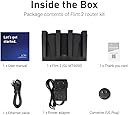
| Box Contents | Ethernet Cable, GL-MT6000 router with 2-years warranty, Power Adapter (EU+UK Plugs), User Manual |
| Brand Name | GL.iNet |
| Colour | Black |
| Compatible Devices | Personal Computer |
| Connectivity Protocol | Wi-Fi |
| Connectivity Technology | Wi-Fi |
| Control Method | App |
| Controller Type | App Control |
| Country of Origin | China |
| Coverage | Long Range |
| Customer Reviews | 4.4 4.4 out of 5 stars (2,589) |
| Data Transfer Rate | 6000 Megabits Per Second |
| Frequency | 5 GHz |
| Frequency Band Class | Dual-Band |
| Has Internet Connectivity | Yes |
| Has Security Updates | Yes |
| Is Electric | Yes |
| Is Modem Compatible | No |
| Item Weight | 761 Grams |
| LAN Port Bandwidth | 2.5 Gbps |
| Manufacturer | GL.iNet |
| Manufacturer Part Number | GL-MT6000 |
| Maximum Upstream Data Transfer Rate | 6000 Megabits Per Second |
| Model Name | GL-MT6000 |
| Model Number | GL-MT6000 |
| Number of Ports | 6 |
| Operating System | Linux |
| Other Special Features of the Product | 8 Stream Wi-Fi 6 |
| Product Warranty | 2 years |
| RAM Memory Installed | 1 GB |
| Router Firewall Security Level | Basic |
| Router Network Type | Wireless and wired |
| Security Protocol | WPA3 |
| Unit Count | 1.0 count |
| Voltage | 5 Volts |
| Wi-Fi Generation | WiFi 6 |
| Wireless Compability | 802.11ac, 802.11ax, 802.11b, 802.11g, 802.11n |
G**N
Solid router for home VPN use
I’ve been using the Flint 2 mostly for VPN at home and it’s been great. Setup was simple; I got WireGuard up and running pretty quickly. The speeds are solid and I haven’t noticed any slowdowns even with multiple devices connected. Wi-Fi coverage is strong throughout the house and the signal stays stable. I also like that it has 2.5G ports, which are a nice bonus if you’re doing any heavy data transfers or just want fast wired connections. One feature I really like is the built-in AdGuard Home support. It blocks ads and trackers across the whole network so I don’t have to mess with browser extensions on every device. It’s super useful for a cleaner, faster browsing experience and for keeping things a bit more private. What I appreciate most is the flexibility. It runs on OpenWrt, so if you’re into tweaking settings or setting up custom configurations, it gives you the room to do that. That said, it still works great out of the box if you don’t want to mess with anything. Overall, it does exactly what I need: fast, reliable, and secure VPN for home use with a few extra features that make a real difference. Would recommend.
A**H
Amazing value, much improved our home network
Brilliant router. Often available on offer so great value for money. Wifi range is great and fast, 2.5gb ports work nicely. Router doesn't looked ridiculous like some of the gaming ones available and has holes in the back for wall mounting, so this is easy to hide away. User interface is a nice layer over openwrt and all the openwrt settings are available too. Support is good with regular firmware updates and because it's based on openwrt, this will keep running and be updatable even after the manufacturer stops supporting it.
F**Y
🌟🌟🌟🌟🌟 Absolutely Unmatched – Hidden Features That Make This a Dream!!!!
If I could give this 10 stars, I would. This isn't just a router — it's a full network control centre hiding in plain sight - even for me that knows next to nothing about networks. I bought the GL.iNet Flint 2 expecting decent Wi-Fi and a few nice extras, but this thing has completely changed how I run my home network. --> Here's what nobody is talking about in the reviews: 1. Drop-In Gateway Mode (The “Secret Weapon”) This feature lets you add the Flint to your existing network without replacing your old router — and still get full control over everything. This should be one the front of the box as it is mind blowing!! That means: - No weird setup clashes - No “double NAT” problems (where you have two routers trying to be the boss) - No IP conflicts - No headaches I was able to move all my smart home gear over to the Flint (like cameras, sensors, smart plugs, etc.) without touching my old PlusNet router settings. It just worked — like magic. I still do not have nay idea how they did this! 2. Built-in NAS (Network Attached Storage) I plugged in a USB solid-state drive (SSD), and within 30 seconds, I had a shared network folder for my whole house. No extra software. No technical setup. It's like having a mini file server built right into the router. The only thing it will not do is file sync between devices, but hey, bung a 1Tb USB3 SSD onto this and you have a discount network storage system, you cant have it all. 3. Tailscale, AdGuard, and VPNs – Built In!!! These just work, and using the Drop-In Gateway Mode, this all just happens behind the existing router. It is mind blowing, this all just works with the existing IPS provided router sitting there with no idea all this is going on! - Tailscale: Secure, encrypted connection to your home network from anywhere in the world. Works across phones, tablets, laptops, even while on 4G or public Wi-Fi. No port forwarding needed. ---> One note on this: You can't set Tailscale as an exit node in Drop-In Gateway Mode, which is a bit annoying. Suppose it just is not able to configure enough settings to run this way when it is not in main control? But...it works a dream as an exit node once it is the main router. That means any device with Tailscale can connect to, and use your home network securely from anywhere in the world, which is amazing! - AdGuard Home: Blocks ads, trackers, and malware at the network level. All devices benefit automatically — no need to install ad blockers on each one. - WireGuard & OpenVPN: These are VPN (Virtual Private Network) options that protect your traffic and can let you appear as if you're browsing from home when away. Great for remote working, bypassing restrictions, or accessing local devices securely. 4. Full OpenWRT Access for Advanced Users If you know what OpenWRT is (a Linux-based open-source router OS), then you already know why this is amazing. You can: - SSH into the router - Install custom packages (like fail2ban, iperf, etc.) - Tweak firewall rules - Monitor logs in real time It’s like having your own little Linux server at the heart of your network. This router should be called “The FlintForge” — it’s a network Swiss Army knife disguised as a consumer router. This is the first product I’ve bought in years that exceeded every expectation. I’ve already ordered another for a family member, and I’m not done yet. If you're even slightly technical — or just want more privacy, more speed, and total control — this is the best 100 odd quid you’ll ever spend.
B**N
A brilliant piece of kit
I do a lot of streaming via apps on a Nvidia Shield TV Pro and decided to look for a router which could host a VPN client due to the consistently low VPN speeds I was experiencing on the Shield. With a 500 Mbps broadband service the best speed I could achieve on the Shield with the NordVPN app installed was 130 Mbps. Trial with a different VPN provider produced similar results. After some homework the thought was moving the VPN app from the Shield to a router could possibly resolve the issue so I bought the GL-MT6000 Flint 2 because along with most of the major VPN providers it natively supports NordVPN. The results were amazing, 475 Mbps on the Shield with NordVPN activated on the GL.iNet router. It also has Adguard Home built in and natively supports NextDNS, all in all just perfect for my needs and best of all it just works. For the price a surprisingly fast processor, loads of RAM with fully customisable firmware via a very intuitive interface. Fully recommended.
D**.
Amazing piece of networking tech
I am using it as my main router, and a VPN client utilising split tunnelling. It's been nothing short of phenomenal - very reliable and high-performing. I've observed max protocol speeds using both OpenVPN & WireGuard, where the limiting factor was the VPN Host rather than this magnificent device. UI is simple to understand and navigate. It is also extremely versatile - if you are a casual user, the setup is very straightforward. At the same time, if you want to dive deeper, there is no limit to how granular a setup you want to make. Imo, this is a very capable and stable VPN-focused router.
A**Z
Way better than your bog standard ISP router
Bought this router because our ISP router barely gives you any features or control over your network. The UI is very easy to navigate and has lots of useful features, one that I especially like is the ability to install SQM and fix bufferbloat for gaming. I have no issues with WiFi signal strength and the connection is stable. I recommend it for anyone looking for a 3rd party router
J**D
Router uses a custom openwrt firmware, you can flash normal openwrt on it but i decided to stay on the custom version. It’s great with good specs.
R**S
I've tried my fair share of routers, but the Flint 2 (GL-MT6000) has actually outdone my expectations, considering that I value privacy, speed, and control of the network most. Setup: The configuration is simple and easy to use. The web user interface (available through both GL.iNet and LuCI) is suitable for beginners and power users. I set it up with ProtonVPN directly on the router itself, so no VPN client software is required on every device now—a huge convenience. Performance: Performance is impressively high on the 2.4GHz and 5GHz Wi-Fi bands. Even when the VPN is running continually through the router, the speed loss is only minimal. The streaming, browsing, and video calling are uninterrupted and smooth. In addition, I have DNS filtering done through AdGuard Home, and the Flint 2 takes it all in stride with no noticeable slowdowns. Security & Privacy: • Full VPN tunneling to protect all devices that are connected • DNS-over-HTTPS (DoH) for encrypted DNS queries • A customizable kill switch that prevents data leaks if the VPN connection drops • The ability to skip the VPN on a certain device or app Network Management: I like the convenience of having independent SSIDs, deciding whether to give both bands the same or different names, and the ability to isolate devices when necessary. Also nice is the feature of labeling some devices such as my work laptop or guest device to a non-VPN Telus connection for selective access. Extras: GL.iNet updates the firmware for performance and security on a regular basis, and the community support is good. The device is also quiet and does not use a fan, ideal for home use. Final Thoughts: If you want a robust, privacy-orientated router that is capable of running an entire VPN client, ad- and tracker-blocking, and sustaining maximum speed, Flint 2 is a winner. The best for those that must have end control of the network but will not compromise speed in the least. Highly recommended!
R**X
Es un verdadero cañón de router. Llevo con él un par de semanas. Y he de decir que desde el primer momento, se ha notado una barbaridad la diferencia con respecto al del proveedor. Lo más notorio es que la conexión es mucho más estable y no se cae tanto. Además incorpora funciones avanzadas de control y gestión del tráfico, filtrado de anuncios con adguard, etc. Fácil de configurar con la interfaz de gli, pero tambien dispone de Luci, la interfaz de openwrt para hacer ajustes y configuraciones avanzadas, instalar paquetes adicionales, actualizar el software, etc... Comentar que cuando os metáis por primera vez a la interfaz web y configuréis la WAN para tener acceso a internet. El propio router os pedirá que hagáis una actualización del software del sistema. No dudéis en hacerlo, pues esto corrige varios fallos de estabilidad, seguridad y demás de la versión anterior. Por lo demás, poco que decir de este "pepinazo" un router con lo ultimo en hardware de redes para uso doméstico y no tan doméstico. Muy buen rendimiento, muchas funciones y posiblemente el mejor sistema operativo para redes y enrutadores que hay en la actualidad. OpenWRT es insuperable. Y este es de los pocos routers del mercado que lo soportan de manera nativa. Vale cada euro, aunque yo lo pille en oferta prime y me salio muy rebajado de precio. Al principio dudaba entre el MiKrotik Hap AX3 y este. Y al final me quedé con este, sobretodo por ser OpenWRT. Ya que el firmware es de código abierto. Y a que leí opiniones discordantes del mikrotik con respecto al rendimiento del WiFi y demás. GliNet es una buena marca que lleva unos cuantos años en el mercado haciendo buenos dispositivos de red. Sin ser por ello excesivamente caros. En serio no te defraudará. Lo dice un administrador de sistemas al que le encantan estos cacharros más que a un tonto un lápiz.
R**S
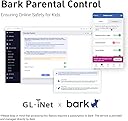
This is the best router ever! It has tons of possible configurations. I bought it primary for blocking youtube on my "smart" TV and my kids phones. And it works. Under Parental control you can ad a profile and under that profile you ad the devices you want to be able to connect to internet. If they are not on a list they will be blocked. Even if they are connected to the network, and this is a must. Then you ad a a rule set under witch you can add all youtube sites to block. I asked an AI for that. There are a lot of sites you need to block. After this you can also ad time windows where these rules applies. Awesome! I also tried to add an M.2 SSD via the USB3 on the side. You set it up under Applications/network storage. My SSD is NTFS formatted but AI told me ext4 is best. Follow the guide and give the disk a UN och PW. Then I added a network drive in my computers file explorer pointing to the one configured in the router. Bam! 256GB on the network for moving files in the network (in Linux Mint, the manual says windows works to). AdGuard Home is a built in feature. It can also block sites and ads! Check out NetworkChuck on YT for more information. Awsome! No more ads. I also connected my old TP-Link P7 mesh network downstream the Flint 2 to extend the range. The rules set in the Flint 2 now also applies to the old P7 mesh network as they work as extenders from now on. AI helped me do this to. Now I have 4 access points for my devices with awesome range! I an go on and on. Best money ever spent on a router! Just buy!
E**M
Excellent routeur. Installation très intuitive.
Trustpilot
1 week ago
3 weeks ago