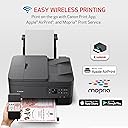
🖨️ Elevate your home office game with Canon’s all-in-one printing powerhouse!
The Canon PIXMA TR7020a is a compact, wireless all-in-one inkjet printer designed for modern home and office use. It delivers high-quality color prints at 4800 x 1200 dpi, supports automatic duplex printing, and features versatile connectivity options including Wi-Fi and USB. With a 1.44" intuitive OLED display, dual paper trays, and compatibility with Canon’s ink subscription service, it combines convenience, efficiency, and professional-grade output in a stylish black design.

| Additional Printer Functions | Copy, Scan |
| Asin | B09TGB62D8 |
| B W Pages Per Minute | 13 |
| Best Sellers Rank | 291,724 in Computers & Accessories (See Top 100 in Computers & Accessories) 528 in All-In-One Printers |
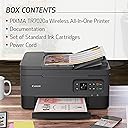
| Box Contents | PIXMA TR7020, Documentation, Set of Standard Ink Cartridges, Power Cord |
| Brand Name | Canon |
| Color Depth | 16, 8 |
| Color Pages Per Minute | 6.8 ppm |
| Colour | Black |
| Compatible Cartridge | Canon standard ink cartridges |
| Compatible Devices | PC, Smartphones |
| Control Method | App |
| Controller Type | Android |
| Customer Reviews | 3.9 3.9 out of 5 stars (3,345) 3.9 out of 5 stars |
| Display Type | OLED |
| Dual Sided Printing | Yes |
| Duplex | Automatic |
| Eu Spare Part Availability Duration | 1 Years |
| Hardware Interface | USB |
| Ink Colour | Colour |
| Item Dimensions D X W X H | 40.4D x 36.6W x 20.8H centimetres |
| Item Type Name | Inkjet Printer |
| Item Weight | 18.1 Pounds |
| Manufacturer | Canon |
| Maximum Copy Resolution Black And White | 600 dpi |
| Maximum Copy Resolution Color | 4800 x 1200 dpi |
| Maximum Copy Speed Black And White | 11.8 ppm |
| Maximum Print Resolution Black And White | 4800 dots_per_inch |
| Maximum Print Resolution Color | 4800 x 1200 dpi |
| Maximum Sheet Capacity | 200 |
| Maximum Supported Paper Size | 8.5 x 14 |
| Model Name | TR7020a BK |
| Model Number | 4460C052 |
| Model Series | PIXMA |
| Network Connectivity Technology | wireless |
| Number Of Drivers | 2 |
| Number Of Trays | 2 |
| Other Special Features Of The Product | Auto-Duplex |
| Output Sheet Capacity | 200 |
| Paper Size | 8.5 x 11, 8.5 x 14 |
| Print Media | Glossy photo paper |
| Printer Output Type | Colour |
| Printer Type | Inkjet |
| Processor Count | 1 |
| Resolution | 4800 x 1200 |
| Scanner Type | Flatbed and Auto Document Feeder |
| Series Number | 52 |
| Specific Uses For Product | home office |
| Total Usb Ports | 1 |
| Unit Count | 1.0 count |
| Upc | 013803348255 |
| Warranty Type | limited warranty |
User
Missing cable and missing ink cartridge
Box arrived without a cable and without an ink catridge.
User
Love it!
I had a previous printer that suddenly stopped taking the paper no matter what I did it just wouldn’t reach down to take the paper in so I had to replace it. I am so glad I did have to replace it because this printer is heads above my previous one even when it was working at its best! Setting it up with my iPhone was a little tricky but I was able to do it with extra steps that they give you if the auto set up doesn’t work. I haven’t set it up with my Mac air yet but I’m sure it will be a breeze. it’s also nice that there is a place in the back of the printer to put photo paper. You don’t have to use the back feeder except for photo paper. The front of the printer has a tray that easily moves out for you to place paper in it and then the catch tray that retrieves what you printed pulls out right above the paper tray. It has a multi page feeder on top for wanting to copy multiple pages, as well as two sided printing and one single page printing if you just lift the top and place the image on the glass. putting the ink in as much easier than my old printer where I had to reach inside the guts. With this printer you just lift the top and you can easily access the printer cartridges. It does come with one color and one black-and-white cartridge but I’m kind of guessing that they’re probably not as full as when you buy a brand new cartridge by itself. But I don’t print very often just the occasional label every now and then so I think I’m going to be fine. I do recommend this printer but not if you have older operating systems only if you have modern ones. I wasn’t able to get it to work with my iMac which is from early 2000. But I have the latest update for the iPhone and I’m using an iPhone 12 Pro Max and I can print from there.PS: the image I am attaching is a full letter size printout of a picture that was about 5 x 6 and printed on regular letter paper, not glossy photo paper. It’s a little on the soft side but when you see it in person, it’s good enough to put in a frame and hang on the wall.PPS: I didn’t rate tech-support because I am thinking they mean over the phone tech-support and not just the how-to for setting it up that you can get online. Since I haven’t used one-on-one tech-support, I decided not to rate that. But as far as what’s given to me online, it was very easy to understand and simple to set up.
User
Excelente producto
Cumplió mis expectativas muy bonita y llegó rápido
User
Whoohoo - unlike HP - this printer WORKS!
This is the 3rd printer in the past 2 weeks I've purchased. The first two were HP. The first HP had a broken scanner. The replacement HP seemed like a nice printer, but the HP Smart app was beyond frustrating. I had used HP printers for years, then recently tried Epson because I liked the ink-tank idea.In comparison to HP & Epson - this Canon meets my needs MUCH BETTER. I will never buy another HP - the invasive HP Smart app with all of it's requirements to be signed into your 'account', and be connected to the internet is bad enough. But the app simply doesn't work, all it does is spin and spin and spin......trying to scan a couple of sheets of paper with HP can take an hour. Epson print heads clog, so if you want to print, you may have to clean the heads twice, and then print the document a couple of times before it's acceptable quality, a waste of paper and time.This Canon printer is so REFRESHING! It quietly and without fuss does exactly what it's supposed to do! Setup was a total breeze, in a few minutes I had the printer drivers and the utility app installed on 2 laptops and a smartphone. The utility app is simple to use, and has the functionality I needed. The print quality looks good. I've not tried the photo printing options yet, but that is a low priority with me. Overall I am thrilled with this new printer!
User
Cuidada
Cumple su función llego en tiempo pero trajo poquita tinta pero por el precio estuvo bien
Trustpilot
2 weeks ago
2 months ago