Desertcart purchases this item on your behalf and handles shipping, customs, and support to USA.
๐๏ธ Elevate your digital canvas with precision and style โ donโt just create, captivate!
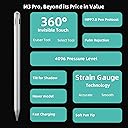
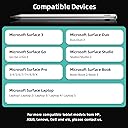
The Metapen Stylus Pen M3 Pro is a high-performance digital pen featuring 4096 levels of pressure sensitivity, advanced MPP 2.0 technology with strain gauge sensors, and a 360ยฐ invisible touch button for intuitive tool switching. Compatible with a wide range of Windows devices including Microsoft Surface series and ASUS VivoBook Flip 14, it offers tilt support up to ยฑ55ยฐ and palm rejection for a natural, paper-like writing and drawing experience. Designed for creators and students seeking precision, comfort, and seamless workflow without Bluetooth pairing.


| ASIN | B0CJC5LS5C |
| Best Sellers Rank | #11 in Digital Pens |
| Brand | metapen |
| Color | Silver |
| Compatible Devices | Laptops, Tablets |
| Compatible Tablet Computer Models | HP 7 Plus, HP Pro 8, Microsoft Surface 3, Microsoft Surface Go, Microsoft Surface Go 3, Microsoft Surface Pro 3, Microsoft Surface Pro 7, Sony Tablet S |
| Customer Reviews | 4.1 out of 5 stars 252 Reviews |
| Enclosure Material | Plastic, Rubber |
| Item Weight | 14 g |
| Manufacturer | metapen |
| Material | Plastic, Rubber |
| Minimum Required Operating System Version | Windows 10 |
| Model Number | MPP662 |
| Number of Batteries | 1 CR5 batteries required. (included) |
| Number of Packs | 1 |
| Pressure Sensitivity | 4096 levels |
| Unit Count | 1 Count |
| Warranty Description | 12-month warranty |
T**N
Palm-rejection, Smooth, Touch button also insane!
I have using this pen on One Netbook 5 laptop which support MPP Pen Protocol. It works perfectly, smoother than Surface pen. I always use with Drawboard PDF app for Windows 11. Nothing to worry about.
W**N
Solid alternative to Kobo pen
Works well. I like the slim form and metallic body. Gives it a little weight. Doesnโt feel cheap. I bought it for my KOBO color. Allows me to draw and take notes. Itโs not like pen and paper, it takes a little getting used to. My only real gripe is the tap function. It works, but I canโt get it to work consistently. Since you canโt use the โeraserโ end to erase stuff it has a tap system. 2 taps for highlighter (I think) and 3 taps for eraser. Maybe I donโt tap it fast or slow enough. Maybe my taps arenโt properly measured. The point is, sometimes I find I have to triple tap several times before I get the eraser tool.
D**S
Love it !!
Awesome pen , has quality feel to it and is butter smooth to write with . I love it , not sure why thereโs negative reviews on it . I needed a tip replacement because I damaged the tip and customer service helped me right away . If you want a great writing and drawing experience it this one !
T**L
Worth it
This pen works amazing for my Surface pro 3 and surface pro 7. Better than my surface pen slim
J**7
M3 is a joke
M2 Metapen is a a literal waste of money for my needs. No magnets to stick to surface pro, 360 touch is very limited and confusing, battery life is trash. GET THE M2 if your stuck on a metapen. Have owned the M1, did the job but wanted more. Got the M3, returned it the next day & purchased the M2. So far so good for MY needs. Save you money, get the M2 or even the M1 for surface pro.
S**E
Nice pen for drawing, but that 360 button with an eraser...
I have to say I love this pen for drawing, but the eraser functionality is for all practical purposes, useless. Sometimes it works, sometimes it doesn't. Most of the time it just gets in the way. As another person mentioned it would be nice to have a way to turn it off. The pen fits my hand perfectly and feels more natural than the Surface Slim Pen 2. I also get more consistent strokes. It's better in so many ways... Without the magnetic capability I do appreciate the stick on/slip in case. That was a nice touch, not the perfect scenario but is functional and I can live with it. The quality of the drawing experience overrides that minor inconvenience. Keep the pen size, but please give us an eraser that is functional or just get rid of it.
J**L
Works on Surface Laptop Studio 2
So far so good on the new Surface Laptop Studio 2, works without pairing, just charge and start using on your screen. No magnet like the Microsoft pen, but that is not a big deal to me. I have had 3 Microsoft pens break in a month on the new Surface Laptop Studio 2. I think the magnet is too strong and something comes loose inside.
M**L
Meta pen
Excellent!
Y**N
Super
Funktioniert super auf meinem surface. Laden geht auch schnell und einfach
G**N
Made out of plastic (not aluminium) and touch controls are awful.
The storepage (2025-01-10) claims the pen is made out of aluminium. It is made out of plastic painted to look like sand-blasted aluminium. The plastic is also quite thin which makes the pen quite bendable compared to other pens out there. From not even one day of usage I can already hear sounds coming from inside the pen each press. The touch controls are not very pleasant to use. For this price point this was a dissapointment.
S**O
ใคใฉในใๆ้ฉ่งฃ
ๅฎ็ฉ่ฒทใใฎ้ญๅคฑใใใ ใใถใใใใใ็ตๆ่กใใคใใพใใใ ็ญๅ ใฏ้ๅธธใซๅฎๅฎใใฆใใใๆใๅณใฏใปใฉใใใใใฃใจใใฆใใพใใ ไฝฟใใชใใใณใไฝๆฌใ่ฒทใใใๆๅใซใใไธๆฌใๆญฃ่งฃใงใใใ ใกใชใฟใซใM3Proใซ้ใใพใใM1ใฏใใณๅ ใใฌใใฌใงๅ จใไฝฟใใพใใใงใใใ
M**N
TRES FACILE D'UTILISATION
PARFAIT RIEN A REDIRE BIEN MOINS CHER QU'UN S PEN 2 DE CHEZ MICROSOFT
J**R
Very good
I have both the M2 and M3 so I know what the differences are. The M3 pro is taller, much lighter in weight that gives it a more cheap feeling compared to M2. The shape resembles more an Apple pen. The M3 pro has a led on top that blincks wen charging and is turned on with white light while using. M2 has an eraser on top, something the M3 does not have. M2 als has an extra button near the bottom, something M3 pro does not have. The tip of the M3 is more rough, gives more resistance when using, I liked it as it represent more a real pencil. Overall I would recommend it.
Trustpilot
1 day ago
1 week ago