

Desertcart purchases this item on your behalf and handles shipping, customs, and support to USA.
🌐 Elevate your outdoor Wi-Fi game—connect everywhere, rain or shine!
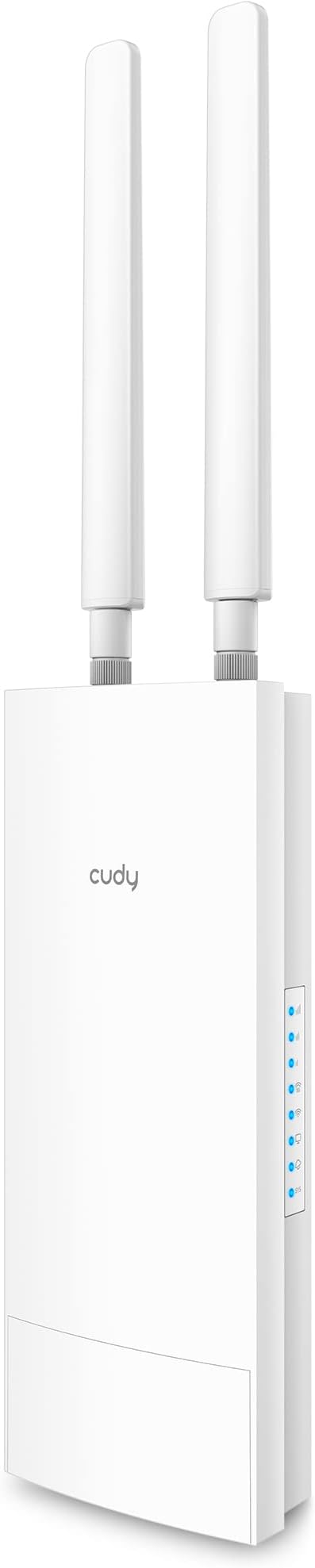
The Cudy AP1300 Outdoor AC1200 Gigabit Wireless Access Point delivers robust dual-band Wi-Fi speeds up to 867 Mbps (5 GHz) and 300 Mbps (2.4 GHz) with MU-MIMO technology, supporting up to 128 devices simultaneously. Designed for harsh outdoor conditions, it features IP65 waterproofing, 4KV lightning protection, and operates in extreme temperatures. Its versatile 5-in-1 modes include Access Point, Extender, Router, WISP, and Mesh, enabling seamless network expansion with adaptive routing and roaming. Equipped with a gigabit RJ45 port and dual PoE power options, installation is flexible and straightforward, making it ideal for yards, farms, RVs, and commercial outdoor spaces.



| ASIN | B0BXN97BT6 |
| Antenna Location | Indoor/Outdoor |
| Antenna Type | Retractable |
| Best Sellers Rank | #104 in Computer Networking Wireless Access Points |
| Brand | Cudy |
| Built-In Media | AP1300 Outdoor, Detachable Antennas, Ethernet Cable, Mounting Kit, Installation Guide, PoE Adapter, Power Cord |
| Color | White |
| Compatible Devices | Personal Computer, Security Camera, Smart Television, Smartphone, Tablet |
| Connectivity Protocol | Wi-Fi |
| Connectivity Technology | Wi-Fi |
| Control Method | App |
| Controller Type | Switch |
| Coverage | Enhanced Wi-Fi Coverage |
| Customer Reviews | 4.5 out of 5 stars 218 Reviews |
| Data Transfer Rate | 1200 Megabits Per Second |
| Frequency | 5 GHz |
| Frequency Band Class | Dual-Band |
| Global Trade Identification Number | 06971690792893 |
| Is Modem Compatible | No |
| Item Dimensions L x W x H | 3.94"L x 2.11"W x 9.45"H |
| Item Weight | 480 Grams |
| LAN Port Bandwidth | 10/100/1000Mbps |
| Manufacturer | Shenzhen Cudy Technology Co., Ltd. |
| Maximum Upstream Data Transfer Rate | 867 Megabits Per Second |
| Mfr Part Number | AP1300 Outdoor |
| Model Name | AP1300 Outdoor |
| Model Number | AP1300 Outdoor |
| Number of Antennas | 2 |
| Number of Ports | 1 |
| Operating System | OpenWRT |
| Other Special Features of the Product | Access Point Mode, Weatherproof |
| RAM Memory Installed | 128 MB |
| Security Protocol | WPA2-PSK |
| Special Feature | Access Point Mode, Weatherproof |
| Voltage | 50 Volts |
| Wireless Communication Standard | 802.11ac |
| Wireless Compability | 802.11ac |
R**S
Great Range & Seamless Mesh Function
This Cudy outdoor access point works great. It is installed POE to my TP Link router. This Cudy outdoor access point has better range than either of my currently used TP-Link EAP110 outdoor access points. The Cudy mesh function works great. Remote living requires that my cell phone uses wifi to make and receive calls. The mesh function is seamless as I walk out of range of one Cudy mesh unit and into range of another Cudy mesh unit and my cell phone never drops my cell calls, email function or text function. I will be replacing my perfectly good TP link devices very soon with the Cudy brand to benefit from the mesh function and increased range! The next time I buy a router it will be a Cudy with the mesh function just because these Cudy outdoor access points work so very well.
M**T
Works great as a repeater
Temp Installed this on my sailboat as a signal repeater while in the marina and it works well. My ball is approximately 100y yards from the broadcast location and the wireless access antennae is only temp installed about 3 ft above my deck on the mast. Has never dropped the signal in the last two months since it’s been installed. Marina WiFi speeds are slow at avg 30 mgb/s without the repeater on the ocasión that I could pick it up. Using this as a repeater I’m seeing almost the same download speeds of 25/26 mgb/s without just bit more latency. I don’t use this connection to stream, so I can’t attest to anything about that. I use this to keep my Victron Energy system online and viewable from anywhere in the world. I don’t live aboard so it’s nice to be able to check on things anytime I want. Peace of mind.
C**S
Solid performance and easy to use, but lacks some advanced features.
This is a straightforward outdoor WiFi access point which, as is common for outdoor APs, comes with a pre-installed vertical pole mount. It supports 802.11ac/WiFi 5 with 2x2 MIMO on both 2.4GHz and 5GHz. There is no support for DFS channels, 160MHz channel width, or WPA3. Power is exclusively via PoE, which is expected for an outdoor AP, and works fine through my PoE+ switch. The AP is easy to set up once it boots - there's a wizard which guides you through the various configuration option, including AP/Router/WISP/Extender mode and other basic settings, and the interface for changing configuration after that is easy to use. Unfortunately it's also rather basic in terms of feature set - there are a few diagnostic tools, but there's no way as far as I can tell to set up a guest network on a separate VLAN. This is fine if you trust all the devices (or none of the devices) on your network and don't want to segment them off from each other, but if not it's a nice thing to have. Also, while the software is clearly based on OpenWRT there's no way to access the normal web interface with the full feature set. These limitations are both consistent with other Cudy network devices I've reviewed, but are still disappointing. I checked to see if newer firmware might make a difference, but while the updated version I found on the Cudy website advertises VLAN support, I can't find it anywhere in the UI. Performance at least is solid - testing with Speedtest my Pixel and Thinkpad which both have WiFi 6 support, I get a consistent 550-700Mbps worth the 1G uplink. I think that overall this AP will be perfectly fine if you have a simple network topology and don't need advanced features, but my existing APs already use a separate guest network at home so I'm not sure what I'll do with it long term.
V**H
Plug & Play. Works great!
I plugged this into our PoE+ switch on a 75' wire and did the brief installation. Now we have good reception at the far end of our house and backyard. The instructions to explain the options are a bit thin, I expected a one-click Help "?" to explain each option and why I would pick it, but in the end just picked "Extender" and gave it a new name. I'll explore "Mesh" later because it's a hassle having to manually switch my phone's network name, but I'm happy with the signal and the TV I was trying to connect now does so instantly and never hangs.
S**.
Better than expected
We installed three of them in our RV Park work better than we ever expected.
D**D
Excellent for price. Easy to setup. No cloud required.
I have had it installed for about 2 weeks now. The WiFi environment at my home is challenging, with about 50+ other devices visible on a site survey. So far, it has worked pretty well. Approximately 480Mbps from inside the house. It doesn't do as well when outside (metal mesh in the walls I think). It drops from Wifi5 to a lower speed, but is perfectly functional every where on the property. I work for a company that does Wireless internet, and it compares favorably to the much more expensive gear we use. Longevity is the only thing I worry about (I have had an EnGenius ENH500 for many years, and it still works but can't deal with the noise as well), given the price. Installation and setup was very easy, and the GUI is very good. It also does not require the use of the cloud for configuration. I would recommend it. especially for the price, and the ease of setup.
M**1
The best one I've had so far
I have several IP cameras located in barns and shelters on the farm. The farthest is about 200 yards from the AP with several large trees in line of sight. With all previous APs two of the cameras would temporarily lose comm. With the Cudy AP this does not happen. I have had to cycle power to it twice. Not sure what caused this but that's the only issue I've had with it.
T**E
Must access dangerous URLs to setup and doesn't work
In order just to set this thing up you need to go to the cudyap.net URL which triggered my Bitdefender software and Windows software as dangerous. I had to skip attempts by my security software to go to cudyap.net and when I did, Bitdefender had to block attempts to access my system. Once there and after the attempts I chose to go ahead and go through their setup and it appeared to work ok. Then when I tried to access the internet via my Netgear router via their POE inserter and Ethernet, it claimed I needed to be authorized and just would not work. Buyer beware of their setup risk and if it works at all.
B**N
Quality item
Easy to set up, external cable cover could be secured with a screw
M**L
Buen rendimiento por el precio
Anteriormente compré otro punto de acceso de este mismo fabricante, y su falta de opciones me hizo descartarlo, porque no se adaptaba a un uso más profesional, pero algo a mejorado en ese tema. Por precio, está bastante bien, trae todo lo necesario para su puesta en marcha, y la cobertura, en mi caso, alcanzó los 40m(en 2.4G). La configuración es sencilla, te permite crear hasta 4 redes wifi por canal, gestionarlas con su vlan, y configurar un portal cautivo. Sigue teniendo otros detalles aún sin pulir, pero cumple con lo esperado.
L**T
Très bon produit
Facile à mettre en place . Efficace
C**N
Pas étanche
Ne fonctionne plus après la première grosse averse !
A**E
Funktioniert wie beschrieben
Er macht was er soll. Eingesetzt als Access-Point. Das einzige Problem war die Vergabe einer statischen IP-Adresse. Die App habe ich nicht installiert und die Konfiguration direkt also mit der von meinem Router angezeigten ip Adresse vorgenommen. Ein bisschen Ahnung sollte man auf jedenfalls schon haben.
Trustpilot
2 weeks ago
2 weeks ago