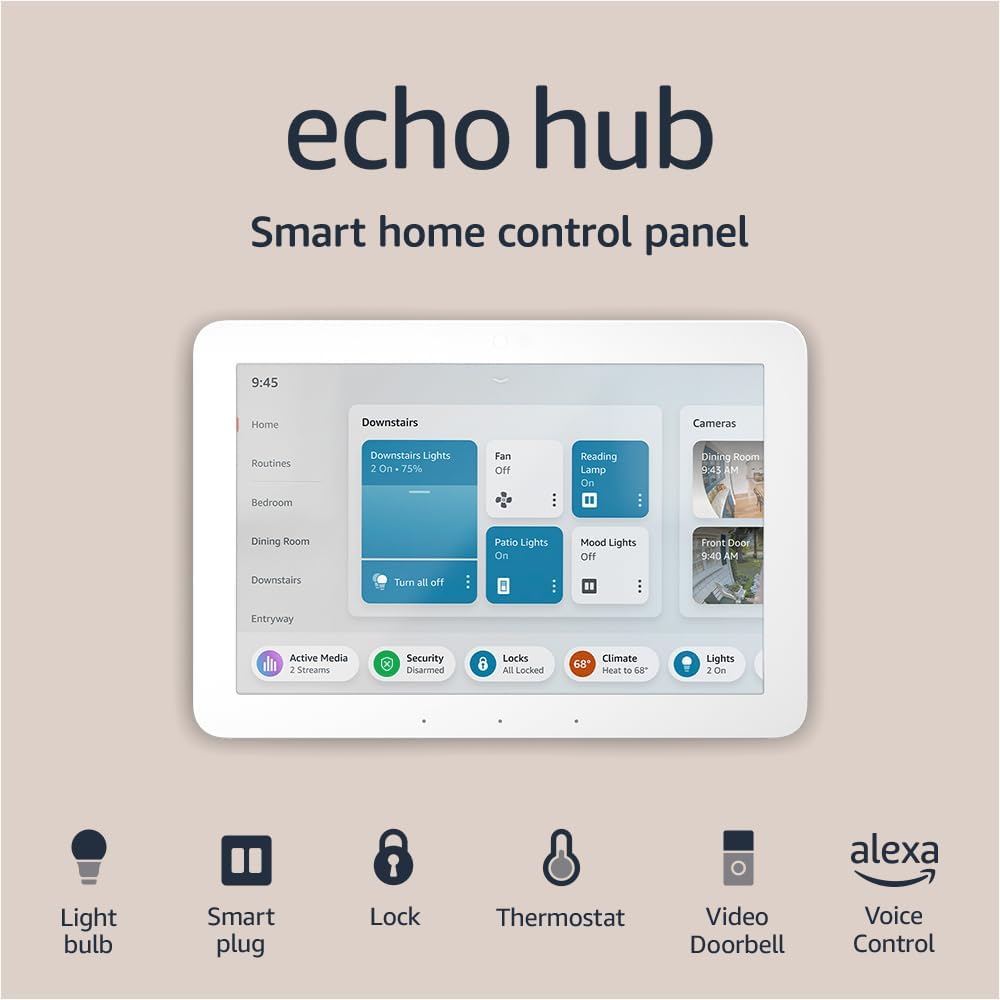




Amazon Echo Hub, 8” smart home control panel, Designed for Alexa+, Compatible with thousands of devices
Product ID: 570515961
📱8” HD touchscreen
🔒Arm/disarm security systems
🔗Supports WiFi, Bluetooth, Zigbee, Thread, Matter
Buy anything from 5,000+ international stores. One checkout price. No surprise fees. Join 2M+ shoppers on Desertcart.
Desertcart purchases this item on your behalf and handles shipping, customs, and support to USA.
🏠 Elevate your home to smart status—Alexa’s command center, redefined.
The Amazon Echo Hub is an 8-inch Alexa-enabled smart home control panel designed to unify and simplify management of thousands of compatible devices via WiFi, Bluetooth, Zigbee, Thread, and Matter protocols. It features a high-resolution touchscreen, supports security system control, and offers flexible wall-mount or tabletop placement. Privacy is prioritized with multiple safeguards, and sustainability is built in with recycled materials. Ideal for professionals seeking a sleek, centralized smart home interface that blends modern design with robust connectivity.
| Power requirements | Compatible with alternative USB-C PD power accessories. Power supply must comply with USB PD protocol and support both 5V/2.4A and 9V/3A ratings. |
| Power over Ethernet | Supports PoE with compatible USB-C converter. Requires IEEE 802.3at/PoE+/Type2 or IEEE 802.3bt /PoE++/Type 3 support. |
| Included in the box | Echo Hub, power adapter (12.5W) and 6 ft. (1.8m) cord (white), wall mount, anchors, screws, mounting template, and quick start guide. Setup requires internet via wifi or ethernet. Device can be wall mounted (electric drill required) or placed on a stand (sold separately). Device not intended for handheld or portable use. |
| Display | 8” touch screen with 1280 x 800 resolution |
| Audio | Pair of top ported full range speakers, with stereo playback |
| Sensors | Passive infrared (PIR) sensor for proximity detection, ambient light sensor (ALS) |
| Wifi connectivity | Dual-band wifi supports 802.11a/b/g/n/ac wifi networks. Does not support connecting to ad-hoc or peer-to-peer wifi networks. |
| Bluetooth connectivity | Advanced Audio Distribution Profile (A2DP) support for audio streaming from your mobile device to Echo Hub or from Echo Hub to your Bluetooth speaker. Audio/Video Remote Control Profile (AVRCP) for voice control of connected Bluetooth speakers. Hands-Free Profile (HFP) not supported. Bluetooth speakers requiring PIN codes not supported. |
| Smart Home Device Compatibility | Compatible with WiFi and Bluetooth Low Energy Mesh devices, as well as Zigbee, Thread, and Matter devices as a controller only. Visit the help page to troubleshoot compatible devices. |
| Amazon Sidewalk | Sidewalk uses Echo and Ring devices to securely keep other devices connected and help find lost items by reporting their approximate location to the owner. Sidewalk can enable supported devices to remain connected even when wifi is lost or the supported devices are outside the range of their home wifi. Sidewalk uses a small portion of your internet bandwidth and the approximate location of your devices to provide these benefits to you and your neighbors. Sidewalk is turned on for your device unless you have previously turned it off. You can turn off Sidewalk at any time. Learn more about Amazon Sidewalk. |
| System requirements | Echo Hub comes ready to connect to your internet via wifi or ethernet. The Alexa app is compatible with Fire OS, Android, and iOS devices and also accessible via your web browser. Supported operating systems. |
| Set up technology | Amazon WiFi simple setup enables customers to connect smart devices to their wifi network in a few easy steps. WiFi simple setup is another way Alexa is always getting smarter. Learn more about Frustration-Free Setup. |
| Processor | MediaTek MT 8169 A |
| Size | 7.9"W x 5.4"H x 0.6"D (202 mm x 137mm x 15mm) |
| Weight | 12.9 ounces (365 grams). Actual size and weight may vary by manufacturing process. |
| Warranty and service | 1-year limited warranty and service included. Optional 1-year, 2-year, and 3-year extended warranty available for U.S. customers sold separately. Use of Echo Hub is subject to these terms found here. |
| Privacy features | Wake word technology, streaming indicators, microphone off button, the ability to view and delete your voice recordings, support for Ring’s End-to-End Encryption feature that provides End-to-End Encrypted Ring video (coming soon) on your Echo Hub, and more. Visit the Alexa Privacy Hub to explore how Alexa and Echo devices are designed to protect your privacy. |
| Accessibility features | To enable features that personalize Alexa to your abilities, go to Settings → Accessibility. • Tap to Alexa enables access to Alexa via touch, instead of speech, through on-screen tiles or a keyboard, including the ability to save your favorite actions. • Adaptive Listening provides customers more time to finish speaking before Alexa responds. • Preferred Speaking Rate enables customers to control how fast or slow Alexa speaks. • Alexa Captioning, Call Captioning, and Closed Captioning provide text captions in any mode for supported content. • VoiceView screen reader enables access for customers who are blind or visually impaired. • Screen Magnifier enables customers to zoom in/out, and pan around the screen. • Notify When Nearby will play notification sounds when you’re detected near your Echo device. • Kindle Read Aloud will have Alexa read your Kindle books aloud. • Real Time Text enables customers to type live text in a video call. • Alexa Accessibility features also include settings for Color Inversion, Color Correction, Request Sound and more. |
| Language | Alexa speaks English and Spanish. |
| Alexa Skills and features | Alexa makes your life easier, more meaningful, and more fun by letting you voice control your world. Alexa can help you get more out of the things you already love and discover new possibilities you've never imagined. Discover and learn what Alexa can do. |
| Software Security Updates | Learn more about these software security updates. If you already own an Amazon Echo, visit Manage Your Content and Devices for information specific to your device. |
| Service Availability | Certain services and skills are subject to change or withdrawal at any time, may not be available in all areas and languages, and may require compatible devices. Certain skills and services may require subscription or other fees. |
I**E
EchoHub & Alexa+ Features Settings
Just got it today, still doing some settings and trying to set Alexa to respond to commands but nothing so far. So far device works okay except the Alexa issues, will update when finished troubleshooting device. Although, came in carefully packed and good condition, not screen damage or scratches. I am posting this at 2100 hr. Update after troubleshooting (22:29 hr), well I finally got the Alexa "No response" issue. I placed it closer to the wifi-extender and it started to talk right away... Just network issue. Working great now, happy with my purchase...follow the instructions concerning proximity to network connection, and it should work as expected.
A**M
These other reviews are pretty awful, read this
Originally I was going to maybe rate this 4 stars, but honestly, this is EXACTLY what I've been looking for and nothing even comes remotely close to it, so I'll go ahead and list everything it does great, followed by what needs improvements, and finally what you should NOT purchase this for... and at the end I'll go over the "general" stuff like screen and sound. IF YOU DON'T WANT TO PULL OUT YOUR PHONE & GO TO ALEXA APP This is honestly the only reason you should be buying this. Because you can already do everything and more directly on the Alexa app on your phone. So you need to (a) see yourself using the Alexa app a lot, and (b) wish you had it on your wall. IF YOU HAVE SMART DEVICES Without these, this is just an overpriced and very bad tablet. Maybe you want to control a few devices around your house like your lights, look at the front door camera. If your requirements aren't too specific with these and you just are willing to take what you can get, then this is it. IF YOU HAVE MULTIPLE OTHER ALEXA SPEAKERS This really does help bring them together, because you now have a screen, although you might save some money if you get one of the other Echo Show devices. It's cool to have it up on the wall, be able to again, not use your phone, not pull out some tablet, to change songs. IF YOU WANT A GENERAL OVERVIEW OF SECURITY & THERMOSTAT This will display your Ring alarm status, let you arm and disarm it, and see what your thermostat is set to from another location across the house (I wouldn't recommend putting them side by side, that's a waste.) IF YOU WANT YOUR HOME TO FEEL "MODERN" SMART This reminds me of things I've seen at high-end hotels. It's just cool to have a touchscreen tablet on the wall, and be able to adjust some lights, play music, adjust the temperature. ___________________ DO >>NOT<< BUY FOR: 1) Managing your device settings. This does a poor job. Your phone can do better. This should only be there to access frequently used devices you've already set up but don't want to navigate through your phone to access. 2) Speakers. This isn't it. The sound isn't awful but it's not great, and you should only use this as a supplement to other speakers you already have in your home. 3) Watching videos. Don't do it. I know you might think it'll be nice to put this in the kitchen and watch something while you cook, just get some other display or tablet. 4) Controlling everything. This kind of ties into #1 above but this should only be set it and forget it, quickly click what you can fit on the screen, and overview of your devices per room. Don't spend a lot of time navigating around. Just get any other tablet at that point. 5) Highly specific apps. The apps on it are lackluster. Have some really cool specific idea? You won't be able to do it or it'll end up being bad. You likely won't be able to do exactly what you want, only as I mentioned very very very basic things. __________________ THE REALLY BAD, DEFINITELY DON'T BUY: 1) Device groups. Currently not supported. If you "favorite" a group of smart devices, it doesn't display it and you can pretty much only do one device at a time, with the "group" being the entire group like "Living Room." This was almost a deal-breaker for me, hopefully they add it later, but I've since found some workarounds for me specific use case. But I wanted to group four mart lights in a room, per room, and have it all display under favorites and could not do that. 2) Smooth tablet experience. Nope, this is going to feel like a really cheap tablet because it is a really cheap tablet. You're going to have to be patient and wait one second or maybe even two for some things, and you'll see it stutter once in a while. This is still miles better than anything else like it that's meant to go on your wall. But probably one of the worst if you're comparing it to an iPad or high-end Samsung tablet. __________________ The Screen: Feels like a really cheap tablet, but they make it work for what it is. The size could have been bigger but honestly then it'd look weird and not like a wall panel. I like it, I just wish there was some more customizability (there isn't really.) The Audio: Again, feels like a really cheap tablet or laptop. The Design: Works out for being wall-mounted. I like the big bezel. Portability: No. Almost none. Do not expect to unplug this and move it around. The Software: Needs some work but it's not as terrible as people make it out to be. I've noticed a few minor bugs like arming my Ring if a device needs a bypass gets it stuck with no error, just loading. Smart thermostat (Nest) if you try to set it to let's say 72 to 73, it will error out vaguely when you should remember that you need a bigger gap between the low and high number. Cameras take a bit to load but they also do that on the apps in any case. It'll only get better from here. The Cost: I wish it would have been closer to $100, but hey, I bought it at full price because I saw the value. If you do not see the value, do not buy it, you'll be disappointed. This is the type of product that's simultaneously worth $50 and $500.
J**Y
This all but sucks - slow and does little
UPDATE: it's worse than I thought. I decided to return it, but Amazon is making it very difficult to return. There is a Kohls a short walk form my house, but Amazon wants me to drive 45 minutes to a drop-off location. They know this thing sucks, maybe that's why they don't want to make it easy to return. This is a huge disappointment. Alexa is awesome because it's the hub that ties all of your smart home devices together. But there was never a good interface. The app is messy, and sometimes voice isn't the best way to control devices. I was hoping that this device called a hub would be the perfect solution. It's not. You need to own one to realize how bad it really is. Here are some examples... -The screen is REALLY sluggish. It's like a $30 no-name android tablet. -The icons are big and few can fit on the screen. -some screens will only display one icon at a time... I need to use the sluggish screen to scroll one at a time to see things when there is room for everything in that category. -you can't easily - maybe not at all - customize the home screen. -if you tap the weather widget, after a delay, you get a full screen showing only the outside temperature. That is much less than the widget shows. I expected to see more detail in full screen, not less. -It's great that it can show the status and limited control of my cielo thermostats, but... The control is temp up or down, and the power toggles on or off. Those three buttons don't fit on the full screen - you need to scroll to see the three buttons. Seriously... the full screen will not show you three buttons at once. You need to scroll. - you can't view and set alarms for other echo devices from it. -you can see your ring cameras. And that works pretty well. -it sees all of my Insteon light switches (that I have given an Alexa name), but I can't organize then in a way that's usable. There's all on and all off buttons at the top of the lighting screen that is useless. I use an all lights off scene every night - but it's not literally ALL of the lights. There are a few that need to stay on until the timer turns them off. -Maybe it's possible, but I can't figure out how to make it play music on my Sonos. I can't even figure out how to make it play music on another Echo. -It can use POE, but Amazon won't tell you how. Plus, how do you reboot it it you have it built into the wall? How is this any better than an echo show? If I were the project manager for this device, I would not let my boss see this version of it. It's really bad. I gave it two stars because I want it to be great, and I suspect there are ways to make it do more things I can't figure out. In my hands, it's a one star product. I think I will return it. Maybe next year there will be a better one. The screen is so sluggish, that it must be an under powered CPU, not just bad programming. All of the YouTubers are pretty optimistic about this product, but I suspect it's only because they want to keep a good rapport with Amazon so they will always get new products early.
C**R
Nice but Not Perfect - InWall Install is Difficult at Best
I generally really like the Echo Hub. As others have said, it's not an Echo Show, but a smart home center that can pull your cameras, Ring Alarms, Ring keypads, lights, switches, and other smart devices into a nice wall-mounted panel that offers convenience apart from your phone. It's meant to be set up, customized, and left alone. It's not meant to watch TV or interact with like a Show. I have one for each floor of a three-story house and another in our primary bedroom. Three are powered by the 12-volt wire that was already in the wall from our old security system, and one is powered by splitting off the PoE of an already existing in-wall ethernet port in the adjacent room. The Black Friday sale made these much more palatable at just over $100 each and I made my own fast-charging power adapters for just under $6 each. This is my biggest complaint with the Echo Hub. They aren't really PoE compliant or ready since they don't have an ethernet port and they don't just require a Power Delivery (PD) adapter like Amazon states. They require a PD3.0 or PD3.1 adapter that optionally supports Programmable Power Supply (PPS). After a couple of weeks of trial and error I made four power adapters from AITRIP PD65W Fast Charging Type-C USB modules that provided the proper PPS power. I added a REVODATA Gigabit PoE Splitter ($13 additional) to power one of them with 12-volts and 2-amps (24 watt) while maintaining the ethernet data port in the adjacent room. The Hubs look professionally installed since all the power connections are completely hidden in the wall. I also bought the Hubs for Thread and Matter support of window shades. Unfortunately, they didn't play nicely with other Echo's nearby, so I disconnected them. Thread connections are much more stable now. However, the shade motors will sometimes flash that they have disconnected. They usually reconnect but will occasionally become unresponsive and show as such in the Alexa app. Thread simply isn't ready for primetime. At least I have new Hub border routers and a several Thread shades to test software update stability. I wish I could talk to a second-tier engineer instead of getting canned responses from Amazon. Oh well. I didn't give 5-stars to the Echo Hub. There are more issues, mostly minor, than just the power and Thread issues. 1. The interface is SLOW. It needs more horsepower to be more responsive! 2. I think the Hubs looks pretty nice on the wall but could be more modern looking by being thinner and having smaller bezels. 3. One of the four Hubs shipped with a faulty power adapter that gave a startup error as many others have mentioned. 4. I find the brightness of the screen to be very difficult to precisely control. The Hub tries too hard to be "smart". Why not allow the user to set the exact lowest and highest brightness settings? 5. The proximity sensor works well, but I turned it off because the only option to allow the screen to toggle back to the main clock interface takes 10 minutes and can't be adjusted. WTH? The Hubs are wall-mounted in the highest traffic areas to make them accessible, especially for disarming the Ring alarms. The clock and background images almost never show when proximity is turned on since someone is almost always passing by.
B**A
Amazing & Compact!
This was simple and exciting to setup. It took a couple minutes to be fully set up and functioning under my own amazon account. I really like that my info was pre installed it's like the device knew who I was. Really nice size for my at home work desk I work remote and it has been a really nice additionto my day! The alexa+ feature makes communicating with alexa effortless and personal. Not having to say alexa everytime you need to say something is awesome. This hub offers a lot of apps and skills that are useful. One that I use daily is the blink camera skill. I love being able topull up all my security cameras on one screen with my voice. Being hands free has made my life so much easier. The screen quality is top notch crisp and clear. The sound quality is fantastic for the size but the best part is you can play the music out of all alexa devices. Never have to miss the music I have it playing in all rooms. The hub can be mounted on the wall but i have been using a stand. The hub is sturdy and durable for the size. Can be moved if needed. The power cord is super long which makes it easy to install. The touch screen works fast and is easy to clean. This hub has been a game changer in my day to day. Fantastic value for the money. Has buttons and controls on the hub. can also be muted so alexa does not wake up.
M**Z
A hustle for power compatibility... But totally worth it! Perfect solution for our house
I moved to a house last year and installed all kind of smart devices: switches, locks, motion sensors, thermostats, and cameras (indoor and outdoor) which I wanted to manage not just from our phones, but from a central console, and the echo hub seemed like the perfect fit when it was announced. The previous owner had an ADT console which was not compatible with any of the smart devices I installed, so I took it out of the wall and waited 6 months for the echo hub to be released. When I could finally buy it I was really excited, but then the hustle began... The old console was working with in-wall low-voltage generic cables. Voltage was 9V, which was what the echo hub needed according to the manual. However, when I connected it showed an error due to "not enough power". I was reluctant to do out-of-wall cable management at first, so I was really close to do a big hole in the wall to connect an outlet from a close-by light switch, but the echo hub is so small that the edges of the recessed electrical box would show. And yes, I wrote recessed "electrical box" because all the recessed outlets I found were too small to fit the echo hub outlet connector (which is massive)... At the end I settled for out-of-wall cable management and it is fine, we like it and cable length was just perfect to reach the closest outlet as shown in the picture. Once installed and connected, everything has worked as intended. All my kasa, eufy, nest and amazon devices have synced with no problem and the multi-camera display for the outdoor ones is really amazing and useful. We created a speaker group including the hub and music sounds great with different echos synced perfectly reproducing surround sound. Sound quality of the device is good for the size. Proximity sensor works great. The possibility to reproduce amazon photos as screensaver is very nice. We have not tried playing video, but it seems to be possible via different apps. In summary, power connectivity could be easily improved including a rechargeable battery as any tablet, so generic low-voltage cables (5V or 9V) work and you are not bounded to use their connector. However, the reality is that the hub was exactly what we needed and wanted as smart home central console, consolidating everything together in a great way. I have not found anything even close to this wall-mounted solution in the market so compatible with other brands (and have researched extensively). I hope it keeps working like it has been doing so far.
E**M
Tech Opinion
I’ve waited for the hub to release since day one and I thought it had some good promise for an all in one solution for someone less tech savvy in the house. It can achieve that at the basic level, but it also has flaws right up front. What I use in my home for reference Ring Alarm Six Ring Cameras Fire Cubes on Each Main Tv to easily turn on and off with voice Smart switches Govee Lights throughout the house. 18 to be exact Nest Thermostat Random Smart Devices Pros - Nice screen Ring Cameras look good on the screen Basic Thermostat adjustment Light Control Cons - Based on where you locate this device, anyone has access to everything and that means all your cameras and the ability to access all smart devices. I believe you can add a lock code, but that adds a layer of inconvience imo. This could be a pro or con based on your usage. Ring Cameras do look nice, but sometimes the buttons don’t do anything when clicked or the camera times out. Thats an Amazon owned product and it concerns me as if any product should work well, it’s gonna be the ones Amazon owns. The only function that works on the cameras is viewing, so everything else still goes through your phone. The Nest Thermostat integration is disappointing imo. Most smart thermostats have additional sensors you can add that allow the capability to adjust the temperature to that sensor. In the hub you can’t see any of those sensors, so it’s only adjusting to the Nest hub. If you only have a hub and no sensors, which in my mind is not truly smart, then you might be fine with this. Lights can be controlled, but some buttons went unresponsive or indicated off and when clicked further showed on. I could adjust the govee to switch colors and etc. No support to turn any cube on and off. If I can tell Alexa to turn tv on and it turns my tv and soundbar etc on, then why not add the ability to click a button on home entry to turn a certain tv on. Missed opportunity for amazons huge product line. Another big con is the fact that it’s all aligned from your Alexa app. The issue with that is my Alexa adds stuff in a non logical approach and trying to edit it or decipher which of my 7 TVs is labeled TV becomes very tedious. I label everything in eero as it becomes available, but Alexa just doesn’t do a great job at adding or even removing old or renamed devices. I have several lights that are still in the system that I haven’t had in years. As a tech by trade, I see this device to be similar as the eeeo routers. It’s good hardware and works well, but it’s hindered by the fact they are dumbing it down so the most basic user can operate it and not allowing for further customization. They should allow way more functionality, but unfortunately that’s probably hidden behind the scenes. This product could work well if you have your grandparents living with you and they need a basic interface to control a smart home, but as a tech enthusiast it falls short of the mark for me and I’ll be sending it back.
M**L
Echo Hub + Ring Doorbell+ Amazon Basic Wall Switch = Satisfaction !! *** 6 mo. Update ***
This gizmo is the real deal and the cat’s pajamas! I purchased the Echo Hub ($130.00) for wall mounting in my kitchen, the basic hardwired Ring Doorbell ($49.00), a 24v wall transformer for the Ring ($14.00), and a Amazon Basic Smart Switch ($14.00) for my porch lights. Everything recognized each other seamlessly. I set up a “Routine” whereby whenever someone pushes the doorbell,it will automatically “anounce” the activity,(no additional “Chime” required), and bring the doorbell image up on the wall mounted Echo Hub for viewing and conversing and return to the Home Screen after 2 minutes of inactivity. The routine also activates the Amazon Basic Wall Switch to turn on the porch lights between the hours of 8pm and 6 am when the doorbell is pressed. This satisfies my needs for what I was seeking for in a video doorbell setup. The Hub also seamlessly connected to my 8 Lorex security camera system so i can also easily access the exterior perimeter of my home. It automatically recognized my Govee lights in my basement,all my other Alexa/ Echo devices in my home and has plenty more room for expansion. This Hub will easily satisfy 99% of people’s needs for utilizing “Smart” devices. Now that i see how easy it is, I’m just getting started in incorporating more devices into my home. Game changer for the masses in my opinion. ***6 mo. Update***- Extremely satisfied with Hub; 6 months of daily use and works great. I can view the Ring doorbell perfectly and super easy interface with my 8 camera Lorex security camera setup.
Trustpilot
4 days ago
3 days ago