


Buy anything from 5,000+ international stores. One checkout price. No surprise fees. Join 2M+ shoppers on Desertcart.
Desertcart purchases this item on your behalf and handles shipping, customs, and support to USA.
๐๏ธ Elevate your digital creativity with precision and power in one sleek stylus!
The Metapen Stylus Pen M2 is a premium active pen designed for Surface and select devices, featuring 4096 levels of pressure sensitivity, tilt support, and a tail eraser for intuitive editing. It boasts a rapid 1-hour USB-C fast charge delivering up to 100 hours standby, with 5 minutes charging enabling 24+ hours of use. Dual strong magnets ensure secure attachment to compatible devices, while its aluminum-alloy body and advanced conical tip provide a comfortable grip and precise input for creators, students, and professionals alike.

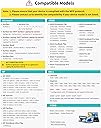


| Brand | metapen |
| Colour | silver |
| Compatible Devices | Surface 3 Surface Go, Surface Go 2, Surface Go 3 Surface Laptop, Surface Laptop 2, Surface Laptop 3, Surface Laptop 4, Surface Laptop Studio Surface Pro 3, Surface Pro 4, Surface Pro 5, Surface Pro 6, Surface Pro 7, Surface Pro 7+, Surface Pro 8, Surface Pro 9, Surface Pro X,Surrace Pro 10,Surrace Pro 11 for Business Surface Duo, Surface Duo 2 Surface Studio, Surface Studio 2 Surface Book, Surface Book 2, Surface Book 3 Kobo Libra Colour,Kobo Sage,Kobo Elipsa, Kobo Elipsa 2E Compatible Devices Surface 3 Surface Go, Surface Go 2, Surface Go 3 Surface Laptop, Surface Laptop 2, Surface Laptop 3, Surface Laptop 4, Surface Laptop Studio Surface Pro 3, Surface Pro 4, Surface Pro 5, Surface Pro 6, Surface Pro 7, Surface Pro 7+, Surface Pro 8, Surface Pro 9, Surface Pro X,Surrace Pro 10,Surrace Pro 11 for Business Surface Duo, Surface Duo 2 Surface Studio, Surface Studio 2 Surface Book, Surface Book 2, Surface Book 3 Kobo Libra Colour,Kobo Sage,Kobo Elipsa, Kobo Elipsa 2E See more |
| Item Weight | 14 Grams |
| Number of Batteries | 1 Lithium Metal batteries required. (included) |
| เคเคธเคฐเฅเคBattery Average Life Standbyเคชเฅเคฐเคคเฅเคจเฅ | 100 Hours |
A**R
Not working Bluetooth
Not support the tab
C**L
Great pen works well with Kobo Libra Colour
I just received my metapen M2 and my Kobo Libra Colour and it matches very well only the controls are switched in comparison with the Kobo Stylus because your eraser will be with the button and highlight with the pen tail (that would be the eraser in Kobo Stylus) but so far itโs been smooth and good experience for the price and fast delivery. You have to charge it at least 10โ before you pair it with your device.
A**D
Funciona muy bien
Es perfecto, funciona muy bien con Microsoft surface!
M**N
A decent substitute for the official pen - and cheaper!
Looks quite good. I lost the MS Slim Pen that I had bought to go with my Surface Laptop Studio 2. I didn't use it very often and really did not want to pay the very high price for the MS original, so I decided to give the Metapen a try. It feels decently built and is comfortable to hold. Also seems to work fine on my laptop - decently responsive and positioning seems accurate. As some others have suggested, the tip is quite hard. I was concerned that prolonged use might mark the screen, so this has prompted me to fit the screen protector that I have always intended to buy. Oh, and, despite various reports on the web, it does fit well enough in the "pen garage" on the Laptop Studio 2. Obviously, it will not charge there - that is for MS pens only - and the magnetic attraction is a bit less than I remember from the MS Pen, but it hangs there well enough.
F**Y
Tevreden
Koppelt makkelijk met mijn kobo libre color. Reageert snel op aanraking met scherm. Snel opgeladen. Zeer tevreden over prijs kwaliteitverhouding. Losse tips gekocht omdat ik 'm van de trap had laten vallen (lekker handig) en tip was krom. Werkt nog steeds! Niks mis mee.
J**R
Outstanding for its price! Works flawlessly with Asus Rog Flow X16
The stylus feels really good in the hand. It's made of a metal, so it's a bit heavier than a usual pen or pencil. Nonetheless, the quality of this pen is on top. You don't have a feeling of possessing cheap product, it feels really good on touch. I had not any issues with drivers or connectivity, it just works out of the box. I'm using OneNote for taking notes and Photoshop sometimes. And the pressure detection works good in both applications. As I said there is no need for drivers, and here is a disadvantage though, you can't configure the pen for your needs, I mean to re-assign a different command on the button or edit the pressure curve as you want. But it's not that essential, just keep this in mind. Overall, I love it, it is worth every penny. Don't hesitate to try it out!
Trustpilot
2 months ago
1 day ago