Buy anything from 5,000+ international stores. One checkout price. No surprise fees. Join 2M+ shoppers on Desertcart.
Desertcart purchases this item on your behalf and handles shipping, customs, and support to USA.
💼 Elevate your data game with the Syba 4-Bay powerhouse—because your files deserve the best.
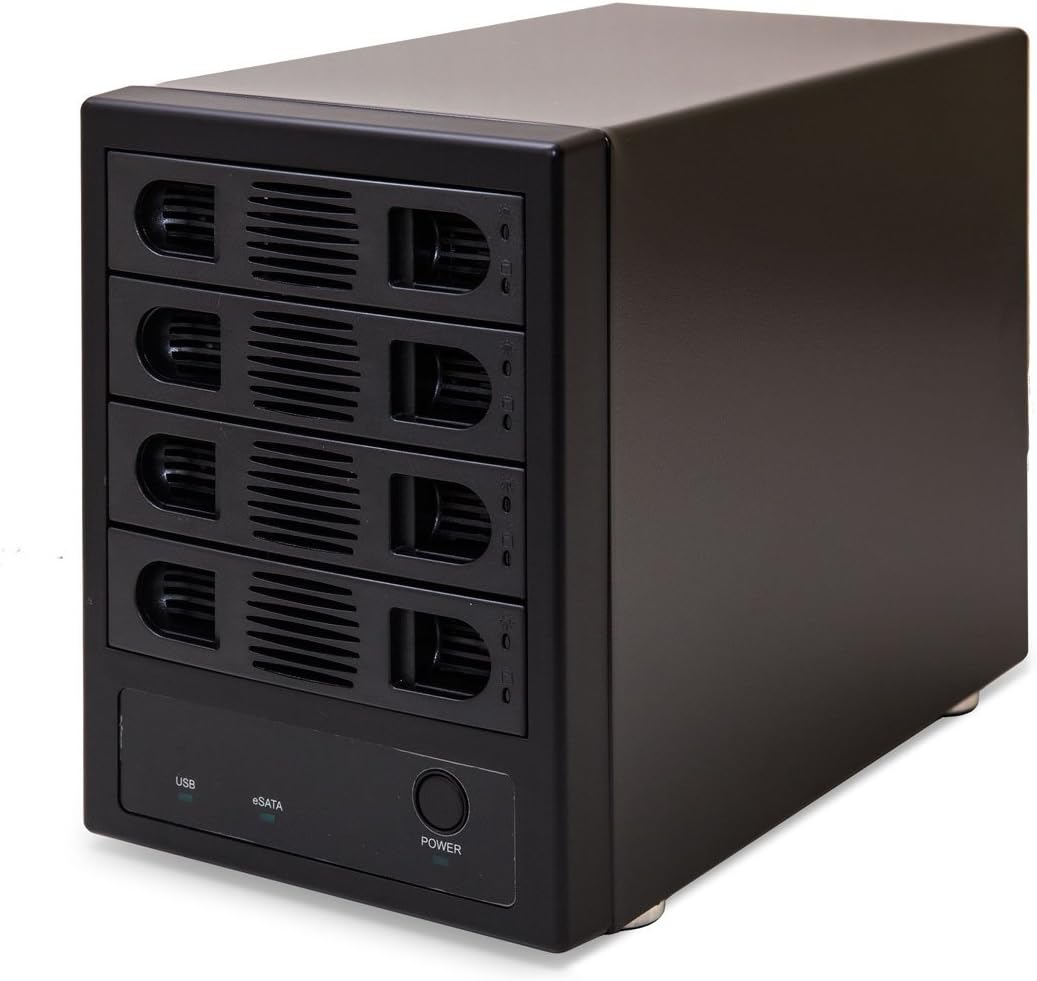
The Syba SY-ENC50104 is a professional-grade 4-bay 3.5” SATA III HDD enclosure supporting up to 24TB per drive. Featuring dual USB 3.0 and eSATA interfaces, it offers high-speed data transfers up to 6Gbps. Its adjustable cooling fan with three speed settings ensures optimal drive temperature and longevity. Compatible across major operating systems, this metal enclosure combines durability with versatile connectivity, making it ideal for home servers and professional storage setups.


| ASIN | B076ZH262B |
| Best Sellers Rank | #190 in Enclosures |
| Brand | IO CREST |
| Built-In Media | (1) 4 Bay Enclosure^(1) eSATA Cable^(1) Power Cable^(16) Screws^(1) Screw Driver^(1) USB Cable |
| Color | Black |
| Compatible Devices | Laptop |
| Connectivity Technology | usb |
| Customer Reviews | 4.0 out of 5 stars 279 Reviews |
| Data Transfer Rate | 5000 Megabytes Per Second |
| Enclosure Material | Metal |
| Global Trade Identification Number | 00810154013944 |
| Hard Disk Form Factor | 3.5 Inches |
| Hardware Interface | USB |
| Hardware Platform | PC |
| Item Dimensions L x W x H | 10.25"L x 5.25"W x 8"H |
| Item Type Name | Syba SY-ENC50104 4 Bay 3.5” SATA III HDD NON-RAID Enclosure – Supports USB 3.0 & eSATA Interface |
| Item Weight | 7 Pounds |
| Manufacturer | IO CREST |
| Material | Metal |
| Memory Storage Capacity | 8 TB |
| Mfr Part Number | SY-ENC50104 |
| Model Number | SY-ENC50104 |
| Product Dimensions | 10.25"L x 5.25"W x 8"H |
| Supported Devices Quantity | 4 |
| UPC | 810154013944 |
| Warranty Description | 1 Year Warranty |
D**T
Basic external hard drive enclosure
Item is smaller than I expected. The item has weight and feels well built. Item comes with no instructions although the hard drive installation is straight forward. The trays install easily and lock into place. A firm pull is needed to remove a tray. The drive indicator lights on each tray are blue for power and red for activity with neither being too bright. On high setting I found the fan noise was not noticeable. The trays use a tool less design to install the hard drive. There are four pins on the side and one on the bottom that align with the screw holes on the hard drive. Be sure to align the pin on the bottom otherwise the hard drive will not fully fit into place. I performed file transfers of pictures to test the speed of the item. Speed is what you would expect from any external USB hard drive. In the 100+ MBS range for a single drive transfer. Multiple hard drive transfers divide this this total. To verify compatibility I installed four previously used hard drives in the enclosure. When the enclosure was powered on Windows 10 automatically recognized all the drives and all their original content was still accessible. I have since installed 4 new Toshiba X300 8TB drives and they worked flawlessly in the enclosure.
N**E
I was pleasantly surprised by this enclosure
I didn't expect much from this enclosure. I had a 5TB sata HDD and two 4TB sata HDDs that used to be internal drives for one of several desktop computers over the years. Now I only buy 8TB drives, but I didn't want to throw these away so I bought this enclosure. The vendor is clear upfront that it doesn't support RAID functionality. When I got the unit, it came with both a USB 3 and an eSATA cable, which was nice. Assuming that eSATA would be faster I ordered a 2-port eSAT PCIE expansion card. When I went to install the card, I found that I was out of slots so rather than give up a 4-port USB card I put the eSAT card away for another day. The setup was incredibly straightforward. Each bay has its own tray. I slid the 3 drives into their respective trays and closed them, plugged the enclosure into a power supply and used their USB 3 cable to attach it to my computer. No tools were required. When I pushed the enclosure's on-off button Windows 11 detected them all fairly quickly. I dragged and dropped files into each drive and back again to make sure they were working. No problems. I don't know why I didn't think of this before I bought it, but I decided to see if I could make the two 4TB drives into one logical 8TB drive. It doesn’t support that, the manufacturer made no claims for that, and I wasn't surprised. Overall, setup was as straightforward as can be. Everything functions as advertised. Everything you need comes in the box with the enclosure. I wish every piece of hardware that I buy could be this easy to set up.
G**M
It works but its functionality is overshadowed by how cheaply made this product is.
Pros: It functions Transfer and Reads data seemingly without a hitch WD Red Pro 14 Tab copy speeds reached as high as 227.1 MB/s, always seemed to average around 200 MB/s though WD White Label Drives (Shucked EasyStores and Elements) never copied faster than 151 MB/s Seagate Barracudas and other 5400 RPM drives never seem to beat 140 MB/s It works and functions well enough if you are not picky and are simply using as a long term home for your drives Easy to setup if you don’t overthink it The fan keeps the drives cool, the aforementioned WD Red never reached over 40°C not even once, even during sustained writes of 12 hours+. The other drives I mentioned never got hotter than 45°C Ejecting the drives from Windows and on my Nvidia shield always worked flawlessly, both in function and reflected in the S.M.A.R.T. Data Cons: I have never seen a multi bay enclosure made with cheaper materials I never trusted this enclosure to house more than two drives at a time, call me over cautious but I don't see this enclosure being able to handle four drives simultaneously and live to tell about it. Even higher end JBOD and RAID enclosures that are over $300 struggle at handling 4 drives at once This enclosure isn't hot swappable, Meaning if you add or remove a drive while other drives are running every priorly installed drive will Abort all operations and essentially eject and have to spin-up again whenever you add or remove a drive from the enclosure The BIGGEST issue with this enclosure is how cheaply made the trays are and how flawed of a system it is: it does not give you the option to mount your drives to the trays with screws and you are forced to use the extremely cheap and slightly undersized pegs attached to the plates that are supposed to fasten the tray to the drive which are made out of extremely cheap/flimsy plastic and you literally have to bend them and forcibly snap them off abruptly in-order to properly install each new drive to the enclosure and each time you do this the plates get looser and looser and pretty soon your drive will not be mounted properly at all. It does not help that there are no screw holes on the bottom of the trays for 3.5 inch drives, Otherwise this problem would honestly probably be O.K. all in all this enclosure is fine if you're just going to be installing and swapping drives sporadically and pretty much only using it to turn a few 3.5 inch drives into external drives. If you are thinking of buying this enclosure for the purpose of using it with several different drives - which would require a lot of swapping - my advice is: Absolutely do not buy this enclosure. Go with a terramaster d4-300 instead. It is worth the extra $53 dollars and It's trays are practically flawless.
C**K
4 Bay Raid 5 in Linux
I rarely write reviews for anything, however I felt compelled for this product. I’m in the tech industry and normally deal with enterprise hardware and software, which also comes with a hefty price tag. I’ve had a numerous array of some type of storage server on my home network since the late 90’s In 2002, I dove had headfirst into linux, samba server, the transition into LDAP’s and so on. Every box I’ve built has always been retired hardware from a site I was working. Around 2010 I started getting into the media server’s, home digital content and learned quite quick 1 terabyte of storage wasn’t going to cut it. As you can imagine accumulating 20 years of home digital photos, movies, documents, databases easily fill up a 4-terabyte drive. Which brings us to today, I started planning the build of a brand-new box a few weeks ago, keeping price point in mind, I truly was ready to bite the bullet and go with an 8 bay Synergy, once I did the math on the cost, I started looking at alternative’s Started with a Dell Business Edition small form factor I-5 through a purchasing program with my employer $424. Drives I need at least 10 Terabyte for the long term. I run across the Syba SY-ENC50104 4 Bay and get it, while the unit does not support raid, Linux can and there’s advantages to building a software raid volume. I could unplug this from the server and mount it to another in minutes and nothing would be lost. Next was the hard drives, went with the Seagate Iron Horse 4 Terabyte, I already had the OS on a solid-state drive I just had to create the Raid 5 once everything came in. The end result. Raid Sync time on this box and storage bay after creation 30 hours on USB 3.0, I’ve got data transfer speeds exceeding 85Mbps and it looks like 36 hours till the entire 4 Terabyte is transferred from my old box to this one at which point I’ll cut everything over. AWESOME PRODUCT ! It does exactly as advertise and the price point couldn’t be better. Will be buying another for total redundancy later down the road
G**R
If you are reading this you should buy it!
For the money this can't be beat. The power supply is is my favorite part. We get 4.0A @ +5V / 6.0A @ +12V (maximum) according to the manual. Works perfectly so far. Two minor complaints. The power switch doesn't switch off the mains power so it is like leaving a wall wart power adapter pluged in. Secondly I'm not sure that the bottem hard disk is adequately shielded from the power transformers underneath it. Lastly i had issues loading it up with failing hard drives. It seems one bad disk can crash the enclosure. Basicly all drives unmount. Seems quite stable with healthy drives though. I'm being very critical here. It works great for me. I highly recommend the product.
A**R
Died after 8 months, but was issued a replacement
Edit: contacted customer service through their website. Explained the problem and was issued a RMA. Got the replacement 2 weeks later and the new one is working well. Customer service was responsive and the process was smooth. So upping review to 4 stars. Hoping the new one will last longer. The enclosure was working great for 8 months. Then one day, it got stuck in a boot loop and failed. It would flash red lights like it was trying to access the disks but then it would flash all blue lights like it was booting up from the power off state. Tried changing bays and the same thing happened. Was a good 8 months, but if it's not gonna last, it's not worth it.
O**S
Easy to add a lot of external storage.
Literally plug and play. I took it out of the box, plugged the cables in, inserted 4 disk drives, then plugged the box into a USB port on my computer. Turned it on. The four disks were recognized by Windows 11. For around $100, it's a great way to reuse old hard drives for backup storage. I'm running the internal fan of the enclosure on High, and the disks are staying cool. The best thing of all is that you only have to powerup the disks when you need the storage.
J**C
Works as described, easy to install drives
I purchased this the same day I also purchased another JBOD enclosure from Orico (from EBay). While this is a 4 bay and the Orico unit is a 5 bay, I like the Syba much better: tool free drive installation and the unit is quieter than the Orico (I have done side by side test measuring the volume with a meter on my phone). While the Syba does require screws to install 2.5 inch drives, 3.5 inch drives do not require screws - there are little posts on the side that are on rubber spring things that hold the drives in place. The Orico requires screws for any size drive. I also like that the Syba has the power switch on the front with the drive bay doors. It is located on the back of the Orico which is difficult if your do not want the enclosure on all of the time. As I have only used these for a couple of days I cannot speak to how either will hold up. Transfer speeds are essentially the same as far as I can tell. The Syba is a much better value.
C**A
works with Android
Similar - and more expensive - products won't work with Android boxes, but this one will. Easy to install and works perfectly, all HDs are viewed individually by the OS. I would be nice to have individual power buttons per HD, but that's a tiny detail. Noise level could be better but it's far from noisy. That little box is awesome
H**.
Muy buen producto.
El case se ve robusto y bien construido. No lo he probado, pero estéticamente me gustó, así como su construcción.
G**.
Syba SY-ENC50104 4 Bay 3.5”
Si lo que buscar es un dispositivo para usar con tus discos de gran capacidad y que no entre en estado de hibernación automáticamente sin que puedas impedirlo, algo sumamente molesto, este es tu dispositivo. Tengo conectados 4 hdd de 16tb cada uno y funcionan perfectamente, silencioso y por sobre todas las especificaciones, los discos no se apagan o entran en hibernacion cada cinco minutos sin que puedas camiar esa opcion, algo que es de agradecerse al fabricante. El costo es bastante accesible y por su facilidad de uso y sin hibernacion es perfecto para cualquier tipo de trabajo en oficina, industria u hogar.
K**Z
Much better than expected
I was very happy with the quality of this product. I was concerned that it might be cheap considering that it cost much less than similar products and that it was an unknown brand. It is inexpensive but definitely not cheaply made. The construction feels solid The fit and finish is excellent. I did find it slightly difficult to open the trays once the drives were installed. That might not be a bad thing, especially if you have young children around. They definitely won't be able to open the trays and remove the drives. This is not a NAS or a RAID array. It is a JBOD (just a bunch of disks) box. It is simply an external USB drive enclosure that holds 4 drives instead of one. You cannot create a RAID array with Windows using this enclosure. That's not a limitation of this particular enclosure. Windows doesn't allow you to create a RAID array over USB. It is likely possible to use this box to create a RAID array or NAS using a Raspberry Pi or another Linux based OS and open source NAS software. I didn't try it yet but I will as soon as I have 4 identical hard drives. I have a refurbished Lenovo ThinkStation that I use for a home-made DVR and media server. There was a hodgepodge of external drives attached to it that I had picked up over the years or recycled from other computers. It was quite frankly a mess. This box has cleaned up my entertainment centre and improved speeds if I have to move files around. Transfer speeds are 100mbps + when transferring between drives in the enclosure and just slightly less when transferring between the enclosure and internal drives installed in the computer. Speeds are still better on the remaining single USB enclosures as I can attach them directly to USB ports on the computer instead of a hub. I will be buying another one of these 4 bay enclosures soon to eliminate the remaining single enclosures. I purchased two new 4 TB Seagate IronWolf drives as well. Although these are NAS drives it is perfectly fine to use them as storage in a computer or in one of these enclosures. They are better quality drives than Barracudas, have longer warranties and rated for far more data transfers per year. NAS drives are meant for 24/7 operation so they are very good for home servers. I don't have eSATA on this computer so I can't comment on that but a cable is included. Installing the drives is easy and no tools are required. Instructions are not included but are available on the manufactures' website in PDF form. Although you cannot create a NAS or RAID array, you can share the drives on your network. You will then have access to the box from any device on your network as long as the computer that the box is attached to is on. Overall, I am very happy with this enclosure. I had considered investing in a NAS device but I didn't have the money to replace all of my current drives and the NAS too. I read that there are also many security vulnerabilities that allow ransomware to encrypt them. The manufacturers aren't too good at updating the software in many cases. I decided that this was the best solution for me.
A**R
Be sure your Computer is up to date, and that you have USB 3.0 support.
I have read other comment reviews, and it seems to be a lot of negative. I bought this product. I inserted my older drives I had from other computers. Plugged it in, turned it on, and everything worked perfectly fine. 100%. I can swap out drives on the fly with no interruption to the other drives, and plug in other drives seemlessly. Here are the details of my computer. Windows 10. 32 bit Running USB 3.0 All drivers are up to date. I recommend this product any day. In fact, I plan to buy another one.
Trustpilot
1 day ago
2 months ago