Buy anything from 5,000+ international stores. One checkout price. No surprise fees. Join 2M+ shoppers on Desertcart.
Desertcart purchases this item on your behalf and handles shipping, customs, and support to USA.
⚡ Power your setup with speed and style — don’t get left behind!
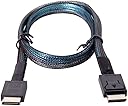
The Chenyang SFF-8611 OCuLink PCIe 4.0 cable delivers a high-speed 64Gbps data transfer rate over a 50cm flexible cable, featuring male-to-male SFF-8611 connectors. Designed for professional-grade external graphics cards and SSDs, it supports the latest OCuLink protocol to ensure superior bandwidth, reliability, and future-proof connectivity for demanding computing environments.


| ASIN | B07TG9DK4W |
| Best Sellers Rank | #49,477 in Computers & Accessories ( See Top 100 in Computers & Accessories ) #8 in SAS Cables |
| Brand | chenyang |
| Brand Name | chenyang |
| Cable Type | Oculink SFF-8611 |
| Colour | SFF-8611 - SFF-8611 0.5M |
| Compatible Devices | SSD |
| Compatible Phone Models | No Compatible Phone Models |
| Connectivity Technology | OCuLink |
| Connector Gender | Male-to-Male |
| Connector Type | Oculink |
| Customer Package Type | FFP |
| Customer Reviews | 4.4 out of 5 stars 220 Reviews |
| Data Transfer Rate | 64 Gigabits Per Second |
| Ethernet Cable Category | Cat 8 |
| Frequency | 64 GHz |
| Indoor Outdoor Usage | Indoor |
| Item Length | 50 Centimetres |
| Item Shape | Round |
| Item Weight | 8 Grams |
| Manufacturer | CY |
| Model Name | SF-014-CY |
| Model Number | SF-014-CY |
| Number Of Pins | 24 |
| Number of Items | 1 |
| Other Special Features of the Product | Data Transfer |
| Outer Material Type | Flexible material |
| Part Number | CY-SF-014-0.5M |
| Recommended Uses For Product | indoor |
| Special Feature | Data Transfer |
| Specification Met | Oculink |
| Unit Count | 1.0 Count |
L**N
Livraison très rapide
Bonsoir, Merci beaucoup pour la rapidité de livraison, le produit me paraît conforme, mais comme c'est pour un cadeau, je ne sais pas s'il fonctionne comme prévu.
K**I
安定して稼働。
intel arc a750にて動作しました。 ミニPCのm.2がpcie3.0だったこともありベンチマークスコアとしては直挿し4.0×16より15%〜20%ほど下落しています。 特に不具合もなく相性問題などeGPUではよく話題にあがるものも発生せず安定しています。 ただ私の構成では電源連動はしなかったです。 m.2スロットには付属のカードではなく、別のoculinkメス端子と止めネジがついたものを使用しケースに固定していました。
H**E
It works amazingly
Product works with my gpd win 4 2024, for people struggling to get it to work here's some tips 1. There's a microscopic on and off switch on the board, make sure it's switched on ( i found it after scratching my head for ages ) 2. If you are trying to connect an nvidia card and get code 43 look up nando4 fix You are welcome
A**C
Perfecto para GPD G1 and Win Max pro 2 2023 GPD G1619-04
Perfecto para mi GPD G1 y Win Max pro 2. Ahora se nota la diferencia. Con el cable usb4 sólo se calentaba mucho la zona del touchpad y ahora está más desahogado y además rinda más.
T**G
Best value
Really happy with this purchase, it comes with the oculink cable and wifi slot to oculink connector but I bought another one with extender through the nvme slot. Much better than the noisy overpriced Aoostar. The build is combined with RTX 5070 and Corsair RM750e modular PSU for a clean build. Zero noise build, the fan only goes up if temperature passes 50 degrees Celsius. The GPU is turn on and off according to the laptop power state. Plug in, Power up, Install latest Nvidia Driver, Gigabyte control center, code 43 script. I write low level CUDA for a living, so here’s some extra info: - nvidia-smi shows 2 GPUs (my original laptop GPU rtx 3050Ti and this one) - 2 GPUs can communicate through PCIe, I tested a NCCL code for vector addition on 2 GPUs and it worked. - CUDA Code can compile with sm_120, and run no problem. Pytorch recognizes 2 GPUs and set the 5070 as GPU 0. Nsight compute works with debugging and uses 5070 if the code is compiled with sm_120.
Trustpilot
2 months ago
1 day ago