📈 Elevate Your Office Game with the WF-7710!
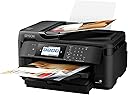
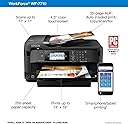
The WorkForce WF-7710 is a powerful wireless wide-format color inkjet printer designed for professionals. It offers versatile all-in-one capabilities, including printing, scanning, copying, and faxing, with a maximum print size of 13" x 19". With a 250-sheet capacity and automatic duplex printing, it ensures efficiency and convenience for any office environment.


| B&W Pages per Minute | 18 ppm |
| Color Pages per Minute | 10 ppm |
| Hardware Connectivity | USB, Ethernet |
| Connectivity Technology | Wi-Fi, Ethernet, NFC |
| Ink Color | Cyan, Magenta, Yellow, Black |
| Additional Printer Functions | Copy, Scan, Fax |
| Maximum Copies Per Run | 999 |
| Control Method | Voice |
| Controller Type | Vera, Amazon Alexa |
| Print media | Envelopes, Paper (plain), Glossy photo paper |
| Scanner Type | Sheetfed |
| Maximum Copy Speed Black and White | 30 ppm |
| Display Type | LCD |
| Compatible Devices | PC, Laptops |
| Printer Type | Inkjet |
| Additional Features | Auto-Duplex |
| Printer Output Type | Color |
| Item Weight | 40.8 Pounds |
| Item Dimensions D x W x H | 22.3"D x 32.2"W x 13.4"H |
| Paper Size | 8.50 x 14, 4 x 6, 13 x 19, 11.70 x 16.50, 8.30 x 11.70, 7.25 x 10.50, 11 x 17, 4.10 x 5.80, 8.50 x 11, 3.50 x 5, 5 x 7, 8 x 10, 13 x 19 |
| Maximum Sheet Capacity | 250 |
| Media Size Maximum | 13 x 19 inch |
| Wattage | 19 watts |
| Power Consumption | 19 Watts |
| Duplex | Automatic |
| Color | Black |
A**I
Perfect for sublimation, plus tons of extras!
I've set this up with a CISS from ebay and the Printer Jack inks here on Amazon. This printer connected to my network with no problems, and using the Epson manager, I have destinations set up for my Google Drive and my email, so any scanned images shoot right over with no fiddling and no cables. Scans very well, prints beautifully and I love that it's got such a large format in case I decide to move onto printing canvases or larger prints. I'm very happy with this!BE AWARE, this takes up a lot of desk real estate. When I got the box, I was hoping it had a ton of padding in it or some kind of prize inside that was taking up room. Nope. It's just a massive printer. Check the dimensions in the listing here because I had to find an alternate spot to my original plan. It easily takes up a quarter of my 3x6 foot work table.Worth it. And the price keeps dropping!
G**A
A nice replacement for a perfectly good printer
So with the last update to Windows 10, my perfectly good working printer was deemed obsolete. The search began for new printer. I decided on this one as it is wireless connection and also has wide format printing. I like to print out my own art work to hang in my home so the wide format hooked me. Only real problem was getting the printer into the house and out of the box. I am old and not so strong anymore. It was heavy for me. Even the box itself was heavy. It was very well packed and survived making it to my home which is at the end of the line for shippers. It spent a long day in the delivery truck traveling on rough country roads. The only other problem was setting up the WiFi connection. I had to enter the info myself. That turned out to be easy too. I have made a few prints. Have to check the settings to avoid stripes showing in the prints. No big deal though. Just a matter of getting the correct settings. All in all a very nice printer for the price. Cannot speak to ink usage as I have not printed much to date. I like the touch screen. Easy to use. Hope it keeps working until Windows 10 decides it too is obsolete.
U**4
Scan docs into multipage or single page PDF/JPEG formats + Great print quality
Main reason I bought this printer was to be compatible with Windows 10 that my old printer was not and I also wanted to be able to scan in a bunch of old docs from my file drawer to keep digital copies of the documents & clean out the filing cabinet of all of the piles of papers. The machine has excellent scan quality either by top tray loading several pages at once, single pages at a time, or by scanning a doc on the glass screen. You can do multi-page PDF/JPG format scanning or single page...the machine will ask you on the screen if it senses there are no more documents in the feeder if you have any more docs you'd like to include in that particular scan. Very intuitive to use. Also, was very quick to get hooked up to wifi so I can wirelessly print and when I make a scan to my USB drive that is plugged in the printer, I don't even have to unplug the USB drive and plug it into my computer. I can actually access what scans are on the USB drive plugged into the printer WIRELESSLY from my computer and I can move files from that USB drive that's still in my printer over to a different folder on my actual computer. Super convenient!! Ink cartridges last much longer with this unit than with my old HP printer and cost significantly less when finally time to replace them when you use a 3rd party vendor. I've had no printer jams yet, and print quality has been great! We will be keeping this printer awhile! Love everything it has done for us already!
G**R
HORRIBLE PRINT QUALITY!!!!
What an unbelievable piece of garbage. Not one single sheet of plain paper or photo paper went through this machine without some defect in the print quality which ranged from slight horizontal banding on plain paper to total ink streaks running down the photo paper like a brush loaded with too much paint. This was straight out of the box the first night it arrived and yes, I was very careful to choose the paper type and print quality. I chose this machine because it fed single sheets from the rear for specialty papers. This is something I cannot do with my Artisan 730 which works perfectly. I did not contact Epson tech support because I have been down that circus act once before with another Epson printer which I threw in the junk pile 3 days after I bought it because it just wasn't worth the trouble and Staples would not make it good. I'm sending it back and will not ever buy another Epson printer for this very reason. Do yourself a favor and pay attention to the reviews of this lemon. When I originally read them, I thought there was no way there could be that many bad machines but I guarantee there if this one is any indication of how the others worked. BTW, I did the head alignment and nozzle clean, print pattern after the first few crappy prints. No change at all and although the only thing I tried to print was solid black images, it used more cyan ink than it did black so I guess the people complaining about high ink usage were correct. Every reply here from Epson technical support is the same boiler plate response. They want you to play their dog and pony show and then pay for another printer up front while they finally get around to hammering out another colossal mistake then wash , rinse and repeat. I wouldn't carry another one of these in my house if they were giving them away. Photo paper and ink are way too expensive to waste while they experiment on their junk at the expense of your time and money.
Trustpilot
2 days ago
1 month ago