Desertcart purchases this item on your behalf and handles shipping, customs, and support to USA.
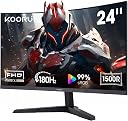
🖥️ Elevate your desk game with KOORUI’s curved powerhouse — see more, play faster, feel the difference!
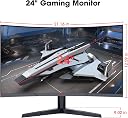
The KOORUI 24 Inch Curved Gaming Monitor features a 1500R curved FHD 1080p display with a blazing 180Hz refresh rate and 1ms response time, designed for immersive, ultra-smooth gaming. It boasts 99% sRGB color accuracy, HDR10 support, and a 3000:1 contrast ratio for vivid, lifelike visuals. Eye-care technologies like Flicker-Free and Blue Light Filter reduce strain during extended use. Connectivity options include dual HDMI 2.0, DisplayPort 1.2, and VESA compatibility with adjustable tilt, making it a versatile, high-performance monitor ideal for both gaming and professional multitasking.


| ASIN | B0FS1BFZH9 |
| Adaptive Sync | FreeSync |
| Additional Features | Adaptive Sync, Curved, Flicker-Free |
| Aspect Ratio | 16:9 |
| Best Sellers Rank | #32,649 in Electronics ( See Top 100 in Electronics ) #854 in Computer Monitors |
| Brand | KOORUI |
| Color | Black |
| Connectivity Technology | HDMI, DisplayPort |
| Contrast Ratio | 3000:1 |
| Customer Reviews | 4.3 out of 5 stars 5,528 Reviews |
| Display Resolution Maximum | 1920 x 1080 pixels |
| Display Technology | LED |
| Hardware Connectivity | DisplayPort, HDMI |
| Image Contrast Ratio | 3000:1 |
| Item Dimensions D x W x H | 21"D x 11"W x 14"H |
| Manufacturer | KOORUI |
| Model Number | 24E6CA |
| Native Resolution | 1920x1080 |
| Number of Component Outputs | 2 |
| Picture Quality Enhancement Technology | HDR10, 99% sRGB, Flicker-Free, Blue Light Filter, Adaptive Sync |
| Refresh Rate | 180 hertz |
| Resolution | FHD 1080p |
| Response Time | 1 milliseconds |
| Screen Finish | Glossy |
| Screen Size | 24 inches |
| Screen Surface Description | Glossy |
| Total Number of HDMI Ports | 2 |
| Unit Count | 1 Count |
| Warranty Description | 3 Years |
K**M
27E3Q YES, YOU SHOULD BUY IT
I ordered a monitor from Sceptre and received the wrong model. This led me to make a somewhat angry purchase but man did it pay off. Jumping the gun on a 1440p IPS display was so worth it. I am pleased, satisfied, and left wanting nothing more. Pros and cons below. PROS: - Really bright display. This is such a game changer when you constantly deal with dim gaming displays. Typically on a budget monitor you get 250cd/m2 but here you get 400cd/m2!!! The brightness is perfect for gaming, day to day use, brightly lit rooms, etc. - Super Colorful Display: The colors on this screen pop like I've never seen. Everything is perfectly saturated. Nothing seems out of the ordinary. Everything you watch, read, play, will be enjoyed thoroughly guaranteed. - Whites are actually WHITE: As you can see in one of the images I attached, My other monitor (HP 25x) provides yellowish whites while the 27E3Q provides a very natural and expected white. - Not a single dead pixel on my unit! - No annoying branding. One simple and almost invisible "KOORUI" in the center of the frame on the bottom. No extended pieces of plastic either. Just a rectangular unit as you would expect. Unlike the HP 25x which has an annoying chunk of plastic that extends out. This is more nitpicky obviously but it still counts! - OSD (On Screen Display) is very easy to use. Its quick, to the point, no frills or gimmicks, and easy to read. - Really nice stand! Although I used my own dual monitor mount, the stand is high quality, heavy duty, with tons of adjustability. (Rotate, side to side, height) CONS: - From the research I've done, if you leave the overdrive off you won't have a problem but, with it turned on you do experience some ghosting I believe. Haven't tested it myself but this is what I've heard. Not worried about it, I leave it off and thoroughly enjoy gaming. - In all honesty, the only possible thing I can think of (and this is a real nitpick imo) is the edges of the display border. They could be a HAIR thinner. My HP 25x has a slightly thinner border (not the bezel/plastic frame). This monitor would have benefited greatly from a thinner border but I wouldn't worry about it. With all of the benefits (AFFORDABILITY) a border shouldn't even be close to a deal breaker. Overall, amazing monitor. I will be purchasing another one soon!
J**N
Good bang for your buck
Running this on a PlayStation 5. Got this on sale, nice upgrade from my KTC monitor, which was not bad by any means. Noticable difference right away with the higher refresh rate. No ghosting or tearing. I play mostly Resident Evil style games and this monitor fits them perfectly. Stand is adjustable and so is the monitor itself which is a bonus. If you're looking for a sub $200 monitor this is a great value.
K**R
Great monitor.
I have had this monitor for 2 years now and I really like it, the stand is great quality, the viewing angles are good, the refresh rate is more and I need (i run it at 105fps) The color accuracy is pretty decent in the picture quality is perfect. when I got it it had one dead pixel But you only notice it when the screen is black so I don't really care.
A**B
It REALLY is a 4K monitor.
Today I set up my dual KOORUI 27" model N07 monitors. I was somewhat worried by multiple reviewers reporting that this model isn't really a 4K screen. So while I don't usually write reviews, I'm here to assure you the N07 is in fact a 4K screen with resolution of 3840x2160 and refresh rate of 60hz. And I know why some people got this wrong. When I unplugged my old 1920x1080 monitors and tried to use the same HDMI cables, Windows identified the monitor as having a 1920x1080 native resolution. But my cables were very old. I plugged both my new monitors in using DisplayPort cables and they were instantly reporting 3840x2160. My monitors did not come with DP cables, just new HDMI cables. But my office had extra DP cables laying around. If you're still having trouble getting 4K on one of these, be wary of adapters, such as DP-to-HDMI, DVI-to-HDMI, etc. Also try shorter or newer cables. You CAN get 4K out of HDMI cables, but remember that HDMI has been around since 2002 and that standard has gone through many versions with new capabilities over the years. As for reviewing the other aspect of these monitors... they look great to me! Neither of mine had dead or stuck pixels. the colors look good and image is sharp. I'm not a professional monitor reviewer, but these seem like perfectly good office monitors for a fantastic price compared to big brand names. I took a chance on some of their smaller screens several months back and was blown away at the quality and low price. I'm glad this higher end model hasn't let me down! UPDATE: My original review was written 10/13/2023 and now it's 5/16/2025. I have never had a single issue with these monitors in the 1 year 7 months I've been using them. In fact I stumbled across my own review after looking to purchase a 3rd matching one... because a triple-monitor setup with these bad boys would be awesome! By the way, I use them on a dual-monitor desk mount. I love that they have VESA mounting holes so they can be used on wall or desk arms/mounts.
D**Z
An actually good off-brand monitor!
Koorui doesn't have the same recognition as a big brand like LG or Samsung. However, the monitor seems to be the genuine article here. Physically it feels sturdy and well-built. It is easy to put together and set up, plus it comes with both an HDMI and a DP cable. The monitor controls forgo that annoying "nipple" button a lot of modern monitors use and goes with the tried and true row of buttons. When you bring up the monitor controls, it is easy to read and navigate the options. Software-wise, it just runs off the generic PnP monitor driver. There's no specialized driver or ICC profiles to add, but what you can (and should do) is use your GPU's software to adjust settings. For me it is through the Nvidia Settings panel. Raedon's equivalent probably works the same way. Tweaking the settings is responsive and with just a few minutes time you'll have your games and videos cooking perfect. You want HDR? This does HDR (and does it beautifully). You want Freesync? It does that and is compatible with Nvidia's N-sync software. You want a high refresh rate? It can push up to 240MHz under the right settings. In conclusion, it is surprisingly well made! Good HDR, High refresh rates, all the options you want for 2k resolutions, etc. The only down side is it doesn't have it's own dedicated driver or color profiles, so you do need to tweak the settings, but I don't see it as necessarily bad since your GPU's software should be able to handle that job. All in all, I am impressed with this one.
A**.
Great bang for buck
Great display for the price, everything works as described. Setup was easy and tool-less. Runs my PS5 and PC at 120Hz+ easily. Colors may be a little inaccurate for professional work but for a casual user like me watching movies and playing games, it's great. Again, for this price: height adjust, good screen, great resolution (unique at 24"), and the amount of ports. Would buy again.
A**R
Outstanding bang for the buck
IMO the Koorui S01 is an outstanding monitor for the price. I bought two in July 2024 for use as left and right monitors in a three-monitor setup. At the time I kept my original monitor in the center. In Feb 2025 I decided to replace it, as it was quite old and the image quality on the Kooruis was noticeably sharper. So I hopped on Amazon to order another Koorui S01, only to find it could not be shipped to my location. I ordered a different brand with identical specs which happened to be a few dollars less expensive. It arrived, I set it up... and was promptly disappointed. Image and video quality were similar but text was noticeably grainer than on the Kooruis. Text on the new monitor simply wasn't as clear regardless of monitor settings (and I tried every possible combination). I returned that monitor, found the Koorui S01 was available from another online seller, and ordered one. I'm not a gamer, nor do I do video editing or other graphics-intensive work, so I can't speak to how well this Koorui would work for demanding applications. But for ordinary home or business use this monitor in combination with a decent graphics card gives outstanding results. Highly recommended.
A**I
Decent Screen, Insufferable LED
Update: The idle LED on this thing is impossible to turn off. Flashes like crazy when the computer is asleep. Can't even block the LED with tape, because the light bleeds through every opening of the computer. The LED is pure white and bright enough that it makes me dizzy if I'm sleeping in the same room with the monitor. Letting the computer fall asleep by itself at night is no longer an option because of how bright the idle LED on this monitor is. If I forget to turn the monitor off before sleeping my sleep quality is decimated. A true tragedy that there's no way to disable it. --- I was looking for a cheap 4k screen that would pair well with my primary 1440p display so I could have an extra browser window on the side. Shopping around on Amazon, it seemed like most products were in the $220 to $260 range. Then I saw the specs and features on this thing (HDR10, AdaptiveSync) and the fact that it was only going for $190 and just had to try it. It arrived today and I can safely say it is a 4k monitor, with adaptive sync, with HDR10, for only $190. I'm not sure how accurate the color accuracy claims are or the ghosting claims are, but for my usecase of media consumption / extra browser window, this thing is working perfectly. Installation of the monitor was really straightforward, basically consisting of plugging the stand onto the baseplate and the monitor onto the stand. However, the stand itself was a little lacking, as you can't really adjust the height, only the tilt, but a few hardbooks or a custom mount solves the problem completely. Overall would highly recommend giving this monitor a try if you're looking for a cheap 4k display with some really nice features.
G**I
Ottimo aquisto
Parto dal presupposto che non cercavo un monitor da grandi pretese, ed in passato ho utilizzato monitor semplici da ufficio. Questo monitor é ottimo nelle sue frequenze, ottimo menù intuitivo anche se con limitate impostazioni, ottimo per avere aggiunte come freesync e HDR, ottimo pannello IPS, con impostazioni che riescono ad avere buoni colori e buoni contrasti, semplicemente ottimo per il prezzo (pagato €120). Ho apprezzato anche come all’abbassare della nitidezza, venga aggiunto una sorta di filtro di aberrazione cromatica, e non semplicemente la sfocatura dei pixels, questo rende più godibile la visione di film a bassa risoluzione. Consigliato
B**0
Incroyable pour un écran full HD
La livraison a été impeccable sans problème, l'écran fonctionne très bien avec de belle couleur.
S**U
Très bonne écran pour du 1440P 170hz
L'écran est parfait pour le prix, très réactif, la resolution est top, je ne vois pas de ghosting ou quoi que ce sois comme problème pour l'instant, très lumineux, je n'utilise pas le HDR mais quand je l'utilise il est vraiment sympa pour le prix, seul chose qui manque ce serait des ports usb a l'arrière, appart sa, top !
P**S
Étonnant
Après avoir entendu bon nombre de louanges sur cette marque, j'ai décidé de passer à la QHD avec cet écran. Et quelle belle surprise. Les réglages par défaut de colorimétrie sont vraiment bons, il y a une multitude de réglages pour améliorer selon vos goûts, et la qualité générale est au rdv. Pour 170€, Il n'y a pas mieux. Un achat judicieux
I**N
Aucun son
Je suis trés déçu, il est écrit nulle part que l’écran n’a pas de sortie audio, je me suis bien fait arnaqué
Trustpilot
2 days ago
2 weeks ago