Desertcart purchases this item on your behalf and handles shipping, customs, and support to USA.
🎯 Dominate Every Fight with Fusion Precision & Speed!
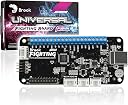
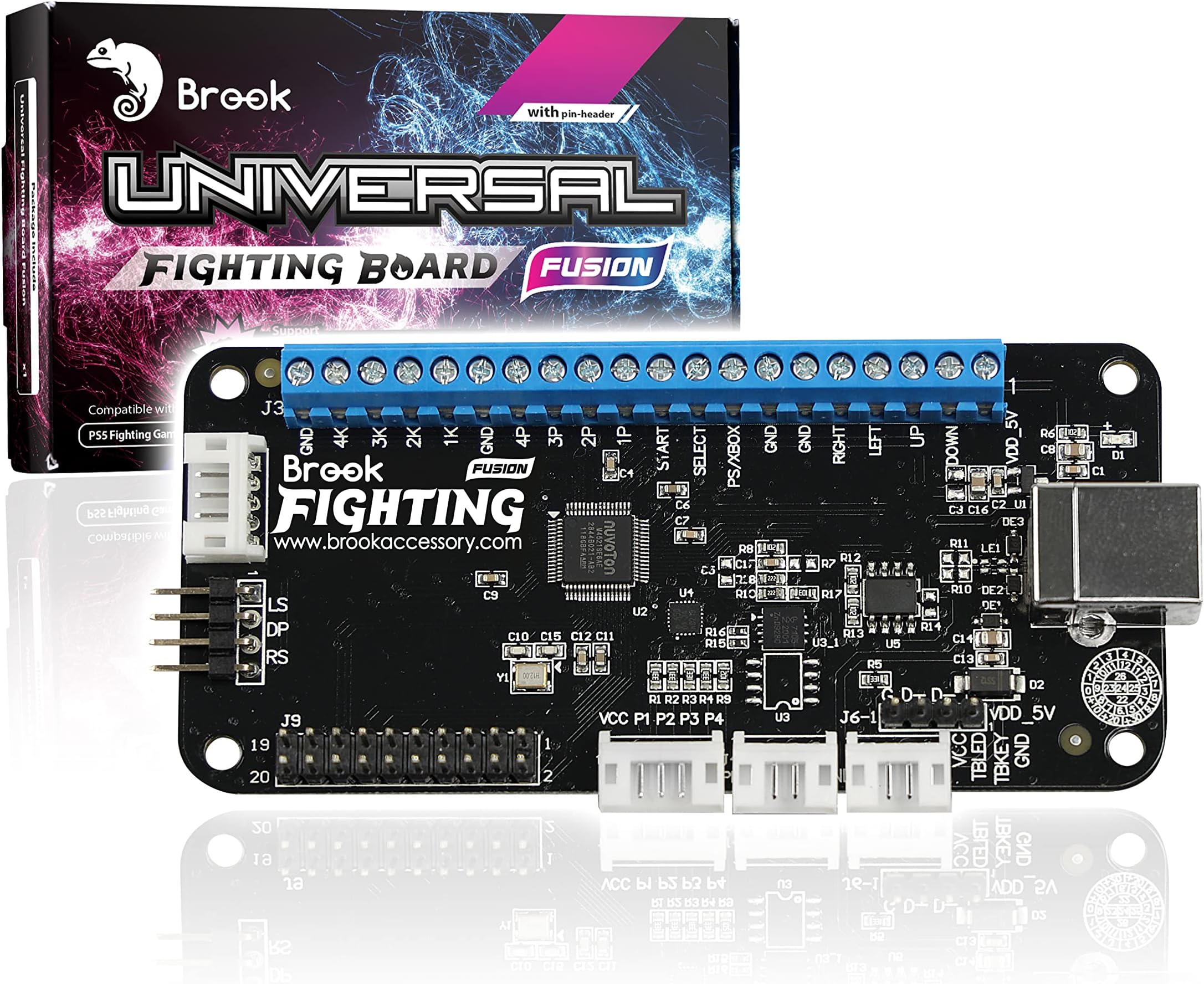
The Brook Universal Fighting Board Fusion is a pre-installed, no-soldering-required arcade stick PCB designed for fighting game enthusiasts. Compatible with a broad range of consoles including PS5 (fighting games only), PS4/3, Xbox, Switch, and PC, it delivers ultra-low latency, built-in SOCD cleaner, turbo settings, and touchpad simulation. Its plug-and-play design and auto console detection make it the top choice for pro players seeking flawless input and effortless setup.


| ASIN | B0C6DRJHW4 |
| Additional Features | It's UFB and UP5, No need for welding skills, Play PS5 Fighting Games |
| Best Sellers Rank | #27,778 in Video Games ( See Top 100 in Video Games ) #6 in PlayStation 3 Adapters #22 in PlayStation 4 Adapters #1,816 in PlayStation 5 Accessories |
| Brand | Brook |
| Brand Name | Brook |
| Color | Black |
| Compatible Devices | PS5(Fighting Games Only), PS4/3, PS Classic, Xbox Series X/S/ One/ 360/ Original, PC, Switch, Wii U, NeoGeo mini, Astro MD mini Compatible Devices PS5(Fighting Games Only), PS4/3, PS Classic, Xbox Series X/S/ One/ 360/ Original, PC, Switch, Wii U, NeoGeo mini, Astro MD mini See more |
| Connectivity Technology | GPIO |
| Controller Type | Joystick |
| Customer Reviews | 4.6 out of 5 stars 101 Reviews |
| Global Trade Identification Number | 04713291623525 |
| Hardware Platform | NEOGEO, PC/Mac, PlayStation 3, PlayStation 4, Xb |
| Included Components | Universal Fighting Board Fusion (Pre-installed header version) |
| Item Dimensions | 2 x 4 x 0.6 inches |
| Item Weight | 0.1 Ounces |
| Manufacturer | Brook |
| Manufacturer Part Number | MM00011034 |
| Model Name | Fusion |
| Model Number | MM00011034 |
| Package Quantity | 1 |
C**L
Amazing quality with ease of use!
Got two of these for my qanba 2009 2P and these are amazing! Just install them plug into the ps5 and you are good to go! Brook makes the best boards and adapters on the market! Must buy!!
J**R
Definitely worth the money
It was pretty straightforward to install granted it was my first time using it, it's worked for any system I've tried it on so far.
H**O
La mejor PCB para arcade stick
Es una maravilla, es una PCB con una amplia compatibilidad, pero lo más importante es que tiene input lag menos de un milisegundo, lo que la convierte en una de las PCB amas rápidas, si no es que la más rapida del mercado. Vale mucho la pena.
F**I
It's worth it and has great quality.
For real, this work on both series X and ps5. It's a great product and hasn't given me any issues since I purchased it. I made my own hitbox controller and used with Sanwa buttons.
A**D
My stickless controller is PS5 ready!
Got this to upgrade the board on my controller. Here's to TEKKEN 8!
V**.
A gamer's dream come true!
I use a hitbox-style controller for PC gaming, and I was thrilled by the possibility of making it compatible with various consoles. The idea of using my hitbox-style controller with different game consoles, including the PS4 and PC, was too enticing to pass up. Upon receiving the product, my first impressions were very positive. The Universal Fighting Board arrived securely packaged. Inside the box, I found the board itself, along with a promotional sheet and a "Brook Inside" sticker. While the absence of a physical manual was somewhat disappointing, the manufacturer's website provided all the necessary instructions and firmware updates. I'd recommend downloading the manual before diving into installation. Wiring my hitbox to the board was surprisingly simple, thanks to the terminal block and pin header options. Initially, I used the terminal block with ferrules for my wiring, which worked well. However, due to my wires being too short, I switched to DuPont connectors and attached them to the pin headers. The board accepts both connection methods without any issues. The only drawback I encountered was the use of a full-sized USB B connector, which takes up considerable space. This design choice made it challenging to position the board precisely in my controller, but with some effort, I found a suitable location. I tested the board with my PC, which instantly recognized it as a Pokken controller. The buttons response is excellent. As for PS4, after some research, I got it working by wiring a PlayStation button. Once I pressed it, the PS4 detected the fighting board, and I was able to enjoy a few rounds of Marvel vs. Capcom, impressed by the controller's responsiveness. One awesome feature of this board is its ability to auto-detect the connected console, making it very simple to configure. For my PC gaming, I could have it appear as the desired controller type with a simple button combination. This flexibility is a huge advantage for gaming enthusiasts. Pro Tips. Keep in mind that the board does not come with cables, so you'll need to purchase those separately. For DIY projects, this board is an excellent choice, and it fits well in smaller controllers and project boxes due to its compact size. If you are not familiar with this sort of DIY tinkering, the best way to approach it is to watch a few online tutorials on Youtube. *** TL;DR *** I wholeheartedly recommend the Universal Fighting Board to gamers who want to enhance their gaming experience and have the technical know-how for DIY projects. It offers remarkable compatibility with various consoles and is a well-made, high-quality product. While the choice of a full-sized USB-B connector can be a minor inconvenience, it's a small drawback in the face of this board's outstanding performance. My rating is 5 stars without a doubt! +++ Pros +++ 1) Easy setup with terminal block and pin header options. 2) Auto-detection of connected console, simplifying configuration. 3) Compact size, suitable for small controllers and project boxes. 4) Exceptional compatibility with various consoles. 5) Well-made and sturdy build quality. --- Cons --- 1) Full-sized USB-B connector can be space-consuming. 2) Lack of detailed physical documentation in the package.
J**N
Easy to wire up and works on everything
I have a hitbox style controller that I used with my PC. But I want to use it for my game consoles as well. This fighting board claims that it works on most consoles, so I ordered it. Wiring it up to my existing hitbox was easy. The board has both a terminal block and a pin header. I first tried the terminal block by wiring up ferrules and that seemed to work. I made my wires too short, so I decided to switch to DuPont connectors. This allowed me to extend the wires and attach to the pin headers. The pin headers worked just as well as the terminal block. After wiring up my hitbox to this board, I tried it with my PC. The PC detected it as a Pokken controller. The buttons worked great. I then tried it with my PS4. At first I couldn't get it to work. After some research, it appears I needed to press the PlayStation button. I wired up a PlayStation button, pressed it, and the PS4 detected the fighting board. I played through a couple of rounds of Marvel vs. Capcom and was impressed with how responsive this controller was. The controller auto detects what console it is plugged in with the exception of mini consoles. Configuring it to the right console is as simple as holding down a face button and plugging it it. This is nice for PC since I can have it appear as whatever kind of controller I need it to be. My only critique of this fighting board was the decision to use a full sized USB B connector. These connectors take up a lot of space making it difficult to squeeze the board to the exact position I want in my box. But I was eventually able to find a good place to stick this. Overall, I'm extremely impressed with this fighting board, and there is so much more that this board can do that I'm not even taking advantage of yet. This is the most premium fighting board I have ever used.
R**.
Awesome as always from Brook!
I have a custom arcade stick which has the Brook fighting board with audio. Unfortunately it did not recognize my arcade stick when I was playing Tekken 8 CBT. I had to endure playing T8 using the PS5 controller. Then I found this item. Torn between buying a PS5 arcade stick or just upgrade my board with this item. I’m glad I made the right decision. Instead of buying expensive PS5 arcade stick, Brook was the best option for my PS5 fighting games. Easy installation and just in time for Tekken 8 demo which comes available in a day. Awesome! REVIEW UPDATE: It was great until it did not work. A few days of using the fighting board for my PS5 playing Tekken 8 demo and Tekken 7, it was flawless. Then it just stopped working. The LED light is on but all buttons do not work for some reason. I’m not really sure what happened but it seems the board gave up. I’ll be returning this and getting a replacement then we’ll see. I’ll leave with a 2 star for now but once it gets resolved I’ll change back my review rating. UPDATE: Got the replacement board and it’s working. We’ll see if it will last. Thanks Brook. UPDATE: The fighting board malfunctioned again. Buttons do not respond. The LED light is on but buttons do not work. I’m really not sure why this keeps happening 2 weeks after the replacement item. I’ll get it replaced again and if the same thing happens, then I guess I have to buy an arcade stick compatible for PS5. I’ll change my review again to 5 stars once replacement comes in.
F**H
Ps5 custom arcade stick
Montaj kolay ve sorunsuz kaliteli custom arcade stick yapacaklara tavsiye ederim .
M**O
Ottimo ma non va su Xbox senza Wingman XB 3
La scheda “universale” di Brook permette di modificare il proprio Arcade Stick, facendolo diventare compatibile con PlayStation 3/4/5 e Switch. Ovviamente viene riconosciuto senza problemi anche su PC, ma su Xbox Series X|S non funziona. Per via di una politica di Microsoft che disattiva i controller non certificati, appena collegherete l’accessorio dopo aver installato la Universal Fighting Board - Fusion, scatterà un conto alla rovescia di 14 giorni finiti i quali il vostro arcade stick non funzionerà più su Xbox. Dopo aver contattato il produttore Brook ho saputo che non esiste una soluzione. Anche l’aggiornamento del firmware non può risolvere il problema. Se volete un Arcade stick davvero “universale”, dovrete comprare anche l’accessorio Wingman XB 3. Collegandolo ad Xbox tramite USB e collegando ad esso l’arcade stick con la Universal Fighting Board - Fusion, potrete scavalcare la restrizione di Microsoft e giocare sereni. Se però avete SOLO Xbox, potete comprare direttamente il Wingman XB 3 e collegare il vostro Arcade stick a quello. Se invece avete PS4, PS5 e/o Switch questa scheda fa quello che premette. Nota: la scheda non contiene cavi, quindi dovrete adattare quelli già presenti nell’arcade stick originale. O può servire un po’ di manualità e attenzione durante i collegamenti, ma l’operazione si può svolgere con un cacciavite e un paio di forbici. Spero di esservi stato utile. Buon gaming!
P**S
Super Qualität
Wie schön von Brook gewohnt super Qualität. Einfache Einrichtung und noch mehr Funktionen als der Vorgänger Model
W**C
Perfect Upgrade for a Custom Fightstick Build
I used this board to build a fightstick from scratch using the shell of an old MadCatz TE fight stick, and it worked flawlessly on both PS5 and PC. The install was straightforward, and everything worked exactly as expected once wired up. Input response is excellent — super fast and consistent, which makes a noticeable difference in fighting games. I’ve tested it across multiple titles and had zero issues with lag or disconnects. Console detection is seamless, and switching between PS5 and PC is effortless. This board basically gave new life to my MadCatz TE and turned it into a modern, tournament-ready fightstick. If you’re looking to revive an old shell or build a custom stick that works on current platforms, this is 100% worth it. Highly recommended for anyone serious about fighting games.
A**E
Klare Kaufempfehlung
Hab damit den alten sf4 arcadestick von der ps3 auf ps5 umgerüstet. Für Leute die es nicht einsehen zwischen 300 bis 500 Mäuse für einen aktuellen arcadestick ausgeben. Ich bin völlig zufrieden und es funktionieren alle Buttons, wie das tpad, l3 und r3. Ich empfehle ein langes Druckerkabel ca. 3 Meter für die Verbindung von der PCB zur ps5. Vielleicht noch den passenden Kabelsatz, so ein 20 Pin Stecker von Brook. Da ist auch das Kabel für tpad l3 und r3 dabei.
Trustpilot
1 month ago
2 weeks ago