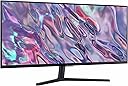
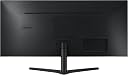
🚀 Elevate your workspace with ultra-wide clarity and silky smooth visuals!
The Samsung 34" ViewFinity S50GC monitor features an ultra-wide 3440x1440 Ultra-WQHD display with a 21:9 aspect ratio, 100Hz refresh rate, and AMD FreeSync for smooth, tear-free visuals. HDR10 support delivers over a billion colors for stunning image depth. Designed with TUV-certified Intelligent Eye Care technology, it automatically adjusts brightness and reduces blue light to minimize eye strain. Dual HDMI and DisplayPort inputs support PIP and PBP multitasking modes, all housed in a sleek, nearly borderless design ideal for professional and creative workflows.


| ASIN | B0C1KPXPM9 |
| Adaptive Sync | FreeSync |
| Additional Features | AMD FreeSync, Borderless Design, Eco Saving Plus, High Dynamic Range, TUV-certified Intelligent Eye Care |
| Aspect Ratio | 21:9 |
| Best Sellers Rank | #3,504 in Electronics ( See Top 100 in Electronics ) #141 in Computer Monitors |
| Brand | Samsung |
| Brightness | 300 cd |
| Color | Black |
| Color Gamut | 72 |
| Compatible Devices | Desktop |
| Connectivity Technology | DisplayPort, HDMI, Headphone |
| Contrast Ratio | 3000:1 |
| Customer Reviews | 4.4 out of 5 stars 1,085 Reviews |
| Display Resolution Maximum | 3440 x 1440 pixels |
| Display Technology | LCD |
| Display Type | LCD |
| Hardware Connectivity | DisplayPort, HDMI |
| Image Contrast Ratio | 3000:1 |
| Included Components | DisplayPort Cable, HDMI Cable, Power Cable |
| Item Dimensions D x W x H | 8.7"D x 32.1"W x 18"H |
| Item Type Name | Monitors |
| Item Weight | 10.8 pounds |
| Manufacturer | Samsung Electronics |
| Model Name | FBASAMLS34C502GAN |
| Model Number | FBASAMLS34C502GAN |
| Mounting Type | Wall Mount |
| Native Resolution | 3440x1440 |
| Number of Component Outputs | 3 |
| Picture Quality Enhancement Technology | AMD FreeSync, TUV-certified Intelligent Eye Care |
| Power Consumption | 50 watts |
| Refresh Rate | 100 hertz |
| Resolution | QHD Wide 1440p |
| Response Time | 5 milliseconds |
| Screen Finish | Matte |
| Screen Size | 34 inches |
| Screen Surface Description | Matte |
| Specific Uses For Product | Desktop, Gaming, Photo Video Editing |
| Total Number of HDMI Ports | 2 |
| Total Usb Ports | 1 |
| UPC | 887276724881 |
| Unit Count | 1 Count |
| Viewing Angle | 178 degrees |
| Voltage | 110 volts |
| Warranty Description | 1 Year Manufacturer |
| Warranty Type | 1 Year Manufacturer Warranty |
J**R
Large screen, nice options, good price.
I'm upgrading from an LG 24" Ultrawide which was 2560 x 1080 resolution. This 34" Samsung is a nice 3440 x 1440 resolution gives me far more visible landscape for working on a variety of tasks. I do various things from Audio mixing to office work to video editing. This is a good enough monitor for me. No gaming. Now for Prime Day the price is very nice at just over 200. Well worth it for such a large monitor. I know it is not OLED or micro-LED but it works great for me.
M**O
Great monitor, must look at it head on
This is my first widescreen monitor. I have 27" wqhd monitors and a 32" 4k, and this one is just wide enough without the text being too small to see. It's a VA panel, so you have to sit right in front of it. It's now flanked by two wqhd 27s in a nice wraparound configuration. Having VA code on the ultra wide is very convenient. I did have to turn dark mode on, because there wasn't quite enough contrast for text on the monitor for my taste. Got it from resale and it was basically new, so what a great deal!
R**R
Amazing!
This thing is amazing! A very wide, crystal clear, brilliant picture. It is like having two monitors side by side with only one connection and you can't go wrong with the Samsung brand.
B**N
Solid Ultrawide for Work and Casual Gaming
Setting up this 34 inch ultrawide completely transformed how I multitask during the workday. Having that extra screen real estate without needing a dual monitor clutter on my desk is a game changer, especially when running spreadsheets next to browser windows. The picture quality is crisp, colors look vivid right out of the box, and the 100Hz refresh rate makes scrolling through long documents feel super smooth. Picture in picture mode also works surprisingly well when I need to connect a secondary laptop for work tasks. There are a few trade offs to keep in mind before buying. The built in stand lacks height adjustment, so I ended up mounting it on a VESA arm to get the ergonomic angle right. Color accuracy shifts a bit if you look at it from sharp side angles, and the HDR performance is pretty basic compared to dedicated high end displays. Still, for everyday productivity and casual evening gaming, it delivers awesome overall performance for the price tag. Solid 4 star.
I**2
Amazing picture
The best screen
M**L
Can't go wrong for the money
I bought this to replace an aging WQHD/IPS monitor that -- I think -- was one of the first of such to come out, over ten years ago. It is honestly still a great monitor but I wanted an ultra-wide for work. It surprised me that flat IPS monitors in ultra-wide format are really just not even a thing. If you want ultra-wide and flat, VA is your display technology. So I was a little worried about that to some degree, but pulled the trigger on this, anyway. It's one of the few high-quality, ultra-wide monitors available, and after doing a lot of investigation had decided I definitely did not want curved. Have to say that I'm very pleased. The clarity of this monitor is as good or better than the IPS monitor had been. And I do love the additional screen real-estate. For basic work it's perfect. I honestly have no complaints at all, especially given the price I paid. Just a couple things to note. I'm not a fan of the multiple clicks required on the control toggle to switch sources. I have three laptops hooked up to it and it's a pain to switch. I really wish they would just put a physical toggle on these things that would allow for truly fast switching. The stand that the monitor comes with puts it a little too high -- IMO -- for comfortable typing at normal desk level. I purchased a separate swing-arm stand for it and now it's perfect. Would definitely recommend as a basic monitor.
M**T
Very nice VA panel for the price!
Been using this monitor for a while and the screen quality and response time of the VA pixels are much better than you’d think for a monitor at this price. The 100hz refresh rate actually looks like 100hz, and on a VA panel, this is impressive. It handles all my open windows well too as I hoped for, so that’s great. I do love how an ultrawide monitor adds a TON of emersion when playing games and watching content. First thing I did when I powered on the monitor on my PC was load up the second season of The Rings of Power, which felt somewhat small on my 16:9 32” 4k monitor that I have, but only because it is recorded as an ultra-wide, so when on this monitor it filled it corner to corner, giving me a FULL-screen ultra-wide 34”. Watching ultra wide content on this thing makes it feel actually a bigger image than on a standard 16:9 43” display to be honest, or at least the same. And when playing video games, the extra FOV is pretty nice for the emersion. The monitor does show the regular drawbacks of a VA panel though, especially with penning over darker colors on a bright background, or visa-versa, you do still get the smear-y look, but as a VA panel that it is, the monitor really makes up for it with the 100hz refresh rate and a good response time (with FreeSync support — dunno about G-Sync though I haven’t tried) to mitigate this. The colors are nothing to write home about, and the display lacks HDR, however, they are 10-bit and is seamlessly recognized by windows. So, that’s strange, it must be an 8-bit+FRC then, regardless, if you set the gamma, color, contrast/brightness settings right, it really does look like an HDR panel minus the brightness levels of course. But, in regular use, it does get very very bright still on the desk, I haven’t ever used it past 50-60% brightness, normally having it at around 30% or so with no issues seeing anything. The stand it comes with is a bit cumbersome (albeit not as bad as a lot of other monitor stands), so I would recommend putting it on a monitor arm though. Don’t bother getting a monitor with a higher refresh rate. 100hz at 1440p ultrawide (4k length x 1440p width), you are effectively pushing nearly the same amount of pixels as a 4k monitor, and you won’t ever get, let’s be real here, more than 100fps in almost all your games at 4k (I am using an AMD RX 6800XT), so the 100hz is more than sufficient for this. You’d benefit from a higher refresh rate for just general tasks around windows, but for games and content it is plenty. Oh, and when viewing 16:9 content or other aspect ratios, it’s still pretty good, it’ll just have the same resolution as a non-wide screen 27” monitor with black bars on the sides. But that brings me to my last couple points, the monitor recognizing different resolutions is automatic and scales very nicely, which I haven’t had good luck with with other monitors in this price range. For example, plugging in my nintendo switch, and the display automatically scales for 1080p, which is pretty convenient (just make sure you turn off FreeSync for that…yeah that’s really dumb). Then you also have the PiP mode, which is great if you want a couple different sources you want to reference at the same time on the same screen. Would’ve been nice though to be able to set the sources side by side or something and have it properly adjust the aspect ratio…the PiP is a bit janky to be frank, albeit still works well, just keep that in mind.
D**C
Looks big, but the low resolution ruins it
I found this monitor very disappointing. At 32 inches, I expected a much sharper and more impressive display, but being limited to only HD 1080P at this size makes it look dated and underwhelming. The screen is simply too large for that low resolution, so the image does not look nearly as crisp as it should. That is really the core problem here. A monitor this size should offer a much higher resolution, and in today’s market it feels ridiculous that it does not. Instead of feeling like an upgrade, it comes across more like a step backward, especially if you are used to sharper screens. The large size may look appealing at first, but to me it ends up being more of a negative because the lack of detail becomes even more noticeable. Rather than feeling spacious and high quality, it feels like a big screen with too little clarity. Overall, I found this to be a waste of money. The monitor may be acceptable for very basic use, but for a 32-inch display in 2024, only offering 1080P is a major disappointment and makes the whole product feel outdated.
N**N
excelente para productividad
gran monitor, ya que pruebas un ultrawide no hay vuelta atras. mas que sobrado para el home office y con el respaldo de una marca como samsung!
J**A
Cumple con el proposito
Muy buen monitor a buen precio
S**O
Excelente monitor
Muy buen monitor, lo uso para programación así que me queda perfecto cuando divido la pantalla en tres
E**A
No lo recomiendo
Se devolvió y sigue sin resolverse el reembolso, estafa
I**K
Buena calidad
Buena calidad
Trustpilot
2 months ago
1 month ago