Desertcart purchases this item on your behalf and handles shipping, customs, and support to USA.
๐ Elevate your workstation โ power, speed, and clarity in one sleek dock!
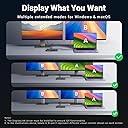
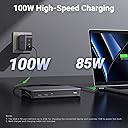
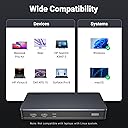
The UGREEN 9-Port Laptop Docking Station delivers dual 4K@60Hz display support via HDMI and DisplayPort, 100W USB-C Power Delivery for fast charging, and three 10Gbps USB-A/C ports for rapid data transfer. Compatible with both MacOS and Windows, itโs designed for professionals seeking a compact, high-performance hub to streamline connectivity and boost productivity. Note: Requires DisplayLink driver installation and separate power adapter.


| ASIN | B0BLNCNCMZ |
| Best Sellers Rank | 5,030 in Computers & Accessories ( See Top 100 in Computers & Accessories ) 38 in Docking Stations |
| Brand | UGREEN |
| Brand Name | UGREEN |
| Colour | Black |
| Compatible Devices | Card Readers, Keyboards, Laptops, Monitors, USB Flash Drives |
| Compatible devices | Card Readers, Keyboards, Laptops, Monitors, USB Flash Drives |
| Country of Origin | China |
| Customer Reviews | 4.3 out of 5 stars 908 Reviews |
| Global Trade Identification Number | 06957303899128 |
| Hardware Interface | USB 3.2 Gen 2 |
| Hardware interface | USB 3.2 Gen 2 |
| Item Dimensions L x W x H | 16.6L x 8W x 2.3H centimetres |
| Item Weight | 510 Grams |
| Manufacturer | Ugreen Group Limited |
| Manufacturer Part Number | 90912 |
| Model Number | 90912 |
| Number of Ports | 9 |
| Product dimensions | 16.6L x 8W x 2.3H centimetres |
| Total HDMI Port | 2 |
| Total USB Ports | 4 |
| Total USB ports | 4 |
| Unit Count | 1.0 count |
| Wattage | 100 watts |
J**S
DiplayLink is great, if you remain within its boundaries
Having used DisplayLink docks for years, I find them highly reliable for business, though they do have notable limitations. This unit functions similarly to standard ThinkPad docks, but you must supply your own power supply (a USB-C PD adapter is highly recommended for stability). It also features a great selection of front and rear ports for easy peripheral access. While the required DisplayLink software makes extending to two extra screens seamless, the "screen recording" compression method means picture quality takes a hit. Text isn't perfectly crisp, colours are slightly off, and fast motion can be choppy. Additionally, HDCP restrictions mean you can't watch copy-protected content like Netflix. Iโve since upgraded to a Thunderbolt 4 dock, which is far superior for my needsโdelivering power, data, and Ethernet over a single cable without any visual compromises. That said, it feels wrong to dock a star for this product; it does exactly what it's supposed to do. Itโs just that DisplayLink technology itself is starting to feel a bit ancient.
A**L
A really great dock for Mac users
This dock is great, it does exactly what it says it does and it works with both my work provided MacBook Air (M1) and my personal MacBook Pro (M3 Pro) and allows me to use two external monitors with the MacBook closed. I do have some issues with it though, but these arenโt big enough to stop me using the dock. The dock shows up in finder and desktop all the time as itโs for two files stored on the dock that links you to the required software for display link for Mac and windows. Itโs easy to ignore, but I wish this was listed in the product page as it took me a while to recognise what this new random drive was. It also shows up as an available microphone on Microsoft teams, but it has no mic built in so not sure why this happens. Apple then being apple will keep displaying the purple screen sharing icon in the taskbar, which Iโll be honest is super annoying when I remember itโs there, but this isnโt ugreens fault, itโs apples. The dock itself doesnโt get that hot and the size of it is perfect, itโs not too big so doesnโt take up lots of room and fits perfectly at the back of my desk. Overall, compared to other docks on the market this one is great value for money, itโs a great build quality and an all round great dock.
B**6
No support for Samsung Dex - Disappointing for price
I purchased this dock, and itโs excellent in terms of sleek, compact design and functionalityโit does exactly what it promises. However, I have two concerns. First, it doesnโt support Samsung DeX, which is disappointing considering the price. For a similar cost, I could choose a Dell dock or another brand that offers DeX compatibility. Second, it has an automatic feature that mounts a USB local disk with drivers. While this might be convenient for personal use, itโs a hassle on my work laptop, which has strict security policies that block external USB drives. The constant mounting and unmounting creates issues, and there should be an option to disable this feature.
L**P
Brilliant without a DisplayLink it works perfectly
I bought the UGREEN 9-Port Laptop Docking Station for my wifeโs setup because her laptop lacked a USB-C port for video output (had one but for data only). Itโs been working perfectlyโsmooth dual 4K@60Hz, fast 100W PD charging, and all the extra ports we need. Highly reliable and hassle-free!
A**R
Perfect for extending to 3 screens on my MacBook
Highly recommend. Excellent quality, UGreen is a go to brand for me when buying IT hardware. It does exactly what I needed with no fuss. Extends my MacBook to 3 screens. I did my research and bought this one because it automatically has the driver you need to install. Or the link at least.
E**F
Best docking station I have used
I have been using this Dock for a while now. It has all the ports you need for connectivity and the monitor output at 2x4K/60Hz is fast enough for work use. I use it with my work PC and Home laptop connected to a dual monitor setup. USB2 ports for Mouse & Keyboard plus Dual HDMI or DisplayPort monitors with a USB3 (usb-c) input port for memory sticks and the like. This unit itself is a nice design and the build feels solid. It is good value for money
L**N
Dodgy Workaround and Poor Performance: A Disappointing Experience with UGREEN Revodok Pro 209
TL;DR: This dock has sub-par user experience, requires third-party software, impacts CPU performance, shows incorrect high refresh rate capabilities, has laggy video output and fails to support HDCP-protected content like Netflix and Amazon Prime. -- I purchased this dock to use with my M1 Pro MacBook because I had purchased UGREEN products in the past and found the price reasonable. Upon receiving the unit, I discovered that the four video ports (2x DP, 2x HDMI) are not independent. Instead, they are grouped into two outputs, each combining one HDMI and one DisplayPort. This raised alarm bells in my mind. After connecting my laptop to the dock, I noticed there was no video output. I then found an external drive on my desktop with links to "MacOS Drivers." This is where the dockโs user experience falters significantly. To get the displays to work, you need to install third-party software called "DisplayLink Manager" which asks for permissions to record your screen any time the dock is plugged in. This dock doesn't function in a conventional way; it uses screen recording to transmit video to the monitors. This process involves encoding, transmitting, and decoding video, which puts a significant load on the CPU. On my M1 MacBook Air, I observed 40% CPU usage with two displays connected: one at 1440p 144hz and the other at 1080p 60Hz. Another issue is the refresh rates. While the display settings may show 1440p at 144Hz, etc the encoding and decoding method introduces high latency and the actual display is not running at 144fps and is most likely at 60fps which also often stutters and has graphical glitches like weird gradients on glass like elements of applications. Anyone who understands display technology and how bandwidth limitations work knows that if a product advertises "4K 60hz" it will also work at higher refresh rates for lower resolutions like 1440p and 1080p, I have no doubt the claim of "4K 60hz" is purposely obfuscated in their marketing so that people will buy this product and naturally expect the dock to output those higher refresh rates. Any sort of gaming that you might want to do on this dock will be completely ruined by high latency and stuttering. The final problem is related to HDCP (High-bandwidth Digital Content Protection). Modern displays and computers use HDCP to prevent video content from being displayed if screen capture is detected. This means you can't watch Netflix, Apple TV, Amazon Prime, Blu-rays, or any other protected content while using this dock, as it thinks you are recording the content. Finding a workaround for this issue is a hassle within itself.. Overall, this dock has an atrocious user experience, sucks power and CPU usage from your machine, doesn't support high refresh rate at all and stops you from watching any protected content. I would steer clear of this dock unless you are only planning to use this for light office applications and spend the extra on thunderbolt docks like those from CalDigit. I understand these are significant jumps in price and if you just want a way to extend your displays i'd still suggest looking at anything other than this as there are significant potential security risks with having your screen recorded at all times by closed source software.
D**N
Didn't Arrive
Didn't arrive with all the other items I ordered for it to work. Usually all Ugreen stuff I get is amazing. Wish I could have received so got to review properly
T**H
Baลarฤฑlฤฑ รผrรผn
UGREEN markasฤฑnฤฑn neredeyse tรผm รผrรผnlerini kullanmaktayฤฑm bu รผrรผnde beni yanฤฑltmadฤฑ gayet baลarฤฑlฤฑ bir รผrรผn yazฤฑlฤฑm kullanarak monitรถrรผ extend etmesi bir sorun teลkil etmez kafanฤฑzda soru iลareti kalmasฤฑn gayet stabil รงalฤฑลฤฑyor tavsiye ederim.
R**H
PERFECTO
Me ha solucionado perfectamente poner dos pantallas a mi Apple M1 y con salida de 10 g para disco duro. Botones de encendido y carga a la vez el ordenador. Material de aluminio y perfecto. Espero que dure tiempo
R**L
Very good for two high screens and lots of harddrives
It was simple to install. Works instantly. Absolutely hazzle free.
A**A
Excellent displaylink dock. Works great with M1 Macbook Pro
I have an M1 Macbook pro ( the one with the ill fated touch bar) and while I love it for most use cases, it has the annoying limitiation of only supporting one external monitor. Fortunately DisplayLink software comes to the rescue and allows me to plug in up to three monitors with a DisplayLink dock. I had bought another brand dock before and this Ugreen dock was to replace it after it burned out. I couldn't be happier and this feels like a huge upgrade. My other dock didn't support full 4K resolution on output and the ports were also not as good. This one has all multiple USB C ports and a dedicated USB C for powering my mac so I really don't lose any conectity by using this on one of my ports.
T**P
Great addition to all Mac users
Very happy with this product. Allow Mac to have 2 Monitors, stable Ethernet connection
Trustpilot
1 month ago
1 month ago