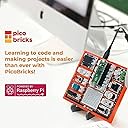
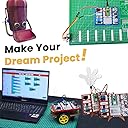
🚀 Unlock your inner innovator with PicoBricks — where coding meets creativity!
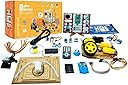
The PicoBricks Raspberry Pi Pico W Starter Kit is a 26-piece DIY electronics kit featuring the latest WiFi-enabled Raspberry Pi Pico W microcontroller, 12 sensors, and a remote control. It includes a 234-page printed tutorial and 25 project videos designed for beginners and educators to learn coding and electronics without soldering. This versatile kit supports rapid prototyping and smart home automation projects, making it an ideal STEM learning tool for all skill levels.


| ASIN | B0BMGL64N9 |
| Best Sellers Rank | #269,734 in Toys & Games ( See Top 100 in Toys & Games ) #2,678 in Educational Science Kits |
| Brand | Picobricks |
| Customer Reviews | 4.0 4.0 out of 5 stars (97) |
| Date First Available | November 16, 2022 |
| Item Weight | 2.57 pounds |
| Manufacturer | Robotistan |
| Number of Processors | 1 |
| Operating System | MicroPython |
| Package Dimensions | 11.1 x 6.57 x 4.69 inches |
| Processor Brand | ARM |
| RAM | SRAM |
| Series | PicoBricks |
| Wireless Type | 802.11b/g |
S**A
Overall excellent!
The product arrived quickly and was nicely packaged in a small box. Initially, I was hesitant about purchasing it, but I'm glad I did. It contains all the circuits I wanted, including WiFi, sound, buttons, LEDs, and sensors, and they even included a remote control. If you don't want to deal with cables or connections, this is the perfect option. It also comes with an integrated screen and a Raspberry Pi Pico card, and all the boards can be separated and additional cards can be added. The box also includes a USB cable and connection cables. The remote control is fantastic.... There is also a quick start guide included in the box, and you can also scan a QR code to view it online. I tried a few of the pre-made codes, and they work great. Overall, it's a simple and effective Raspberry product. There are three different packages available, and I purchased the base kit. I'm looking forward to getting the largest set next week. The included remote control is amazing, and I can control it from a distance. I combined it with my smart lamp, and now I can automatically control the lights when I enter the room or get into bed. I'm turning my house into a smart home just the way I want it. Thanks.
R**O
It is probably the best Raspberry pico based kit for kids
I just received the kit and I was impressed by everything in it. It comes with the latest Pico (Pico W) which means you will be able to build projects that leverage a wifi connection (and possibly Bluetooth). I was worried that this kit would come with the older Pico and I am so glad it came with the Pico-W The other thing that I really like is that it comes with a getting started printed book. I found with other kits that come with an e-book, for young kids it's hard to follow along. I think a printed book will ease them into this topic and once they understand the instructions in a printed book, they will be able to make an easier transition to online content. The full ebook for this kit is awesome and has some fun exercises and is available as a link from the seller. I will keep updating my review as I use this kit to introduce microcontrollers and python to my kids.
A**R
Picobricks
Don’t buy it . Picobricks don’t work. The library is messed up. Got no help.
B**S
Awesome Bit of Kit
I love Picobricks. I used them as learning tools for my programming class. It came exactly as described and in excellent condition. Would and will buy again.
S**S
Good place to start
Quality was great . Size was good. Cost was fair. I agree that the product is okay for the listed age range. I would buy for a kid. But depending on the adults motivation in science????
C**S
Perfect kit to share between adults and kids
I first became aware of PicoBricks after reading a review of MicroBlocks education focused programming tool and saw PicoBricks were a supported platform. After a visit to PicoBricks web page, I was most impressed with their documentation and how each project gives example code using MicroBlocks, MicroPython, and Arduino IDE so kids can repeat the projects and gain even deeper understanding of programming over time. Their documentation is the real value add compared to one of those cheaper kits that include a Pico and random assortment of components and wires and minimum documentation thats not really geared towards kids. There are a lot of projects included with this kit and its going to last much longer then a single weekend of usage. I also really appreciate that it comes with a test application pre-installed on the board that allows you to quickly verify that almost every component is working. Since its going to take a while to get to all the projects, its nice knowing the needing parts will be in working order once we get to them. I plan to use the kit myself for prototyping my own Pico projects as well. Who wants to mess around with wires if you don't really need to? One final note of interest. They appear to have released a revision 1.1 of the board but haven't updated the pictures or description and that is the version I was sent. This version ships with a Pico W (built in wifi) and replaces the external wifi connector with an IR sensor and remote control. This remote is a big part of what allows you to quickly test all the components with that test application.
R**E
Good board, example code needs work
I bought the main board. It does not come with a Pico W. I downloaded the Micropython software files from Github. Some of the code examples are creative, but almost none of it runs without fixing errors. The user shouldn't have to fix the code.
I**E
Perfect for the Noob
This is the perfect starting point for getting into microprocessors and IoT devices. This is going to be a lot of fun for anyone at any level.
S**E
Great to learn concepts of electronics and programming with kids. If you are unsure if this is for you, you can "simulate" the product on their website, even without the device. At the time of writing, find the link "Go IDE" and then "SIMULATOR". This gives you a virtual output of the actions in the browser as opposed to the device. There is also a Junior IDE with a limited set of simpler to use building blocks for smaller children. Works with 3+ years old. While PICOBLOCKY is suited for older children, and you can even inspect or write code straight in the Python programming language, which can be seen as the final way to interact with the devices. F NOTE: It only worked with Chrome browser as opposed to Firefox for us. A very productive toy that can entertain kids and parents of all ages.
R**W
Bought for my 13 year old step son (his Christmas list) Searched so many different kits that would be suitable for a beginner teen and this is great. He's super happy with it
G**N
They invest a lot in marketing but most website and ebook codes are incorrect. Link to git hub not working. Forget the support
A**R
South this for my godson(10years old) as he is bored with the school coding program. He jumped in with it and was loving that he could actually see stuff happing from a light coming on to a buzzer going off. The instructions are simple and the projects fun. Well worth it. Feels like scratch which aloud him to jump straight into the projects with only a little bit of playing around in the UI.
H**O
The actual components are very good, but the website and ebook have lots of broken links and incorrect code examples. Support for the issues is poor or non existent from the company. Luckily the maker community is amazing and helpful. I wouldn't recommend for kids unless their parent or teacher are experts.
Trustpilot
5 days ago
1 week ago