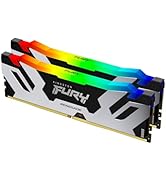
🚀 Upgrade your laptop’s brainpower with Kingston FURY Impact DDR5 — speed, power, and stability in one sleek kit!
Kingston FURY Impact 64GB (2x32GB) DDR5 SODIMM kit delivers cutting-edge 5600MT/s speed with Intel XMP 3.0 certified Plug N Play overclocking. Operating at an efficient 1.1V with On-Die ECC for enhanced stability, this compact memory upgrade is perfect for professionals and gamers seeking powerful, reliable performance in laptops and small form factor PCs.


| ASIN | B0BRTJT5P2 |
| Batteries | 1 AAAA batteries required. |
| Best Sellers Rank | #179 in Computer Memory |
| Brand | Kingston |
| Color | Black |
| Computer Memory Type | DDR5 SDRAM |
| Customer Reviews | 4.8 4.8 out of 5 stars (1,050) |
| Date First Available | January 9, 2023 |
| Hard Drive | 64 GB Hard disc |
| Hard Drive Interface | eSATA |
| Hard Drive Rotational Speed | 7200 RPM |
| Hardware Platform | standard |
| Item Dimensions LxWxH | 2.74 x 0.15 x 1.18 inches |
| Item Weight | 0.537 ounces |
| Item model number | KF556S40IBK2-64 |
| Language | English |
| Manufacturer | Kingston Technology Company, Inc |
| Memory Speed | 5600 MHz |
| Product Dimensions | 2.74 x 0.15 x 1.18 inches |
| RAM | 32 GB DDR5 |
| Series | FURY Impact |
| Voltage | 1.1 Volts |
W**F
Top notch, great quality, no sacrifices.
Top quality, quick and easy installation. The system recognized it immediately, picked up on the settings/timing in my Omen 16 Max, and runs like a dream. Of note, after installing, it may take 45-60 seconds for the PC to post for the first time, so if it doesn't boot immediately, you may just need to give it a little time to run it's checks and balances. After the first boot, it's smooth sailing. Great price/value for the quality. Now my system laughs at games or whatever I want to throw at it.
S**K
Perfect Upgrade
I had 32gb (2x16gb) in my beelink mini. I'm running nested virtualized labs to get caught up on learning stuff. I was constantly choking my system because 32gb just isn't enough. I got this 64gb in there and I can run everything all at the same time. No more waiting. No more turning off one VM so I can bring up another. This memory was exactly what i needed. Same specs as my old memory too. Just twice as much of it.
S**S
Great value + fast shipping
This product came in quickly and was packaged really well. Everything feels sturdy and not cheap at all. Setup was simple and it worked right away without any problems. I’ve used it multiple times already and it’s been consistent every time. Great value for the price and I’d definitely buy again.
S**M
Great memory. Has been stable for a month in new laptop.
Summary: I don't think you can go wrong with this memory. Using in Dell XPS 17 9730. Pros: Fast, Reliable Cons: A little pricey, hard to get at this time in the US for some reason Detail: As anyone who is somewhat technically savvy knows when you buy a new laptop the manufacturers always overcharge for memory. I find it's always much cheaper to buy the lowest amount you can for the laptop you can and replace with new memory right away. You can literally throw the OEM memory away and buy new and same $100 or more in the process. In this case I also went from 4800 to 5200 speed as well. Why did it not register at 5600 like advertised you ask? This is not Kingston's fault. In my case it's because there is a known issue with Intel chipsets at 64GB of memory. I knew this before buying and only expected to get 5200. Not sure if AMD has this issue as well, but a lot of Intel based systems do, even the top of the line Alienware 18 as of the time of this review. Reseller: I purchased this item from a reseller out of Texas who had a lot of negative reviews, most which Amazon defended due to manufacturer/supply chain issues. My delivery was a few days late, but did make it. I was kind of expecting this ahead of time. I found in my research that this memory isn't common and the reseller probably had to work overtime to get it from Kingston. My guess is that it had to be imported. If you find this review and are looking at the same reseller for this product, know that I believe he/she/they are truly trying to do a good job but are in some cases selling products like this that are often hard to get and that is why their reviews aren't all 5-star.
C**.
Great RAM, fast speeds
Works great in my HP Victus 15-fb2082wm. I went from 1/8th of my laptops RAM cap to 1/2 it's max capacity. This is a temporary ram upgrade for me but the dual 16GB Kingston Fury Impact cards are working good... At least until I can afford to purchase some dual 32GB cards of theirs later on so I can reach my laptops max RAM capacity.
C**N
High-Performance RAM for AMD Systems: Quick, Compatible, and Reasonably Priced
TL;DR: Successful installation in AMD system despite XMP label, fast performance, ECC compatibility, good price for its speed class. Initially, I was apprehensive about purchasing this RAM due to its "XMP certified" label, typically associated with Intel technologies, as I planned to use it in an AMD-powered Framework laptop. However, my concerns were unfounded as it worked flawlessly in my AMD system. The first boot-up post-installation took less than two minutes, and since then, it's been running at impressive speeds. My laptop's mainboard doesn't support ECC (Error Correction Code), so I can't attest to the effectiveness of this feature in the RAM. Nonetheless, it's compatible with systems that don't have error correction support, which is a plus. Finding 5600 CL40 RAM is a challenge, and this product stands out in that regard. In terms of value for money, I rated it 4 out of 5 stars. While top-tier performance products like this aren't typically about value but rather about peak performance, there are cheaper alternatives for acquiring a similar amount of RAM. Yet, for its speed class, this RAM is competitively priced, earning it high marks in that aspect.
L**Y
Worked fine
Worked out of the box in my lenovo laptop.
A**R
Great performance at the cost extra Heat
Purchased these ram sticks for a firebat mini pc. The performance is stellar. The one downside is it seems to throttle due to overheating in ps2 emulation. I was able to solve that by getting copper heat shields that fit these smaller sodimms along with a smaller second fan. The trade off is i have to keep the top cover off the mini pc case becausethe fan doesn't fit the case it'stoo large. Back to the ram it's supposedly only 1.1v which is a slight increase from 1.0v of the other ram that came pre-installed with the computer. Very surprised that just a little bit in voltage can cause so much more heat... For comparison the slower ram that came with the pc never throttles at all. The great performance is as advertised but the heat should be a consideration for anyone looking to get a mini pc ram upgrade. Buyer beware just my two cents.
G**G
Super produit, compatible avec pc portable Lenovo Légion 5 Slim 16ARP9. Montage aisé.
S**3
Kingston quality, they just work!
R**O
crazy good fast ram
P**M
I recently installed the Kingston FURY Impact DDR5 5600MHz CL40 SODIMM in my laptop, and the performance boost is impressive. Despite being compact, this module delivers high speed and low latency, ideal for gaming and multitasking on portable systems. The CL40 timing ensures fast data access, and I noticed smoother app launches and better responsiveness. Installation was plug-and-play, with Intel XMP 3.0 support working flawlessly. Build quality is solid, and Kingston’s reliability gives me confidence for long-term use. Temperatures stay cool even under heavy workloads. It’s a great way to future-proof a laptop without breaking the bank. Perfect for creators, gamers, or power users on the go. Highly recommended for DDR5 laptop upgrades! A smart investment in portable performance.
P**T
Mit diesen Blöcken habe ich die 16 GB RAM in meinem Lenovo Legion Pro 5i 16" auf 64 GB erweitert. Beim Kauf hatte Lenovo für 200 € Aufpreis 32 GB RAM angeboten gehabt, was mir nicht attraktiv erschien, und was ich deshalb auch nicht gemacht habe. Nun habe ich fürs gleiche Geld 64 GB RAM bekommen. Der Einbau ist kinderleicht und hat nicht mal 10 min gedauert. Es gibt eine hervorragende Anleitung von XDA-Developers, "How to upgrade RAM in Lenovo's Legion Pro 5 and 5i (2023)". Aber auch ohne Anleitung kein Problem. Schrauben lösen, Rückwand ab, Alumuniumgehäuse über RAM anziehen, je 2 seitliche Klammern an den RAM-Bausteinen lösen, alten RAM herausnehmen, neuen RAM einsetzen, alles wieder zusammensetzen. Keinen Wollpulli tragen, kein Wollteppich, keine Reibung mit Gegenständen, vorher Schutzleiter berühren. Der neue RAM hat auf Anhieb funktioniert und wird im System korrekt angezeigt. Ich bin sehr zufrieden.
Trustpilot
1 month ago
2 months ago