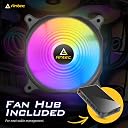
🌈 Light Up Your Build with AntecRGB Fans!
The AntecRGB Fans pack a punch with five 120mm addressable RGB fans designed for superior airflow and minimal noise. With a sync-ready feature compatible with major motherboard brands, these fans not only enhance cooling efficiency but also elevate your PC's aesthetic. The package includes a control hub and remote for easy customization, making it a must-have for any gaming or professional setup.
| ASIN | B0BRMTSPRK |
| Air Flow Capacity | 42.8 Cubic Feet Per Minute |
| Best Sellers Rank | #160,537 in Computers ( See Top 100 in Computers ) #1,485 in Computer Case Fans |
| Brand | Antec |
| Brand Name | Antec |
| Compatible Devices | Desktop |
| Compatible devices | Desktop |
| Customer Reviews | 4.1 out of 5 stars 68 Reviews |
| Item Dimensions L x W x H | 12L x 2.5W x 12H centimeters |
| Manufacturer | Antec |
| Material Type | Polycarbonate |
| Maximum Rotational Speed | 1500 RPM |
| Model | AMGRCFF12R-120ARGB5F |
| Noise Level | 26.7 Decibels |
| Noise level | 26.7 Decibels |
| Part Number | AMGRCFF12R-120ARGB5F |
| Power Connector Type | 3-Pin |
| Power connector type | 3-Pin |
| Product dimensions | 12L x 2.5W x 12H centimeters |
| UPC | 761345777346 |
| Unit Count | 5.0 Count |
| Voltage | 12 Volts (DC) |
J**S
Easy to install (even for computer illiterates like me)
I don't understand anything about the inner-workings of a pc. I probably shouldn't even *own* a pc if truth be told. But my fans went out and it was overheating, so I ordered these. I assumed it would be set up exactly like the stock ones. I spent a lot of time carefully tracing cords and cables and labeling them all as I removed the old fans, only to find out that these new ones did not connect *at all* like the old ones. Panic set in. With some deep breaths and careful examination I realized these fans were actually much simpler than the old ones and once I pulled out the rest of my meticulously-labelled cords, I got them hooked up just fine. All by myself. I didn't even have to use YouTube. And these work great, by the way. The rgb is gorgeous and they spin really well and keep the pc nice and cool. They're quiet too! So basically: just believe in yourself. You can do it! Even if you're dumb, like me <3
R**C
Quiet and dependable
I have built a number of rigs using this brand and so far they have come through every build. I like the balance of price to features and of course how much air they move without a lot of noise. Still the quietest fans I have used in this price range.
T**J
Great budget ARGB fans!
So I’m new to the gaming PC world but I’m a pretty tech savvy type of guy. I know how to do basic wiring and such. The install was pretty simple besides the nest of wires that end up as a result. That was solved with zip ties. The airflow is much much better than what I had and it was keeping my GPU and CPU temps down 5-10°C cooler than before. Still testing the results to see how much they actually help in the long run. I did get the ARGB and PWM so I can wiring them into my motherboard and let them communicate. I really wish it would have came with some instructions though. I was able to figure it out but someone who isn’t well versed or doesn’t know the basics may have a hard time. The fans work well with different RGB software, so test which one you like the best. The fans seems to be made out of durable plastic that will last a long time. My computer was reading the fan RPM’s at almost 1600-1700 so they will cool things down for sure. 4 stars was just due to packaging and lack of installation instructions.
I**L
Awesome quality fans! They push air really well too.
These fans are great and for a great price. I've been using Antec fans for 2 years now throughout several PC builds with no issue. They have great color for their rgb and the included hub helps a lot when you don't have enough rgb headers on your board!
T**N
Nice fans and lights but no instructions!
The fans work well and look fantastic, but there were no instructions for installation and operation. I am guessing what I received was an older model, since all videos show a different controller than the one I received with the fans. It also contained a remote control device (pictured), but there was no guidance as to what certain buttons (S+, S-, M+, M-, and lighting buttons beside them) are for. Guidance for installation and operation would have been helpful, even if it was a website link. With this being my first computer build, I am excited about having the light show, but it would be nice to know how to control the lighting. Please make things easier for first timers by including guidance.
Trustpilot
2 weeks ago
1 month ago