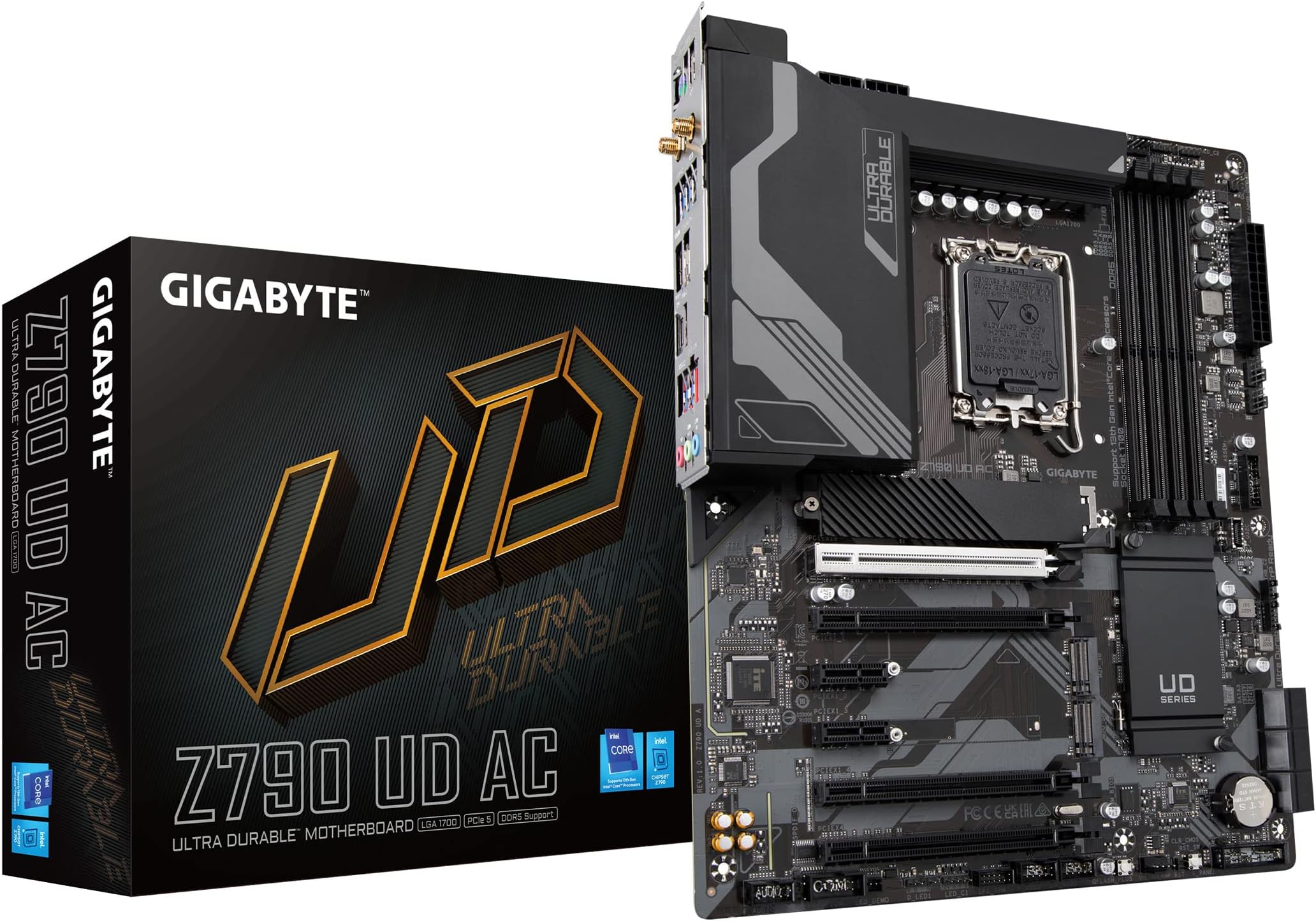
🚀 Power Your Next-Level Build with GIGABYTE Z790 UD AC – Where Speed Meets Style!
The GIGABYTE Z790 UD AC motherboard supports 12th and 13th Gen Intel Core processors with an LGA 1700 socket, featuring DDR5 memory compatibility up to 192GB at 4400 MHz. It boasts a robust 16+1+1 power phase design with 60A DrMOS for stable performance, advanced thermal solutions including MOSFET heatsinks and M.2 Thermal Guard, and next-gen connectivity with PCIe 5.0, triple NVMe M.2 slots, USB 3.2 Gen2x2 Type-C, 2.5GbE LAN, and Intel Wi-Fi. Additional features include Smart Fan 6 cooling, RGB Fusion 2.0 lighting control, and Q-Flash Plus BIOS updates, making it a premium choice for high-performance gaming and professional builds.


| ASIN | B0BHTMXMRQ |
| Are Batteries Included | No |
| Best Sellers Rank | #28,284 in Computers ( See Top 100 in Computers ) #165 in Motherboards |
| Brand | Gigabyte |
| Connectivity Type | Wi-Fi |
| Customer Reviews | 4.4 4.4 out of 5 stars (3,130) |
| Date First Available | 13 January 2023 |
| Form Factor | atx |
| Graphics Card Interface | PCI Express |
| Item Weight | 998 g |
| Item model number | Z790 UD AC |
| Manufacturer | Gigabyte |
| Maximum Memory Supported | 192 GB |
| Memory Clock Speed | 4400 MHz |
| Memory Technology | DDR5 |
| Number of Ethernet Ports | 1 |
| Number of HDMI Ports | 1 |
| Number of USB 2.0 Ports | 2 |
| Processor Socket | LGA 1700 |
| Processor Type | Intel Pentium G2020 |
| Product Dimensions | 33.48 x 26.97 x 7.98 cm; 997.9 g |
| Series | Z790 UD AC |
A**D
No issues so far
Running smooth with intel gen 13 i5 no issues so far..
A**I
Gigabyte UEFI bios settings is easy to use
The PBC and heat sink materials are good.
J**.
works greate
E**H
This ATX motherboard has excellent features for its price. I am running an i7 13700k , with a 3070ti, 16 GB of 5600MT/s DDR5. Overall- Twin 16+1+1 Phases Digital VRM, with 2 x8 pin CPU power supply. Which is perfect for overclocking I cannot find another reputable branded motherboard that had both Wi-Fi and Bluetooth and 18 VRM for less than 450$ CAD not to mention DDR5 as well. The heat sinks are of solid, matte heavy aluminum, making the board looks sleek and of high quality. The wifi is 802.11ac, WIFI 5. I am getting 238 Mbps on a 1000Mbps network, about 20 feet from the modem. Bluetooth 4.2. There is a programable "CMOS" button and Bios Flash button soldered to the board. Some issues- I have had issues getting the system to post with XMP enabled on stock settings (5600), I'm thinking that with later BIOS versions the issues will be fixed as I made sure to select compatible RAM from manufacturarers website. Currently am running at 4800, which is the native speed for the motherboard, but not a big deal for the time being, will update my review if this changes. I personally would like to have more than 6 fan headers, and a separate CPU water pump header, not one that doubles as a fan header, which takes you down to 5. Connectivity- 1 x USB Type-C port on the back panel, with USB 3.2 Gen 2x2 support 1 x USB Type-C port with USB 3.2 Gen 1 support 1 x USB 3.2 Gen 2 Type-A port, 6 x USB 3.2 Gen 1 ports, 8 x USB 2.0/1.1 ports There is a 5.0 PCie x16 slot, and 1x 4.0 PCIe x16 slot and 2x 3.0 Pcie x16 slots and two PCie x4 slots. 4 DIMM Dual Channel DDR5 Ram, supporting up to 128gb, at MT ratings up to 7200Hz. 3x PCIe 4.0 M.2 slots, one with a built in heatsink. Features a "Display Port" and HDMI port on the back side of the motherboard. Has 6 Fan headers one doubling as a water pump header, 4 LED headers, two are addressable. There is a 3 x 3.5mm MIC/LINE IN/LINE OUT ports. PS/2 mouse port.
M**R
Well it is working fine so far , can get you going with the cheapest price yet no compromise over VRM. But lacks some stuff I was used too like debug panel , SPDIF/out. wireless is a + , didnt have it before. Some printing are so tiny and not so clear where you connect the power switch and leds. It just gave me a hard time as I have old GPU and it wouldnt pick up signal ang the vga led was always on. I paniced but searched the forums and it was a BIOS thing to adjust took me a while though as I had to order a DP Adaptor to HDMI. Yes beware! you need a DP Cable or Adapter
I**.
Packing was great , all components are there , thanks seller delta computer supplies
T**A
Otima praca mãe atende a tudo que eu preciso
Trustpilot
1 week ago
1 day ago