Desertcart purchases this item on your behalf and handles shipping, customs, and support to USA.
🎨 Unlock your digital canvas with precision and style — don’t just create, captivate!
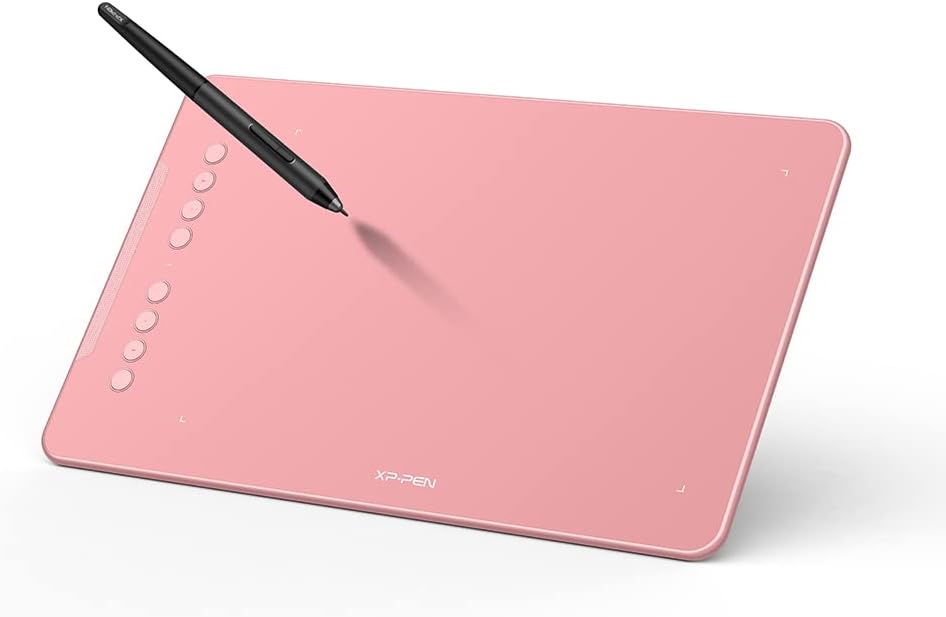
The XPPen Deco 01 V3 is a sleek, professional-grade drawing tablet featuring 16,384 levels of pressure sensitivity and 60° tilt support for natural, fluid strokes. Its 10 x 6.25 inch active area and 8 customizable hotkeys provide a spacious and ergonomic workspace. Compatible across major OS platforms including Windows, Mac, Android 10+, Linux, and Chrome OS, it connects easily via USB-C. The battery-free stylus ensures uninterrupted creativity, making it ideal for digital artists, educators, and gamers seeking precision and portability.


| ASIN | B09W98HPHT |
| Active Surface Area | 10 inches x 6.25 inches |
| Additional Features | 60° Tilt Support |
| Best Sellers Rank | #226 in Computers ( See Top 100 in Computers ) #2 in Graphic Tablets |
| Brand | XPPen |
| Built-In Media | 1 x Drawing Tablet,1 x Passive Stylus,1 x Stylus Stand,1 x USB Cable,8 x Replacement Nibs,1 x Protective Film,1 x USB to USB-C Adapter,1 x USB to Micro USB Adapter,1 x Anti-fouling Drawing Glove,1 x Quick Guide |
| Color | Pink |
| Compatible Devices | Laptop, Personal Computer, Smartphone |
| Connectivity Technology | USB |
| Connectivity technology | USB |
| Customer Reviews | 4.4 out of 5 stars 8,150 Reviews |
| Display Type | LCD |
| Item Dimensions L x W | 15.9L x 25.4W centimeters |
| Item Weight | 1.25 Pounds |
| Manufacturer | XP-PEN |
| Mfr Part Number | Deco01V2 |
| Model Name | Deco 01 V2 |
| Model Number | Deco01V2 |
| Model name | Deco 01 V2 |
| Native Resolution | 1920x1080 |
| Operating System | Windows, Android, Linux, Chrome OS, Mac |
| Operating system | Windows, Android, Linux, Chrome OS, Mac |
| Pressure Sensitivity | 8192 Levels |
| Pressure sensitivity | 8192 Levels |
| Screen Size | 10 Inches |
| Special features | 60° Tilt Support |
| Specific Uses For Product | Drawing, Painting, Design |
| Target Audience | Teacher |
| Unit Count | 1 Count |
A**W
Great device. I like it
Makes my maths online teaching tutorials superb
S**L
A great affordable drawing tablet
Delivered fast and smoothly! Everything is placed neatly in the box, works well especially after downloading the driver to your laptop. Having some trouble with the mobile version but other than that its great!!
H**A
جيد
جيد مقارنة بالسعر
M**.
fast delivery
very fast delivery, as stated in the item during purchased
B**M
Good product
Serving the purpose. I really like the dimensions of this product.
M**N
The first and only Graphics tablet I will buy
The experience was really nice since this tablet is sooo smooth and it has keyboard shortcuts on it, I’ve been using it for a long time now and I think it’s worth the price for the quality
F**I
Original Product!!!
Original product, quality looks really good. I can give an honest opinion after using it, but it looks nice.
V**H
Worth it
Good one
F**I
Für den Preis in meinen Augen eines der besten Tablets, das auch unter Linux läuft
Ich habe mir dieses Tablet vor gut 3 Jahren gekauft und verwende es hauptsächlich für digitale Kunst. Meist nutze ich dafür Krita unter Linux. Und hier kommt schon ein großer Pluspunkt: Das Tablet, sowie auch die meisten anderen Produkte von XP-Pen funktionieren nativ unter Linux. Für Druckstärken- und Arbeitsbereichanpassung sollte man sich allerdings den von XP-Pen zur Verfügung gestellten Treiber herunterladen. Ich wsr überrascht, dass Linux hier auch komplett abgedeckt wurde und ich das Tablet nach Belieben konfigurieren konnte. Der Stift ist solide und verfügt über 8192 Druckstufen. Damit lassen sich in Krita oder Clip Studio Paint organische Linien ziehen. Natürlich sei angemerkt, dass die Lernkurve bei einem displaylosen Tablet sehr steil sein kann und man die Hand-Augen-Koordination dafür erstmal trainieren muss. Die Ersatznibs lassen sich für den Stift problemlos hier für wenig Geld ordern, doch bis ein Nib erstmal abgenutzt ist, kann es schonmal ein Jahr dauern. Das Tablet ist also perfekt zum Einstieg geeignet. Durch den fehlenden Bildschirm gibt es kein Parallax und das Gefühl beim Zeichnen ist angenehm. In meinen Augen ist es den Wacom-Äquivalenten vom Komfort und dem Preis deutlich überlegen. Ein noch besseres Gefühl mit dem Stift habe ich mit dem Stylus vom XP-Pen Artist 12, das ich ebenfalls besitze, da dieser gefühlt noch sensibler auf die Druckstufen reagiert. Trotz dem Umstands, dass ich mit dem Artist 12 ein Tablet mit Bildschirm besitze, komme ich immer wieder und auch für den Großteil meiner Zeit zurück auf dieses Modell, weil es schlicht, günstig und effizient ist. Klare Kaufempfehlung von mir! Das gilt im Übrigen auch für die Firma XP-Pen allgemein. Seit Jahren bin ich dort Kunde und wurde nicht enttäuscht, nur immer wieder positiv überrascht.
A**L
شغال جداً
لو مش قادر على الواكم كسعر وعندك حد بيبتدي يتعلم يبقى دي بداية ممتازة
A**S
Bonne découverte !!!
J’ai eu l’occasion de tester la tablette graphique XP-PEN DECO01V3, et voici mon expérience avec ce produit. 🖊️ La prise en main s’est faite progressivement, avec une surface de dessin suffisamment large pour être à l’aise sur différents logiciels. Le stylet sans batterie est léger et agréable, ce qui permet de travailler sans se soucier de la recharge. 🎨 Lors de mes sessions de dessin et de retouche, la sensibilité à la pression se ressent bien et les traits suivent correctement les mouvements. Les variations d’épaisseur sont naturelles et donnent une bonne précision dans le geste. 💻 L’installation sur mon ordinateur s’est déroulée sans difficulté particulière, la tablette étant reconnue rapidement. Les raccourcis personnalisables sont pratiques une fois configurés et s’intègrent bien à l’utilisation quotidienne. 📐 Le format est facile à poser sur un bureau et reste simple à déplacer. La surface offre une sensation correcte sous la main, avec un glissement fluide pendant le travail. 🤍 J'espère que mon avis vous sera utile !
J**N
Worth the wait
The delivery was a bit slow but honestly worth the wait. Responsive enough to let me draw the girlfriend I will never get. 5/5
A**N
Big, pink, and effective.
After my old XP-pen Star05 finally died on me after many years, it was time to get a new drawing tablet. This new one is a nice and big tablet, runs smoothly, and the buttons are fantastic. The active drawing area alone is larger than the entire size of my old one. No complaints, I love it. Software is easy to set up and the pen pressure is decent. It's wired, so it does need to be plugged in, but the connection is fast and the chord is long. It's also just really cute. I'm so glad I found one in pink, and the price was great. The buttons are customizable which is great. The pen moves smoothly across it and even after taking the protective sheet off (because I was deforming it), there's no scratches on the surface. The replacement nibs fit into the pen holder. They come in a separate bag but you put them inside the pen holder in the little grooves. All you have to do to use it is plug it in and install the driver which you can find easily on the XP-pen website.
Trustpilot
1 month ago
4 days ago