🚀 Triple your screens, not your clutter — power, connect, conquer!
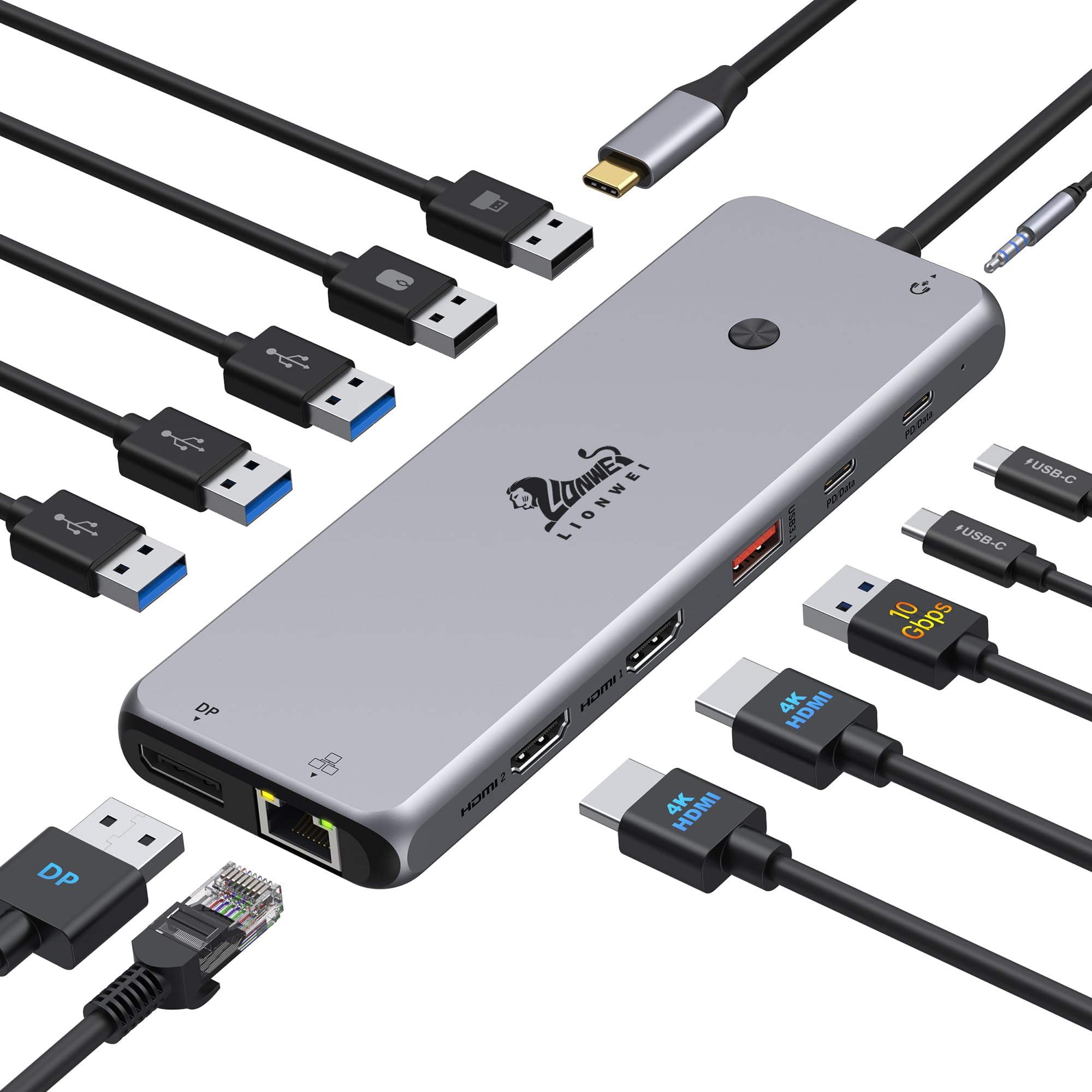
The LIONWEI 13 in 1 USB C Docking Station is a premium all-metal hub designed for professionals who demand seamless multi-display setups, fast data transfer up to 10Gbps, and 100W power delivery charging. Compatible with major laptop brands and supporting dual or triple 4K monitors, it combines 13 versatile ports including HDMI, DisplayPort, USB-C/A, Ethernet, and audio, making it the ultimate productivity booster for on-the-go managers and multitaskers.


| ASIN | B0BNTHWWMY |
| Best Sellers Rank | #12 in Laptop Docking Stations #20 in USB Hubs |
| Brand | LIONWEI |
| Color | Black |
| Customer Reviews | 4.1 4.1 out of 5 stars (2,044) |
| Date First Available | August 22, 2022 |
| Item Dimensions LxWxH | 13 x 0.5 x 5 inches |
| Item Weight | 4.9 ounces |
| Item model number | 1 |
| Manufacturer | LIONWEI |
| Operating System | Mac, Windows |
| Product Dimensions | 13 x 0.5 x 5 inches |
A**A
Very nice and works well for me
Cord length is durable, easy to use, enough usb ports and compatibility with things
B**N
Top quality external hub for Laptops
You know the problem.........Laptops with minimal connections for outside devices. Of course the assumption is that if you own one of these (1) You are traveling with this device and are unlikely to be plugging a bunch of external devices into it. (2) You are not a serious PC user and probably one step away from being a Phoneophile. (3) You have never seen a tower PC. All of these are actually reasonable assumptions but some of us have real computers but still have a need for a portable PC. If you find yourself recovering from a PC crash or are away for extended periods of time you will have peripheral devices and you will need a reliable hub. Many of the hubs out there are cheap plastic garbage with even worse electronics. This is an extremely well made Hub. Its all metal with lots of USB 2, 3, 3c plus HDMI, miniport and a Cat5 connection. Has full power pass through so you can power your laptop and charge your devices. I have had no technical issues with this hub and highly recommend this device. Its built like a Tank !!
B**B
UpDATE my review! Don't buy Doesn't last very long!
Feb 4, 2024 ordered another USB c and it didn't work either, and I realized my computer was not recognizing the plug. And it was not recognizing the power plug either. Had to get computer repaired with new Mother Board! Now the USB C works fine. So it was me not them. And to top it off I got an email from the Company offering to refund my purchase amount on a 6 month old product. So Excellent customer support!!! ...purchased July 27, 2024 today is Jan26, 2025 6 months later. It worked great then today it doesn't work at all. I have unplugged it all. Plugged it back in. Restarted the computer, it is just dead the computer doesn't even notice it's plugged in. You know for over $50 you'd expect it to work longer. Really disappointed!!
A**R
One of the Best docking stations I have purchased
Great Docking Station and extremely versatile to hold multipe USB ports. Quality is excellent. Small yet mighty.
H**Y
Junk. Will reboot itself constantly through the day or when a USB or new port usage is added.
I am so frustrated with this item. This is the third one we have purchased, and all of them have the same issue. The set up we are using it for is for my kids laptop, stationary on a desk, with two screens, the mouse/ keyboard and a speaker system. Anytime something is plugged in, like a USB or their memory hubs, or a cell phone, both of the screens go blank, as if the docking station was disconnected from the laptop, mouse and keyboard don't work, and the whole thing takes several minutes to self re-boot. My biggest annoyance, is that if you are trying to transfer cell phone or tablet pictures, this rebooting thing happens randomly during the download, and given todays annoying multi-verification, you need to re-enter your passwords and restart the whole dl process over and over; causing something that should only take maybe 15 minutes to turn into several HOURS. Because it does this, many of the photos also become corrupt and files don't open properly, but you wont know that till later and by then you may have deleted the photos from their original source to try and save it space. I know it reboots itself because my speakers will be turned off and so will things like the mouse. Most of the ports are empty, so it shouldn't be overloaded, and the docking station hasn't been moved from the desk. The docking station will also re-boot randomly throughout the day. Don't fall for the the lie that there are 13 useable hubs, I cant get it to use more than the 4 (2 screens, mouse, speakers). You can imagine the frustration. I would be peeved if this re-booting happened during remote learning, or a job, or gaming. I have tried different laptops and the results have been the same. Remedy this re-booting problem and it would be a solid product, but since the docking station has such a major flaw, this thing is basically junk.
B**E
Performs better than expected!!
I was leery at first, because I had used powered docking stations for decades. I connected 10 USB external drives (added a USB extender), dual monitors, and a cooling pad. I expected the startup to fail, and I was very surprised when all the devices fired up, the monitors came on, and the cooling pad was cooling. What an amazing device! I purchased it for my new MSI Katana A15 laptop. I recommend this docking station!! Works great!
A**R
Multifunctional, very short USB-C cable. Potential lag issues with wireless devices.
Just set this up and all my devices connected flawlessly. I would give a 4 star review because of one significant design flaw. The USB-C cable that connects to the computer definitely could be much larger, it's only like 6" which really limits the placement of the hub. Basically has to be right next to the device whereas my prior hub had an 18" cable and I was able to install it in a hidden location. This hub IS powered though that's hard to tell as none of the ports are clearly marked for that purpose. The product photos on Amazon do show you how to connect to AC power via one of the USB-C ports. I saw other reviews that complained about lack of power pass-through but I used the power cable for my laptop and everything works fine. Edit 1: After less than a day of usage, I experience a highly frustrating level of lag with my wireless mouse to a degree that makes it impossible to do work. I moved my wireless dongle from a USB port to a USB-3 port, which after a couple hours of use seems to have alleviated the problem to some degree. I noticed other reviewers raised a similar concern. Edit 2: The company proactively offered a full refund, which I highly appreciate. I continued to use the dock, however after one month of daily use the ethernet adapter on the dock also failed. I have concerns about the HDMI ports as well because on two occasions the connected monitors have simply gone to a black screen and wouldn't acknowledge input until I used the button on the hub to cycle through the display options.
Trustpilot
1 month ago
2 days ago