Buy anything from 5,000+ international stores. One checkout price. No surprise fees. Join 2M+ shoppers on Desertcart.
Desertcart purchases this item on your behalf and handles shipping, customs, and support to USA.
🚀 Unlock Lightning-Fast Storage, No Tools Required!
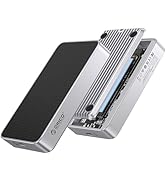
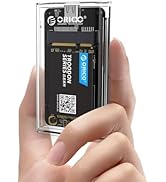
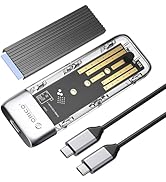
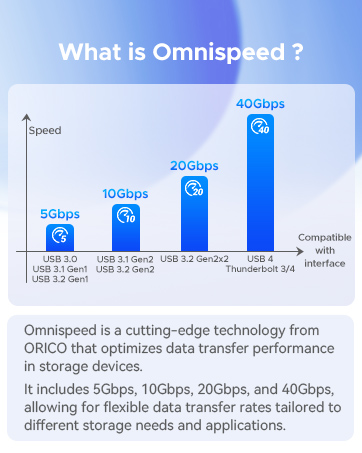
The ORICO PWDM2-BK is a premium M.2 NVMe/SATA SSD enclosure featuring USB-C 3.2 Gen 2 with blazing 10Gbps speeds for NVMe drives and 5Gbps for SATA. Its aluminum shell and thermal silicone ensure efficient heat dissipation, while tool-free installation and broad compatibility (up to 4TB SSDs, multiple OS) make it the perfect portable storage upgrade for professionals on the move.


| ASIN | B0BJ24GHC7 |
| Best Sellers Rank | #56 in Enclosures |
| Brand | ORICO |
| Built-In Media | 1*Cooling Vest(Heatsink), 1*Thermal Pad, 1*USB C to C cable, 1*m.2 ssd enclosure, 2*Rubber Fastener |
| Color | Black |
| Compatible Devices | Laptop |
| Customer Reviews | 4.4 out of 5 stars 1,335 Reviews |
| Data Transfer Rate | 10 Gigabits Per Second |
| Enclosure Material | Silicone |
| Hardware Interface | PCI, USB Type C |
| Hardware Platform | Windows |
| Item Dimensions L x W x H | 1.38"L x 0.55"W x 4.88"H |
| Item Weight | 0.01 Kilograms |
| Manufacturer | ORICO |
| Material | Silicone |
| Memory Storage Capacity | 4 TB |
| Mfr Part Number | ORICO-PWDM2-G2-BK-EP-US |
| Model Number | Black-C to C cable |
| Product Dimensions | 1.38"L x 0.55"W x 4.88"H |
| Supported Devices Quantity | 1 |
| Unit Count | 1.0 Count |
| Warranty Description | 12-month |
K**R
Easy to use
Easy to set up and works fine.
K**H
Great portable drive
Much better than a flash drive if you don't mind a little bit larger drive. Speeds and ease of use are decent. I paired with a 2tb Samsung nvme drive for photo back up so does more than needed for my needs
T**Z
Got the job done; good value for the money
Instructions aren’t super helpful but it worked. The transfer took forever but I don’t know if the enclosure had anything to do with that. The plugs they give you to hold the drive down were a bit too wide to go through the holes so it didn’t feel as secure as I would have liked.
C**.
Very nice NVMe enclosure...
I tried and tried to devise a way to to copy my NVMe to a regular SSD and retain bootability , WITHOUT having to buy one of these one-use-only enclosures... But, on a <1-NVMe-slot-motherboard-machine>, there is just NO WAY to do it... So I splurged the $25 buxx to get it all done properly... I had just installed a fresh copy of Win10 about 3 weeks earlier, and I didn't feel like doing it all again... Good thinking on ORICO's part to use a little rubber plug instead of a microscopic screw to hold the NVMe within... No tools required... Slide the endcap to unlock, install your NVMe drive with the rubber plug, replace the endcap, plug in the cable, and CLONE away... Oh, it comes with a heat sink also... I left it in the box, 'cuz I didn't wanna stick it to the OLD NVMe drive, basically a working clunker... I used Macrium Reflect 8 for the process, and it worked like a champ... But don't try to get rid of the Macrium program, because it digs 100s of little tentacles into your operating system that can't be found, let alone deleted... But this review isn't about that program... This enclosure is tough enough to drop, and small enough to carry around... Keep your old NVMe stick inside to protect it, and to transfer other files when needed... GOOD DAY...
P**R
Works very well
The manual describes the disassembly of the external adapter's housing, which took the guesswork out of that part of the project. Included are rubber stops, heat tape, a metal heat exchanger and a relatively large surface area aluminum shell. I was remotely, through our corporate IT staff, extracting my data from a company work laptop whose BIOS corrupted, and then installing that same data on a replacement company laptop. Because it was a company computer, I pulled the bad laptop M2 SDD and flexed up its attached plastic heat sink to allow the SDD signal connection to physically go into this adapter. The adapter friction held onto the SDD sufficiently to slide the heat sink on without the heat tape and gently wedge the aluminum housing over that, squeezing the housing, heat sink and laptop plastic heat sink together which held the signal end of the SDD into the adapter without needing to use the included rubber pin. I plugged the included type C USB cable into the adapter end and then into the operating replacement company laptop USB C port. Immediately, the company laptop recognized a drive F:. I proceeded to copy all data from the bad laptop M2 SDD in the external adapter as quickly and easily as if it were another internal SDD in the good recipient laptop. Additionally, I was able to touch the adapter housing while it was attached and communicating with my good laptop while improperly sandwiched together, with the signal end of the bad laptop SDD still attached to the signal end of the adapter and the other end of the bad laptop SDD attached to its plastic heat sink, adapter heat sink, sandwiched by the aluminum adapter housing and hanging out of the adaptor. All were very cool to touch, with the laptop heat sink only slightly (perhaps less that 5°F) warmer than the rest of the adapter held components that were squeezed together by the adapter aluminum housing (that appeared by touch to be at room temperature). I WAS SO IMPRESSED WITH THIS that I'm keeping this M2 SDD external adapter to obtain and permanently install a large M2 SDD in the adapter for a laptop external portable storage unit.
E**Y
Easy to Use M.2 SSD Enclosure
I needed this to fix the SSD in my desktop PC (corrupted file prevented Windows from booting up). It was really easy to install the SSD thanks to a tool-free design. I only needed to slide the bottom off, install the SSD into the slot, and secure the end with a clever rubber plug. It is a nice compact size, and came with heat sink materials (not needed for my SSD or for the amount of time I was using it), and feels durable with a good USB-C cable. File deletion speed felt quick, and I could also view files when I plugged it into my Chromebook as well as Windows PCs. Excellent for any need!
B**.
Sturdy, snazzy enclosure for my 2TB WD Black SN770 - NOT -
Please see below update added December 8, 2025. This is a great combination for those who prefer to keep their backups of personal data close to home rather than floating in the cloud. A 2TB WD Black M.2 SN770 and an Orico M.2 NVMe SSD Enclosure. I use it for system backups and find the SN770's SLC buffering technology absorbs 100s of GBs at blinding speeds. My entire system is backed up in just over 10 minutes. And the Orico enclosure was truly a breeze to configure. What's not to like? 12/8/2025 I'll tell you what's not to like. Beware the "Device settings were not migrated" event in the RealTek firmware Properties. Looks like I'm not the first to deal with this and, so far, I see no fix posted anywhere. So, I hereby lower my rating to 1 star and issue this warning: Your perfectly good SSD can't be initialized because the Orico enclosure is sadly wanting. Don't even think of replacing the enclosure with another Orico because yours is likely not fried, it's just logically "impaired" as indicated by the event error above. There's a missing handshake somewhere in the chain of control from Windows to drivers to enclosure to SSD. To Windows, your SSD looks like it's READY, but it's NOT! It cannot be accessed, initialized, or formatted. I suggest trying a different enclosure MANUFACTURER! I'm waiting for mine to be delivered and hoping a better enclosure will force a "clean" install starting with Initialization of the attached 2TB SSD.
U**R
Was great until it suddenly wasn't (updated)
The manufacturer reached out and gave me many options for replacement or refund and made everything right. They were pretty quick with the responses. Thank you for the great service. You guys are amazing. ------------------ This enclosure was working great for a couple months. The setup was easy and because it uses a rubber stopper instead of a screw it is very convenient to use. However, after a couple months, the enclosure would suddenly stop functioning and the drive would disappear when I slightly move or even touch it. I'm not sure how many times an SSD can stand to get unplugged while getting data transferred onto it but I'm scared to use this now. I tried different USB c cables and I tried different nvme m2 SSD but it's all the same unreliable result. I contacted Amazon who promised me a refund over two weeks ago but that never happened. Hoping this review will change that. Will update with a resolution if there is one.
R**.
Excelente
Aun no lo uso pero, todo buen todo chido. C
A**R
خامة ممتازة
يعمل بشكل رائع وممتاز جدا ، وحل لدي العديد من المشاكل
A**N
not bad
working good for me
R**O
Mais rápido
Maravilha de produto, ainda não testei, estou esperando chegar o ssd
M**H
Good product
Good product
Trustpilot
2 weeks ago
2 weeks ago