Desertcart purchases this item on your behalf and handles shipping, customs, and support to USA.
🚀 Elevate your mobile productivity with ASUS’s ultra-slim, USB-powered portable monitor!
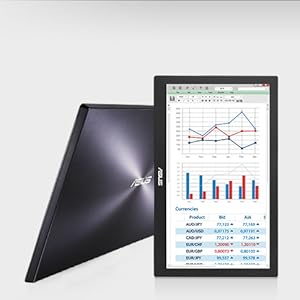
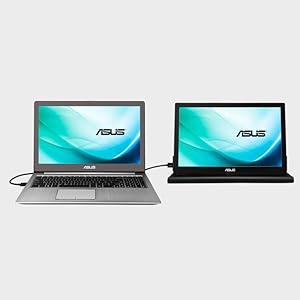
The ASUS MB168B is a 15.6-inch portable USB monitor featuring a 1366x768 resolution and a slim 8.5mm profile weighing just 800g. Powered and connected via a single USB 3.0 cable, it offers plug-and-play convenience with auto-rotating display modes and comes with a protective smart case that doubles as a stand. Ideal for professionals seeking a lightweight, dual-screen setup on the move.


| ASIN | B00FE690DI |
| Aspect Ratio | 16:9 |
| Aspect ratio | 16:9 |
| Best Sellers Rank | 268,688 in Computers & Accessories ( See Top 100 in Computers & Accessories ) 4,373 in Monitors |
| Box Contents | Asus Smart Case, Mb168B Portable Usb Hd Monitor, Quick Start Guide, Support Cd, Usb 3.0 Cable |
| Brand | ASUS |
| Brand Name | ASUS |
| Colour | Black, Silver |
| Compatible Devices | Laptop, Desktop, Gaming Console |
| Contrast Ratio | 500:1 |
| Customer Reviews | 4.0 out of 5 stars 4,589 Reviews |
| Display Technology | LED |
| Display Type | LCD |
| Global Trade Identification Number | 00886227531868, 04716659483632, 04716659483656 |
| Hardware Connectivity | USB 3.0 |
| Has Color Screen | Yes |
| Image Brightness | 200 cd/? |
| Image contrast ratio | 500:1 |
| Is Electric | Yes |
| Item Dimensions D x W x H | 9.3D x 14.9W x 0.3H centimetres |
| Item Type Name | ASUS MB168B 15.6" USB Portable Monitor, WXGA 1366x768, Ultra Slim, Protected Smart Case, OS Compatibility Microsoft Windows, Mac OS, Chrome OS, Linux |
| Item Weight | 1.76 Pounds |
| Manufacturer | Asus |
| Maximum Display Resolution | 1366 x 768 |
| Model Name | Portable Monitor |
| Model Number | MB168B |
| Mounting Type | Desk Mount |
| Native Resolution | 1366x768 |
| Network Connectivity Technology | USB |
| Picture Quality Enhancement Technology | Blue Light Filter |
| Pixel Pitch | 0.289 |
| Product Features | Ultra-Slim |
| Product Warranty | 12 months |
| Refresh Rate | 60Hz |
| Resolution | XGA Wide |
| Response Time | 11 Milliseconds |
| Screen Finish Type | Glossy |
| Screen Size | 15.6 Inches |
| Screen size | 15.6 Inches |
| Screen surface description | Glossy |
| Shape | Rectangular |
| Specific Uses For Product | personal |
| Total USB 3.0 Ports | 1 |
| Total Video Out Ports | 1 |
| UPC | 021112155952 012300309646 886227483655 390819301956 803982816900 886227483631 745559482043 734911147706 886227507610 102930783128 |
| Viewing Angle | 90 Degrees |
| Voltage | 220 |
| Warranty Type | 12-month warranty or limited warranty for 12 months |
M**T
Fabulous! Why Isn't EVERYBODY Doing This?!
This has transformed how I work in libraries, which I do very often as I am engaged in research. To be able to use two screens, and carry one around which is so light and of such high quality is a dream! Be aware that the old drivers do not work on the most recent versions of Windows 10, but this is no restriction at all since Windows 10 handles your screen for you (including plug and play). Use the Windows 10 display options in the Control Panel to decide whether you want to use the screen in landscape or portrait mode. Unfortunately, Windows 10 is not able to control the brightness of the screen, but I have not found that to be any problem whatsoever. I have my default for the additional screen on my laptop now set to portrait, so that I can work on whole pages of documents. The protective case which comes with the screen is of good quality, and doubles as an excellent stand in both landscape and portrait mode. You will be astonished by how light this screen is, and to be able to work without any power cables, since the screen is powered through the USB port of your laptop, is wonderful. I would recommend however buying an additional USB three extension cable to plug into the supplied cable, since when you use the screen in portrait mode the supplied USB 3 cable is not quite long enough. All in all, one of the best pieces of computer kit I have ever bought.
R**H
Armed stand-off with Windows 10
This is a very cool gadget with a couple of weird niggles that required some Googling/squinting to work out. But work them out I did, and write them down I shall. I'm no hero. I'm just a man with dreams of a portable monitor with adjustable brightness and colour contrast settings that doesn't keep falling over backwards. First off: the case. It's free (yay!). It's solid (yay!). It collapsed once because I didn't read the instructions properly (my fault!). It's basically one of those folding sheet cases that protects the monitor when you store it and then can be origami-ed into a stand. The angle isn't adjustable (boo!), but the thing that made it fall over was the stiff fabric tab that looks like it's flush against the inside of the case. It isn't. You have to get a nail under it and bend it up, as that's the bit that holds the monitor upright and stops it sliding about. If you don't, it does. So do. Second: the monitor comes with a driver CD. If your laptop doesn't have a CD drive, you'll have to get the drivers from the Asus website. It's not really an issue, but it's not plug-and-play so don't go carrying it off somewhere you don't have internet without installing the drivers first. Third: Windows 10. This monitor will work with Windows 10. Grudgingly. There's a brightness rocker switch on the left side of the monitor (in landscape mode) that didn't seem to do anything, and the screen by default starts off a bit dim. I had a look through some forum threads and it's something that seems to be a problem with Windows 10 and some versions of MacOS. I didn't find a way to get the switch working, but there's a bit of freeware called ScreenBright that lets you set the colour saturation and brightness (on Windows, at least). On launch there's a weird warning that using ScreenBright may invalidate your screen's warranty. I don't know if it does or why it should, but it does fix the brightness problem. Live dangerously. Change your brightness and contrast settings. Choose life.
E**M
Very thin, great quality display
My first impression of this product when I saw it on Amazon were maybe 3 stars. The actual product as far overcome that expectation. Packaging : Very, very good packaging, if anything overkill. Came inside 3 boxes: a paper padded Amazon box, a blank cardboard box with some foam, presumably from Asus, and then the Product box, with fitted foam around the Panel itself. All I could have asked for and more, and the product arrived in perfect shape. Aesthetics: The bezel of the panel is just plain plastic (ABS I think) with an Asus logo on the bottom centre, so from the front the monitor is nothing to write home about, but turn around the back and it is a large silver brushed panel with a larger Asus logo, dressed to impress on the table of any conference room. The product is also extremely thin, making it look even better. The buttons on the side also look good, with a small LED in the power button to show the status. Panel Quality: At £120 the panel was never going to be anything jaw-dropping, so I was pleasantly surprised when I first turned on the display. Although the panel is not 1080p like the laptop screen it is accompanying, it is not extremely noticeable, and the colour depth more than makes up for it. Contrary to my expectations, this panel was not plagued by the usual washed-out blueish colours that most cheap laptop screens have. This makes it great for doing photo editing on the move, when away from my 24inch monitor, as my laptop screen tends to cause me to over-saturate colours. The only qualm I have is poor viewing angles, as discolouration happens very quickly, so I would not recommend for sharing movies or for a slideshow, however this should not matter in a reasonably static desk environment. Functionality: The first time set up of the drivers was quite simple. I would recommend downloading the drivers from Asus' website directly, as the CD which came in the box was probably out of date, and didn't support windows 10. They can be found easily by searching the product name followed by 'drivers' on Google. On install and restart later and the product was working perfectly, acting as a third display, along with my laptop screen, and 24inch Acer monitor. The brightness button on the side works very well as well, giving a good range of brightness for any room, and a satisfying brightness in direct sunlight. The auto-rotate is also a good feature, although slightly laggy. I enjoy using this product whilst playing resource-intensive games on my primary display, as the internal displaylink card allows me to run skype, steam messenger, or VLC media player, without dropping the frame rate of the game I am playing. The case that comes with the product is very sleek, however takes up a lot of desk space. I invested in a very cheap tablet stand to use at my desk, which is compact enough to fit in my laptop bag and take with me. Overall this product is definitely worth a buy I you need that extra desktop space on the go, or if you are looking at a smaller monitor for a gaming setup, without slowing down your gameplay.
M**N
Stopped working after one month
Initially I was really impressed with this item because it was very easy to set up and worked for me without any fuss using USB-C ports on both my laptops. The case/stand quality (once I worked out how to set it up) seemed good for this price level and although the monitor isn't the brightest or sharpest, it was fine for my needs as a second screen on my desk for office type applications. Unfortunately, I have had to return it after just under a month of use because it has just stopped working. The power button usually has a light that indicates it is receiving power from the laptop and this just isn't coming on anymore. There doesn't seem to be any damage to the cable nor have I been travelling about all over the place with it so I'm at a loss as to why it has just stopped working with only light use. I can only assume there is a fault with the monitor itself. The port on the monitor is slightly fiddly and doesn't seem very robust so perhaps this is the issue? I won't be ordering a replacement because, for well over £100 I expect a good deal more than one month's (light) use. Very disappointing.
I**K
Great lightweight monitor
As I often work away from home and often on client site, I miss the benefit of working from home where I have three monitor setup. I therefore decided to buy a lightweight portable monitor that I could carry around between sites quite easily, adding minimum weight to my already packed rucksack. This monitor was discounted as a warehouse deal and at the price it was ideal. The screen is larger than my laptop’s but the resolution is exactly the same. Although a higher resolution would have been better for my needs I couldn’t face paying 60% more in price. The monitor normally comes with a standard usb male-B cable, driver disc and protective cover. The monitor is actually quite light and weighs in at a feather-like 800g. The screen connects very easily and my Windows laptop detected and loaded the drivers without needing the CD. PROS - lightweight design - no flickering or shadowing - decent resolution - comes with 3year warranty - sturdy case supplied with monitor - great price - easy to connect and extend desktop - large size screen CONS - resolution could have been better - requires USB male-B cable to connect (missing from box) - feels a bit flimsy - can be difficult to get screen into protective case Overall this portable monitor works brilliantly and being so light is easy to carry around. Highly recommended. *** Please could you click Yes if my review has helped you in any way ***
A**R
works excellently as an external monitor, brightness levels don't adjust though initial setup a bit complicated.
This is a really good piece for programming with. I would recommend it. However I had to find the drivers for it online as it comes with a cd and who on earth has a cd drive in their laptop anymore? The carry case it comes with is great for transport but really not reliable as a stand so do buy a little stand for it too. The only real con is that the brightness is not adjustable. The buttons are there on the screen but they don't actually do anything I would recommend it as a gift, sure, but ASUS could have improved this design.
W**E
Excellent quality and great case used as stand
This is just what I wanted as needed a 2nd screen for long-term home working and don't have the space / didn't was to have to keep a standing monitor permanently on display as am using the dining table for work. This works well plugged into my laptop and needed no additional set up. I am very impressed and is a game-changer for anyone working from home with just one screen when used to 2 screens in the office. Only thing is, my boss was going to buy one as well and by then, the price had gone up by £10 so he chose a standing / static option that was much cheaper. Supply and demand I suppose but annoying that prices increase so much over the COVID-19 period.
J**N
Works well with Windows 10 and is very portable.
Pros 1. Works with Windows 10. 2. USB3 cable supplied is long enough to connect monitor to laptop on same table/desk. 3. Screen resolution is good is sufficient for the price. 4.Light and will fit in a suitably sized laptop bag. 5.Portable and ideal for those who work out of the office and require an extra screen when onsite. 6.Supplied with a protective case which can be used as a stand. 7.Video playback quality is good. Overall it works well. 8.Its great not to have to lug a monitors power pack around. Cons 1. Driver installation using the supplied software did not work initially. I downloaded the latest versions from the Asus website. 2. The case is good and will protect the monitor during transit. I do not like using it as a stand and instead have used a ipad stand acquired from a very cheap high street store. 3. No Linux support that I am aware of.
B**.
Prodotto Amazon Marketplace
Arrivato come nuovo, pagato pochissimo rispetto il valore di mercato, ha semplificato e migliorato la qualità del mio lavoro. Uno schermo sottile essenziale per chi necessita di doppio schermo, comodo da portare ovunque e poco ingombrante a casa, non necessita di alimentazione perchè si attacca con il cavo usb al pc. Super soddisfatta.
A**Z
Calidad y precio
Excelente monitor portátil, muy ligero, buena calidad y a buen precio, a mi gusto cumple la función que uno espera.
Y**G
Monitor does not work and cannot seem to find any troubleshooting
Followed setup but still doesnt work after a long time trying to setup, resetup, and the online help desk is so difficult to find. I would not recommend Asus products. Finally found an online portal, hopefully they will respond. Product looks sleek and nice, too bad the usb socket is Micro B USB 3.0 Port. i want to refund....
D**A
Good performance
Its been over a month since I got it. Its been working fine.
L**Y
Using it for business, highly reccomend. Full day use without eye fatigue
Great monitor! I work in tech, and require alot of screen realistate. This screen was affordable, and some of the reviews mentioned it wasnt sufficient for their gaming and media requirements. Myself, I find it fantastic, it is slightly dimmer but this is fantastic for my eyes! I highly reccomend this item for work related tasks! The price is on point, clarity is awesome, the font doesn't get distorted when looking at command line or scripts. :) what more could a person want! I have an asus laptop, I didnt require any additional software. The draw on my battery life has been un noticable. It is really lightweight, not noticable in the briefcase. Overall will purchase again.. because who doesnt want 3 screens!
Trustpilot
1 month ago
2 months ago