Buy anything from 5,000+ international stores. One checkout price. No surprise fees. Join 2M+ shoppers on Desertcart.
Desertcart purchases this item on your behalf and handles shipping, customs, and support to USA.
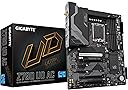
🚀 Elevate your build with the GIGABYTE Z790 UD AC — where power meets precision!
The GIGABYTE Z790 UD AC is a high-performance ATX motherboard designed for Intel's latest 12th, 13th, and 14th Gen Core processors. Featuring DDR5 memory support, a robust 16+1+1 power phase design, triple M.2 PCIe 4.0 slots, PCIe 5.0 expansion, and advanced connectivity options including USB-C 3.2 Gen 2x2, Dual Band WiFi 6, and 2.5Gb Ethernet, it delivers a future-proof platform ideal for gamers, content creators, and professionals seeking reliable, fast, and versatile computing. Enhanced with user-friendly features like EZ-Latch CPU installation and RGB Fusion lighting, it balances performance with style and ease of use.


| ASIN | B0BHTMXMRQ |
| Best Sellers Rank | #170 in Computer Motherboards |
| Brand | GIGABYTE |
| CPU Model | Core i7 |
| CPU Socket | LGA 1700 |
| Chipset Type | Intel Z790 |
| Compatible Devices | 13th Gen Intel Core, 12th Core |
| Compatible Processors | 12th Generation Intel Core, 13th Generation Intel Core , 14th Generation Intel Core |
| Customer Reviews | 4.1 out of 5 stars 441 Reviews |
| Graphics Card Interface | PCI Express |
| Item Dimensions L x W x H | 10.62"L x 3.14"W x 13.18"H |
| Item Weight | 2.2 Pounds |
| Main Power Connector Type | 24-Pin |
| Manufacturer | GIGABYTE |
| Memory Clock Speed | 4400 MHz |
| Memory Slots Available | 4 |
| Memory Storage Capacity | 128 GB |
| Mfr Part Number | Z790 UD AC |
| Model Name | Z790 UD AC |
| Model Number | Z790 UD AC |
| Number of Ethernet Ports | 1 |
| Number of Ports | 2 |
| Platform | Windows 11 |
| Processor Socket | LGA 1700 |
| RAM Memory Technology | DDR5 |
| Ram Memory Maximum Size | 192 GB |
| S/PDIF Connector Type | Optical |
| System Bus Standard Supported | SATA 3 |
| Total Number of HDMI Ports | 1 |
| Total PCIe Ports | 3 |
| Total SATA Ports | 6 |
| Total Usb Ports | 2 |
| UPC | 889523034460 |
| USB 2.0 | 2 |
| Unit Count | 1.0 Count |
| Warranty Description | 3 year manufacturer |
R**R
Gee, More PCI Slots seems more Popular!
This Gigabyte Z790 UD AC version motherboard with 6 PCI-E slots has ~200+ reviews, while the Gigabyte Z790 UD AX version with one less PCI-E slot has only ~65 reviews. Both motherboards apparently released at the same time, but with AX only have a more recent wireless chipset. I would say, most people desire more PCI(-E) slots than anything else or any other feature, as quite obviously, motherboard manufacturers likely dislike motherboards being easily upgraded. I found, almost all motherboards on the market to date using-up all of the numerous PCI-E port/lanes with mostly undesirable hardware features, with most features commonly being out-dated within a year or so. Although the Gigabyte UD AC version has the extra PCI-E slot near the graphics 16x's slot and mostly being covered/unused by the primary add-in graphics card, if ever falling back to CPU integrated graphics, the port next to the primary 16x's slot would then be accessible. The extra slot would likely be usable either prior to somebody purchasing a graphics card, or later within the board's lifetime. One significant downside, most of the PCI-E slots are only 1x's speed. PROS 1) Motherboard provides several extra PCI-E slots, except minus the PCI-E slot #2 if using a typical large size discrete graphics card within slot #1. CONS 1) Very tight or little room for plugging in cables into the SATA side ports! 2) Motherboard pins are likely a larger diameter than typical motherboard pins, more durable however plugging in connectors will be very difficult or tight fitting. Using a thick coating of De-Oxit oil helped a little with tight fitting adapters/plugs. 3) Most CPUs of this period lack CSM integrated graphics, only EFI/UEFI graphics, so the BIOS/EFI CSM option will constantly revert to disabled until adding a discrete PCI-E graphics card with CSM/EFI capability. 4) Several other Gigabyte AMI BIOS/EFI options tend to be elusive and mysteriously toggling on and off. The Gigabyte AMI BIOS/EFI has a really dumb upfront menu called "Tweak" menu. No options for disabling NVME storage devices, for hiding while installing operating systems on other storage drives. 5) BIG PROBLEM, the onboard motherboard Ethernet RTL8125 is loosing/dropping/reverting it's MAC address to 00:00:00:00:00:00 after random periods of linked network usage and occurring upon warm reboots! Gigabyte support claims there's nothing wrong, returned the board and had the RTL8125 chip replaced, upon return Support claimed documentation did not cite chip replacement! And continues denying a problem. Regardless, just purchased a separate/discrete (Intel 2.5Gbps) Ethernet adapter and the unit is performing excellently about two months later, and as long as the onboard RTL8125 is not physically connected to the Ethernet network via cable, MAC address remains assigned/default/stable. Loss of RTL8125 MAC address could be due to non-standard TCP/IP packets, or something with the firmware or drivers, occurred both using explicitly either Linux and Windows though. Again, regardless, likely happier with separate Ethernet card, due to the amount of network usage here. Workaround, pull the electrical power cord, then cold boot, RTL8125 MAC address returns to original OEM address. Likely not heat related, has a 120mm fan pointed directly at the RTL8125 chip, so heat is likely ruled-out completely, and laser thermometer reads chip temperature well within OEM specified operational limits. Seems the manufacturer is replacing the chips upon RMA, without documenting, however I strongly believe this is firmware and/or possibly upper level driver software created, due to a recent driver update release, possibly including a firmware change or update. WITHOUT A MAC ADDRESS, WakeonLAN will require using 00:00:00:00:00:00 address for broadcast wake-up packet, and is likely a minor security flaw. Usually I see these errors, within my past 20 years with Intel, with Ethernet hardware failing, sometimes they limp along like this, but really believe, so far, this is software induced due to multiple chip model numbers being affected. INSTALLING WINDOWS 7 FOR LICENSE MIGRATION 1) If the CPU you're using does not have CSM/BIOS integrated graphics/display (eg. Intel Core i7-12700K does not have CSM inigrated graphics, only EFI graphics!), will need an add-in PCI-E CSM/BIOS compatible graphics/display card. And to be able to enable the BIOS/EFI CSM boot option/capabilty, will also need a more recent video card capable of UEFI/CSM boot capabilities, as the Windows 7 installation may hang on a more recent CSM/UEFI graphics/displays. For example, I have two discrete PCI-E graphics/display add-in cards. One being EVGA nVidia GTX 670 (used on Windows XP and Windows 7) and the other a more recent Intel Arc 750 for Windows 10 and later. The Intel Arc would allow viewing the BIOS/EFI settings and enabling CSM boot options, but would either hang or freeze during the initial Windows 7 boot CD install. (eg. Frozen or endless pulsating color Windows icon.) Installed my old nVidia GTX 670 PCI-E graphics card with BIOS/EFI CSM still activated, I was able to boot further into the Windows install CD process. NOTE: Turn-off CPU integrated graphics, else graphics/display will be corrupted/blurry and the Windows 7 not start at all! 2) Once you've rebooted approximately a million times, finally getting the right incantation for enabling CSM booting and Windows 7 CD-ROM is also now booting, will need a PS/2 mouse (or keyboard), as Windows 7 install CD (and operating system) will deactivate/drop USB keyboard/mouse hardware due to incompatible motherboard USB port/hub BIOS/EFI drivers. Having a PS/2 plugged in also averts the long undesirable boot delay! Windows 7 install CD should now be starting along with the on-screen keyboard if using a PS/2 mouse. ac 3) After installing Windows 7, the following reboot(s) the motherboard BIOS/EFI may not automatically find the boot partition on the drive, and I happened to have The rEFInd Boot Manager installed on one of my USB drives and using BIOS/EFI F12 key/boot options during BIOS/EFI starting, the rEFInd boot manager will readily detect the Windows 7 100MB FAT partition, and allow booting the installed Windows 7 installation. 4) Once Windows 7 install has booted and running, first install KB4474419 for fixing SHA1/SHA2 driver signing, and subsequently download the Windows 7 RTL8125 2.5GB ethernet network adapter driver from the RealTek website. I happened to also deactivate driver signing via bcdedit and gpedit, but likely not required. 5) Internet should automatically start working using DHCP configuration, with subsequently being able to readily activate your Windows 7 operating system. Should also be able to upgrade over the Windows 7 install, with probably more preferably using an older version of Windows 10 install CDs. However, still resulted with no Windows 10 license error codes. Possibly I first need to upgrade to Windows 8, using the included Windows 8 key only for re-provisioning the motherboard/licensing. But it is very doubtful. WINDOWS 10/11 UPGRADE LEGALITIES FUNNY. I have a valid Windows 7 Professional RETAIL license purchased (just prior to microsoft.com store being standardized, but purchased from Microsoft) and used on a Gigabyte Z77UP7 motherboard, now after successfully installing and properly activating Windows 7 on my Gigabyte Z790 UD motherboard, subsequently performing an upgrade over Windows 7 with an older Windows 10 v1903 CD, I still get an error during activation, 0xC004F213! Subsequent license key changes result in my usual 0x803fa067 hex error code. Likely something about not having a license! This is bate and switch! There is a scenario where the official Windows 7 license is migrated to a digital license being physically attached to the motherboard, making installing Windows 10/11 with the digital license supposedly not possible. However, the official Windows 7 retail license should still be transferable to other motherboards. My first error was another hex error, associated with not having a license, now after all this, I get another different hex error code. After looking over my notes, I see possibly skipped first upgrading to Windows 8 and using the Window 8 license key only for the license/motherboard re-provisioning. I doubt upgrading first with Windows 8 will resolve this, as I think Microsoft intentionally forcing all official retail licenses to be attached to the motherboard, regardless of whether or not the retail versions boost of such feature. Nothing but headaches with Windows, and Microsoft wants another $100-200 for a newer key. (Always been really funny how users owning multiple license keys, cannot easily manage or keep track of their keys.)
T**N
Solid Foundation for PC Builds
The Gigabyte Z790 UD AC motherboard is a testament to Gigabyte’s commitment to quality and innovation. As a tech enthusiast, I was eager to test this motherboard in my latest PC build, and it has not disappointed. First and foremost, the build quality of the Z790 UD AC is impressive. The board feels sturdy and well-crafted, with a clean and aesthetically pleasing design. The layout is thoughtfully arranged, providing easy access to all the necessary ports and slots, which is a boon for both novice and experienced builders. One of the standout features of this motherboard is its support for the latest Intel 12th and 13th Gen processors. This compatibility ensures that users can leverage the latest advancements in CPU technology, providing a future-proof platform for high-performance computing. The Z790 UD AC also shines in terms of connectivity. It comes equipped with Wi-Fi 6 and Bluetooth 5.2, offering fast and reliable wireless connections. Additionally, the board boasts a plethora of USB ports, including USB 3.2 Gen 2x2 Type-C, ensuring ample connectivity options for all your peripherals. For storage, the motherboard offers multiple M.2 slots with PCIe 4.0 support, allowing for lightning-fast data transfer speeds and ample room for high-speed SSDs. This feature is particularly appealing for gamers and content creators who require quick access to large files. The motherboard’s audio capabilities are also noteworthy. The Realtek ALC897 codec provides crisp and clear audio, enhancing the gaming and multimedia experience. Whether you’re gaming, watching movies, or listening to music, the sound quality is immersive and satisfying. Overclocking potential is another area where the Z790 UD AC excels. The board features robust power delivery and comprehensive cooling solutions, including Smart Fan 6 technology, which allows for fine-tuned control over fan speeds and temperatures. This ensures stable performance even under heavy loads, making it an excellent choice for enthusiasts looking to push their systems to the limit. In conclusion, the Gigabyte Z790 UD AC motherboard is a solid choice for anyone looking to build a high-performance PC. Its combination of build quality, connectivity options, and support for the latest technologies make it a versatile and future-proof platform. Whether you’re a gamer, content creator, or just looking for a reliable motherboard for everyday computing, the Z790 UD AC is sure to meet and exceed your expectations.
T**N
Ultra durable is an understatement!
Wow!!! Upgraded from a b650. I also upgraded my PSU. This board can handle all of the over locking! From 7200mhz ram to ssd 6000gb speeds!
J**E
All 2 Motherboards Died from power flip.
Terrible motherboard. I bought not one, but two of these (one to replace the first) and they both died due to a power fluctuation. Basically my computer did a weird thing where it didn’t fully initialize on startup so I wanted to turn off and turn it back on. I did this by flicking the power supply on and off and it completely died. I tested the psu (with voltmeter) and it still worked and I tested the motherboard with another psu and it was still dead. I did all the work arounds and nothing worked (yes, I removed power and the battery for 20mins). I typed my problem into google and one other person had this same thing happen with the same board. A power fluctuation is a normal thing and should not kill a board. I will be returning this second one. Do NOT buy this board.
S**0
High quality reliable ATX computer motherboard.
High quality, reliable ATX computer motherboard in a trusted brand. I ordered this to replace/upgrade a second computer I maintain at my house for various automation/networking applications. The motherboard I was replacing was Gigabyte brand as well and have installed it in 2012. It was still working well but being about 12 years old it seemed like a good time for an upgrade. I have build many computers using Gigabyte motherboards over the past 20 years and will continue to do so. I have always had great luck with Gigabyte and have found them to include great features and overall support. Will continue to buy Gigabyte brand motherboards and components and found this board to be of great value.
J**S
Board pairs perfectly well with a 13900k but the slow bios/ slow boot times are no joke
Overall I can't complain too much. Once everything is setup, everything runs perfectly fine. System is stable and fully functional but those boot times really are no joke. 10+ seconds to even reach the post screen and then add another 5-10~ seconds in the splash screen before your OS finally goes through the process of booting up. Maybe 30~ seconds total but I haven't really timed it. Waking from sleep is also a bit of an issue as well, as other reviews have mentioned. At least 15+ seconds from when you hit a key to wake your PC up, until you actually see the windows login screen. I also seem to have this weird issue where my mouse will turn itself on and off again a few times, as if it's getting connected and disconnected from the usb port, before finally latching on to the connection. This only happens when waking up my PC from sleep (and it doesn't happen every single sleep/wake cycle either, just sometimes), absolutely no USB issues of any kind outside that, but you can add maybe another 5-10 seconds on top of the already slow wake up process before you finally have full functionality of your computer. These things are very annoying of course but everything else about the board is so good that I'm willing to look past it. If snappy, fast startups are a feature that you absolutely need to have on your build then you definitely need to look elsewhere but if you're willing to put up with this motherboard's weird quirks, it's an incredible deal.
V**B
Decent, Inexpensive Board for Intel Raptor Lake (Update BIOS for Nvidia 4000 GPUs)
This is a good budget motherboard for Intel's 13th Gen series of CPUs. I've paired it with a 13900K and have had 0 problems. Runs cool and honestly is an inexpensive version of Gigabyte's Aorus Master boards. The one thing I'd point out is that the BIOS Firmware is horribly out of date. Installing an RTX 4080 FE on this board was fine for the most part until the first boot where no picture was shown. After talking to Nvidia support, checking cables, etc. I noticed on Gigabyte's site of an update that addressed this issue (though for a different card, the 3060). Updating the BIOS to this version, however, did help and since then, I've had no issues with this card. Great overall MB but again, if you're installing an RTX 4080/4090, do yourself a favor and install the latest BIOS update from Gigabyte so you save yourself a few hours of troubleshooting.
A**5
Stable, easy setup, cost vs value vs features paid off
The MOBO had a lot of features for the cost that I didn't even realize in comparison to the ASRock Z790 PG Lightning. It has WIFI, which is great for quicker setup to get up and running. I use ethernet but WIFI is a great backup for any issues in troubleshooting. Stability is great so far without any OC. I will come back after doing some OC configurations later. I was happy it has the type-C USB port rather than having to use adapters for it. Notes: Case: Thermaltake S Series S200 TG ARGB Memory: G.SKILL Ripjaws S5 Series 64GB Card: PNY GeForce RTX™ 4070 GPU 12GB XLR8 (was an MSI RTX 4080, but the junky adapter cables had me return it immediately) Cooler: Enermax ETS-F40 A-RGB CPU Air Cooler White
E**H
High quality. Excellent features for price point.
This ATX motherboard has excellent features for its price. I am running an i7 13700k , with a 3070ti, 16 GB of 5600MT/s DDR5. Overall- Twin 16+1+1 Phases Digital VRM, with 2 x8 pin CPU power supply. Which is perfect for overclocking I cannot find another reputable branded motherboard that had both Wi-Fi and Bluetooth and 18 VRM for less than 450$ CAD not to mention DDR5 as well. The heat sinks are of solid, matte heavy aluminum, making the board looks sleek and of high quality. The wifi is 802.11ac, WIFI 5. I am getting 238 Mbps on a 1000Mbps network, about 20 feet from the modem. Bluetooth 4.2. There is a programable "CMOS" button and Bios Flash button soldered to the board. Some issues- I have had issues getting the system to post with XMP enabled on stock settings (5600), I'm thinking that with later BIOS versions the issues will be fixed as I made sure to select compatible RAM from manufacturarers website. Currently am running at 4800, which is the native speed for the motherboard, but not a big deal for the time being, will update my review if this changes. I personally would like to have more than 6 fan headers, and a separate CPU water pump header, not one that doubles as a fan header, which takes you down to 5. Connectivity- 1 x USB Type-C port on the back panel, with USB 3.2 Gen 2x2 support 1 x USB Type-C port with USB 3.2 Gen 1 support 1 x USB 3.2 Gen 2 Type-A port, 6 x USB 3.2 Gen 1 ports, 8 x USB 2.0/1.1 ports There is a 5.0 PCie x16 slot, and 1x 4.0 PCIe x16 slot and 2x 3.0 Pcie x16 slots and two PCie x4 slots. 4 DIMM Dual Channel DDR5 Ram, supporting up to 128gb, at MT ratings up to 7200Hz. 3x PCIe 4.0 M.2 slots, one with a built in heatsink. Features a "Display Port" and HDMI port on the back side of the motherboard. Has 6 Fan headers one doubling as a water pump header, 4 LED headers, two are addressable. There is a 3 x 3.5mm MIC/LINE IN/LINE OUT ports. PS/2 mouse port.
N**R
Good performance
good product 👌 👍
M**S
Can't see the SATA Disk.
Windows can't see the required disc driver despite it being added to a USB and tried as instructed. If you want a RAID array Gigabyte don't provide a link they just say look for *Configuring a RAID array* but it seems there are several of these and I found one that wasn't far off and eventually managed to create my RAID 1 array. I've even reset the BIOS and gone through it again and with or without a RAID array set up Windows Setup cannot see a licensed driver for the disc despite the one downloaded from Gigabyte being on the folder I can select for the driver. A HELP request to Gigabyte has not been replied to after 36 hours.
A**D
ماذربورد جميله واتمني من البائع لا يزيد السعر لاني انا اعطيته خمس نجوم
ماذربورد ممتازه ومركب عليها رامات من كورسير بسرعه ddr5 6400 شغاله بكامل سرعتها الحمد لله انصح بيها والا بيقول الرامات مش شغاله بكامل سرعتها فعل ال XMB والماذربورد بتحدد سرعه الرامات اتوماتيكي او اعملها يدوي لو ما فعلت الرام بكامل سرعتها
A**M
Excelente calidad y prestaciones.
Excelente articulo, cumplió las expectativas. Me sirvió excelente, de preferencia actualicen la bios a la ultima versión. La uso a la perfección con un i9-13900k y memorias RAM Corsair Vengeance DDR5 32GB (2x16GB) DDR5 5600 (PC5-44800) y nvme Samsung 980 Pro.
Trustpilot
3 days ago
1 month ago