Buy anything from 5,000+ international stores. One checkout price. No surprise fees. Join 2M+ shoppers on Desertcart.
Desertcart purchases this item on your behalf and handles shipping, customs, and support to USA.
🔥 Elevate your workspace with touch precision and ergonomic mastery 🖱️
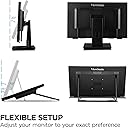
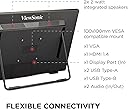
The ViewSonic TD2465 is a 24-inch Full HD (1920x1080) touch monitor featuring advanced 10-point PCAP touch technology, a flexible ergonomic stand with 7 height adjustments, and versatile connectivity options including HDMI, USB, DisplayPort, and VGA. Designed for professionals who demand responsive touch input in diverse environments, it supports pen, glove, and wet hand modes, and offers MacOS multi-touch compatibility via a dedicated driver. With a durable matte finish and 7H scratch resistance, this monitor blends productivity, durability, and seamless device integration.


| ASIN | B0B7JBZY4R |
| Additional Features | USB Hub |
| Aspect Ratio | 16:9 |
| Best Sellers Rank | #18,422 in Electronics ( See Top 100 in Electronics ) #515 in Computer Monitors |
| Brand | ViewSonic |
| Brightness | 250 cd/m2 |
| Built-In Media | TD2465 x1, 3-pin Plug x1, HDMI Cable (v1.4; Male-Male) x1, USB A/B Cable (v3.2; Male-Male) x1, Quick Start Guide x1 |
| Color | Black |
| Color Gamut | 72.0 |
| Connectivity Technology | HDMI, USB 2.0 Type B, USB Type A, VGA |
| Contrast Ratio | 20,000,000:1 |
| Customer Reviews | 4.3 out of 5 stars 286 Reviews |
| Display Resolution Maximum | 1920 x 1080 Pixels |
| Display Technology | LCD |
| Display Type | LCD |
| Hardware Connectivity | DisplayPort, HDMI, USB, VGA |
| Has Color Screen | Yes |
| Image Contrast Ratio | 20,000,000:1 |
| Is Electric | No |
| Item Dimensions D x W x H | 7.8"D x 21.6"W x 15.82"H |
| Item Type Name | LCD Touchscreen Monitor |
| Item Weight | 5.7 Kilograms |
| Manufacturer | ViewSonic |
| Model Name | TD2465 |
| Model Number | TD2465 |
| Mounting Type | Wall Mount |
| Native Resolution | 1920x1080 |
| Number of Component Outputs | 1 |
| Number of Height Positions | 7 |
| Picture Quality Enhancement Technology | VESA |
| Power Consumption | 20 Watts |
| Refresh Rate | 60 |
| Resolution | FHD 1080p |
| Response Time | 7 Milliseconds |
| Screen Finish | Matte |
| Screen Size | 24 Inches |
| Screen Surface Description | Matte |
| Shape | Rectangular |
| Specific Uses For Product | Business |
| Total Number of HDMI Ports | 1 |
| Total Usb Ports | 3 |
| UPC | 766907017885 |
| Unit Count | 1.0 Count |
| Viewing Angle | 178 Degrees |
| Warranty Description | 3-Year limited warranty on parts, labor and backlight |
L**L
WONDERFUL MONITOR
I bought this as a replacement of an ACER 22" toch screen. That screen had did not meet criteria. This screen is better. For one thing, the adjustments show up properly on the screen and are easy to manage. Secondly, the monitor itself is brighter and displays pictures better. I use Quicken for Windows for money stuff. This screen makes it possible to actually SEE the screen, even though Q for Windows has lousy contrast that they don't seem to recognize. Touch is fine. Just be sure to plug in BOTH cables. I even use the touch with a hdmi Switch. The touch is recognized on both Wndows computers and even the third one, a Windows 10 macine. Kudos to Viewsonic on makine the screen adjstment work well. Viewsonic is the only company I found that does work ok. UPDATE------- I have used this monitor since October. It is now December 31. The screen works well. Touch is reliable. The monitor works with an HDMI switch. I have 4 computers hooked into the screen, one ma MAC and three Windows 11. The base is large and requires a LOT of room, but is easy to use. Monitor easily moves up/down and tilts at all levels.
D**R
Works like a champ
I purchased 2 of these to work side by side, and they work as advertised. The screens fold down to make it easier to draw or write items. The response on these is exactly what you hope it would be. These are not as "fine" as my surface laptop screen when I draw - these do not have that same preciseness that I have on my Surface and Lenovo Thinkpad. These ViewSonics are good for touch buttons and some rougher drawing (draw larger boxes in OneNote, etc...). I chose Viewsonic TD2455 over the Dell and the Lenovo monitorss because the Viewsonic came with the pens to draw on the screen (you can find these easily on Amazon), and these also came with all the cables necessary to connect (Display Port and USB cables). Additionally, these monitors support daisy chaining the Display Port cables (helps a bit in the cable management category). These monitors also have USB ports on the left side of each monitor, which is helpful if you need to charge something or connect something quickly. If you have 2 of these, you have to tell Windows 11 which monitor is which for the touchscreen, so that the touch applies to the right monitor. Control Panel (view by category) --> Hardware and Sound --> Tablet PC Settings --> Setup. That took me a while to figure out. Additionally, there is a Calibrate color section, and another calibrate for where edges of the screen are located. I did not find it necessary but did these at the behest of Tech Support. What I learned is that these came configured well, right out of the box. In windows 11, the calibrate is not where the tech support people were telling me it is. It was actually in Control Panel (view by category) --> Hardware & Sound --> Tablet PC Settings --> Calibrate (select the correct monitor). As a big note: I was going to send these monitors back after 1 day because the touchscreens were only enabled ~50% of the time after booting up. I had to unplug and replug in the display to get the touchscreen to work after each bootup. This happened on both touchscreens, so it was not a screen or cable issue. After a month of emailing with US Tech Support people we found the solution is to use the older USB 2.0 ports, and not the newer USB 3.2 ports. After switching both monitors to USB to USB 2.0 ports, the touchscreens work 100% of the time. This is on a brand new Dell XPS 8950. Also to note is most of the 1-month delay was me not being at the monitor each day to try out the scenarios - mostly due to my own delays and not ViewSonic tech support. All in all, this is working just as we hoped and glad we purchased this! Now, I am going to tap the [submit] button using the touchscreen :)
R**Y
Very nice monitor, touch works well
I've had this monitor for about 6 months now. It has worked very well for me. The image quality is very good, and the touch screen is accurate. I really like using touch in conjunction with a mouse, and don't know why more monitors don't have touch capabilities. But, this ViewSonic has been great, so I'm happy!
J**R
Very nice, but does not pivot
UPDATE: I bought a quality level and discovered the monitor IS level. Surrounding items caused a visual illusion of tilt. So, I'll update my grade for this monitor from B+ to A-. I'm still not happy with no pivot capability and may return this. Pivot is a good feature. But this is still an excellent monitor. ----- This is an excellent monitor. My go-to has been ASUS for years, however, I am not satisfied with what they have to offer recently. I wanted a touch screen and struggled to find one that can be used like a standard monitor and not just like a tablet. Color and image quality on the ViewSonic is excellent without having to make any adjustments. And that is rare. There is one issue though. These new style stands. Yes, I understand the value of tilt and lying flat, as this is a touch screen. However, what I've noticed is this type of stand (none of them that I have looked at) can pivot. At least 10 degrees of pivot left and right would be useful. Why? Not every surface is level, and pivot can be useful for leveling and not just for turning the screen to the vertical position. This stand and others like it cannot pivot. Swivel and tilt, yes. But no ability to adjust left-right leveling. I ran into an annoying issue where the monitor appeared to be leaning to the right. Less than one degree, though this is noticeable if you are picky about having your monitors level like I am. I've had difficulty determining whether the issue is the monitor, my desk, or the floor. I bought a roll of 1/16-inch rubber shim and cut one piece to put under the front right foot of the monitor, and two pieces (stacked) under the back right foot. I think it is level now. However, this would not even be an issue if it could tilt left and right. This is a design oversight with these types of monitors. And it is one thing that ASUS definitely gets right that I have appreciated: ability to swivel, tilt, pivot 90 degrees, and ample vertical adjustment. Speaking of vertical adjustment, this relies on the V-shaped arm, and as a result there is not much vertical adjustment. I am using the ViewSonic as my main monitor in between two ASUS monitors to the left and right. Both are on monitor stands. With that arrangement I've been able to get maximum vertical adjustment. However, I had to purchase a new stand for the ViewSonic that allows more vertical adjustment than the other two stands. I needed to raise the monitor 3.75 inches vertically to level it with my other monitors. I am satisfied with that arrangement. However, the lack of pivot is still a consideration. I'll give it a chance and see. But I may return this for a monitor that can pivot. It is not easy to find a touch screen monitor that also pivots. It seems that touch screen computer monitors may be less common now. I know Apple used to to make a desktop touch screen but discontinued it. I think some of the thinking here is that it does take some physical exertion to hold one's arm up to touch the screen. But, for me, having the option of using either the mouse or touch screen is such a cool improvement. I WOULD consider replacing my other two monitors with ViewSonic TD2455 monitors -- if it were not for the lack of pivot. With that said, here are some definite positives. The touch screen feature works well. The stylus that comes with it works well. The thin bevel around the screen is very nice, and I still am able to clip my webcam on the top of the monitor without an issue. I do recommend this monitor. But consider the pros and cons I've mentioned. My grade for this monitor is B+. I want to give a higher grade, but I just don't get this new V-shape stand. I'm hoping that alternatives will be created that have the capability of pivot capability.
S**E
Great Plug & Play Monitor
Touch screen monitors are great for people with mobility (shaky hands) and visibility difficulties. I have used "regular" ViewSonic monitors for years and have always found them to be reliable and fairly priced. The 24 inch touch screen monitors (I have purchased 2 for friends) also fall into that same category. They are easy to install, and are virtually Plug & Play (you just have to remember to plug in the HDMI and the USB connectors). It is the USB connection that provides the Touch capability (on Windows computer). This monitor is well built (very sturdy), it is very clear and crisp, and the touch is very sensitive and responsive. An added feature is that you can either use the screen stand (which folds out from the back of the screen) or you can attach the vesa mount/stand provided. I am very impressed with the ViewSonic monitors, and so are the folks that are using them.
D**Y
Horrible Mac Support
They show it working with a Mac -- it's a fraud. (Not any modern Mac laptop or Apple Silicon). (1) The driver documentation is the worst I've seen in 35 years in Tech Doc -- missing steps, wrong steps -- they tell you to do things like boot in safe mode, but not how, they forget to tell you to install driver. I'm a software engineer, so I got their drivers installed anyway, but it doesn't work. (2) it needs cables they don't provide. So I bought 3 other cables. On a MacBook Air I needed a USB-C to HDMI/Display Port. Then you need a USB-C - USB-B to dive send touch commands. (You can't use the USB-A ports they have on the back, but they don't document that you need this at all, you have to call tech support to find out). Then because you filled up both your ports on an Air, I needed a 3rd pass-thru adapter and power supply to power the MacBook Air. (Since it doesn't have a dedicated power port, and the monitor doesn't provide power over USB). (3) Their tech support doesn't know Macs and couldn't escalate me to anyone that knew a Mac. They just read the same lousy documentation and I pointed out the missing steps, and they said, "oh yeah, you're right". But we couldn't get it to recognize the device. So it's a touch monitor that supports Mac, as a non-touch monitor. The hoops to install (like booting in safe mode, lowering your security, then installing the driver, is a series of hurdles because of Apple and/or because they haven't updated the driver to a new style in a few years). It might work better for Intel Macs with much older versions of the OS. But it makes customizing your own Linux install look plug-and-play.
R**S
Great monitor.
Wow, I forgot to rate this monitor. The monitor is bright and great color quality as well as offering touch screen capability. I’ve had the monitor for several months now and I love it. No issues and/or problems.
C**S
Screen is very glossy, double tap issues in linux
The replacement monitor (1st had issues) works ok. In linux, it will not work with double tap on the desktop. Double tap on a title bar does work. The work around is to put shortcuts on the taskbar or to enable single click to open on the desktop. I'm using this monitor on a cnc milling machine so the bright lights in the garage reflect off the screen. The matte touch screen from this brand still had a lot of glare and to make it worse, the matte finish made the image quality very bad. the other one also had a bezel that made it very hard to click on anything at the edge of the screen. This monitor isn't perfect, but it won out. With the lights off, it does look good, so maybe it would work ok in a darker office. Initial review on 1st order: The screen is very reflective and is hard to see with lights on in the room. Somehow, I got the touch input to work for a little while then it stopped working. I have tried it on 2 different computers and my phone. It seems there is an intermittent issue with the touch part connecting to the computer.
A**E
Guter Bildschirm, etwas tief
Der Bildschirm an sich ist gut, auch die Touch-Funktionalität ist gut. Das Bild ist klar und die Farben werden natürlich und kräftig wiedergegeben. Wir nutzen ihn allerdings auch „nur“ als Wandkalender mit Bildern im Hintergrund und To-Do-Liste. Etwas ungünstig ist beim Aufhänngen, dass der Bildschirm recht tief ist. Das Panel ist recht flach, aber hinten ist noch mal eine Art „Aufsatz“ dran, der die Tiefe deutlich erhöht. Damit steht der Bildschirm dann ein gutes Stück von der Wand ab.
M**D
Excellent produit.
Fonctionne très bien, pratique pour l'édition de certaine fonctions sur digital audio workstation.
A**E
Funciona tal como lo pretendía
Cuando vi que las instrucciones indican muy escuetamente que los drivers pueden descargarse de la página web del fabricante, temí que mi laptop del trabajo no aceptara fácilmente éste monitor y debido a las configuraciones de seguridad que pone la empresa donde trabajo, tuviera que llamar al área de sistemas y tal vez no pudiera usar el monitor, pero mi sorpresa fue grata al comprobar que con el cable tipo C, todo funciona como lo pretendía y también que la definición es muy buena, los colores bastante cercanos a los la propia laptop y el sistema táctil muy funcional. Se agradecería que el soporte permitiera girar el monitor en sentido horizontal y no solo vertical y que el conjunto fuera un poco más ligero, pero en todo caso considero que hice una muy buena compra en la relación precio-beneficio, ojalá saquen un monitor con conexión Bluetooth.
L**I
Ottimo monitor, ma carente di istruzioni
Il monitor è un prodotto davvero ottimo, funziona su Mac benissimo, multitouch e fantastico per disegnare, è reclinabile, diventa praticamente una tavoletta grafica anche se bisogna, chiaramente, essere consapevoli che non è un iPad gigante o una Cintiq: non supporta i livelli di pressione. Quel che mi fa mettere 4 stelle è la difficoltà di installazione delle funzionalità touch. Non c'è manuale, devi cercare tutto in rete e anche così ci sbatti il muso durissimo nella guida online per riuscire a farlo funzionare. Stavo per arrendermi, credevo fosse un bidone, e invece... è davvero fantastico! Ve lo consiglio, ma rimboccatevi le maniche da subito perché c'è da sbattersi moltissimo all'inizio per attivare le funzioni touch.
A**R
Excellnt product with excellent functioning
Trustpilot
2 days ago
3 days ago