Description
🖋️ Elevate your labeling game with precision and speed!
- DYNAMIC VARIABLE PRINTING - Seamlessly switch between text, QR codes, barcodes & logos without missing a beat.
- INK OPTIONS FOR EVERY NEED - Choose eco-friendly refillable water-based or quick-dry solvent ink for cost-effective, sharp prints.
- PRECISION MEETS PORTABILITY - Print crisp 1-inch high-def marks anywhere, on any surface.
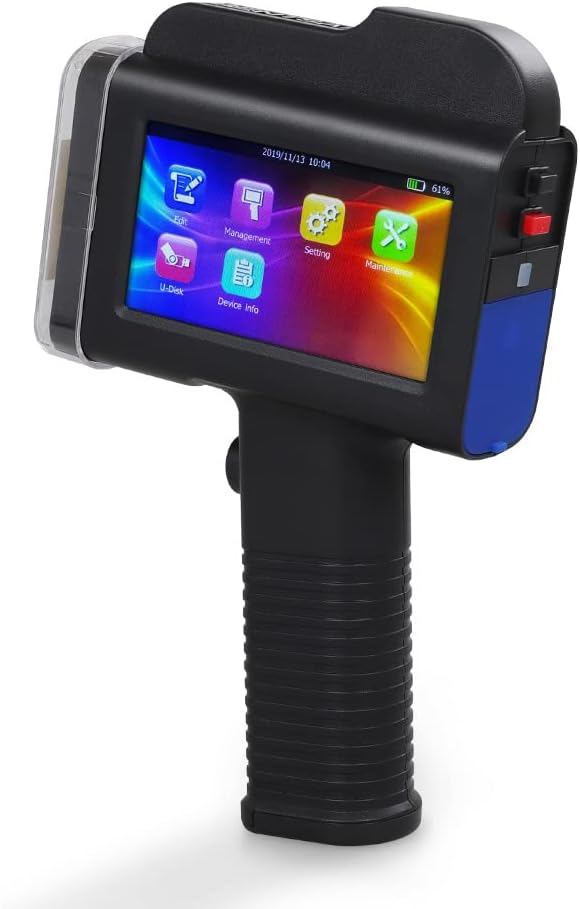
- INTUITIVE TOUCHSCREEN CONTROL - Navigate effortlessly with a 4.3" high-res touchscreen and ergonomic design for all-day use.
- BOOST PRODUCTIVITY WITH AUTOMATION - Mount on conveyor lines for hands-free batch coding that keeps your workflow flowing.
The BENTSAI B35 handheld inkjet printer delivers high-definition printing up to 1 inch tall on virtually any surface, including curved and uneven materials. It supports variable data printing from text, QR codes, and barcodes sourced from CSV or TXT files, ideal for batch coding and product labeling. Equipped with a 4.3" touchscreen and ergonomic handle, it offers user-friendly operation and supports both refillable water-based and fast-drying solvent inks. Designed for portability and efficiency, it can also be mounted on conveyor lines for automated printing, making it a versatile solution for small businesses and industrial applications.