Buy anything from 5,000+ international stores. One checkout price. No surprise fees. Join 2M+ shoppers on Desertcart.
Desertcart purchases this item on your behalf and handles shipping, customs, and support to USA.
🎬 Elevate your streaming game with effortless Full HD capture—because your content deserves the best!
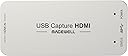
The Magewell USB 3.0 HDMI Full HD Video Capture Device (Model 32060) is a professional-grade, plug-and-play capture dongle that converts HDMI signals into 1080p60 USB webcam streams without driver installation. Featuring 64MB onboard memory for smooth frame buffering, automatic input format detection, and broad OS compatibility (Windows, Mac, Linux), it delivers reliable, high-quality video capture ideal for streaming, conferencing, and recording. Its rugged metal casing supports long hours of stable use, making it a top choice for content creators and professionals seeking superior HDMI-to-USB capture performance.


| ASIN | B00I16VQOY |
| AV Output | HDMI |
| Antenna Location | Video Recording |
| Best Sellers Rank | 43,472 in Computers & Accessories ( See Top 100 in Computers & Accessories ) 66 in External TV Tuners & Video Capture Cards |
| Box Contents | Capture Card |
| Brand Name | Magewell |
| Compatible Devices | computers |
| Country of Origin | China |
| Customer Reviews | 4.6 4.6 out of 5 stars (598) |
| Hardware Interface | HDMI, USB 3.0 Type A |
| Item Dimensions | 8.4 x 4.3 x 1.3 centimetres |
| Item Weight | 91 g |
| Manufacturer | Magewell |
| Manufacturer Part Number | 32060 |
| Minimum System Requirements | Compatible with Windows, Linux, Mac OS X and USB 3.0 interface. |
| Model Name | XI100DUSB-HDMI |
| Model Number | 32060 |
| Operating System | Windows, Mac OS, Linux |
| Other Special Features of the Product | Real-time processing, Automatic input format determination, Automatic audio format conversion, Webcam emulation, Onboard memory for frame buffering |
| Platform | Mac OS X, Windows |
| Product Warranty | Default Manufacturer Warranty. Please contact us if you require further details |
| UPC | 796594620815 813493080301 699956392156 |
| Unit Count | 1.0 count |
| Video Capture Resolution | 1080p |
R**N
Works brilliantly but then again at this price so it should! Full HD 1080p at up to 60fps!
Expensive or what? More than my video camera but it does the trick of turning Full HD HDMI signals into 1080p USB3.0 webcam signals that can then be used with, say, OBS. Unfortunately I discovered that ManyCam could not handle the data volume so thank goodness OBS can. No frames are lost and it handles audio too but I use a separate USB mic so that aspect is not important to me. It does get HOT in use so do NOT leave it plugged in except when using it - see my Amazon review of the USB ON/OFF SWITCH FOR USB 3.0 & 2.0 // HmbG - 1401 for an easy way of switching it off without constantly unplugging it from the USB socket. As this is the ONLY device guaranteed to make an HDMI signal look as though it's coming from a webcam (and can therefore be used in Skype, for example) I guess they can name their own price. And they did. But it is THE answer for me so I just swallow hard at the price tag and now use it several times a week.
J**K
Works well. Gives good quality video
I bought this to do live streaming. It was not cheap, but I wanted something with some quality behind it. It is very well built in a sturdy metal case and I imagine it could take some punishment. It connects to a variety of Gopro Hero 4 cameras via some infeasibly long HDMI cables and a switch. It gives excellent results on the video. I have not tried the audio at all, because I source the audio for the live stream separately. There is a slightly annoying "No Signal" screen that pops up when I change cameras over using the switch, but I can hardly criticise it for that because it does actually lose the signal for a few seconds, so it is only doing its job. I have a second USB webcam I cut to when I need to swap sources over, so no one ever notices.
V**P
Excellent but far too expensive and I had to send the first one back
Really a life saving if you are looking for trueplug-and-play Full HD streaming and you want to use your own camcorder, which has a HDMI output. Pros: Excellent plug and play (truly!) and no big usage of the CPU Cons: it gets really hot (I think this is because it processes the signal itself, without using the resources of the PC, which is great) and...the price...come one guys, it costed me more than the Canon camcorder that I bought together...I don't believe not even one second that the production costs are so high to oblige you to fix such a high price, so the only thing that pops up to my mind is that there are no other tongles like this one around and you are using the desperation of your clients to raise the price Having said this, the first one did not work and I had to send it back (thank you Amazon for your return policy) but before I have been in touch with the after-sales service who responded in less than 24hours, I believe from China, giving me some useful information and advices to check whether I had a problem with the ports or it was tge dongle that was not properly working (I am impressed guys...well done) Overall, only four stars due to the price (really too high) and to the quality control, otherwise I don't regret the purchase.
I**S
Watch the video on the link included in the documentation
As with most things these days we assume plug and play means just that but to save yourself a little time and frustration do watch the short video recommend in the paperwork provided. It will not be a waste of time and I found the results impressive allowing me to use my Sony a7iii camera as a webcam and for recording directly to my laptop. Costly but effective so worth it
A**S
I'm currently using this little wonder to stream my Wii ...
I'm currently using this little wonder to stream my Wii U on Twitch. The picture quality is impeccable though I could not get sound from the Wii U, resorted to AV out to computer audio jack. Apart from that its a stellar product.
S**D
Expensive, but works perfectly.
Certainly not cheap, but worked perfectly first time I used it on both Mac and PC. Bought to replace a faulty Elgato Camlink that never functioned as well as this.
J**L
Works really simply, just plug and go. I ...
Works really simply, just plug and go. I had problems with the image upside down in VLC, this means I'll probably need to spend some more money on professional capture software (doesn't work in Pinnacle Studio or Adobe Premier which I already own). Pulled a demo of VMIX and that seems to work. I actually only purchased so I could use an external camera source for Skype and it works OK for this, which is why I'm not down rating it to much. I need to figure out if I can improve the picture quality, as it looks OK from the camera, but 'processed' from other HDMI inputs.
G**G
It just works
It just works - plain and simple. Plug it straight in to your PC and it's recognised. We use it for Skype calls and it's rare to find something video-related that does the job without any interference, driver loading, updates etc. For what it is, it's pricey but it's a solidly built unit and the time saved compared to other solutions we've tried has more than repaid the cost.
G**Z
Funcionó como debería de ser.
P**5
今まで数ヶ月使用して、なんのストレスも感じたことがない。値段の価値ありです。
J**S
So far, seems to be an awesome little capture device. It's pretty pricey compared to other options, but I also think it is worth it, considering the high quality and adjustment capabilities of the device. I only wish that I had a free PCI-E slot to use the PCI-E Pro Capture version instead (which also includes analog inputs, for the same price) -- might be a better option if you have the space for a PCI-E 1x device, and also need to capture analog signals: Magewell Pro Capture HDMI Video Capture Card Magewell's website has the full specs for this device, and also a link to download the accompanying utility for Windows/Mac/Linux to adjust all of the various device parameters, audio levels, etc: http://www.magewell.com/usb-capture-hdmi (click the 'Utility' link at the top of the page to download for your platform) - Uses the USB UVC protocol-- this means the device is plug-and-play, and acts like a webcam under most software; on Windows, it can be used a DirectShow source, and shows up as a /dev/videoX V4L2 device on Linux. Brightness, contrast, and resolution can also be adjusted via the UVC protocol without using the accompanying Magewell utility - Supports up/down-scaling, aspect ratio, crop, deinterlacing, desaturation, and color space conversion (RGB, YUV BT 601/709/2020) in hardware - Will capture in YUY2 (default), UYVY, RGB24, or RGB32 formats - Supports a max resolution of 2048x2160 for capture (max input of 2048x2228) up to 60 fps (up to 75 fps w/ YUY2 format at 1080p, up to 120 fps at lower resolutions) - Supports custom and arbitrary video resolutions and framerates - Captures PCM audio, and the input level can be adjusted (from +6 dB to -80 dB or muted) - Can load/save custom EDID profiles to emulate certain devices. EDID information is used to tell the source device what formats are supported by the sink (in this case, the capture device) - Can use multiple devices on a single machine. To do this, you'll need to open up the Magewell utility, click the Advanced tab, then set Device Name to "Serial number" - By default, the device will show a test pattern with "NO SIGNAL" text. This might not be desirable. In this case, use the Magewell utility to change the "Status image" from 'Default' to 'Black' (under the Advanced tab) I have included a couple screenshots from the Magewell utility (under Linux, but the capabilities are the same under Mac/Windows)
B**Y
Works as intended & have had no issues since purchasing this for live streaming from my Canon video camera. very happy with this purchase.
V**T
Dopo aver provato senza successo un ripersaw che ho reso, con questa scheda ha riconosciuto immediatamente la mia dslr e la videocamera, perfetto l’uso con Obs, ottimo il software ed installazione immediata. Inutile perdere tempo con altre soluzioni. Costa di più, vale di più.
Trustpilot
2 days ago
2 weeks ago