Buy anything from 5,000+ international stores. One checkout price. No surprise fees. Join 2M+ shoppers on Desertcart.
Desertcart purchases this item on your behalf and handles shipping, customs, and support to USA.
🌍 Stay connected everywhere, effortlessly stylish and travel-smart!
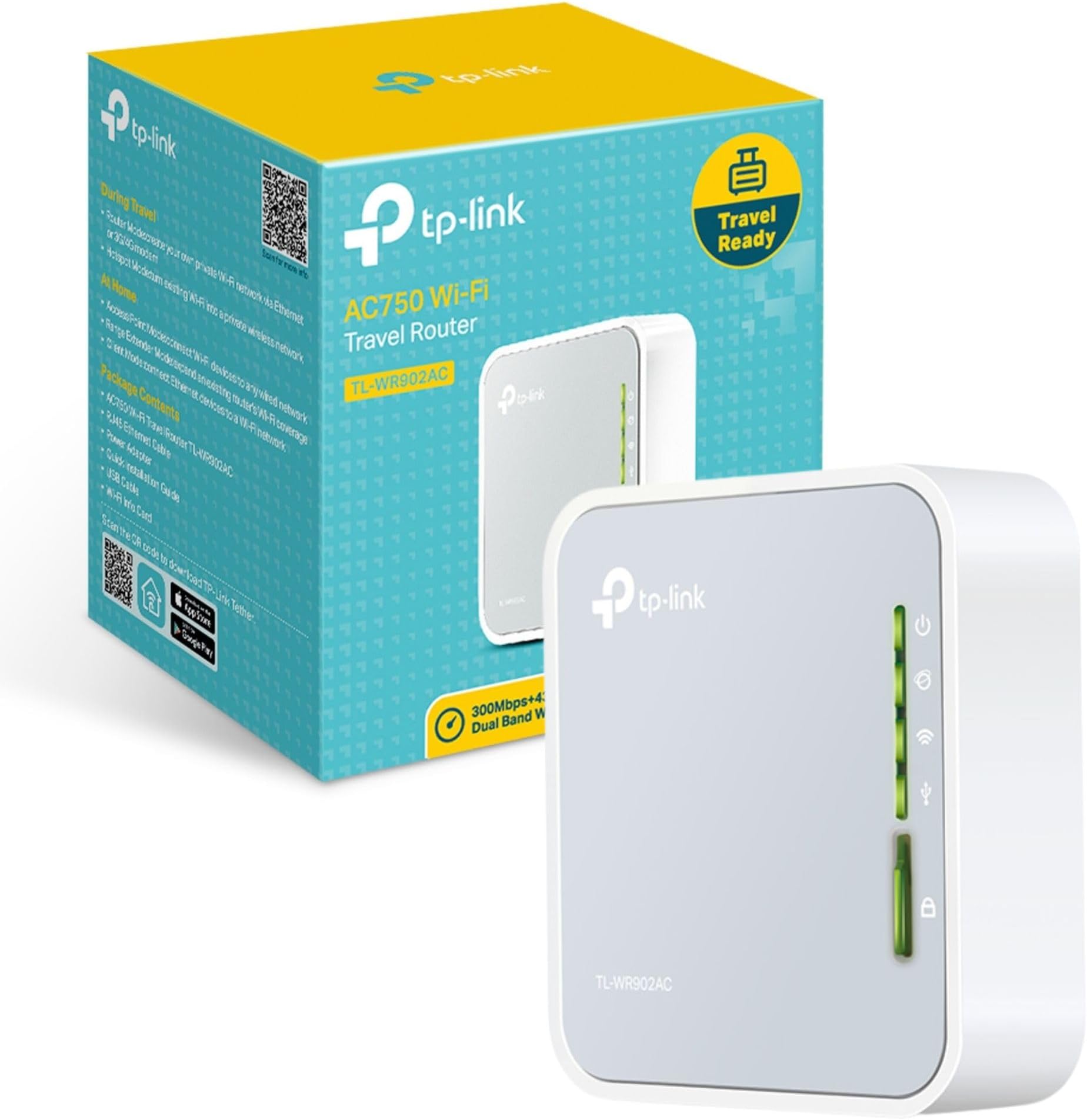
The TP-Link TL-WA902AC is a compact, travel-sized dual-band AC750 Wi-Fi router designed for professionals on the move. It supports multiple modes including router, range extender, and hotspot, enabling versatile network setups. With internal antennas and a USB port for 3G/4G modem support, it delivers secure, private Wi-Fi networks up to 100 square meters. Lightweight and easy to configure, it’s ideal for creating reliable connections in hotels, offices, or remote locations, backed by a 3-year warranty.


| ASIN | B01NAYG15H |
| Antenna Location | Home |
| Antenna Type | Internal |
| Best Sellers Rank | 1,608 in Computers & Accessories ( See Top 100 in Computers & Accessories ) 13 in Routers |
| Box Contents | Ethernet Cable |
| Brand | TP-Link |
| Brand Name | TP-Link |
| Colour | Mist Grey |
| Compatible Devices | Personal computer, laptop, tablet, smartphone, game console |
| Compatible devices | Personal computer, laptop, tablet, smartphone, game console |
| Connectivity Protocol | Wi-Fi |
| Connectivity Range | 100 Square Metres |
| Connectivity Technology | Ethernet |
| Control Method | Touch |
| Controller Type | Switch |
| Country of Origin | China |
| Coverage | Up to 2 Bedroom Houses |
| Customer Reviews | 4.2 out of 5 stars 11,639 Reviews |
| Data Transfer Rate | 150 Megabits Per Second |
| Frequency | 5 GHz |
| Frequency Band Class | Dual-Band |
| Frequency band class | Dual-Band |
| Global Trade Identification Number | 06935364095673 |
| Has Internet Connectivity | Yes |
| Has Security Updates | Yes |
| Is Modem Compatible | Yes |
| Item Dimensions L x W x H | 6.7L x 2.2W x 7.4H centimetres |
| Item Weight | 2.12 Ounces |
| LAN Port Bandwidth | 150 megabits_per_second |
| Manufacturer | TP-Link |
| Manufacturer Part Number | TL-WR902AC |
| Maximum Upstream Data Transfer Rate | 150 Megabits Per Second |
| Model Name | TL-WR902AC(UK) |
| Model Number | TL-WR902AC |
| Model name | TL-WR902AC(UK) |
| Number of Antennas | 3 |
| Number of Ports | 1 |
| Operating System | Windows |
| Other Special Features of the Product | USB Print Server, WPS |
| Product Warranty | 3 year Manufacturer |
| Router Network Type | Wireless Router |
| Security Protocol | WPS |
| Special feature | USB Print Server , WPS |
| Unit Count | 1.0 count |
| Wi-Fi Generation | Wi-Fi 5 |
| Wireless Compability | 2.4 GHz Radio Frequency, 5 GHz Radio Frequency, 802.11ac, 802.11b |
| Wireless communication standard | 2.4 GHz Radio Frequency , 5 GHz Radio Frequency , 802.11ac, 802.11b |
G**P
Excellent value for money
Easy to setup and very fast speeds for the tiny size. Includes power brick, power cable and Ethernet cable too.
M**N
Wireless bridge solid
One set up if have this working with a security camera seamlessly. Setup was a bit of a faff but reading the instructions helped. So far solid and reliable
J**L
Superb product
I have been using wired connections to my router, all of it via powerline adapters, my wife finally cracked and told me to clear things up around the router which sits in our hall. First project connect two NAS devices sitting on my desktop to my router over wifi. I chose this because it was compact and together with a small 5 port Ethernet hub my research indicated this would be a good solution. Day 2 after a simple setup, read the instructions, all working well, who knows how long this will work as it is sold as a travel device, however my experience with TP-link is they make reliable devices. Four stars only because it has not had a test of time.
C**P
Problem: OLD smart tv 2.4GHz couldn't connect to New/latest Vodafone Wifi Hub.
Despite new wifi hub able to split the wifi into 2.4ghz and 5 ghz separately but somehow my old hisense smart tv unable connect to the new wifi hub. I was advised by chatgpt to try this tp link router and to my surprise it did work perfectly by insert the tp link ethernet cable into the smart tv ethernet port directly. The tp link will act like a wireless bridge between new wifi hub and old smart tv, ensure old smart tv is connected under ethernet mode instead of wireless. Of course, you also need to power up the tp link. Do ensure you connect to tp link wifi instead of your home wifi in order to kick off the login/setup process.
A**N
Excellent when working. Good range and dual band wifi. Poor support for 3G/4G USB mobile devices. Documentation not good.
I have had this for a few weeks and have by no means tested everything but I will update this review as I go along. The model I received was the TL-WR902AC(EU) Ver 1.0 (with UK plug on the mains adapter). There are other versions out there (like EU ver 3 and US). Also, this model has a recent firmware update available from the tp-link UK website which I have applied. The micro USB socket for the power is set back in the unit and I have found some USB cables have a B plug that isn't quite long enough to stay connected. YMMV The first thing to do is check that the built in Wifi networks have a password. Set the switch to ETH and switch it on. Don't plug it into a network. When the unit is ready, use a tablet or laptop to connect to the WR902 wifi. If it doesn't ask for a wifi password, visit the WR902 admin page tplinkwifi.net and login. Check the Wifi settings and make sure both the 2.4G and 5G networks have a secure password set. I didn't do this and just plugged it into the home network. The WR902 promptly created 2 completely open unprotected Wifi access points. :( :( The wifi range of the WR902 is surprisingly good even though it has no external aerial. However, the unit has to be powered externally (there are no batteries) although it can be powered from a USB port (on your laptop, or car socket for example) so you don't require a mains socket. There was no manual provided. Just a quick guide. I did find a bigger manual on the USA TP-Link website (but not on the UK one). The documentation is not good and neither is the support website. If things don't work as expected, you can spend a lot of time tinkering trying to make it work. Test scenarios: Share ETH switch setting: Wifi access to the internet via an existing (wired) network. Plug the WR902 into a handy RJ45 ethernet port on the network and switch on. After a couple of minutes the WR902 should provide 2.4G and 5G wifi access to the internet via the network. This works flawlessly. As long as the WR902 can get an IP address from the network there is no more to do. If the local network requires the WR902 to have a fixed IP address, you can use the WR902 admin page to enter it. Wifi access to internet via a 3G/4G mobile network. Instead of plugging the WR902 into an existing network, you can plug in a USB mobile dongle. However, the WR902 is very choosy about which USB mobile dongles it will talk to. It doesn't recognise my Vodafone K5160 4G dongle and it doesn't like my old K3520 3G dongle either. Luckily it likes a K4201 3G dongle. The WR902 takes several minutes to recognise and connect to the internet via the dongle. You will probably have to do some configuration via the WR902 admin pages to make it a plug and play process but it can be done. Share Hotspot switch setting: Wifi access to internet via a Wifi network. This seems a bit strange. Why would you use the WR902 to connect to a Wifi network? You can just connect your device directly. There are a couple of situations. 1) The hotel wifi only works in one part of the room but you want wifi in the whole room. Place the WR902 where it can connect to the hotel wifi and share the internet around the whole room. 2) The hotel wifi only works with one device. Use the WR902 as the device. it will share the connection with all your devices. Start up the WR902. After a couple of minutes you will be able to connect to the WR902 Wifi and log in to the admin page (URL = tplinkwifi.net). Choose Quick Connect. You can get the WR902 to scan the local wifi networks and choose the one to connect to. Enter the wifi password and continue. The WR902 will reboot and after a few minutes, the internet will be available. The good news is the WR902 remembers the last wifi network you connected to so if you are staying in the same hotel for a while, subsequent use is plug and play. Note: With both of the above modes, the WR902 creates its own LAN which it connects to the internet. Devices using the WR902 can network with each other, but are isolated from the LAN that the WR902 uses to connect to the internet. If you want to use the WR902 to extend your existing LAN, use the third switch position AP/Rng Ext/Client. More later.
N**R
Fantastic value for money
As with every TP-Link product I have purchased, this worked straight out of the box. It has been purchased ahead of a trip to Madeira to a hotel we have stayed at before where wifi is available in the public areas but only an ethernet connection in the rooms. I have tested it on my own home network by plugging into a spare port on a switch in my home network located in a room in a corner of our fairly large house and found I could access it via an ipad (air 2) and my wife's Samsung tablet throughout the house, even at the furthest point from the unit. A hotel room should prove no issue. Physically the unit is tiny - about the size of two matchboxes side by side - and therefore highly portable and ideal for going on your travels. The only comment I have on setting it up was that you need good eyesight to read the access password which is printed on the base of the unit. I had a couple of false starts with this inputting incorrect passwords before a magnifying glass came to the rescue. Once I had the correct password everything worked exactly as it said on the tin! For less than £20, its an absolute bargain!
M**S
Lasted 5 days
Was an absolute breeze to setup. Took 5 mins and had my phone hotspot connected, shared through this device, WiFi printer and enabled my laptop, other phone and tablet to print. Signal strength was great and it worked perfectly. Suddenly stopped working after 5 days, the laptop refused connection, went through every trouble shooting guide, nothing worked. TP Link support never responded. Unfortunately now being sent back because it's as useful as a brick.
A**B
Easy to set up and 'Client Mode' disables WiFi Repeater as I wanted.
This device, TP-Link AC750 WR902AC Travel Router, does exactly what I want: a WiFi to Ethernet Bridge ONLY. When set up in "Client Mode", functioning as a WiFi to Ethernet adapter, it will not be broadcasting WiFi as a repeater. This is unlike several other TP-Link devices that combine WiFi Repeater/Extender functions with that of a WiFi to Ethernet Bridge/Adapter. On those, such as the RE450 (and all others in the series) the WiFi broadcasting (i.e. the Repeater function) cannot be turned off, which can cause interference issues that can quite severely slow down the WiFi throughput. This little Travel Router does actually work purely as a WiFi to Ethernet bridge/adapter when set to Client Mode, and thus is a perfect choice if that is all you want to do and you are doing that well within the range of the main router so you need to avoid WiFi interference/contention. This little device is providing exactly what I want: a WiFi to Ethernet Bridge with no WiFi Repeater/Extender function active. My Ethernet-only devices are now connected via this WR902AC to the home wifi network with no unnecessary wifi signals causing trouble. I have read one or two reports here of failure after a few months of constant 24/7 use, and it does get rather warm, a bit more than I think it should, so I will watch out for any issues (this one can be switched off from time to time but I need a second one which will not be - we will see). At the moment I am very happy.
Ö**N
harika ürün
harika ürün smart tv wi-fi çipi tarla olmuştu ama LAN çalışıyordu bana 4000 tl fiyat çıkardılar bu ürünle hallettim acayip ucuza
A**A
Good as Expected!
This gadget as its described!, perfect!
Y**E
Affordable, small, works!
After multiple failed attempt to provide internet connection to a device without wifi capability, decided to try this travel router in client mode. Instruction was clear, setup was smooth, and it performs well so far. Inexpensive and solid option for anyone looking for wifi-to-ethernet adapter. Very happy with the purchase.
M**A
Working good
Stable performance and no surprises ... good item ...
D**M
Excellent via une Clé 4g pour fonctionner avec RJ45
Excellent pour obtenir un accès internet possible que par du RJ45 et en Utilisant une Clé 4g ( pour ma part nécessité pour connecter un CozyTouch Thermor avec Mon Airbox confort Orange ) et comme le Cozy ne peux être connecté qu'avec un câble RJ 45, TP-Link ma enlevé une belle épine du pied. Pour le moment, fonctionne très bien.
Trustpilot
1 month ago
3 weeks ago