🚀 Dominate your digital domain with the ultimate WiFi powerhouse!
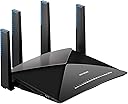
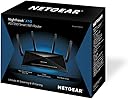
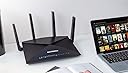
The NETGEAR Nighthawk X10 R9000 is a premium tri-band smart WiFi router delivering up to 7.2 Gbps combined wireless speeds using cutting-edge 802.11ac/ad technology. Equipped with a 1.7GHz quad-core processor and four active external antennas, it ensures superior coverage, ultra-low latency for 4K streaming and VR gaming, and seamless media streaming via built-in Plex server support.
| Antenna Location | Home, Gaming, Streaming |
| Asin | B01M3Z2YA6 |
| Best Sellers Rank | 211,706 in Computers & Accessories (See Top 100 in Computers & Accessories) 1,615 in Routers |
| Box Contents | 1 |
| Brand Name | NETGEAR |
| Colour | Black |
| Compatible Devices | Gaming Console, IPTV Decoder Box, Personal Computer, Smart Television, Smartphone, Streaming Device |
| Connectivity Protocol | Wi-Fi |
| Connectivity Technology | Wi-Fi |
| Control Method | App, Voice |
| Coverage | Wide coverage |
| Customer Reviews | 3.9 3.9 out of 5 stars (248) 3.9 out of 5 stars |
| Data Transfer Rate | 7200 Megabits Per Second |
| Frequency | 5 GHz |
| Frequency Band Class | Dual-Band |
| Global Trade Identification Number | 00606449114669 |
| Has Internet Connectivity | Yes |
| Is Electric | Yes |
| Is Modem Compatible | No |
| Item Weight | 1.86 Kilograms |
| Lan Port Bandwidth | 10 Gbps |
| Manufacturer | NETGEAR |
| Manufacturer Part Number | R9000-100EUS |
| Maximum Upstream Data Transfer Rate | 800 Megabits Per Second |
| Model Name | Nighthawk X10 |
| Model Number | R9000-100EUS |
| Number Of Ports | 8 |
| Operating System | Chrome,Linux,Mac Os,Safari 1,Vista,Windows 7 |
| Other Special Features Of The Product | USB Print Server |
| Product Warranty | Two Years Warranty |
| Router Network Type | hybrid |
| Security Protocol | WPS |
| Unit Count | 1.0 count |
| Upc | 606449114669 |
| Wi Fi Generation | Wi-Fi 5 |
| Wireless Compability | 802.11ac |
User
Netgear Nighthawk R9000 X10 gamble paid off
This feedback is for the Netgear R9000 X10 Router. I've read reviews on here and they can relate to any number of Netgear routers? Don't know why Amazon bundle all the reviews into one, as its very confusing.Anyways, I've currently got a Netgear R7000 Nighthawk version and had it for 12-18 months. Been getting on with it ok, except recently when my broadband speeda just got really bad. But I had upgraded a whole load of tech in the house.The Microsoft Surface Pro 4 tablets were only getting 20-30 mbps speeds on a 200 MB Virgin Media broadband. In the evenings my Samsung Galaxy S7 Edge phone would drop to around 20-30 mbps and everything seemed to be struggling.I've now got around 46 connected devices ranging from Tablets, Laptops, Desktops, Smart TV's, Smart Phones, Gaming Consoles (just about every variety), VoIP Telephone System, Printers, Amazon Echo's, Smart Bulbs, Smart Sockets and Switches, Heating systems, Security and Safety devices, basically a ton of Internet Connected stuff..As good as it was, the Netgear R7000 nighthawk was struggling and evenings were worse (4K TV Streaming, YouTube Streaming, Gaming, Mobile Phone browsing, Tablet Browsing etc).So after reading a few reviews about the R9000 X10 being overpriced, over developed and over the top, I decided to buy it anyways. Whats the worse that could happen?But to my delight, its worked out well. I now get 150-200 mbps speed testing across all devices at all times of the day. 100% WiFi signal strength whereas before it could be 70-80% or less.My Surface Pro 4 tablets were never any better than 30 mbps and now are up at 160 mbps which I'm delighted with as I honestly thought it was a Microsoft hardware issue? But it wasn't.So happy days, the new router is powering its way through the evening and I stress tested it with 4K Video streaming, gaming, YouTubing, Browsing on every devices I could find and it came out great.
User
Best router I have had so far. And I have had many.
I really love this very powerful router. I can reach local upload and download speeds of up to 600mbs. When I ping the interned Speedtest.net it downloads at 382mbs and uploads at 19.6mbs. My BB provider is Virgin 350 which offere 350mbs download and 29 upload. So I am getting better download speeds than Virgin says I should expect to get and that is when this router is in the other room. Wired connection speed are blisteringly fast in addition. It has lots of great other features too. The 60ghz ad Wi-Fi is not any use to me at present because I don’t have any Wi-Fi clients capable of the 60ghz band yer so I Bev turned that off for now. However, it will be here in a year or so. 60ghz apparently only works in the same room at line of site.The 2.4ghz has a massive long range I am still getting 70mps download when I am in my garage 65 meters away.
User
Router resets itself to factory default
Absolutely disappointed with this router after spending days and days testing it. I work from home everyday, got multiple devices constantly connected (roughly 7 devices) to the internet. plus security cams for live streaming and also I do use quite a lot Skype, Voiper for meetings, etc, etc. I was really frustrated with my internet provider (EE) router not being able to manage multiple devices connected to the router, therefore, decided to go ahead and try this expensive router. First thoughts? Solved my problem until....today after having a power cut in the house and the router reset itself to factory default. I did set up the router again and loaded the saved settings and in purpose decided to turn off and on the router again (via the button) and once again reset everything to factory default. I seriously wonder how comes a router that expensive behaves like that?
User
Monster of a router.
My old TP link router (purchased 6.5 years ago) started to die e.g. randomly restarting, randomly not detecting modem attached to the router (Virgin Media in Modem mode only).Old TP link router never got me anywhere near the 350mb/s download rate on my internet and whilst upstairs in my room I only ever got around 80mb/s, and now with this monster of a router I was getting 300mb/s upstairs! already a huge plus.Has abit of future proofing too with the single 10gbe connection for people who has a 10gbe capable NAS solution, port 1 and 2 supports port aggregation, perfect for people who has a team NIC setup!It's abit pricy, but as a techie - I would highly recommend this.
User
Pricey, powerful and physically huge for a router
This is a beast of a device! I totally hadn't appreciated quite how big it actually is, when I purchased it. Its footprint is roughly the same as that of a laptop and its design will dominate any place you site it. That said, it does look cool, with its antenna lights and stealth bomber-like design.Performance wise, it works very well and I now have a good WiFi signal in rooms that were previously patchy, at best. Having 6 RJ45 network sockets is also useful.Downsides: my old Netgear router allowed me to create multiple SSIDs. The R9000 will allow just two. In truth, this is unlikely to be an issue for most and I have worked around it, but it does seem odd that an older Netgear had this option and newer, premium product, like the R9000 doesn't.The elephant in the room - the Price. It is hugely expensive for a home router. Particularly one that has no built in modem, meaning you need to use it with a separate modem device, to get internet through it. For me, this wasn't an issue, as I already had that setup. But if you have a newer Fibre Optic broadband service, which has the fibre modem built in to the router, you won't be able to replace that device with the R9000. You can use it, but you'll still need the old ISP provided device to handle the Fibre termination. I suggest talking to your ISP or a local IT Professional, before you purchase, if you're unsure.It's an expensive device, but I do like it. If it comes down in price, then I think it'd be much more attractive option. But if WiFi signal is your issue and you can afford/justify the price and live with its small failings, it will do a good job for you.
User
It works and way better than the xr700
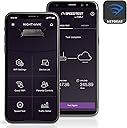
Managed to get this as a replacement from the new nighthawk rx700 which is terrible for setting up and has terrible user friendly interface. This router the nighthawk x10 is very easy to set up via the nighthawk app. Just enter your broadband provider address and password and its set up. The nighthawk app works well with the router for your basic requirements and if you want to get technical with the router you can do via your computer laptop unlike the new model nighthawk xr700 you have to set up with your computer laptop you need to know a lot more about computer programming to set that thing up. This the x10 very easy to install has the same functionality features as the current so called replacement model only difference between the two is that the xr700 has different software settings and it is awful unless you like programming and spending your time locked away with your pc. The x10 great easy to use software brilliant WiFi range i Live in 3 bedroom home and brick walls no plaster boards and get signals even in the areas of the house which we didn't get. We have all the connections hardwired which there is six and multiple items on WiFi and so far so good. In total there is about 31 devices. We are on the plusnet super fibre and the router is connected to the bt openreach modem. The x10 looks cool and a lot quieter than the other router we had. Shame netgear stopped producing this model well they haven't because of the xr700 but that software is terrible on it. This x10 brilliant a total must if you have a lot of devices and hard to reach WiFi signal area around your home. If You can afford it and get one before they gone I highly highly recommend you do.
User
OK I suppose, but VERY expensive
It's OK but for the price, I would have gone for something else. Had to switch to Kong firmware as signal kept dropping, and a lot of functions don't seem to work. I think it depends on what you want it for - but for example, couldn't get the Plex side working at all for me - and the USB drives were beyond me (can only use one and the list of compatible ones is very short!)
User
Blistering speed with great looks
If it can be said that an object looks amazing then I would say that the Nighthawk is deserving of such an occasion. It has stage presence when reveal from its frankly seductive packaging. It really feels like you have just purchased something really special and once I had plugged it all in and flicked on it’s switch I was keen to see what performance laid in wait for me, across the invisible waves and hinted at by flickering lights. Once connected it was immediately a step up from my previous gigabit router and of course the first stop for my browser window was the beloved speedtest.net which done exactly what I expected and flew to the end of the scale and then kept climbing to a fantastic 400MB/s! Glorious! It’s been in place now for a week and I have been massively impressed by the speed of my internal network and it’s been so fast I haven’t been hindered by page load times and have not noticed updates anymore as they download so briskly. This router may cost more than others, but in the car world so does a Ferrari and both deliver outstanding performance and results for your purchase!
User
Plex Media Server !
Ich habe mir den X10 wegen der Plex Media Server App geholt, daß mein Server nicht 24/7 Lauffen muss.Der HP Z420 war ja beim Streamen ziemlich ausgelastet und machte mir ein wenig sorgen das es Ruckelt oder andereProbleme geben könnte. Nichts dergleichen.It is Huge, it is Bright, is Shiny. Naja Fettes Schwarzes teil mit vielen Blinkelichtern die man zum Glück Abschalten kann.Das TriBand hab ich bis jetzt nicht Testen können, da ich kein AD Netzwerk habe, aber die 2.4 und 5 GHz sind ausreichend.Die UI ist nichts neues. Netgear Like, zwar etwas Langsam aber nicht das es Nervt.Nette Features mit Cloud Save auch mit Handy APP nach Registrierung auf der Homepage.Der kleine Lüfter der Oben zu sehen ist, hat sich bis jetzt kein einziges mal gemeldet, oder er ist so Leisedas ich es nciht bemerkt habe.Ich habe in den Anderen Rezensionen Gelesen das das Teil Kein Modem hat... Ähhm das teil ist nen Router und keine Fritz Box.Ja Bei dem Preis... usw.Ich hab das Teil Hauptsächlich wegen dem Plex Server Gekauft, hatte vorher den 7500er und war mit der Leistung schon zufrieden.Wer mehr Funktionen haben will, sollte sich nen WRT54 GL zulegen und DD-WRT als Firmware aufspielen und dran hängen ;)
User
BUEN ROUTER, CARO Y DE FUTURO
Es un pedazo de router, pero para comprarlo de aquí a dos años. La banda de 60 no está implantada y tardará. Por tanto, se convierte en un router bueno a 240O de doble banda. Yo a día de hoy con el asus triple Banda 3500-5300, mucho mejor.
User
R9000 - Ottimo Router
Sto usando da una settimana il Nighthawk X10 AD7200 R9000 e non posso che parlarne bene.E' stabile e veloce. Grazie alla porta SFP+ ho collegato il mio Nas DS1517+ a 10Gb e riesco a lavorare con 3 PC alla massima velocità (circa 120MB/s) che è praticamente il massimo per connessioni lan ad 1Gb.anche il vecchio nas DS414 collegato alle porte lan 1 e 2 in link aggregation ha visto aumentata la velocità di trasmissione.il wifi poi è stabile e riesce a gestire tutte le apparecchiature di casa (TV, Tablet, Smartphone, Decoder...) senza rallentamenti evidenti.Molto ricca la possibilità di settings.Grazie Netgear
User
Reglé!
Après des problèmes, depuis longtemps, avec mes ordinateurs et pertes de connexion avec mes périphériques (NAS’s etc), j’ai essayé cet appareil pour remplace le routeur de mon FAI. Installé a l’intérieur du routeur FAI, elle fonctionne bien et mes problèmes sont bannis. J’avais eu quelques trépidations au niveau de configuration, mais, rien plus simple – elle s’installe, elle détecte, elle connecte, voila !
User
original and good quality
all good
Trustpilot
3 weeks ago
2 weeks ago