Buy anything from 5,000+ international stores. One checkout price. No surprise fees. Join 2M+ shoppers on Desertcart.
Desertcart purchases this item on your behalf and handles shipping, customs, and support to USA.
🚀 Elevate your Wi-Fi game—fast, secure, and hassle-free connectivity!
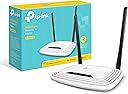
The TP-Link TL-WR841N is a Wi-Fi 4 router delivering up to 300Mbps on a 2.4 GHz single band, equipped with two fixed antennas for enhanced coverage up to 50m². It supports easy wireless security via WPS, offers 5 Ethernet ports with 100 Mbps LAN bandwidth, and is compatible with all major browsers for straightforward setup. Ideal for HD streaming, gaming, and multi-device households, it combines affordability with reliable performance and a 3-year warranty.


| ASIN | B001FWYGJS |
| Antenna Location | Home, Commercial, Public |
| Antenna Type | Fixed |
| Best Sellers Rank | 383 in Computers & Accessories ( See Top 100 in Computers & Accessories ) 1 in Routers |
| Box Contents | Wireless N Router TL-WR841N, Voltage Adapter, CD, Quick Installation Guide |
| Brand | TP-Link |
| Brand Name | TP-Link |
| Colour | White |
| Compatible Devices | Not |
| Compatible devices | Not |
| Connectivity Protocol | wireless |
| Connectivity Range | 50 Square Metres |
| Connectivity Technology | Ethernet, Wi-Fi |
| Control Method | App |
| Controller Type | App Control |
| Country of Origin | China |
| Coverage | 50 m² |
| Data Transfer Rate | 300 Megabits Per Second |
| Frequency | 2.4 GHz |
| Frequency Band Class | Single-Band |
| Frequency band class | Single-Band |
| Has Internet Connectivity | Yes |
| Is Electric | No |
| Is Modem Compatible | Yes |
| Item Dimensions L x W x H | 17.5L x 11.7W x 3.3H centimetres |
| Item Part Number | TL-WR841N |
| Item Weight | 8.82 Ounces |
| LAN Port Bandwidth | 100 Mbps |
| Manufacturer | TP-Link |
| Manufacturer Part Number | TL-WR841N (UK) |
| Maximum Upstream Data Transfer Rate | 300 Megabits Per Second |
| Model Name | TP-link N300 |
| Model Number | TL-WR841N |
| Model name | TP-link N300 |
| Number of Antennas | 2 |
| Number of Ports | 5 |
| Operating System | Ja |
| Other Special Features of the Product | Maximum temperature 0 - 40 °C, QoS, Removable antennas, Reset button, Security algorithm: 128-bit WEP, 152-bit WEP, 64-bit WEP, SSID, WPA, WPA-PSK, WPA2, WPA2-PSK, WPS, VPN Support (PPTP, L2TP, IPSec), Web-based management |
| Product Warranty | 3 year Manufacturer |
| Router Network Type | Wireless |
| Security Protocol | WPS |
| Smart Home Compatibility | Not Smart Home Compatible |
| Special feature | Maximum temperature 0 - 40 °C, QoS, Removable antennas, Reset button, Security algorithm: 128-bit WEP, 152-bit WEP, 64-bit WEP, SSID, WPA, WPA-PSK, WPA2, WPA2-PSK, WPS, VPN Support (PPTP, L2TP, IPSec), Web-based management Special feature Maximum temperature 0 - 40 °C, QoS, Removable antennas, Reset button, Security algorithm: 128-bit WEP, 152-bit WEP, 64-bit WEP, SSID, WPA, WPA-PSK, WPA2, WPA2-PSK, WPS, VPN Support (PPTP, L2TP, IPSec), Web-based management See more |
| UPC | 845973051242 |
| Unit Count | 1.0 count |
| Wi-Fi Generation | Wi-Fi 4 |
| Wireless Compability | 802.11b, 802.11g, 802.11n |
| Wireless communication standard | 802.11b, 802.11g, 802.11n |
G**T
Cuts out frequently, DO NOT BUY.
Cuts out frequently under moderate use. I have Virgin Media and the router they provider was absolute s**t (I'm being honest here). So I was looking for a router that wasn't too expensive as I wasn't looking for something amazing, after all anything would have been better. If you live by yourself I'd say that this router is fine, it is very consistent and does not drop. However with anymore than 2 users using the internet for gaming, streaming, etc the router simply cannot handle it. Setting up was easy and took no time at all, I was able to customise it with ease. I had everything on default as my usual settings would cause it to drop every 5 minutes. Despite this, if 3 people use the internet vis this router it will not be able to handle it. I'm not a qualified network technician but I do know a fair share when it comes to networks and would not recommend this product. Every day I experience a drop or three which then requires you to reboot the router. This is a complete pain. During hours after 11pm/12am it cuts out completely, you cannot reconnect to it despite it showing up in the nearby wifi signals. You have to physically get up and unplug it for a bit then plug it back it. The only good thing about it is the increased wifi range and speeds when it actually works. The settings do allow me to remotely reboot the router when I cannot access the internet but sometimes even this is impossible. As of now I'm currently using the Virgin Media router after 4 months of use with the TP Link router. I'd avoid this by all means necessary and would advise spending it a bit more money on a better router.
D**D
God help you non-techies if you try a firmware upgrade. Random behaviour that breaks your network.
Amending my original review... For the money, I guess this is sort of good value - when it works. It's fast - had a crummy old Netgear router acting as a cheapo AP before and got around 18M download through it as opposed to my Ethernet at 100+M. Dropped this in with relative ease and instantly got 80M on the same client test. Had it all working and - being a CCNP network engineer by trade with 30 years of networking behind me - decided I should upgrade the firmware. What a nightmare, lost access and took several default/resets and reboots to restore everything back to working. Won't bore you with the details here, but if you aren't tech savvy, don't even think of doing this - if it works pretty much out the box for you, keep it that way. More recently a couple of power-trips due to a finicky toaster in my house cut all the juice to all my home. Did my network come back? Sort of - except this TP link device decided that it would start ARPing for my router IP (the default gateway to the Internet), thus blowing my network away. I figured this out with Wireshark and MAC address examination, but my Mum would probably struggle with this... A couple of other settings didnt survive the reboot - it changed weirdly to become a DHCP server when it wasnt before. And I am sure I had all the config saved OK. Lost a good couple of hours fault finding and rebooting to this, sent it back and - credit to Amazon - got a full refund even past the return date expiry. I think I'm done with TP-Link kit - had a pair of Powerline adapters which were also cheap and flaky. Up to you if you fancy a gamble I guess...
D**S
Couldn't get a reliable connection. Returned for refund.
Bought this to improve the poor coverage of our Virgin Media Superhub. According to most of the reviews and comments this should of been the simple task of changing the hub to Modem setting and plugging in the TP-Link router, but it was far from it. For about a minute after setting up the system the internet connection worked fine and I could see a massive improvement in speed and signal strength, then it loss the internet connection. I have spent hours searching the net for a solution and had Virgin on the case, it actually worked after changing some of the router's settings but no sooner had I put the phone down it died again. As no one else appears to have experienced similar issues, so I can only assume I have received a faulty unit and it will be returned to Amazon for a refund.
J**N
Not fit for purpose - but you may not realise!
I bought 2 of these devices in an attempt to extend my WiFi range to the whole house. They were both connected via ethernet cables to the ADSL router, and configured as wireless access points, both with the same SSID and password as my main router. In theory, this should all work fine, and as you walk around the house your phone etc will automatically swap to the access point with the strongest signal without you even noticing. However, I kept having what appeared to be unpredictable temporary wifi drop outs. It too me literally 2 months to finally diagnose what the problem was......the problem was......these devices! The test that finally proved this was as follows: Connect via wifi to either device, and ping any device on the wired network, or on the wifi of the other access point. If you do this, you will see most pings coming back in a few tens of milliseconds as you would expect, but every 5-10 seconds, you will get one ping that takes over a whole second to get sent back. It's only when connected via wifi to one of these device, not when connected via cable and not when connected via wifi to my main router. I can only presume that they have some really bad firmware in them, despite me checking that they where both running the latest version. I replaced them both with WAVLINK AC1200s and the problem went away. Maybe these devices are cheap for a reason.....because they are not fit for purpose. I would definitely not recommend these at all.
R**Y
Not impressed
I am a professional IT consultant and networking SME and I wanted this as a wired access point which it reportedly supports and I am having lots of software issues. 1) It comes with a hard coded ip address rather than exploiting DHCP so I had to jump through hoops to get my PC on the right subnet to connect at all. 2) once I connected and changed its hard coded ip address on the wired interface this gets reset when you enable access point mode which I can forgive but its annoying. 3) selected sync time with PC and it set the time correctly and the browser interface hung. On further investigation it somehow enabled IPV6 and dropped the IPV4 interface hence why I lost the connection. So I am now in a situation where I cant set its time correctly and I cant connect with IPV4 and I need to reset and start again which I have done 3 times now. 4) also annoying that on every time you make a change you have to wait for a reboot and you cant make several changes at once (poor GUI design). It might be fine as a router but as a wired access point its a nightmare to work with and so its going in the bin because I cant be bothered retuning it during covid. Waste of money
F**A
Product does not have a UK plug
EDIT 20/02/12: I reordered this item when it went back on sale hoping that Amazon would have sorted out the plug issue - they haven't. My second order just arrived with the two pin plug again. So now I have two to return. I will now try to buy this item from a different company. I ordered this item from Amazon last week and it arrived this morning. Firstly, the product was shipped in its TP-Link box only, with no external Amazon packaging, so all and sundry could see what was being delivered to me. I was pleased when I opened the product as it looked like just what I was looking for until I saw the plug which is not a UK plug. I called Amazon and they have issued a refund but I now have to go through the hassle of returning it and finding some appropriate packaging to make it secure on its return journey. So far my experiences with Amazon have been positive on the whole but this was a let down, especially the lack of packaging, and I am still left with no working wireless router.
M**H
Requires Restarting Constantly
The firmware this router ships with has known issues where the network becomes unusable if 4+ clients connect at the same time or if you stream certain types of media. There is a firmware upgrade on TP-Link's website that claims to fix these issues but even after the firmware upgrade I still have to restart my router several times a day. I would avoid this router if you have lots of devices and/or do a lot of streaming. If it weren't for the constant need for reboots I would say this was a decent router - signal strength is fairly good and has good speeds. Oh and for the people who complained the setup of this router is too complicated, here's some simplified instructions: 1. Connect the power cable and the ethernet cable from your modem to the router. 2. Connect to the wireless using the password on the bottom of the router. I'm not sure it could be any more simple.
P**O
Unreliable. You get what you pay for.
14 months into buying this, one day it suddenly packed up. No matter what you would connect to the WAN (router) port, the setup said 'cable is unplugged'. Tried updating the firmware, tested on 5 different computers/modems, even in a different country! No luck. Technical support is not free as they have an 0845 number. After waiting on the line they proceeded to treat like a computer illiterate, despite telling them all the troubleshooting I had done already a few times. They eventually sent me an email asking me to do more troubleshooting by connecting TWO different computers to the ethernet ports --I don't even have ethernet ports anymore, that's why I bought a wireless router! Decided to give up and use that time to write this review. Extremely annoyed to have to throw this in the bin. As they say, 'you get what you pay for'. Apple Airport Express it is!
S**H
Very good
Very good
B**A
Magnifique
Sa marche très bien
T**M
Billig men bra
Gör det den ska utan problem. Och - vilket var viktigt för mig: den gick fint att väggmontera!
A**O
Quando le cose vanno bene va detto...
Bene..Bene.. sono a scrivere una recensione che ho deciso di dividere in due parti. La PRIMA e' legata al prodotto, che ho trovato perfetto, conforme e funzionante al 100x100. l ho configurato e devo dire che con gestore windtre funziona in maniera ottimale. Imballato correttamente e arrivato in 1 gg. insomma sono soddisfatto sia del prodotto che del venditore che ha dimostrato cordialità e presenza in fase di pre-acquisto scambiando con me info importanti che mi hanno convinto ulteriormente. Insomma tutto bene. LA SECONDA parte di questa recensione e' dedicata al servizio TP-LINK support.. e' innegabile che a volte in un mondo che viaggia sempre piu veloce si abbia bisogno di un aiuto e i ragazzi del supporto TP-LINK sono stati pazienti professionali gentili e immediati sia al telefono che via mail. Mi hanno aiutato e supportato come mai altro supporto web ha fatto. Devo dire che se abbino la professionalità e correttezza del venditore alla professionalità e alla efficenza del gruppo tp-link stavolta il tutto potrei definirlo imbattibile. Quando le cose vanno bene mi fa davvero piacere scriverlo e sottolinearlo anche perche e' giusto anche dare soddisfazione sia a chi vende un buon prodotto sia a chi ogni giorno con pazienza dedica il suo tempo agli altri e ti aiuta se hai problemi, sono plus che mi piace, quando li ricevo, sottolineare per tutti gli altri che verranno. Grazie quindi al venditore e grazie a tp-link-support per una gestione di entrambi senza ombre.
P**L
Mauvaise prise murale pas compatible française
Bonjour Ce routeur m'a était livré avec un transformateur 220v 12v avec une prise murale pas adapté au prise murale française ! Est-il possible de m'en envoyer une compatible française
Trustpilot
2 weeks ago
5 days ago