Desertcart purchases this item on your behalf and handles shipping, customs, and support to USA.
🖥️ Elevate your workspace, elevate your game — sit, stand, and conquer in style!
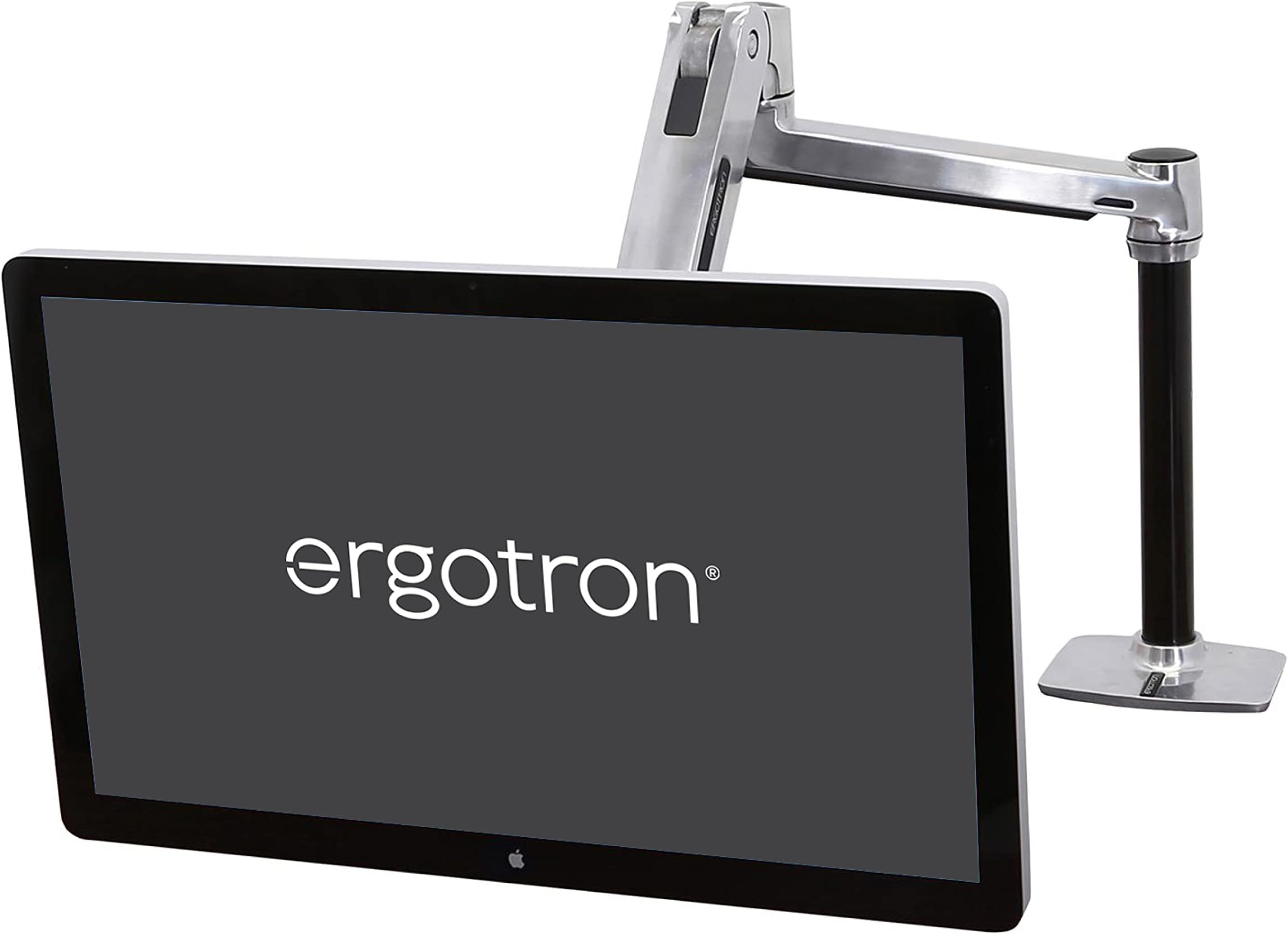
The Ergotron LX HD Sit-Stand Single Monitor Arm is a premium polished aluminum desk mount designed for large monitors up to 49 inches and 13.6 kg. It offers 50.8 cm of vertical adjustment, 360° rotation, and 75° tilt, enabling seamless transitions between sitting and standing postures. Compatible with multiple VESA patterns and featuring integrated cable management, it folds compactly to save desk space. Tested for durability with a 10-year warranty, it’s the ultimate ergonomic upgrade for professionals seeking a sleek, flexible, and reliable workstation solution.


| ASIN | B00GN4DCR0 |
| Best Sellers Rank | 214,700 in Computers & Accessories ( See Top 100 in Computers & Accessories ) 1,043 in Computer Monitor Arms |
| Box Contents | monitor arm |
| Brand | Ergotron |
| Brand Name | Ergotron |
| Colour | Aluminium |
| Compatible Devices | Monitor, Television |
| Compatible devices | Monitor, Television |
| Customer Reviews | 4.6 out of 5 stars 179 Reviews |
| EU Spare Part Availability Duration | 10 Years |
| Enclosure Material | Aluminium |
| Global Trade Identification Number | 00794924548648 |
| Item Part Number | 45384026 |
| Item Type Name | Ergotron LX HD Sit-Stand Desk Mount LCD Arm - Mounting Kit |
| Item Weight | 204 g |
| Manufacturer | ERGOTRON |
| Manufacturer Part Number | 45-384-026 |
| Material | Aluminium |
| Maximum Tilt Angle | 75 Degrees |
| Maximum-Supported Screen Size | 46 Inches |
| Minimum-Supported Screen Size | 1 Inches |
| Model Number | 45-384-026 |
| Mounting Type | Tabletop Mount |
| Mounting type | Tabletop Mount |
| Movement Type | Articulating |
| Movement type | Articulating |
| Number of Items | 1 |
| Number of Packs | 1 |
| UPC | 794924548648 004398193511 698833040098 631457461559 996594238922 040517548671 |
| Unit Count | 1.0 count |
N**I
Bought to mount Cintiq 27QHD
I bought this to mount a Wacom Cintiq 27QHD as the 'Ergotron LX Desk Mount LCD Monitor Arm, Tall Pole' can't accomodate the weight but this one can take a few extra kilo's. It's solid equipment packaged really well, what you'd expect for this price. Most of the necessary tools are included BUT you will need a phillips screw driver and a 3/8 inch rachet. Instruction were pretty straight forward with the tricky bit being fixing the arm to the screen first then placing it on the main support (might want 2 people here also I recommend taking off the back panel for the Cintiq before doing this). Important to mention is this kit includes a VESA mount so there is no need to purchase the one Ergotron sell separately...well for the Cintiq 27QHD anyway. Once all mounted you have to adjust the lift tension so the arm supports the screen when it is raised. The mount has built in cable management, which is a nice touch. I was extremely impressed with the tilt, lift, rotate and pan range of motion. This stand allows me to work standing up and when I want to sit down I can grab the screen and move it into place effortlessly. There is a little bit of screen shake when the screen is lifted but you get used to it and it's barely noticeable after a while. Just ensure you have a solid desk to attach this to (recommend viewing the online manual for desk thickness) and you won't regret the purchase!
C**N
Perfect for a Cintiq 27QHD
I use this with a Wacom Cintiq 27QHD, so for normal monitors, I guess it would be great too, but this is specifically for the Cintiq. I was planning on getting the proper ergo stand for my Cintiq, but the price of that kept going up and up, so I settled on this after a friend recommended it for the same reason. It hold the weight of that with no problem, it's super-versatile and will easily accommodate working standing up and in portrait orientation too. The Cintiq wobbles slightly when you're working, but really not that much at all and that was my main concern before I used it. Plus, it's freed up most of the work space on my desk, which in itself is useful. Just have someone handy when you fit it, as you need a lot of tension wound into the arm, so it will try to uppercut you if you let go of it when fitting. I use a larger vesa mount with mine (the mount for the cintiq is 200x100), but honestly, the brackets supplied were fine with it too, I just look for any excuse to burn more money on problems that don't need solving. The next thing I need is a more substantial desk, as the flimsy ikea one I've currently got does not have the mass to act as a counterweight for this now, so that might also be something to be aware of.
N**.
Very good product but with one little flaw
Expensive but I'm sure this will last for many many years. Very solidly build, mostly very solid engineering. There's one thing that I think could be solved better but it's not that important. Basically the lowest ring that is holding the first segment of the arm is fixated with very small screws that basically screw into the lacquered post. I don't understand this, instead this should be done bigger screws that have a rubberized button so you don't damage the finish. Not quite sure why it was done this way. Other then that it is very good and easily handles my quite heavy 28" lcd screen.
J**N
Brilliant bit of kit for Cintiq 27QHD and heavy Monitors.
I got this for my Wacom Cintiq 27QHD as it gives me more freedom than my Ergo stand. Brillant piece of kit and works better than expected. A few things to note. First - the desk clamp is quite poor on this and you'll find you'll have to keep going round all 3 camps to tighten them as one will come loose. Eventually they will all tighten. Second - for the desk clamp it comes with a 8mm head for a ratchet. But you will need a ratchet handle to attach it to. Third - The Cintiq is a 200x100mm VESA fixing. The arm does come with an adapter however I wouldn't trust it to hold heavy monitors. So for peace of mind I'd get a solid !STEEL!VESA mount. Finally - This is a heavy arm especially with the Cintiq attached or a heavy TV. Make sure your desk is thick enough and not made from flexible wood as this could potentially damage thin desk tops. Other than that make sure once monitor is mounted put enough tension in the arm to hold it. For the Cintiq you will need to crank it pretty much max. So be careful when removing the monitor. I'd suggest releasing all tension first before removing monitor.
A**A
Solid, dependable stand.
Fantastic stand, is able to comfortably hold a Sony KDL-42W705B as long as the tension on the two springs is wound up to maximum. Very impressed.
D**E
Expensive, but worth it.
A large, solid piece of kit that handles my 30" Dell monitor with ease. Ordered two more now I've seen the quality and performance first hand.
J**Y
Just the BEST
This product, this company has got it right! ALL THE TOOLS and all the pieces tropical plastic packed ALL clearly printed direct to the plastic everything as it should be. Included allen keys Except a Philips screwdriver. It also includes extra fingers to make a 200 x 100 mount as used on Wacom Cintiq 27" tablet However I purchased a 200 x 100 steel mount for around £6.50 as I was advised sometimes the fingers move slightly. My personal choice. Excellent instructions - pictures Excellent price versus quality. Pleasure to work with, even the box is a quality item. Support was excellent when enquiring about models nothing was too much trouble for them.
C**.
Good enough to use with a Cintiq 27 QHD. Won't work in the stand setting because the Cintiq weighs too much, though.
Can hold a huge Cintiq 27QHD comfortably. I can shift it around with no effort at all, like it's nearly weightless. It needed a lot of tightening until it could keep the tablet steadily up in the air, and the springs seems to sag shortly after tightening, but that's okay because the tablet stays 99,9% of the time supported by the desk.
K**Y
Expensive but excellent quality
Very stable easy to install. Significantly improved my work productivity. Yes it’s expensive but worth it.
F**N
Great moun that holds my LG 43MU79-b without issue.
I just got this in last night and overall this is a great mount. Installation: Installation couldn't have been easier. The instructions were well laid out and had I actually followed them I would have saved myself some headaches. My first mistake was not installing the VESA extenders before attaching it to the monitor. This left me with 2 stripped screws, but I find that is completely my fault as I tried to force them. Once i replaced the 2 screws with new ones and did it correctly, the arm attached to the monitor easily. A Note on installation, while I didn't end up using this (see below), I found that a 1/2" hole is more than big enough to attach the mount to the desk using the grommet mount (if you don't want to use the edge clamp). Use: This thing is great with one caveat. It allows me to go from sitting to standing without issue and the 20" lift is good, but not what I would call great depending on your height. I am 5'10" and it is attached to my 30" tall desk. At it's max height, my 43" monitor is just barely at the correct height for me. If I were taller I might be concerned that it would not go high enough. I am giving it 5 stars because for my use it is a near perfect fit, but depending on your height, you might need to take into consideration it's limits on height. It's not that it doesn't go up high, but if you are 6'3", it might not go high enough for comfort when in a standing position. now, if you aren't using it for a sit/stand, I still think it is great and offers a wide range a movement. Cable management: The mount has 2 different ways of managing cables used on the 2 arms. The arm directly on the pole has a "tray that comes out and you run the cables under. At first I preferred this, but I have 4 HDMI cables, a power cable and soon to have a few USB cables. At is is, the 4 HDMI cables and the power cable are pushing that channel to it's limits. I'm not sure I'll get anymore cables in there. I realize the fact that I have so many HDMI cables may not be the norm so didn't knock any stars off. I also have some thinner HDMI cables on the way to help with that. The second method is used on the arm that attaches to the monitor. It just uses cable ties and some tabs to run the cable ties over on the underside of the arm. This means it is not as "clean" looking at the method above, but it has the added benefit of allowing more cables. I plan on sleeving all my cables in 1 sleeve to help clean this up, but it's not high priority and is probably being picky. Over all, I think the cable management is going to be great for the vast majority of people out there. Cost: This thing costs a lot! I had huge sticker shock when I went to first go and purchase it. However I have a 27lb 43" monitor (LG 43MU79-b or 43UD79-b - both are the same monitor) and this mount was the one that offered the range of movement I needed for my purpose. After receiving it and feeling the build quality I think the cost is justified, but somewhere deep inside a small piece of me still wonders how much of the cost is inflated because of the "standing desk" craze. A Note on placement: When I first set to install mine, I decided to drill some new holes in my desk. I have a corner desk and I assumed the best placement would be to put the arm in the back corner. So I drilled a 2" hole for a cable grommet and about 2" or so from it's edge drilled a 1/2" hole for the grommet adapter for the mount. This worked great for attaching the monitor to the desk and giving me a close by grommet hole to feed the cables. However, because my desk sits in a corner, I lost a lot of movement. One part of the arm would hit the wall and that would be as far back as it would go. What I found helped, was I changed out the grommet mount to the edge clamp style mount and tried a few places along the edge until I found a good spot. Unfortunately My desk's sides prevent me from using that mount permanently so once I knew where a good position was, I used that to determine where to put the grommet mount. Now, it ends up that using one of my desks existing grommet holes was the best placement so I refrained from drilling any new holes. I routed the cables to the new 2" grommet I drilled and placed an order for a 1/2" cap to cover my mistake. For those that have corner desks, what I found was that placing the arm about 13" from the back corner on either side gives me the best range of motion as the portion of the arm attached to the pole will rotate almost exactly into the corner. For those with normal desks, I would suggest you consider placing the mount off center, but if possible use the edge clamp option to position it first if you plan on using the grommet mount for permanent mounting. That way if you need to drill holes you can do so knowing it's in the right place. If I were to do this again knowing the above, I would have placed the new grommet hole I drilled much closer to the one I used for mounting for a much cleaner install. As it is, it's not bad (See picture), but I would have preferred the cables go through the desk much closer to the mount. I did contact ergotron before buying it and suggested that they look into a way to pass the cables through the mount through the same grommet hole you mount it to (some do this, but were not heavy duty enough). They said they would pass it down to their product development team, so maybe that change will come in a newer version.
D**E
Lohnt jeden Cent: Sehr stabil, sehr wertig
Seit mehr als vier Wochen in Benutzung: Ich bin hochzufrieden mit dem Teil! Anwendung: Der Ergotron LX HD ist an einem Schreibtisch an der linken Ecke über den Klemmmechanismus montiert und hält derzeit nur einen Monitor Philips BDM4350UC/00 mit 43" (ca. 11,3 kg). Der Monitor ist nach rechts ausgestellt, so dass also ein erhebliches Drehmoment auf den LX ausgeübt wird. Dadurch wird die Halterung etwa 1° aus dem Lot gebracht; die Fassung des Schwenkarms auf der Halterung weist damit oben auch ein Spiel von ca. 1 mm zur Seite des Monitors auf, während die dem Monitor abgewandte Seite am Ständer anliegt. Trotz des hohen Gewichts ist der Schwenkarm sehr leicht beweglich. Wird der Monitor beispielsweise für eine Präsentation um 90° vom Schreibtisch weg hin zum Gang gedreht, behält der Monitor seine horizontale Ausrichtung bei und kann sehr leicht noch in der Höhe verstellt werden, ohne dass der Arm wieder absackt. D. h. die Haltekraft des Monitorarms konnte sehr einfach genau justiert werden. Geplant ist, noch einen zweiten Monitorarm dazuzukaufen und noch einen zweiten Philips-Monitor zu montieren. Der Ergotron LX wird dies sicherlich aushalten, da er im Dauerbetrieb dann symmetrisch belastet würde; mutmaßliche Schwachstelle dürfte eher die Schreibtischplatte sein. Die Haptik ist hervorragend, die Optik ist befriedigend, da die Kabel zumindest im Arm verlegt werden können. Schön wäre es, wenn jetzt noch die Kabelzuführung am senkrechten Ständer verborgen werden könnten; ebenso würde ich mir noch eine vertikale Verstellung über einen Kurbelmechanismus oder elektrisch wünschen, um die Höhenverstellbarkeit vollständig ausreizen zu können. Solcherlei Mimiken habe ich bisher aber bei keinem Monitorständer gefunden. Die Ergotron LX-Serie scheint auch für die Monitorständer von Amazon Basics verarbeitet zu werden; letztere allerdings haben eine etwas geringere Tragkraft (ca. 11 kg).
E**N
Solidez
Muy sólido y estable. Esmero en los detalles propio de la marca. Es sencillo de operar una vez montado, pero la operación de montaje inicial lleva su complejidad. Manual de instrucciones correcto. Embalaje bueno. Muy feliz con la compra.
J**T
Très bon produit!
Produit de qualité facile à installer. Nous avons des écrans tout en un de 25 lbs et ça tient très bien. La livraison a été ardue avec plus de 2 semaines de retard mais j’ai eu un bon service à la clientèle. Réponses rapides à mes courriels et remboursements des frais de transport (payés pour livraison rapide en 4-5 jours.
Trustpilot
4 days ago
2 weeks ago