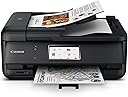
🖨️ Elevate your home office game with smart, sleek, and seamless printing!
The Canon PIXMA TR8620a is a versatile wireless all-in-one printer designed for the modern home office. Featuring a compact footprint, a user-friendly 4.3” touchscreen, and easy smartphone setup, it supports faxing and includes a 20-sheet automatic document feeder for multitasking efficiency. Auto duplex printing reduces paper waste, while high-resolution output ensures crisp documents and vibrant photos. Ideal for professionals seeking reliable, space-conscious printing with smart connectivity.


| ASIN | B09TRZLPXP |
| Additional Printer Functions | All In One |
| B&W Pages per Minute | 15 ppm |
| Best Sellers Rank | #48,606 in Computers ( See Top 100 in Computers ) #110 in Ink Tank Printers |
| Brand | Canon |
| Built-In Media | Power cable |
| Color | blackone |
| Color Depth | 30 bpp |
| Color Pages per Minute | 10 ppm |
| Colour | blackone |
| Compatible Devices | Laptops, Desktops, Smartphones, Tablets |
| Connectivity technology | wireless |
| Control Method | Touch |
| Controller Type | Android |
| Customer Reviews | 4.0 out of 5 stars 6,091 Reviews |
| Display Type | LCD |
| Dual-sided printing | Yes |
| Duplex | Automatic |
| EU Spare Part Availability Duration | 1 Years |
| Hardware Interface | USB |
| Initial Page Print Time | 4 Sekunden |
| Ink Color | Black |
| Is Electric | Yes |
| Item Dimensions D x W x H | 35.1D x 43.9W x 19.1H centimeters |
| Item Type Name | Inkjet Printer |
| Item Weight | 17.4 Pounds |
| Manufacturer | Canon |
| Maximum Copy Resolution Black and White | 4800 dpi |
| Maximum Copy Resolution Color | 4800 x 1200 dpi |
| Maximum Copy Speed Black and White | 15 ppm |
| Maximum Media Size | A4 |
| Maximum Print Resolution Black and White | 4800 x 1200 dpi |
| Maximum Sheet Capacity | 100 |
| Maximum print Resolution Color | 4800 x 1200 dpi |
| Model Name | Canon PIXMA TR8620a |
| Model Number | 4451C032 |
| Model Series | TR |
| Model name | Canon PIXMA TR8620a |
| Number of Drivers | 1 |
| Number of Trays | 2 |
| Other Special Features of the Product | 20-sheet ADF for scanning and copying, Borderless printing up to 8.5 x 11" and square format printing, Built-in auto duplex printing, Five individual ink tank system, Wireless printing |
| Output sheet capacity | 20 |
| Paper Size | 210 millimeters |
| Power Consumption | 15 Watts |
| Print media | Glossy photo paper |
| Printer Connectivity Type | wireless |
| Printer Output Type | Color |
| Printer Type | Laser |
| Printing technology | Laser |
| Processor Count | 1 |
| Resolution | 4800 x 1200 |
| Scanner Type | Sheetfed |
| Series Number | 86 |
| Special features | 20-sheet ADF for scanning and copying, Borderless printing up to 8.5 x 11" and square format printing, Built-in auto duplex printing, Five individual ink tank system, Wireless printing Special features 20-sheet ADF for scanning and copying, Borderless printing up to 8.5 x 11" and square format printing, Built-in auto duplex printing, Five individual ink tank system, Wireless printing See more |
| Specific Uses For Product | Home Office |
| Total USB 2.0 Ports | 1 |
| Total Usb Ports | 1 |
| UPC | 013803348323 |
| Warranty Type | 1 Year Warranty |
H**L
Excellent printer, happy after one year.
ETA: the printer has been working well. Recently, I had an unusual job requiring the printing of hundreds of pages. It worked flawlessly. Also, it is very easy to refill the ink, which Aoyama is recommended. Do not buy Canon cartridges, a waste of money. Just a few drops of ink will make the cartridges like new. Strongly recommend this printer. Previous review: The only requirement for a printer is just to work - to do its job when needed. This one has been tested for several weeks, not 20 years like one of my previous printers, thus, it is too early to rate. Nevertheless, I hesitated quite a bit because of negative reviews before buying; and this review with "nominal" 5-star is just to allay the fear of someone who might hesitate like me: 1- Setting up isn't that smooth, but it is hard to blame Canon, because the printer has many features, functions, so, smart things are usually a bit complicated. One has to be patient to go through and set it up correctly. Once it is done, with all the Canon software (just basic, not fancy) installed, it will do its job. 2- Printing: since it is new, hard to know when "paper/carriage jams" will occur. I threw away my 3-yr old HP printer because even though it was hardly used, the "paper/carriage jam" problem was beyond tolerable, not to mention misprinting, misaligned on non-common media such as envelopes, checks, labels, etc. Hence, those are the things I tested on this Canon, and so far, with two trays, one cassette for letter-size paper, and one rear feeder for uncommon sizes, the printer works. It works, that was all to be asked of it. How many years (or months) will it work is a different matter. Bottom line, not fancy, but it works so far because it is new. Its print quality is decent for its class of inkjet printers in a similar price range. Photo printing on Canon glossy paper is quite nice looking. I don't have a need for heavy printing, just occasional usages, less than a dozen pages at a time with regular black/color. So far, it is very nice and trouble-free. In particular, I recalled frequent problems with my previous HP inkjet printer when printing thick and odd-size envelopes. This one so far is very reliable. I only hope that it will continue working without HP's classic "paper/carriage jam" troubles. A last note: it is well-known that HP makes money by selling very expensive ink. The rate of ink usage of this printer so far is much better than that of HP. So, if one is considering a low-end full-function, all-in-one printer, I would recommend this over any equivalent HP. I will never buy a HP again.
I**E
Compleja
Compleja para configurarla
P**R
Absolutely Great for What It Is
Look: You want a high volume, super durable, high quality printer that'll print long-documents? This is not your best choice for that. But for a compact, low-cost, color ink-jet that'll print a few pages when I need it to? I found this to be an EXCELLENT choice. MY specific use for this printer is as a "luggable" -- that is, I can bring it with me (in the car) to different locations. For example, when I'm away for a couple of weeks at a seminar that I can drive to. It's not going to set any speed records, but it's very reliable (particularly when you connect to it via USB) and the print quality is absolutely decent. When it's either THIS or (a) buy a 3x as expensive "portable" printer, (b) torture myself by attempting to use the hotel's printer in the "business center" (i.e. the alcove off the lobby)? Give me this printer any day. I have also very successfully connected to is using Wireless Direct and over "regular" WiFi via a router. Just no problems at all. Recommended, for what it is.
J**S
No sé puede configurar con la lap, y venía mal empacada, bailando en la caja
Muy complicado empatarla con la lap top, además instrucciones nada claras
A**R
WORST PRINTER & PHONE APP EVER!!
This will be my very first 1 star review, but I cannot help myself. I spend days and weeks researching every printer I've ever bought. I was in a bit of a hurry and only spent a few hours looking around before deciding on this one. HUGE mistake. The reason it is affordable is because it's not even worth the current price. I already own a strictly for photos printer and needed something for my home office/personal use. Canon has done good by me and the past, and it was at least 4 stars, so should be fine, right? SO Wrong. The set up was fairly simple but getting my phone connected to it was a straight nightmare. Even after it successfully connected, it consistently gave me a no "no printer available" warning the entire 1.5 hours I spent on it. 1.5 hours to print ONE document. The app is absolutely trash. Seriously the worst, slowest, least user friendly device app I have ever encountered, printer or otherwise. It took FOR-EV-ER every single time I selected any option the made the app connect to the printer. Every single time, ever single option I chose. Even selecting "Printer Status" took over 7 minutes to simple tell me it was online. But the best part was the quality, for sure. I needed to print a single document. Just 1. It took me over an hour to print a just halfway decent copy. The black ink look ash gray in the first few copies, and not very black by 6 (the aforementioned halfway decent print which i decided to accept and be done). I got a "Printer Block"error, after error, over and over and over again, with no block to be found anywhere. The last copy I printer was no even very good, let alone great. The ink was dull and much more gray then black. I was able to FINALLY remove the page borders the printer kept inserting despite the settings corrections I did MULTIPLE times, but the only way I got them removed was through a third party app that adjusted the dimensions. In other words it dumbed it down so even this garbage printer couldn't justify another useless copy. I almost never leave bad reviews, but I could not live with myself if I didn't warn any future possible buyers to TURN BACK. Oh and after 5 copies my ink was almost halfway gone, just for the cherry on top. If you are considering giving this device a chance, one more time, It is a TRICK, Don't do it!
Trustpilot
4 days ago
1 month ago