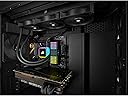
💻 Cool your core, light your lore.
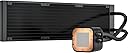
The Corsair iCUE H100i RGB Elite is a premium all-in-one liquid CPU cooler featuring a 240mm radiator, dual 120mm AF Elite PWM fans, and 16 dynamic RGB LEDs. Designed for high-end Intel and AMD processors, it offers powerful cooling performance with whisper-quiet operation modes. Fully customizable via Corsair's iCUE software, it synchronizes lighting and monitors system temps, making it a must-have for millennial pros who demand both style and substance in their PC builds.


| ASIN | B09YCHFXQL |
| Air Flow Capacity | 59.1 Cubic Feet Per Minute |
| Best Sellers Rank | #183 in Water Cooling Systems |
| Brand | Corsair |
| Brand Name | Corsair |
| Compatible Devices | Desktop |
| Cooling Method | Water |
| Customer Reviews | 4.5 out of 5 stars 1,752 Reviews |
| Global Trade Identification Number | 00840006648123 |
| Item Dimensions L x W x H | 15.63"L x 4.72"W x 1.06"H |
| Item Type Name | Cooling Fan/Radiator/Pump |
| Item Weight | 1.1 Kilograms |
| Manufacturer | Corsair |
| Material Type | Copper |
| Maximum Rotational Speed | 2200 RPM |
| Model | CW-9060060-WW |
| Noise Level | 31.5 Decibels |
| Number of Items | 1 |
| Part Number | CW-9060060-WW |
| Power Connector Type | 4-Pin |
| Product Dimensions | 15.63"L x 4.72"W x 1.06"H |
| UPC | 840006648123 |
| Unit Count | 1.0 Count |
| Voltage | 28 |
| Warranty Description | 5 year manufacturer |
| Wattage | 25 watts |
F**S
Amazing cooling power for Intel 14900k
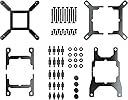
The H150i cooler has 3 120MM fans that give it amazing cooling power. I used it in an Antec P20 case and had tons of room. I have it oriented so that the fans blow through the radiator and out of the top of the case. I'm using it with an Intel 14900k and even at 100% cpu usage temps stay around 70-80c using the Extreme setting on the fans and pump. If you leave it on "quiet" they go up to about 86c on a few of the cores. I'm not currently overclocked. The software for this product is called iCue and it allows you to change the LED settings on your system based on color schemes or the temp of the system. It can even control Phillips Hue lights based on the app. The install was super easy. You basically have to just identify which processor type you are using and get the correct standoffs out of the well marked packages. Screw those into the backplate support (which comes with some pre-applied double sided tape to hold it in place to the back of your motherboard. Once the standoffs are in place, the cooler sits down on top of your processor. It includes pre-applied thermal paste. You use 4 included nuts that can be hand tightened down and then snugged into place. The radiator requires that you screw the 3 fans onto it and then secure it into your case. There is a cable (appeared to be USB-c) that plugs into the cooler and it then connects to your 3 fans and to a usb header on the motherboard). There is an additional PWM fan connector that you can plug into your motherboard. The whole system gets power from a sata connector. All of these wires have plenty of length which should allow you to hide them pretty well inside your case (in the P20 they all easily fit on the backside so they don't have to be seen). The top of the cooler has a magnetic piece with the Corsair logo on it that can be rotated depending on your installation orientation. This is a super solid cooler that is really easy to install and keeps your processor really cool. The other really amazing thing is that all of your other computer components should last longer without the hot air from the CPU being blown on them.
N**L
Works great even on 13900ks
I got this to replace an air cooler on my 2nd PC that’s right on my desk about 2-3 feet away from me. It’s on a i7 13700k 5.4ghz all core 4.3ghz e core. Hitting 90c under full load 260watts. I added this cooler and I instantly like the quality of the radiator. The paint looks and feels good. The sleeves on the water tubes are nice and the USB connection for the power is sleek looking and not an eyesore. I like the fans they run well but are not annoying loud. They do get loud but it’s only at 300watts full load. Now my CPU is at 5.6ghz all core 4.5ghz e core and it runs great. While gaming this has dropped my gaming temps by 10-20c depending on the load and the water pump is not loud. I’ve had about 4 AIO and this is the best quality ones I have seen. Also to note the pump seems to run cooler than my older AIO’s. So I just took out the 13700kf and put in a new 13900ks. It’s enough to cool that but only for gaming and everyday use. This can cool out 300watts. Now it can’t run this KS fully, but it’s still faster than a stick 13900k They have been making quality AIO,s for over a decade now so the tech is actually a lot more advanced than it was back in 2008-2013.
N**6
great temperatures
The CORSAIR H150i RGB Elite Liquid CPU Cooler has exceeded my expectations in every way. Its 360mm AIO design, coupled with the efficient AF120 Elite PWM fans, provides outstanding cooling performance, keeping my CPU temperatures impressively low even under heavy loads. The cooler's installation was straightforward, and it seamlessly fits into my Intel® LGA 1 socket. One of the standout features is the customizable RGB lighting, which adds a vibrant and visually striking element to my build. The lighting effects are easily controlled through CORSAIR's iCUE software, allowing for endless personalization. The cooler operates quietly, even when ramped up, ensuring that my system remains cool without the distraction of fan noise. Overall, the CORSAIR H150i RGB Elite is a top-tier liquid cooler that combines high performance, sleek aesthetics, and ease of use, making it an excellent choice for gamers and PC enthusiasts alike.
M**N
Works well, 240mm fits in a micro atx case, cools i7-10700k
Had it for 1 month so far and absolutely no complaints. Used this cooler as a cheaper replacement for my old H150i which had a pump fail after ~5 years. I got the 240mm version and it cools my i7-10700k very well. Idle temps/light usage are around 28-30C and I haven't seen over 70C under load gaming in 1080p. Install was fairly easy and I would recommend getting a zip-tie for the radiator fan wire unless you want one to hang like mine (top left) :p. The wiring for the AIO itself is all connected and is ample length to route wires easily. Corsair's website has a video guide showing how to install an AIO that is fairly simple to follow as this particular system does not come with instructions. Big bonus is that this pump block comes with thermal compound pre-applied, and the packaging offers many different mounting brackets depending on which cpu socket you have. Would recommend if you are in the market for a bang for buck AIO :)
I**N
Very cool, fans don’t light up
This worked well to keep our Ryzen 9950x cool. The processor never went above 70C in stress tests. The cooler comes with thermal paste pre applied. That is convenient, but easily ruined. The plastic cap to keep the paste from being ruined is designed to be held on by the Intel mounting clip, so as soon as you put on the AMD clip, it can’t be reattached, so you are probably going to need to mount it on to the cpu immediately to avoid ruining the paste. Otherwise the usual workbench bump and knockabout while attaching fans and mounting the radiator risks damaging the paste. This is what happened to us even though we were quite aware of the problem. Fortunately we didn’t know the paste would be there when we ordered it and were already prepared to add new. The ruined paste was easy to wipe away with a tissue and some isopropanol. With the RGB designation, I assumed the included fans would light up, but only the cooler head does. In retrospect this is fine. With all the other light up fans, the machine can be a little distracting, especially in the dark, so maybe less is more.
S**N
Easy install, nice finish
If your case fits it’s a good cooler. With a R7 3700x I used to get 40-60c fluctuations in temp since they like to turbo at idle. With the AIO I get 40c (no fluctuation) at idle and 60 at load. Coolant temp (in summer) peaks at 42c under heavy all core load. Fans aren’t silent but if you don’t have an open air case like I use you wouldn’t hear them over your gpu. ICUE is a good software but color accuracy in the color wheel to the pump LEDs could use some tuning. A mix of there being a slight delay from setting any fan curve or led setting would be my only complaint. At first I set the fans to “quiet” and they didn’t ramp down, I had to wait 10-15 seconds to see the rpm in the software to drop and hear a difference in speed. Not a big deal but worth mentioning. Overall no complaints
A**D
Great AIO!
Keeps my i7-13700K nice and cool. I can't say anything about the fans since I use Noctua 120mm fans in place of the Corsair fans. Not to say the Corsair's don't work well, they look great and I'm sure perfom fine, it's just my preference to use Noctua fans throughout my whole case including the AIO. One thing to take note if you're using iCue and the Corsair Commander Pro fan/RGB hub...at least for me, I had the cooler's USB connected to the Commander Pro itself and iCue would not recognize the pump. After a few hours of troubleshooting, I switched the cooler's USB directly into a USB header on the Motherboard and then it showed up in iCue. So, something to try if you're using the Commander Pro (maybe the Commander XT, too?) and run into this issue!
S**L
Got this to replace my old gen H100i, way better design than the old ones.
I got this to replace my aging original generation H100i. The old one lasted quite long (around 5 years now), and actually still works. However, I replaced it because I run my PC 24/7 and I dont want it to die on me randomly at night. This is a much better design in every way and costs less than my old one did (which was around $150-$200 from what I remember). Design: The USB C cable is super convenient, as my old one had a micro USB along with a 2nd non-removable cable for power. The USB C cable is the only connection point here, and splits off into separate cables later for much easier cable management. Because you can completely separate the USB C cable from the pump, this makes installation a lot easier. Also, I have an AM4 board, and its really nice to see that this one has a proper 4-point screw down mount. The old H100i design had used the stock AM4 plastic mounts and this sketchy 2-point mount system which had terrible mounting pressure and commonly would cause CPU boot errors if mounted improperly. I hated the old design but this new one is foolproof. Another thing to note is that the corsair logo on the front of the pump can actually be rotated to support different mounting orientations. Its also worth noting that I got this one over the Capellix version so I can still use my Commander Pro to control my fans. To swap the old AIO out, I didnt really have to change any of my fan cable management which was nice. My existing fans plugged right into the fan power plugs and everything works just fine in ICUE. All I had to do was remake my CPU fan curve which wasnt much of a big deal.
H**I
SESSİZ SOĞUTMA USTASI
Son derece sessiz ve kaliteli. Yeni veya yüksek güç tüketen oyunlarda 45-50 (i5-12600KF) dereceyi geçmiyor. Almayı düşünenler alabilir ancak fiyatı biraz fazla artmış, 4500 civarı makul bir fiyat olur.
M**I
Extremely loud and uncontrolled
Fans always run at 100% and it sounds like a jet engine. RPM cannot be controlled in BIOS. Neither CPU nor Pump headers allow controlling this AIO. iCUE softwares does not detect it either when plugged into JUSB port, so no way to control the fans on this unit. Not sure if this particular unit is defective or it's normal for this model. Returned it and purchased another brand AIO which works as expected.
T**S
Perfecto para un Intel i7 de 14va gen
Lo compre para un i7 14700f. Mantiene las temperaturas por debajo de los 70°C. En videojuegos a 4k @ 60fps y hasta en 120fps se mantiene en 60°C, solo con Cyberpunrk y raty tracing al maximos llega a los 70°C de ahí nunca lo he visto llegar a más temperatura. Y que decir del ruido, imperceptible. Eso sí, con el iCue puedes personalizar la velocidad y si es necesario subir las velocidades cuando esté en alto rendimiento el CPU, ahí si se escuchan los ventiladores, pero no es tanto para lo que mantiene refrigerado. En estética mantiene el interior más libre y como el monitor donde está el logotipo de corsair tiene RGB se ve genial con las luces apagadas además que puedes controlar el RGB con el iCUE y uno que otro software; aunque es una lástima que no se pueda sincronizar con el resto de RGB con aura. No se si alguien sepa que tipo de mantenimiento hay que darle, cada cuando y que tipo de agua hay que ponerle para cambiarla, y sobre todo que riesgo hay que una manguera tenga una fisuar donde pueda derramarse el líquido, ya que he visto que es el único inconveniente de este tipo de refrigeración.
K**E
Warning!!!
Warning! The pump can not go below 40%/2000rpm because it is controlled by the software / hardware which is bad and missing 3 and 4 pin! Which makes the product sound extremely loud! Ive tried everything. I have been very happy with Corsair before but this is the last time i buy something from Corsair!
A**.
Corsair è una garanzia!
Corsair è un marchio che non ha certo bisogno di presentazioni; negli anni ha saputo crearsi una solida reputazione grazie a ottimi prodotti ed accessori per pc. La fascia di utenti è quella definita Enthusiast, ovvero utenti appassionati di modding perennemente alla ricerca del pc perfetto sia da un punto di vista estetico che delle prestazioni. Io non mi riconosco propriamente in questa categoria di utenti, anche se talvolta amo ammodernare un vecchio mio pc, oppure, come in questo caso, assemblarne completamente uno nuovo. Tra le problematiche più complicate la gestione delle temperature risulta sicuramente al primo posto ed è complicata poiché coinvolge moltissimi componenti ed è soggetta a moltissime variabili, come la gestione dei flussi di aria in entrata e in uscita dal case. Sia la CPU che la scheda grafica sono delle discrete "stufette" e le alte temperature mettono seriamente a rischio la stabilità e la durata stessa del pc. Questo prodotto si prende “cura" della CPU, raffreddandola a liquido e mantenendola in un range accettabile; è una soluzione chiusa, in quanto il liquido tramite due tubi flessibili viene a contatto con la piastra e poi raffreddato dal radiatore con le ventole Una soluzione completa e razionale H 150i RGB elite è una soluzione completa che consente il montaggio del radiatore con annesse 3 generose ventole da 120 x 25 mm il tutto fissato a un radiatore da 360 mm; tale radiatore può essere montato sia un orizzontale (la posizione orizzontale ed in alto è quella che personalmente consiglio) che verticale, ovviamente a condizione che le dimensioni del case lo permettano. Grazie a specifiche staffe di adattamento è possibile installarlo per raffreddare CPU sia Intel che AMD In particolare lo potete utilizzare con Intel 1700, 1200, 1150, 1151,1156, 2011, 2066, 1366 e con CPU AMD del tipo AMG, AM 5, STR 4; unica accortezza è ricordare che le staffe di fissaggio alla cpu vanno fissate nella parte posteriore della scheda madre, per cui prestare attenzione che la parte posteriore sia accessibile nel case, altrimenti optate per il montaggio delle staffe sulla scheda madre PRIMA di fissarla al case; comunque è un' operazione abbastanza semplice; la piastra di dissipazione da montare a contatto con la cpu è di rame e viene fornita con la pasta termoconduttiva già applicata e pronta all’uso; il montaggio completo non porta via più di 15/20 minuti. Tralascio qui i dettagli RGB ed i relativi effetti, belli ma dedicati principalmente ai patiti del modding, maentre mi soffermo sulle prestazioni, davvero notevoli; Il mio processore intel i9-13900KF non ha mai superato i 45º e le ventole quando sono in funzione risultano estremamente silenziose, niente a che vedere con i miei precedenti PC con quel delizioso effetto "elicottero" che faceva tanto "Apocalypse now”. In definitiva un prodotto davvero valido dedicato a tutti coloro che vogliono godere delle prestazioni dei moderni processori senza dover preoccuparsi del rumore o delle temperature; vi assicuro che non è poco!
Trustpilot
4 days ago
1 week ago