Desertcart purchases this item on your behalf and handles shipping, customs, and support to USA.
🚀 Elevate your WiFi game—ditch dead zones and stream like a pro!
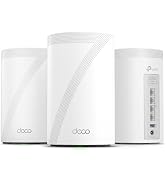
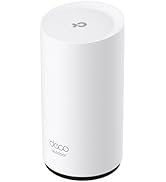
The TP-Link Deco XE75 AXE5400 is a premium tri-band WiFi 6E mesh system designed to cover up to 7,200 sq.ft with ultra-fast, low-latency wireless connectivity. Featuring a dedicated 6 GHz band, AI-driven mesh technology, and advanced WPA3 security, it supports over 200 devices at speeds up to 5,400 Mbps. Easy to set up and manage via the Deco app or Alexa, this 3-pack system replaces traditional routers and extenders, delivering seamless, future-proof WiFi ideal for large homes and smart offices.


| ASIN | B0B88T5RDY |
| Antenna Location | Gaming |
| Antenna Type | Internal |
| Best Sellers Rank | #6 in Computers & Accessories ( See Top 100 in Computers & Accessories ) #2 in Whole Home & Mesh Wi-Fi Systems |
| Brand | TP-Link |
| Built-In Media | 1 x Quick Installation Guide, 1 x RJ45 Ethernet cable, 3 x Deco XE75, 3 x Power adapters |
| Color | Black and White |
| Compatible Devices | Personal Computer |
| Connectivity Protocol | Wi-Fi |
| Connectivity Range | 7200 Square Feet |
| Connectivity Technology | Ethernet, Wi-Fi |
| Control Method | App |
| Controller Type | App Control |
| Coverage | 7,200 square feet |
| Customer Reviews | 4.3 out of 5 stars 2,136 Reviews |
| Data Transfer Rate | 5400 Megabits Per Second |
| Frequency | 6 GHz |
| Frequency Band Class | Tri-Band |
| Global Trade Identification Number | 00840030707148 |
| Has Internet Connectivity | Yes |
| Has Security Updates | Yes |
| Is Modem Compatible | Yes |
| Item Dimensions L x W x H | 4.13"L x 4.13"W x 6.65"H |
| Item Weight | 1.59 Kilograms |
| LAN Port Bandwidth | 10/100/1000 Mbps |
| Manufacturer | TP-Link |
| Maximum Upstream Data Transfer Rate | 2700 Megabits Per Second |
| Mfr Part Number | Deco XE75(3-pack)_US |
| Model Name | Deco XE75 V2 |
| Model Number | Deco XE75(3-pack)_US |
| Number of Ports | 9 |
| Operating System | TP-Link Firmware |
| Other Special Features of the Product | QoS |
| RAM Memory Installed | 512 MB |
| Router Firewall Security Level | Advanced |
| Router Network Type | hybrid |
| Security Protocol | WPA-Personal, WPA2-Personal, WPA3-Personal |
| Smart Home Compatibility | Smart Home Compatible |
| Special Feature | QoS |
| UPC | 840030707148 |
| Unit Count | 1.0 Count |
| Warranty Description | 2 year manufacturer |
| Wi-Fi Generation | WiFi 6E |
| Wireless Communication Standard | 802.11ac, 802.11ax, 802.11b, 802.11g, 802.11n |
| Wireless Compability | 802.11ac, 802.11ax, 802.11b, 802.11g, 802.11n |
H**W
Good buy to get rid of dead zones for Wifi
This TP-Link Deco XE75 3-pack basically fixed every dead zone in my house. I've got a two-story place with a detached garage and I used to lose signal constantly in the back bedroom — now it's solid everywhere, garage included. Setup was stupid easy, took maybe 15 minutes through the app, and it walks you through placement for each unit. The new 6GHz band is noticeably faster for stuff close to the router, and having tri-band means my smart home devices aren't fighting my laptop for bandwidth anymore. Only real gripe is the price — this isn't a cheap upgrade. Also if you don't have a lot of WiFi 6E devices yet, you might not notice a huge speed boost right away, but the coverage alone is worth it. No more random dead spots, no more yelling "is the wifi down again?" from the other room. Would recommend if you've got a bigger house or just want to future-proof your setup.
S**T
Completely Eliminated Every Single Dead Zone!
This mesh system is worth every single dollar. Setup via the app was incredibly straightforward, and it seamlessly blanked a massive footprint with lightning-fast, stable internet. The dedicated 6GHz band handles heavy streaming and gaming flawlessly without any drop-offs. If you are tired of weak router signals, this is the ultimate fix.
T**R
Working great so far 👌
Needed to replace the old Deco M4 which I have been using since 2018. It worked great but its aging showed especially with more devices connected to it and the large lot size of my house. It's close to 7200 sq ft with a guest house in the backyard. With the Deco M4, the wifi signal would be decent reaching to the guest house but the signal quality would drop about half or more. And, I needed at least 4 mesh satellites to relay the wifi signal. The XE75 changed all that. With the wifi 6e technology, wifi signal is a lot better and no more traffic getting congested. The wifi signal in the guest house is getting about 70 to 80% of the full strength signal which is good considering how far away it is from the main mesh device acting as the router. Also, the tri band feature is a super addition. Having a device able to use the 6ghz band is so good. Not to mention the upgraded wifi security protocol from WPA2 to WPA3. A fore warning, some older devices may not be compatible with WPA3, so it'll refuse to connect to the wifi even if you set the XE75 to support both WPA2/WPA3. I had one such device, an old iPad. To resolve this, I had to create a separate guest network within the XE75 app and set it to use only WPA2. Setting up the XE75 was a breeze. Took less than 15mins. It is also future proof. I'm looking to cut the cord with Spectrum (expensive and only has old cable internet) and switch to fiber internet with At&t. Unfortunately, 1GIG is the fastest offered in my area at the moment but the XE75 is more than capable to handle it. I bought the XE75 with a great deal on Prime Day for like $180 for the 3-pack. If you ever needed to upgrade your home wifi mesh, I highly recommend the XE75 if you can get it on a deal. If faster ports are important to you, I suggest looking at the XE75 Pro.
A**C
Amazing
Upgrading from EERO to the Deco system has been a night-and-day difference. These two really aren’t even in the same league. The Deco performs exceptionally well, especially in multi-level homes where consistent coverage can be challenging. The speeds are exactly as advertised, and the setup process was incredibly simple and user-friendly. Everything just works smoothly right out of the box. I highly recommend the Deco to anyone looking for reliable, fast, whole-home Wi-Fi—it's been a fantastic upgrade.
B**S
Pathetic roaming and frequency management
I am an network engineer with 30+ years of experience - way longer than WiFi has been around. I have designed and implemented many business WiFi systems that support seamless roaming over larger areas so when I say that this system is a pathetic implementation of meshed WiFi and roaming I do have experience to back it up. I bought this system because I wanted to upgrade my home's WiFi system with a 6GHz WiFi 6e capability and I was sorely disappointed in this system's meshing and roaming capability. I performed extensive testing with demanding applications on modern Android phones, Apple iPads, Samsung tablets and laptops. The bottom line - this system is an abysmal failure for supporting roaming in a meshed WiFi network. This system's ability to allow devices to roam between access points is pathetic to non-existent. You might as well have 3 independent WiFi access points in your home. In spite of everything you read about this system it is technically inferior because it relies on using the exact same WiFi frequencies on all units when they are meshed! This pretty much kills the ability for devices to smoothly roam between the APs without dropping, re-scanning and re-connecting. The reviews for WiFi access points generally only emphasize performance - how fast you can download and upload and how much the signal degrades based on distance to the AP. That is fine for a single AP however, any system like this one that is supposedly offering a fully meshed solution it is an inadequate measure of performance and completely leaves out test results for the main reason to consider a meshed system in the first place. In fact, I have yet to read a single review that addresses a consumer grade system's meshing/roaming capabilities and performance. This system like almost all of the 'consumer' grade systems do not set the WiFi frequencies independently for each AP. This system chooses the exact same WiFi channels for 2.4GHz, 5GHz and 6GHz for each node. This makes it all but impossible for devices to smoothly roam between AP's. Why you may ask? Because the device has a difficult time distinguishing between a signal that is fading from a more distant AP and the stronger signal of the next AP (that it has yet to connect to) effectively causing the device to stay connected to the distant AP until it is overwhelmed by the interference of the stronger signal from the the same WiFi frequency on the closer AP next to the device. Eventually the device just drops the connection to the distant AP and goes through a 'scan and connect' to the closer AP with the stronger signal. This will always interrupt VoIP (WiFi) calls and other latency sensitive applications such as gaming and trading apps. This system purports to offer 'Fast Roaming' (802.11r) but it is totally ineffective. Next there is the issue of frequency management. A good system will only use 2.4GHz bands with client devices as a last resort. Either because the client device can only connect on 2.4GHz channels (many IoT devices only work on 2.4GHz channels) or because a device has gone beyond the useful range of a 5GHz channel. 5GHz channels are a much lower power level and don't penetrate walls very well. 2.4GHz channels offer better penetration through walls and floors. A well designed and implemented WiFi AP will 'encourage' devices to connect on 5GHz channels because 5GHz offers much better performance than 2.4GHz. This system does not do this AT ALL!! In fact it will mostly connect at 2.4GHz - especially once a device moves far enough away to make 5GHz to weak. From that point on - even when switching (I can't call it roaming because it is a drop, scan and re-connect) to the next AP it will tend to remain on 2.4GHz channels. Only devices that stay relatively still, close to an AP and rarely move to another AP will utilize 5GHz channels and even then for no reason the device may switch from 5GHz to 2.4GHz even if it doesn't change position and has a strong 5GHz signal. This could be caused by nearby interference (your neighbor's WiFi). Please don't confuse this with the selectable option that causes the AP to only use 5GHz channels - an option that is disruptive to most devices and can actually make roaming and the overall WiFi experience worse by depriving devices the ability to use 2.4GHz channels when 5GHz channels would be ineffective. The absolute worst aspect of this system (and most other 'consumer' meshed WiFi systems) is that it used the exact same 2.4GHz, 5GHz and 6GHz channels for each node making it impossible to mitigate any external WiFi interference near each node (mostly your neighbor's and outside WiFi systems) since each node is bound to be exposed to different WiFi frequency interference. There are so few WiFi channels available that this means at some locations you will have good WiFi performance with the nearest AP and at other locations performance will be poor due to local interference newar that AP. The bottom line don't buy this if you are looking for smooth and seamless roaming between APs. The high cost of this system just means you are throwing more money away - not getting a good solution. In case you are wondering - I returned mine.
W**E
Works great, but with some limitations
I have a 3 unit mesh. I'm getting 700Mbps consistently on my PC 30 feet from the nearest router through 2 walls, which is pretty amazing. Setup is a snap, EXCEPT you have to use a TP-Link app on your phone and set up a TP-Link account. Didn't fiddle around to see if that can be bypassed. Aside from that, configure the primary, then adding another node consists of turning it on. Yes, that's it. The system has been stable, it's just working. So why only 4 stars? The user interface is horrible. The web-based one is essentially useless. The phone-based one gives you some better control, but various features are not at all obvious, such as how to pin a particular device to a specific router (you can, once you manage to discover the magic place to do it). You have no control at all over channel assignments or other settings I've always been used to having with a wrt-based router like the ASUS ones. Setting up separate 2.5G and 5G SSIDs is fairly straightforward, but again not well explained, do you use the 'IOT' or the 'Guest' SSIDs? Turns out either, but you have to discover the setting that lets the guest network access your local net if you want to use that. Pick the IOT one for 2.5, turn off the 5G radio on it, turn off the 2.5G radio on the primary SSD. Standard practice, but again the horrible UI makes it a bit of a hunt. I moved to this because my ASUS RT-AX86U and RT-AX56U mesh would just stop working on 2.5G fairly frequently, requiring a reboot. But, the ASUS never came close to the speeds I'm getting now. Conclusion - if you just want plug-and-play and don't want much configurability, this is a great mesh system. So far. BTW, be sure the wifi in your device can actually support the data rate, don't blame the router when it's the wifi in a device that's the culprit. Update after about 4 moths, loving these. Far more reliable than the ASUS mesh I had before. They just work, period. UI is still lame, though.
S**R
Huge mesh upgrade from Google Nest!!
I’ve now had these for four months and am so happy with my purchase that I find myself writing a review. I was looking to upgrade from my google nest WiFi (purchased in 2022) as I was having issues when my wife and I worked from home simultaneously while both constantly on video. Our house is taller than it is wide, and we need four stories of WiFi coverage as we both work in the finished attic. I was set on upgrading to 6E with the addition of the third 6ghz band, which I can specify for connection for both our work computers. Setup is a breeze, maybe took me 15 minutes. I’ve enjoyed the deco app and, since I hardwired my points together, it honestly discovered each device on its own without any fuss. We pay for 1G speeds and with Google nest we never could get north of ~300gb, and typically sat at 80-150gb. The deco immediately was surpassing 500GB without hardwiring them in. Once I connect them via Ethernet we were getting speeds of 900+ consistently, across the whole house. Call me crazy but when I pay for 1000GB, I’d like to get my moneys worth. There are many features of the Deco app I like- but I LOVE that I can have both a separate IoT network and a guest network with the click of a button. You can easily see what points have what devices connected to them. You can also reboot your system, check for updates, and optimize your network. The only issue I’ve had with the app is my weekly reports never pull thru, which is a minor issue. Maybe my favorite part of this system is that it is reverse compatible! I got a 3 pack of these 6Es and they are great for heavy use in my house; but I have a shed 80 feet from my house that I trenched an Ethernet too. Point being, I wanted to have some smart plugs/iot devices in my shed but didn’t want to have to buy a single 6e device, so I simply got a used X55 point and they all work together seamlessly! Google doesn’t have reverse compatibility so this was a big selling point for me. Even my X55 puts up 800GB plus! Since our household setup is four floors, the final feature that made this a no brainer for me was having the 3 Ethernet points in each device. My modem is in my basement and to optimize my network, my other two points need to be in my attic, and my garage. Having 3 ports allows my basement device to receive from the modem, have one output to the attic, and one head the other direction to my garage. This saved me a ton of hassle of having to wire from my attic, back down to the garage. Lots of flexibility with your setup having that 3rd port. This is what sold me on TP Link over Eero. I would highly recommend these to anyone looking to upgrade or get into a mesh network. If you are paying for speeds and not realizing them, I’d give these a shot. The reverse compatibility, 3 ports flexibility, and app functionality have blown me away.
M**E
For the Technically Semi-Literate
After replacing three TV's with new OLED's, I decided that it would be time to upgrade my WiFi system. Also my ISP was now providing a faster service, and my router clients had grown to forty. The previous system was one of the first Netgear Orbi meshs and I was dropping nearly 150 Mbps from the router to the two satellites. Looking again at Netgear Orbi, I was floored by the prices, and since I had had good luck with tp-link products, I turned there. The Deco pricing was good, the sale better. I also replaced my modem, sticking with a Netgear upgrade to handle higher speeds. Since it was my modem, it took longer to get my ISP to initialize it than it did to set up the entire mesh router system. Installation was simple. One reason for this is the simplicity of the app. I installed three XE75's in a single floor layout in a triange with a distance of a minimum of 40' between. I kept the same network name and passcode so everything joined nearly immediately and all within a short time. The app after installation is about as detailed as the Orbi app, with basic information and controls. Where the major difference comes is in the web page for the router itself when going into it by IP. With Deco you get information and some controls. With Orbi you get an abundance of things the regular user will never touch and probably would be in fear of messing with. What you need to know during set up is your ISP IP protocol. Most will be a dynamic IP. You can find this on Google. You also can hook up to Alexa or Google Home if you want to be able to do some queries and commands verbally. "Reboot" or "Update" would probably be the only things one would commonly use, however. In the web page for the router IP, there is a method to daisy chain the units (unicast). In most installations this will not apply and could be a detriment. Multicasting (default) works best for my situation. The improvement was remarkable. Everywhere I go in our home, I am getting back the 150 Mbps that I previously was losing and more. The loss between the main router and satellites is in ten or less Mbps. Switching on my mobile was fast, and I have noticed that the system will vary which router some static clients hook up to depending on best signal at the moment. So far, considering price and performance, it was the right choice.
A**I
يغطي المنزل بشكل ممتاز
ممتاز وقوه وسرعه
P**O
Bueno para el precio
Migré de un sistema de malla de Wifi 6 de Asus del cual estaba encantado, sin embargo en su momento pagué cerca de $16 mil MXN por ello. Habiendo dado ya esa información les comento que no quise hace un "upgrade" ya que mi sistema actual era muy bueno peeeeeero mi nodo falló y pude vender mi router principal y por eso decidí comprar este sistema de malla de Wifi 6E. Comparándolo con el anterior (ROG Rapture GT-AX11000 y un RT-AX92U) puedo decir que no es mejor pero pagué la mitad del precio así que no es queja. Hablando ya del sistema actual es muuuuy fácil de instalar y hacer la configuración inicial, descargas la app en tu celular y listo. En cuestión de distancia la banda de 6Ghz es para cuando estás muuuuuy cerca (6 o 7 metros) del nodo y sin paredes de por medio, en mi caso utilizo esta banda de 6Ghz para un "wireless backhaul" o conexión inalámbrica entre nodos, por ende la transmisión de datos es muy buena. Utilizo un nodo secundario conectado por cable a mi PC para jugar en línea y ya que utiliza la banda 6Ghz para mandar el internet pues tengo un ping cómo si estuviera conectado por cable a mi modem principal, no hay pérdida de velocidad de descarga ni de subida, 750 mbps tengo contratratados y son los mismo que recibo en mi PC a través de mi nodo secudnario. Desafortunadamente no tengo ningún dispositivo que tenga conectividad Wifi 6E por lo cual no sabría decir si la velocidad es exactamente igual que en mi PC, pero en mi iPhone (Wifi 6) si me alcanza los 650mbps entonces no me quejo. Tengo 25 dispositivos conectados, entre ellos cámaras wifi y "smart devices" y no he tenido problemas con la conexión, siempre estable. Nota: Detecté un aumento en el consumo de energía electrica muy considerable y revisaré si es por los nodos o por el tema del calor y el uso del minisplit, actualizaré un vez que no utilice el minisplit.
B**R
جيد جدا
راوتر جميل ، اعطاني انتشار كويس وتغطية جيدة ، اذا فيه ملاحظة بعض الجوالات ما يتنقل بسهوله بين قطع الراوتر عند الذهاب من غرفة الى اخرى ، لا اعرف السبب هل من الراوتر او الجوالات ، اضافة ان الحماية المتطورة اصبحت باشتراك ؟
Y**O
UTILIZAR UTP CAT 6
Les recomiendo utilizar UTP CAT 6 ya que inicialmente utilicé UTP CAt 5 y la velocidad bajó a una cuarta parte. En general es un excelente producto.
K**H
10/10 Upgrade your life with this.
Full hous coverage ,internet package full speed,good price.
Trustpilot
1 week ago
2 weeks ago