Desertcart purchases this item on your behalf and handles shipping, customs, and support to USA.
💼 Light up your leadership—shine bright in every Zoom room!
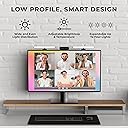
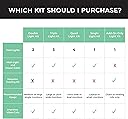
The HumanCentric Video Conference Lighting kit is a sleek, USB-powered webcam light designed to enhance your video calls with adjustable brightness and color temperature. Its stable clip-on mount fits securely atop monitors or laptops, providing even, glare-free illumination ideal for professionals who want to look polished on camera. Expandable up to four lights via daisy-chaining, it effectively combats backlighting issues and is perfect for remote work, streaming, and online classes.


| ASIN | B09Z15DNPP |
| Best Sellers Rank | #1,190 in Computer Audio & Video Accessories |
| Brand | HumanCentric |
| Built-In Media | Camera, UBS cable |
| Compatible Devices | computers, laptops, webcams |
| Connectivity Technology | USB |
| Customer Reviews | 4.0 out of 5 stars 1,175 Reviews |
| Flash Modes Description | adjustable brightness and color temperature |
| Hardware Interface | USB, USB Type C |
| Item Highlight | Monitor & Laptop Light for Video Conferencing, Zoom Lighting for Computer, Upgrade Light for Zoom Meetings, Single Kit Item Highlight Monitor & Laptop Light for Video Conferencing, Zoom Lighting for Computer, Upgrade Light for Zoom Meetings, Single Kit See more |
| Manufacturer | HumanCentric |
| Manufacturer Part Number | 301-1038-P1 |
| Media Type | ProductImage |
| Model Number | 301-1038-P1 |
| Number of Items | 1 |
| Number of Packs | 2 |
| UPC | 810009091653 |
| Water Resistance Level | Not Water Resistant |
I**M
As expected & described should do what many people need.
I bought the 'single' light for use at the office for Zoom/Teams video calls/meetings as my office has windows on two sides & it puts me in shadows even with room lighting. Setup was quick and easy and I like the little controller which can be clicked on for quick video calls, has brightness & light temperature controls along with a lengthy enough cord to position effectively & plug in. I've now used it at work & home and it does just as expected, without glare on my glasses.
N**G
Better than a ring light, especially if you wear glasses 🤓
I bought the HumanCentric double light kit because I needed lighting centered on my face, and I could not get a ring light mounted in a way that provided consistent, evenly lit light. These lights sit easily on the top of my monitor, which is on an adjustable standing desk, and they stay in place no matter how often I move the desk up and down. The biggest benefit for me is that I wear glasses, and with these, I can position the lights so there is no obvious reflection on the lenses. With my old ring light, I always had glare (circle) in my glasses on camera. The light from this kit is even, adjustable, and compact, and it has been a much better solution for regular video calls and Zoom meetings. Overall, very happy with the purchase and the price. They look much cleaner on the monitor than a ring light and work better as described.
F**.
Lights balanced in back for thin or curved screens. Control cool-to-warm lighting and intensity.
My two lights sit on top of a 29" cinema iMac. Because the bases are wider than the top of the monitor, the mounted lights tend to lean back on the thin monitor They feature a curved attachment on the back that prevents the lights from falling backwards off the top of the monitor (see photo). The lighted area thus remains effective—front-facing with a slight tilt upward. The control is about 3/4-in wide, 3-in long; it hangs off the cord for one of the lights in the back of the computer—out of the way when not in use. I like the ability to change the lighting in realtime from cool to warm, dim to bright, on or off with embedded icons on the control. The four icons are black on black—on-off; cool-warm; plus; and minus. These are difficult to see in dimmer light; however my fingers seem to reach for the correct button most of the time. I bought and have used mine since December 2024, such that my picture may represent a different model than the one you're considering. If the control's icons and their separation contrasted more with the black background of the control so that they could be seen with a quick glance, I would have added a star.
A**R
Good, but not great.
I'm not sure if I'm keeping these. I was looking for a light source for Zoom meetings. I needed something with a warm setting to offset the blue tint on my face from my screen. What I like about these are the different temperature settings, the adjustable brightness, and that they fit nicely at the top of my screen. Having them off my desk is really helpful and they're easy to use: you plug them into a usb-c port and change your buttons with the remote on the cord. Where I'm having trouble loving them is the method of changing your settings. You have to physically change them on the remote embedded in the cord rather than by an app on your computer or an external remote. To keep the cables concealed, you'll have to attach them to the back of your screen and move your screen every time you want to turn them on or off, or if you need to adjust your settings. Otherwise, you have to let the cord hang below the screen to keep the remote accessible. I would love to see a version that could be adjusted by an app or remote in the future. This might just be too clunky of a setup for me.
R**E
Great product. Recommended for lighting up your conference calls.
This review is for a four pack of the HumanCentric lights, and a review of a cable to extend the length of them that I received from HumanCentric after asking about it. HumanCentric sent me the extension cable for free, but did not request that I post a review. My choice to do so is completely my own. Below is the message I sent Humancentric including my experience with the optional cable. I believe it provides a decent review of the lighting product as well, and have posted it in it's entirety. "Hello all, I received the cable and have been using it though the month of September. First off I want to say thanks for great customer service. The cable arrived before the lights did. Impressive. Here is a quick review. The system itself is extremely easy to setup and also extremely effective. I definitely could have used just two lights. My corner of the office is difficult to light nicely. While the ambient lighting we have is pleasant there is a lamp and window behind me, making it difficult for cameras to do anything but provide a washed out and poorly lit image of my face during meetings. These lights fix that, even with the window blinds cracked to provide a little extra ambient light to the room. For the cable itself, it let me extend four lights across my 24" and 40" monitors easily. I have previously owned a 49" monitor and would not have had problems there either. The length is great. My only real issue is a voltage drop along the cable. Testing using increasingly larger USB-C power supplies there is a clear difference in how bright the first light is compared to the fourth light on the chain. It's a fairly minor nit, there is still plenty of light provided. It is my only real complaint about the system. I have attempted to take photos of this, but it's difficult to capture. That said, I do have one suggestion that I would like to propose. I am a stickler for clean cabling. I like the 'stadium effect' of the lights on top of my monitor, but would love thinner connecting cables. If they could be sleeker and thinner (I understand I just complained about voltage drop, please humor me) and lie flat along the top of my monitor I believe the look could be much cleaner than it currently is. The headphone jack style connectors are probably very cheap, but they are bulky. I would love it if the system was as flat as possible across the top of my monitor. Thanks for great engineering, service and for creating a quality product."
J**B
An Excellent Solution for Perfect Video Calls - HumanCentric Video Conference Lighting
Working remotely comes with challenges, and one of the most underestimated yet crucial ones is lighting for video conferences. I recently purchased the HumanCentric Video Conference Lighting kit, and it has significantly enhanced my video calls by providing consistent and adjustable illumination. The sleek and professional design effortlessly blends in with my home office setup. There's nothing flashy or distracting about it; the light does its job, making you look your best on camera without drawing any attention to itself. The setup was a breeze. The system is intuitive and user-friendly, which means you don't have to be a tech wizard to figure it out. The inclusion of clear instructions further facilitated the installation process. One of the standout features of this lighting kit is its customizability. The brightness and color temperature adjustments have been beneficial. It allows me to adjust the lighting to suit my surroundings. The most impressive part, however, is how it tackles backlit situations. With my desk positioned near windows, the background sunlight threw off my webcam's balance, making me appear like a silhouette. With the HumanCentric lighting, this is no longer a problem. It effectively counters the bright background light, ensuring I am visible and well-lit on camera. In conclusion, the HumanCentric Video Conference Lighting is a piece of top-notch equipment for anyone working remotely. Whether in a crucial meeting with a client or just catching up with your team, this lighting will ensure you're seen in the best possible light. From its stylish design to its ease of setup and impressive brightness and color temperature adjustments, it's a worthy addition to any home office.
S**T
WARNING: this item damaged my monitor
WARNING. This item scratched my $2000 57" monitor in 4 different places. These clip on like a webcam. The back of the clip (the part facing the back of the monitor) has some padding on it. The front part, however, does not have padding and has very sharp edges. During a video call, while I was adjusting the angle of the light, one of the lights fell off towards the front of the monitor. Since the second light is attached by a wire to the first one, it pulled the second one off too. The very sharp corner of the clamp scratched my brand new monitor. I was sick after it happened. My webcam falls off every now and then and does no damage. Taking a look at my webcam, it has very nice rounded edges that do not scratch. I think this is a huge design flaw in these clip on lights. Likely something the design of the light did not take into consideration because it has nothing to do with the performance of the light itself. But it's an issue that I think buyers need to be aware of. Yes, the item should be securely fastened to the monitor, but it's very common for these clip on style devices to fall off, and the design of the device should not contain sharp damaging edges. Take this review for what it's worth, your mileage may vary.
A**Y
Well Made But WAY Too Dim
Pros: - Metal construction feels great Cons: - Very high price for what you get - Dim as hell - Color temp variation between lights. I have this LED lamp on my desk that was a gift. It is great. There's a wide color temp range from the warmest to coolest. It is bright. It is movable. But it also takes up space on my desk that could be being taken up by my cat. This is important to my cat. So I thought I would get a bright, monitor-mounted light. This has to be common. Remote work is much more widespread. I like my video calls to not have me looking like a proof-of-life video. I really thought this was going to be the light, but no. It is SO dim. It doesn't even throw out half the light of my lamp. I expected much more for the price. I'm feeling like my only choice is a huge, 12" ring light. Regardless, I'm returning these.
D**C
Funktional, leicht und gutes Licht
Sehr funktionale und sehr leichte Leuchte die einfach an den Laptopbildschirm zu klemmen ist. Sogar gut zum Transport. Die verschiedenen Lichteinstellungen sind top.
F**.
Connecteur alimentation défectueux.
Le connecteur USB-C pour l'alimentation électrique était défectueux en arrivant. J'ai renvoyé le produit.
D**L
Super Licht. Einfache Bedienung. Ein Bedenken
Funktioniert super. Meine Logitech Kamera mag bloß nicht über eine USB-Verteiler mit dabei sein. Die Kamera ging immer an und aus sobald ich Farbe oder Helligkeit geändert habe. Aber im Zeitalter von ausreichend USB Anschlüssen leicht zu beheben
E**S
Produit conforme aux attentes
produit conforme aux attentes, facile d'utilisation, simple à monter, et utile une fois bien positionné sur l'écran.
C**O
This is very good
The product is very good, help a lot to improve the light for videos / calls. Super easy to install and use, and with different levels of customizations. Pretty good. I totally recommend.
Trustpilot
1 month ago
2 months ago