Desertcart purchases this item on your behalf and handles shipping, customs, and support to USA.
🚀 Upgrade your rig, outrun the rest!
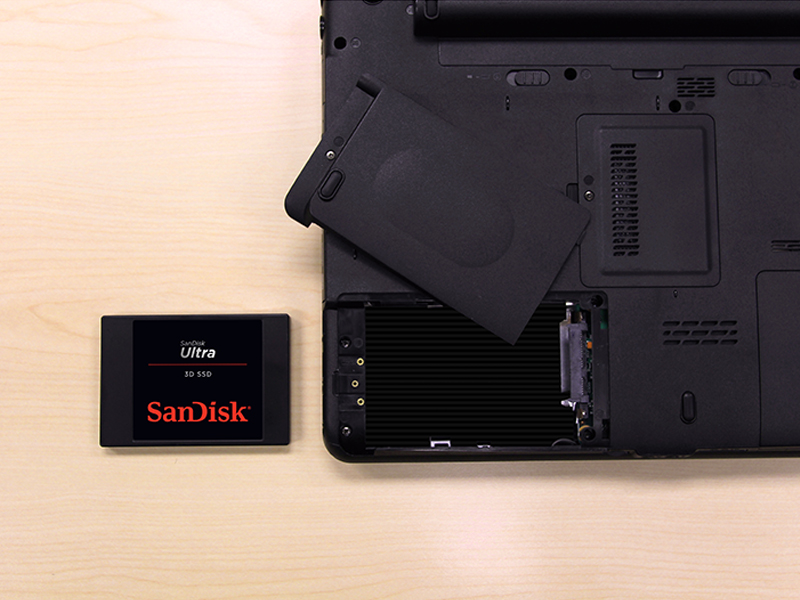
The SanDisk Ultra 3D NAND 500GB Internal SSD combines cutting-edge 3D NAND technology with SATA III interface to deliver up to 560MB/s read and 530MB/s write speeds. Designed for professionals and gamers alike, it offers enhanced endurance, cooler operation, and shock resistance, making it a reliable, high-performance storage upgrade for laptops and desktops seeking faster boot times and smoother multitasking.


| ASIN | B072R78B6Q |
| Additional Features | High Speed SSD Drive |
| Best Sellers Rank | #415 in Internal Solid State Drives |
| Brand | Sandisk |
| Built-In Media | SSD |
| Cache Memory Installed Size | 500 |
| Color | Black |
| Compatible Devices | Gaming Console, Laptop, PC |
| Connectivity Technology | SATA |
| Customer Package Type | Standard Packaging |
| Customer Reviews | 4.8 out of 5 stars 35,445 Reviews |
| Data Transfer Rate | 50 megabits_per_second |
| Digital Storage Capacity | 500 GB |
| Enclosure Material | 3D Nand |
| Form Factor | 2.5-inch |
| Global Trade Identification Number | 00619659155513 |
| Hard Disk Description | Solid State Drive |
| Hard Disk Form Factor | 2.5 inches |
| Hard Disk Interface | Serial ATA-600 |
| Hard-Drive Size | 500 GB |
| Hardware Connectivity | SATA 6.0 Gb/s |
| Hardware Platform | PC, laptop |
| Installation Type | Internal Hard Drive |
| Item Dimensions L x W x Thickness | 3.96"L x 2.75"W x 0.28"Th |
| Item Type Name | SanDisk Ultra 500GB 3D NAND SATA III SSD - 2.5-inch Solid State Drive - SDSSDH3-500G-G25 |
| Item Weight | 1.92 ounces |
| Manufacturer | Western Digital Technologies Inc. |
| Media Speed | 530 |
| Mfr Part Number | SDSSDH3-500G-G25 |
| Model Name | SanDisk Ultra 3D NAND Internal SSD |
| Model Number | SDSSDH3-500G-G25 |
| Number of Items | 1 |
| Read Speed | 560 megabytes_per_second |
| Special Feature | High Speed SSD Drive |
| Specific Uses For Product | personal, gaming, business |
| UPC | 619659155513 |
| Unit Count | 1 count |
| Warranty Description | 3-year limited |
E**S
Still One of the Best SATA SSDs for Speed and Reliability
Still One of the Best SATA SSDs for Speed and Reliability The SanDisk Ultra 3D NAND 500GB SSD is a fantastic upgrade for anyone looking to give an older computer a major performance boost. Installation is straightforward—just plug it into any SATA port, and it’s immediately recognized by most systems. Once installed, the difference is dramatic: Windows boots in seconds, applications launch instantly, and overall responsiveness feels like using a new machine. Performance is rock solid. With sequential read/write speeds around 560/530 MB/s, it hits the limits of what SATA III can deliver. SanDisk’s nCache 2.0 technology helps maintain consistent performance during large transfers, and 3D NAND gives it excellent endurance. I’ve used SanDisk Ultra SSDs in multiple builds—both desktops and laptops—and they’ve all been extremely stable with no data loss or slowdowns even after years of daily use. It also runs cool and silent, drawing much less power than a traditional hard drive. Whether you’re using it for an operating system drive, a game library, or even in an external enclosure for backups, it performs flawlessly. Compared to budget SSDs, the Ultra 3D feels a bit more refined—faster sustained speeds and longer lifespan justify the slightly higher price. Bottom line: A proven, high-quality SSD that’s still one of the best choices for SATA upgrades. It offers the perfect mix of speed, reliability, and longevity—especially for breathing new life into older PCs or laptops.
M**L
Works fast and tons of capacity!
We upgraded a 3-4 year old Dell Inspiron laptop from a 1TB HDD to this 2TB SSD. The process was very easy with a simple interface adapter cable (not included, available here on Amazon). I used Macrium Reflect to clone the disk and it booted right up. I had to download a free partition tool (mini-tool partition) to change the partitions around as the Windows 10 native app won't allow you to allocate space unless the donor and recipient "drives" are physically listed side by side in the app (IE: won't work if there is a reserved space in between them). The drive boots fast, sped the whole computer up when opening big files and has enough room that I doubt it will ever run out of space. I considered getting the more expensive single level drives that last much longer, but the reviews showed that these seem to last quite a long time. Considering that most new mid/high range PCs have M.2 NAND drives, I didn't see the value in buying a drive that will likely outlast any PC that will be able to work with it. Suggestion:-Be sure to turn off any defragmentation apps or processes when upgrading to SSD or it will shorten the life of your drive. SSD drives do not need to be defragmented like physical HDD, so just turn it off in your control panel, and make sure none of your PCs OEM maintenance apps do any defragging to be sure. Check it periodically as mine somehow got turned back on for a short time. I am not sure if an update reset the default to on, or if I goofed up. It's not a huge worry, it won't ruin anything fast, but the life span is based on how many times you erase and re-write each address, and defragging greatly increases that.
B**.
Great price for performance / volume
Firstly, I want to go ahead and state the following: While everyone moves to M.2 and PCI-E based NVME storage, I still recommend SATA based SSDs as the best bang for your buck. If you look at synthetic or simulated test scores from software like crystal disk mark, you may be easily swayed to pay the premium for NVME, however, real world usages still shows that SATA SSDs are still very close in terms of game / application loading speeds. Yes, the NVME is faster, there is no denying it, but at this juncture if you are looking to keep costs low, you can feel confident in still buying a standard SSD. With that out of the way, I particularly want to state that I have had really good luck with Sandisk drives, with zero failures to date. This 2TB drive is still fresh so I can't comment on its longevity, but it booted fine and is not showing signs of early failure. To be perfectly honest, you can likely even go for the lower tier variant and not notice any real world difference in performance, but I chose the extreme because the price difference is small and when I build for someone else I tend toward slightly more premium options.
R**I
A good drive that's fast and easy.
I ordered a mounting kit for this that came with cables. It turns out all I needed was a cable as my computer had a bay that it slid right into and required no extra mounting hardware. But you do need a SATA cable and power cable. You can buy a kit like I did that has the mounting hardware and cables pretty cheaply. Installation as an additional drive was simple. I just screwed it into the mounting bay and slid it back into my computer, plugged a small power cable into the drive and an available power port, and plugged the SATA cable into a socket on my motherboard and the the drive. Using the drive manager in Windows, I saw the drive, partitioned and formatted it, and now have an additional drive. I bought this one because one specific game I play takes a very long time to load and is a game that I load and reload frequently to switch characters. This speeds it up a lot. If you want to use it to replace your system drive, then you'll want to get a utility that allows you to make a copy of your master drive onto this one. There are utilities from Acronis and other manufacturers. What you would do is plug in the drive into your computer, boot up the utility from a flash drive or CD-ROM you burn, use the utility to mirror your system drive onto this SSD, then turn off your computer, unplug the drives, and plug this SSD back into the port your had your system drive on. Then when you boot up, you'd be booting up from this SSD and you'll see a HUGE gain in performance if you're coming from a physical hard drive.
A**R
Best Upgrade You Can Make - Why'd I wait so long?!?
My 2015 Lenovo ThinkPad Yoga14 Intel Core i5-5200U 2.20 GHz w/ 8 GB of RAM and a 1TB HDD had gotten extremely slow. Startup or reboot was taking 2+ minutes. Once I cloned my HDD onto the SanDisk SDSSDH3-1T00-G25 Ultra 3D NAND 1TB Internal SSD and made the install, the old girl NOW BOOTS IN 16 SECONDS! Programs and applications start almost instantly once prompted. Any processing delays have all but disappeared. Are you kidding me? Why did I suffer through this pain for so long? Do yourself a favor and make this inexpensive upgrade at just over $100. You will not regret it. I estimate that I saved at least $1500 since I won't be buying a new laptop now. I expect my ThinkPad to last another 2-4 years. CLONING SOFTWARE TIP: The SanDisk/Western Digital version of the Acronis True Image cloning software was awful. Not user friendly at all. After repeated attempts to clone my disk with this software, wasting an hour, and not having it find the new SanDisk 1TB SDD drive hooked to my USB 3.0 port with an the SATA to USB adapter by Benfei I bought along with this order, I gave up and went to Google. I found the Macrium Reflect 7 Free Edition and it worked flawlessly. My old HDD was cloned to the new SanDisk 1TB SDD in about 45 minutes (I had just under 400 GB of data on my 1TB HDD drive). The physical replacement of the drive was a breeze after watching a couple of Youtube videos and took about 20 minutes. My ThinkPad booted up on the first try and I was amazed at the speed. I highly recommend this upgrade.
T**D
For want of four screws, a star was missed...
When you can add an SSD into an old PC and extend its life, it is no wonder new PC sales are down. This 1TB SSD went into a 5-year old i7 Windows 10 desktop and immediately transformed performance. Specifically, these are the Crystal Disk Mark 5 (64-bit) numbers for the old Western Digital WD10EARX: Sequential Read: 42.153 MB/s Sequential Write: 56.039 MB/s Random Read: 0.472 MB/s [115.2 IOPS] Random Write: 0.681 MB/s [166.3 IOPS] That was state of the art performance years ago, and here is current generation performance from the SSD, which is roughly 10-times faster in sequential access and orders of magnitude faster in random access: Sequential Read: 558.219 MB/s Sequential Write: 515.298 MB/s Random Read: 228.833 MB/s [55867.4 IOPS] Random Write: 192.345 MB/s [46959.2 IOPS] I've only just finished the install - the copy over USB cable took many, many hours longer than I expected - but it was very straightforward. Unlike my laptop I did not need to change the BIOS to recognize the new drive and when I downloaded the SanDisk SSD Dashboard app to check the firmware on the SSD it was up to date. The only niggle, and this is why only 4-stars, was that the four screws that secured the old HDD did not screw into the SSD. I'd not bothered buying a mounting frame because the Crucial MX300 I purchased the other month included a little spacer and the screws worked. Given that the drive is in a desktop I've just laid at the bottom of the case and secured it with Blu Tac, but that's not ideal and I'll have to get a mount for it. Still, if you are looking for a cost-effective way to supersize your old PC performance, this is definitely an SSD to consider.
N**E
Fast, Stable and Solid! Happy!
I have been waiting to get my first SSD since they first released. Found this one for a good price and made the change. Overall, it is definitely faster than a standard SATA hard drive with all of the mechanics and fast 7200 RPM spindles. I timed my boot times two different ways. First, had my PC powered off. I hit the power button and it took about 17-18 seconds to get into Windows to where I could enter my password to log into Windows. I also did a Restart from within Windows and waited for the same results. Time was at 20 seconds for a full reboot and for me to be able to sign into Windows. I also noticed that while in Windows, I could double click on icons and they are lightning fast at loading up. I was under the impression that these drives would give you a 10 second or less boot up time. But, all motherboards are different with the BIOS and posting and that can definitely contribute to losing seconds. Overall, happy with this drive. Seems to be stable, it is fast and it works. Hope it lasts me a long time beyond the 3 year warranty.
B**G
Upgraded after a few days from the SanDisk SSD PLUS 1TB to the SanDisk Ultra 3D NAND 1TB
Nothing wrong with the other drive, I will move it to another computer. The SanDisk Ultra 3D NAND 1TB seems to be a bit faster and I like the 5 year warranty vs. the 3 year. Also the Samsung 980 (or other drives of that type) will not work in a SATA-3 application, hence the SanDisk Ultra 3D is about the fastest available for the SATA-3. I used a cloning docking station to clone the original drive, then as the drive is much smaller than the original in my HP700 Envy I purchased the Corsair Dual SSD Mounting Bracket 3.5" CSSD-BRKT2 from Amazon. It slid exactly into place of the original drive. I plugged in the SATA III cable and power cable connected the power and started the computer. The difference is that everything started up much faster than the original HDD. The SanDisk Ultra 3D NAND 1TB Internal SSD - SATA III is much faster than my old disk drive. How fast? I don't exactly know, but the difference is very significant and well worth the upgrade. Aside from cloning the drive, start to finish took me probably 10 minutes, and I was taking my time. The SanDisk SSD Dashboard software seemed to crash the drive with my Windows 7 Pro 64 bit, so I had to re-clone without installing the SanDisk SSD Dashboard...works just fine now with the Windows 7. As Western Digital has owned Sandisk since 2019, and the specs are the same and according to their website, one design and two products: targeted to the customer bases that appeal to each brand name. Thus the Western Digital 1TB WD Blue 3D NAND and the Sandisk Ultra Label, same product different label...also the price is the same on Amazon, so take your pick! If I have any problems with the new SSD, I will update this as needed. For now I am very pleased with the drive.
C**H
Works well
All is good, although the speed is slightly below the advised.
A**D
speed review
arrive in specific time speed read 550m speed write 350m not like site 550m
J**S
Excelente compra
Muy buen SSD, reemplace un Kingstone que tenía instalado anteriormente y se nota que mejoro la velocidad de mi PC, y en cuanto a la capacidad de 1Tb bastante bien que a mí me da de sobra ya que todo lo importante lo almaceno en un NAS y la nube, este SSD lo agarre en una oferta por $1,700Mx así que fue muy buena compra.
C**N
EXCELENTE!
Excelente produto! Meu PS4 pro ficou muito melhor!
C**N
SSD 500GB Per ora ottimo (due giorni di vita)
Installato su pc desktop HP 8100 elite SFF al posto di un HDD Seagate 3,5" di 3 anni delle stesse dimensioni, già piuttosto rapido ma la differenza si nota. Anche perché il disco è stracarico. Non lo uso per giochi. Quello che mi preme far presente è la facilità di clonazione ottenuta con AOMEI Backupper versione free. Programma testato il giorno prima con un HDD 2,5" da 500 GB collegato direttamente ad un'altra porta SATA del pc. Andata a buon fine al 95% perché al termine ho dovuto sistemare la lettera assegnata alla seconda partizione dove non abita il S.O. e qualche file è andato disperso. Essendo una prova non ho perso tempo a capire quale (l'ho capito da alcune icone mancanti sul desktop). Con il SanDisk ho cambiato metodo e l'ho collegato tramite un supporto SATA USB 3 esterno su porta pc USB 2. Il tempo è stato lo stesso, circa 4 1/2 ore. Ho clonato l'intero disco (unica cosa fattibile con la versione free) ed era ciò che mi serviva. Non ho usato "clona Sistema Operativo" perché riservata alla versione PRO. Comunque il risultato, con CLONA DISCO, è stato perfetto. Ricreate con le stesse lettere e partizioni un disco identico al 100% a quello originario. Naturalmente il risultato definitivo appare solo al termine e dopo aver installato l'SSD al posto dell'HDD. Avvio preciso e rapido. L'unica cosa che non ho trovato sono i punti di ripristino esistenti sul vecchio disco. Ne ho subito creato uno manualmente. Ho controllato che WIN 10 avesse riconosciuto l'SSD per evitare la deframmentazione automatica che è inutile e dannosa su un SSD e tolto l'indicizzazione alle due partizioni, anch'essa inutile e dannosa. Gli SSD hanno un ciclo di vita limitato al numero di scritture che vengono fatte sul disco che, ancorché gigantesco, è pur sempre limitato. Non a caso i software che le case forniscono con gli apparati (da scaricare dai relativi siti) segnalano anche lo stato del ciclo di vita. Il disco l'ho collegato così come esce dalla scatola. Alla formattazione provvede il programma. Inutile tentare la clonazione se l'unità ricevente è anche di un solo bite più piccola. Forse sono stato fortunato, forse dipende dal pc, non lo so. So che molti segnalano con le clonazioni problemi di avvio e affini. Comunque il rischio è zero. Si sta creando un clone di una cosa funzionante che tale rimane.
Trustpilot
1 month ago
2 weeks ago