🚀 Navigate Like a Pro, Wherever You Go!
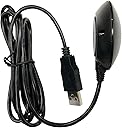
The BU-353-N5 is a high-sensitivity USB GPS receiver supporting 75-channel multi-GNSS tracking (GPS, GLONASS, Galileo, Beidou, QZSS, SBAS). Featuring a built-in patch antenna, roof mount magnet, and backup power for rapid satellite acquisition, it offers fast, reliable positioning compatible with Android, Windows, Mac, and Linux systems. Ideal for professionals needing precise, hassle-free navigation on the move.


| ASIN | B0B1W1YBZC |
| Additional Features | USB |
| Are Batteries Included | No |
| Best Sellers Rank | #37,076 in Electronics ( See Top 100 in Electronics ) #3 in Satellite Television Receivers |
| Brand | GlobalSat |
| Built-In Media | Quick Start Guide, Suction Cup |
| Compatible Devices | Windows, Mac, Android, Linux |
| Compatible with Vehicle Type | Car |
| Connectivity Technology | USB |
| Control Method | Touch |
| Customer Reviews | 4.2 out of 5 stars 24 Reviews |
| Display Type | LED |
| Human-Interface Input | Buttons |
| Item Type Name | USB GPS |
| Item Weight | 0.11 Kilograms |
| Manufacturer | GlobalSat WorldCom Coporation |
| Map Types | Global |
| Model Name | BU-353N5 |
| Model Year | 2022 |
| Mounting Type | Roof Mount |
| Operating System | Android |
| Screen Size | 5 |
| Special Feature | USB |
| Supported Satellite Navigation System | GPS |
| UPC | 795945000016 |
| Vehicle Service Type | Car |
| Warranty Description | 1 year warranty |
A**R
USB connection makes set-up simple
This a great little GPS receiver and a really good price point. It is NEMA-0183 compliant so it will work with most positioning applications. We use it in our Victron Energy solar installation to automatically track location which helps with solar irradiance forecasting no matter where we roam in our RV. It plugs directly into a USB port on our Cerbo GX (the "brains" of the installation) and required no additional set-up. Even installed in a basement compartment on the Class A RV it is able to track up to 17-30 satellites. You almost can't go wrong with this receiver.
J**.
Works great, quick setup, good instructions
Works great. Downloaded their driver, from their website (no 3rd party stuff) per included instructions and checked com port per instructions and entered data in OpenCPN and it worked first try. Wasted hours with other cheaper GPS from Amazon that I could not get to work and returned. This one works and is accurate.
S**Z
simple GNSS receiver
This is an N version which is their latest model which no longer use mini disc you can get the driver from their website or it installs automatically when you plug in the device. This is the GNSS model which requires your software to be able to support GNSS data. If you are trying to use GPS only or Windows apps you will need different models.
C**A
Troubleshooted for hours
It works for raspberry pi 5, Kali Linux on VM ware on my laptop, but man was it hard to get to work. At first it worked after setting the /etc/default/gpsd file then made udev rule for it to work. It worked for awhile but when on the move it stopped working me thinking it was software related I spent hours debugging it and trying to find out what was the matter. So I thought to myself it must me a hardware issue or something is the matter with the cable so I took it apart and found it worked properly after unkinking a wire linking to the gps module so it worked after that but then it stopped working again due to the the cable being wrapped up since I don’t need it to be so long. So if you are having problems with it just straighten the cord out as much as possible and at the end of the module. I think there just might be interference in the cables or they just kink very easily
J**E
Great for laptop navigation
Perfect for OpenCPN, easy to set up on Mac M1.
I**T
Does not work with Windows Location Services !!!!
Useless on Windows.
S**S
Great GPS option.
I have only used it a few times but I am quite happy with it. My intention is to use it to feed my OpenCPN chart plotting software.
J**S
Super easy setup
I bought this to use with my Microsoft Surface running Windows 11 and OpenCPN charting software. Install took 5-10’ and I have now used the puck for a week long trip. It doesn’t seem to be critical for position of the puck. I have used it inside my boat and it still maintained a good GPS fix.
Trustpilot
2 weeks ago
2 weeks ago