Buy anything from 5,000+ international stores. One checkout price. No surprise fees. Join 2M+ shoppers on Desertcart.
Desertcart purchases this item on your behalf and handles shipping, customs, and support to USA.
๐ก Tune in, light up, and solder your way to tech mastery!
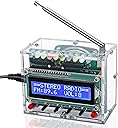
The ICSTATION FM Radio Kit is a DIY soldering project featuring a 87-108MHz FM tuner, a high-definition LCD1602 display for easy frequency and volume control, and 10 colorful LED lights that pulse with your music. Designed for electronics enthusiasts and learners, it comes with a transparent acrylic case and USB power interface, making it an ideal educational tool and stylish desktop gadget.


| ASIN | B09Y1BJZ6F |
| Additional Features | FM Radio Kit with LED Lights |
| Best Sellers Rank | #32,628 in Industrial & Scientific ( See Top 100 in Industrial & Scientific ) #69 in Soldering Stations |
| Brand | IS |
| Built-In Media | Soldering Projects |
| Color | Green |
| Compatible Devices | USB Device |
| Connectivity Technology | USB |
| Customer Reviews | 4.2 out of 5 stars 349 Reviews |
| Display Technology | LCD Display and LED Lights |
| Display Type | LCD |
| Enclosure Material | Plastic |
| Frequency | 87 MHz |
| Hardware Interface | Mini USB 2.0 Type A |
| Item Dimensions L x W x H | 2"L x 0.78"W x 0.4"H |
| Item Type Name | Soldering Projects |
| Item Weight | 272 Grams |
| Manufacturer | IS |
| Mfr Part Number | GY20384 |
| Model Number | GY20384 |
| Power Source | dc |
| Product Dimensions | 2"L x 0.78"W x 0.4"H |
| Radio Bands Supported | FM |
| Special Feature | FM Radio Kit with LED Lights |
| Style Name | LCD Display |
| Tuner Technology | FM |
| Tuner Type | FM |
| Voltage | 5 Volts |
| Water Resistance Level | Not Water Resistant |
S**Y
Fun project, good instruction manual, good learning project
I found the assembly very easy and straightforward. It does require soldering skills which can be found from a video or two and by the time you are done you will get ample practice. You need to either print out the user manual from Amazon or scanning the QR code. Part orientation-like polarity on electrolytic capacitors and LED and general diodes were clearly described both in words and clearly marked on the well-printed circuit board silk-screening. One cautionary note that should be added is to minimize the bending of the stranded wires soldered into PC boards and speakers. The stranded wire is made solid when the strands get filled with solder and will break after only two or three bends right where the solder-filled stranded wire turns back into all stranded. Typically, stranded wire is very flexible, but after soldering will break as described. I found the kit stocked with all the right parts and directions easy to follow. I even got help from my wife to speed things along. I hope you enjoy the project as much as we did.
R**R
Great Radio Kit and Project to Teach Basic Electrical Engineering Skills and Soldeirng
I got this radio kit to teach my 12-year-old sister how to solder and assemble as a way to teach basic electrical engineering principles and terms. Upon unboxing the kit, I found the acrylic box was separated in its own space while the electrical components were in their own ziplock bag which is great and prevents scratching of the acrylic and losing electrical components. However, the instructions werenโt included, but I looked at the listing and found the instructions there as a PDF file. The PDF instructions were very high quality, and the English was pretty good for a kit like this and very understandable. There was also a list of materials which tell the item names and their quantities as well as a circuit schematic. The instructions even used proper engineering terms. As I was at a house without access to a soldering station, all that was available was a $3 harbor freight soldering iron and some very cheap solder. First, I explained the components and gave a brief overview of how each one works. I then taught my sister how to solder and soldered two pins of the SMD component to show her was it was like and explain. I then let her solder the rest of the pins, and amazingly, she was able to solder them correctly. She was also able to solder all the resistors, and the header pins, and the LEDs without more than 2 bridged connections which she corrected on her own without me telling her how to correct them. As this was her absolutely first time soldering and she did so well and picked it up without a problem, I was very amazed. As an electrical engineering student myself, I see a good number of college students (around half) having trouble soldering their boards of even easier difficulty and a lot of them even messing up their boards and needing to get a new one. After doing about half of the kit, my sister wanted to take a break, so I let my 16-year-old brother complete the rest of the kit which he easily did as he has been soldering for a while. I also let my brother assemble the acrylic part. As acrylic smudges with fingerprints, he made sure to not touch the inside surfaces of the acrylic as he installed the panels to prevent the final product from looking dirty. Once the product was assembled, we applied power via USB port and the product turned on. Upon changing the channels and cycling all the way through, we couldnโt get the radio to pick up any radio stations. However, the radio was tested in Japan and the FM band in Japan is about 76-90 MHz while in America, the FM band is about 88-108 MHz. Furthermore, the frequencies in Japan are in different increments for tuning than in the US. This radio supports frequencies 87-108 MHz and most radio stations in Japan also aren't going to be close to 90 MHz either. This explains why the radio doesn't pick up Japanese radio stations. While the radio doesn't pick up Japanese radio stations at all, this is not a design flaw of the radio at all and it was demonstrated that the radio does work on US frequencies when I used a radio transmitter to test. . We tested the radio by using a portable radio transmitter and set both the transmitter and this radio kit to the same channel and it picked up the sound perfectly. The sound quality was really decent for a radio. That tells that the radio kit does work. Regarding the functions of the kit, there were minor things I found awkward. The volume increase button and decrease button were โswitchedโ in a way. Volume up was on the left and volume down was on the right. The same was done for the channel increase and channel decrease buttons. This โswitchingโ wasnโt intuitive and goes against what you would expect and can cause confusion. The other thing was the screen said stereo on it, but this radio isnโt stereo at all as it is only one speaker and therefore mono. This isnโt a bad thing, but the screen shouldnโt mention stereo. Overall, I am pretty satisfied with this kit. For one, it has taught my 12-year-old sister to solder and allowed her to find that she could solder to a very reasonable proficiency at such a young age and at her first try which I am sure she found amazing. Now, she discovered another skill she could use later which is very useful. My brother liked soldering it up too and assembling the product and I enjoyed using it as a teaching tool and we all enjoyed testing the final product. The whole assembly process in itself was a lot of fun. While we did it in one sitting, I would highly recommend doing half the assembly, taking a break, then doing the other half. The things I would recommend improving are having the volume buttons and frequency buttons arranged so left is lower volume and up is higher volume. I would recommend also having the volume settings persist even when power is removed. I would also recommend including a headphone jack to listen with headphones and get stereo sound as well as having an audio in jack to allow the radio to also be used as a portable boombox. Otherwise, the product is really cool and functioned as intended. The LEDs were an extra cool feature that is fun to watch as the radio plays too. Overall, I am giving this product a 4.5-star review because the volume and frequency buttons were โreversedโ and there isn't any stereo output as it says as well as there not being AM channels or an audio in. Since Amazon doesn't allow 4.5-star ratings, I am rounding to the nearest whole number which is 5. Overall, I am very satisfied with this product and the teaching/learning opportunity it brought.
J**E
Pros and Cons
Cons: volume isnโt โmuteโ on โ0โ so if you want to have it on while you go to sleep it is too loud for that even when volume is all the way down. The acrylic housing is kind of difficult to figure out and the instructions on that arenโt super clear. Does not charge or run on batteries. USB plug only to power it. It resets to Volume 8 and lowest FM station when turned off. Even when you keep it plugged in, the unit completely resets when you press the power button. No Bluetooth or AUX or AM radio. Pros: seems pretty high quality for the price. Speaker sounds good. Like way better than I expected. Fun to build. Instructions for soldering are well written with photos and easy to follow. Acrylic housing seems pretty durable. The screen is really cool. Overall super fun to build, LOTS of components to solder so definitely not for children. Iโd say a 15 year old is probably more than capable of doing it if theyโre dedicated. Took me about an hour and a half and I do these type of kits pretty often.
G**E
Fun kit to build
This was a fun kit to put together. It requires a good fine point soldering iron and good solder skills. The instructions that come with it are marginally adequate but if you search the web you can find instructions that you can print out full sized. That helped me quite a bit. Just go slow and read and re-read the instructions to make sure you've got it. The components were all labeled and easy to identify although a magnifying glass or magnifying glasses are most helpful for older eyes. The most annoying thing about the radio is that it doesn't have a memory. So, every time you power it you have to start over looking for your station. It's loud and would be nice if it have two speakers with stereo sound. Overall, fun and enjoyable to build.
J**E
Junk - very tough assembly, finished product has no sound!
Poorly designed kit. Case assembly requires the dexterity of a brain surgeon. Poor foreign language translation in the directions is sometimes confusing. Got it finished, everything lights up, I can control frequency and volume, but to no avail...THERE IS NO SOUND! I've checked through the assembly twice, everything's good, no soldering shorts. BUT NOTHING COMES OUT OF THE SPEAKER! A radio, even a "toy" like this, is junk without sound!
J**N
Fun to build, fun to watch
One of my daughters (age 10) is always asking to build things out in the radio shop, so why not build a radio? This one was challenging enough to take several evenings, but not so hard that it required reworking, or resulted in frustration. The English instructions (PDF available right on the listing page) are 30 pages long, in full color, with photos of each step, things to look out for, and advice on proper construction. Easy-peasy! It's powered by 4.5-5V, and comes with a USB cable, so it's good on the kitchen counter, plugged into a phone changer, or completely portable with a power bank. It draws very little power, so just about any power bank of any size will run it all day. The 5W power output shown in the listing is a typo. It uses an LM386 op-amp for an audio amp, and those top out at 0.5W, so I think they missed a decimal point. Some things to watch out for while building: The instructions seemed to have the screw lengths for assembling the case wrong. Just ignore them and use the length of screws that seems right in the various locations, and you'll be fine. Use masking tape to hold the case panels together, and a magnet to hold the backing nuts in place while you turn the screws. That was a huge help to us. The screws that hold the screen in cannot be tightened completely without warping the case or potentially breaking the screen. Just lightly torque then down, and you'll be all set. I tried to get a photo of it, with the gap between the board and the pillars the screws go into circled in red so you can see. We added a few adhesive rubber feet to the bottom just so it stayed put and keep the bottom of the case from getting scratched. (I took a photo of that, too.) As for operation, the FM receiver module is a generic receiver, not necessarily designed for this specific radio. Its power output is far more than the power amplifier can handle. The Volume display goes from 0-15, but in operation, any setting above 4 or 5 leads to distortion. No biggie, it's plenty loud at "4." The tuning is a "seek" feature. I've found no way to step through the tuning. You push the button, and it either seeks up or down until it finds the next station strong enough to bother with. The volume and tuning buttons seem "backward" to my thinking. The left button is "up" and the right button is "down," which doesn't seem intuitive to me, but once you know, it's easy. One thing that gave us a laugh was how the display shows "Stereo Radio" this whole time it's playing, despite having only one speaker and no headphone jack. Like I said, the guts of it are probably part of a more universal receiver. This thing is fun to watch. The bargraph display at the top is fun to watch, multi-color (RGB LEDs used) and the kids love to just watch it. It reminds me of Knight Rider! The bargraph can be turned off is it's distracting, or if you need to save power for some reason. The LCD display is always backlit. You'll have fun building it, and maybe even teaching someone else how rewarding it can be to use something that you built. Happy building!
J**A
Had a bunch of fun putting this together, but could not get it to work
Putting this device together was brilliant fun. It is like jigsaw, for adults, but after your done, the jigsaw does something. Brilliant! The fundamentals are unimpeachable. One thing that was slightly disappointing was that it did not actually work. The display did not show the frequency or the volume, and no sound played out of the speaker. I am open to the idea that I'm doing something wrong, but it's kinda hard to find out what. No debugging instructions are provided, so if you screw something up, the first indication you're going to get is when nothing happens after you press the button on the assembled device. I have some friends who are really into this sort of thing, and I'm pretty technical myself. So I went on a bit of an odyssey trying to figure out what was wrong. The first thing I tried was probing a bunch of the connections on the board and comparing resistances and continuities to the schematic in the instruction. That's when I noticed that I have three more diodes on my board than are shown on the schematic. Whaaat? It turns out these diodes are on the receiver power circuit, presumably to decrease the noise coming from the power supply. They are on the newer revision of the instructions, which can be found on the Amazon page, but not the revision present in the box you receive. I couldn't find any issues with my multimeter. I found datasheets for all the components. I learned that the microcontroller (the big chip with STC labelled on it) communicates with the receiver via I2C. My friend suggested that I snoop on/inject I2C commands to the receiver to see if it was actually responding. I soldered some dupont headers onto the receiver and hooked it up to my Raspberry Pi. I was able to run i2cdetect and I found that the radio was indeed responding to I2C. What's more, that caused it to turn on! Cool! All I heard was static though . . . So I wrote a userspace I2C controller program for this receiver board to try to get it to work. This also did not succeed. I was able to set some of the values (like mute, the volume, etc.), but I could not get the receiver to tell me anything about its current frequency, and none of the frequency adjustment nor seek functions seemed to work. Update: I was able to adjust my code to get *everything* working. But, the device still could not pick up any stations in the middle of a large city. So, for what it's worth. At this point, I think I've hit a wall with this device. I'm sad I couldn't get it working, but it still provided hours of good entertainment, so it's hard to complain.
F**D
Itโs fun and worth it (imo)
Was fun to build, worked perfectly
M**M
ไธญๅฝ่ฃฝใฎใผใฃใใใๅๅ
ๆฅๆฌ่ชใฎๅๆฑ่ชฌๆๆธใใใใพใใใงใใใ่ฑ่ชใ ใใใฎ่ชฌๆๆธใฎQRใณใผใใง่ฑ่ช็ใฎไฝใๆนใงใใฃใฆใฟใพใใใใๅคฑๆใใพใใใใฉใใๆชใใฃใใฎใใใใใใพใใใๅใใฆ่ฒทใไบบใฏใใฃใจๅฎใใใคใง่ฉฆใใใปใใใใใใใใใพใใใ่ฒทใใชใใใใใฃใใ้ฆฌ้นฟใใใใ
J**.
May not work. Expensive to return.
This device may or may not work. I have purchased two. The first worked. The second only partially so and I am proficient with soldering techniques. I began the return process for the second unit but found that UPS ground shipment between Canada and the US overly expensive compared to the original purchase price.
J**N
Works well.
Works well great kit.
A**R
Looked great, but no instructions, and will not work
Components and PCB looked to be good quality, but why such a project would not come with instructions is a bit unusual. My son and I spend hours following every step to the letter once we did eventually find instructions, but it wont work. We get a buzzing sound in the speaker, and the frequency buttons will not work. AND, the PCB had 3 extra areas not listed in the instructions, and we didnt have all the capacitors to complete it as the PCB outlinesโฆ. Very disappointed 10 year old here, for his first solder kit project.
ไป**ๆ
ไธญๅฝใใ้ใใใฆใใ
ๅๅๅฐ็ ใใใไธญๅฝใใ ้ๅฐ ้จๅๆใ ๅ่ชฌใชใ ใใใงใฉใใใฃใฆๅๅฟ่ ใฏไฝใฃใใใใใใ ใปใปใปใปใป ๅๅ่ชฌๆใฎๆฌใซไฝใๆธใใฆใชใ ใใใใไฝใใชใ ็ใใ
Trustpilot
1 week ago
2 months ago