🚀 Elevate your home network to pro-level speed and security — don’t get left behind!
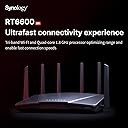
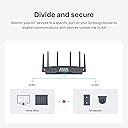
The Synology RT6600ax is a tri-band Wi-Fi 6 router delivering up to 6.6 Gbps wireless throughput, featuring a 2.5GbE WAN/LAN port, advanced VLAN segmentation, and robust parental controls. Powered by Synology Router Manager, it offers intuitive network management, comprehensive threat prevention, and a VPN server with 40 free client licenses, making it ideal for tech-savvy professionals and prosumers seeking high performance and security in one sleek device.


| ASIN | B09ZQ5W4G7 |
| Best Sellers Rank | #12,585 in Electronics ( See Top 100 in Electronics ) #83 in Computer Routers |
| Customer Reviews | 4.2 4.2 out of 5 stars (427) |
| Date First Available | May 11, 2022 |
| Item Weight | 4 pounds |
| Item model number | RT6600ax (US) |
| Manufacturer | Synology |
| National Stock Number | 0 |
| Product Dimensions | 14.25 x 10 x 4 inches |
J**R
This router can do it all!
I am an experienced IT Infrastructure professional, and this is by far the best set of features and ease of use I've come across in a home router including units that cost much more. This unit could easily handle a small business/retail office as well. There's not much you can't do with this, and you don't have to spend hours getting it set up. Took me about 30 min including the VPN server and Threat protection. I won't deep dive into the features as there many videos out there for that but the VPN server, Threat protection and parental control (best implementation of this I have seen) features are all superb and all included for no extra cost. The VPN server includes 40 free client licenses on this router which is an amazing deal and there are Apple and Android apps available. This is the best way to access your network remotely for cameras, NAS and such. Do not open up access for those things through your firewall or you're asking for trouble. VPN is the way. The VPN even supports 2 factor authentication for added security. Here are some minor complaints: 1) I received a used unit at first. I had to factory reset it to be able to set this up. This was Amazon's fault and they resolved it to my satisfaction. 2) Only 1 USB port. There should be 2 since you'll need 1 for storage if you use Threat Protection. 3) Only 1 2.5Gb Ethernet LAN port. There should be 1 for the WAN port and 1 or more for LAN. 4) Only 4 LAN ports. There should be more ideally, although external switches are pretty cheap these days. 5) It did not do a good job of selecting the 5Ghz channels. There were much better unused/less used channels available that I had to manually set. Get yourself a good Wifi analyzer app for your phone so you can avoid the same channels all your neighbors are using. This should be done with any Wifi router and is a good investment of time unless you live in the boonies. I mostly have 5Ghz channels all to myself now. 6) Would have liked to see wifi 6E in this. Not a huge deal since 6E is not any faster than 6 (2.4gb max speed with 160 mhz channels). 6E gets you access to the 6Ghz spectrum which would only help if 2.4 and 5Ghz are really congested (apartment building, city, etc.) Otherwise, don't waste your money and wait for Wifi 7 which will really speed things up with 320Mhz channels. 7) They tout the 5.9Ghz spectrum support in Wifi 6. There are very few devices out there that support this. This would only be useful if you are meshing multiple of the newer Synology routers and used it for wireless backhaul which is why I suspect they support it.
S**P
Best in class prosumer router
This router is an upgrade from a Netgear Orbi AX4200 RBK753. That router is about 2x the cost, though it is a 1+2 satellite mesh system. I am a fairly advanced user who was looking for three things - 1. good speed and coverage, 2. parental controls, and 3. IoT lan separation support. The Netgear mesh system satisfied criterion 1, but was hopeless at (2) and (3). Parental controls are a subscription with Netgear and is pretty basic. There is also limited support for multiple networks and VLANs. And worst of all, the Netgear router interface was incredibly sluggish and frequently, the iOS app would not be able to find the router despite being on the same network. Before settling on the Synology RT6600ax, I also evaluated the Ubiquiti Dream Machine, which is also highly rated by the community. The problem with the DMP is the complexity of setup and overhead is much higher. You do need to setup the Wifi 6 access points separately and the UI is a lot more complex. It wasn't too difficult, but can be overwhelming for the average home user. The Synology RT6600ax is as simple and as complex as you want it to be. It is reasonably priced for a Triband Wifi 6 router. The coverage and speed are great. But where Synology really shines above the rest of the competition is in the software. The SRM software (v1.3.1 at the moment of writing) is incredibly intuitive to use and the router itself is very responsive. The parental controls are the best of any router I have tested, bar none, and completely free (this saves you at least $50/year alone in subscription fees on some competing systems). You can do the simple route of just specifying "Child" accounts and clicking a few options, or you can go down to fine-grained control of allowing only certain websites at certain times (very useful if you want to allow only, say a particular homework website during certain hours). Setting up separate SSIDs and VLANs for your IoT devices (I hope you are doing this!) requires just a few clicks. Most of the time was spent reconfiguring the many IoT devices to connect to the new SSID. Firewall setup is also as simple as it can be. The above are just some of the features that matter most to me personally. But there are other features that can be transformative to other home users. For those of you without a Network Attached Storage (NAS), this router comes with a USB port that you can connect an external storage and turn it into a simple networked file storage. It is not a complete replacement for a proper NAS (and Synology makes some of the best of those as well), but for those who do not have complicated needs, it is a great starting option. Finally, for those of you with sizable homes, two or more of these can be connected into a mesh system as needed. To summarize, this is the best router I have found for the prosumer. If you want to take a step up from the simple plug-and-go routers (or worse, the ISP-provided garbage) of the world, this router is a major step up. I have Synology NAS and now this router. I have every confidence they will continue to improve the already great software and add new capabilities to it.
G**G
Simplicity and Need for Appreciated Speed!!!
I purchased my first Synology RT6600ax April 2023. About 6months later I decided to purchase a second one and use as a Mesh (meaning like Orbi and other units tying them together). Depending on your square footage of your home, you may or may not need more than one. Some may need updwards of 3 at best or 4 or more for much larger homes. The average person likely only need between 1-3 with 2 being ideal for most. Let me start by saying you don't have to be a Techy person to setup Synology routers. The user interface (Linux) is very clean and easy to use. Adding additional RT6600ax units are super easy as well during setup. All "looks" not jokes aside, don't be fooled by it's appearance. As a matter of fact, who cares as long as it performs and that's where Synology comes in. "Set it and forget it!" You can set up to a total of 4 different WiFi names to connect to plus add a Guest one for a total of 5, to keep lets say IoT (Internet of Things) = Smart devices separate from your Gaming and/or Streaming devices. I have my Main, Gaming, Media, IoT, and Guest. You can name them whatever you like. What I like most about Synology unlike others... NO SUBSCRIPTIONS! Their security is top-notch as well as downloadable apps are free and useful. You can also create and run let say a VPN on the router and allow only specific traffic to use it and allow others to bypass it. Super cool. Set it and forget it! Now, let me say this because I've been reading some reviews here and there about Synology support and speed. I'm going to call BS on the majority and call those the entitled group who feels like their needs are important over all things possibe, not of reality. HEY OVER HERE... I'M #1... ANSWER ME NOW!!! Have to laugh at most of them or those that are just trying to re-invite their own understanding, not of what it really is. First off, if you have AT&T or another provider whose modem/router combo is the primary source of your internet, you MUST set that device in what's called Bridge mode or pass-through. That means the traffic will pass through it to your Synology router which will be the acting DNS (Communication and Traffic Router) for your service. Your Service Provider such as AT&T will not support you adding your own equipment and the Techs will surely play dumb because it's not their job to hook up and configure your 3rd party equipment. It's not Synology job to support your speed issues coming in through the providers equipment. So there's this tall tell that if one doesn't help me, surely the other will. They're 2 different entities that work together but not for us to get 100% of what we think we're entitled to have. The speeds you pay for are ALWAYS to be looked at as UP TO that speed. Speeds don't stay the same. Many factors will affect your speed. You phone don't need 1gig gong to it. It can't handle it. So it won't detect it. The 1 gig or whatever your speed you're paying for is the shared speed amongst all of your devices. As one device uses a block of that speed you have, it will affect the speed of other devices. The more the devices sharing, the less each device will get and it's ok as long as it's working. If your speeds are terrible, maybe look at whose downloading large sums of data affecting your speed. Otherwise, normal "legal" traffic usage with tons of devices should suffice. Ok, back to my review. Getting back on track... I have 2 RT6600ax routers. As I move through my house, my connection transitions to the other without interruption. I pay for up to 1gig. I'm getting through to the routher a speed of 987 pretty consistent when I check. Sometimes it'll drop to 950. We have over 30 devices. Smart home with several phones/tablets, handheld consoles when the grandkids and guest come over in addition to 3 gaming systems, 4 computers, and 5 TVs going at any given time and/or at the same time. There's a lot going on on my network. Synology handles them with ease. 2 are hardcore gamers. Ping and Speed are everything to them. There are times I may have to work from home. When I do, even with all of that traffic, as most who work from home knows (No one can be doing a lot or it'll affect calls and/or my work.) I don't have those issues. I've been happy with my RT660ax here. Just last year I purchased 2 additional for our second guest home. There, we have over 20 smart cameras around the property. It's out in the country where the fastest speed is only up to 25MB! It's also a smart home with about 40 something devices in all there. Synology handles all of those devices. It utilizes the shared speed control amongst all of those devices with that speed. I do have to admit, no gamers there. They hate it. Maybe in the future the speeds will get better but no router will make magic with speeds like that but what it will do is ease the pain and Synology RT6600ax does that. Lastly, as an update, yes, the signals show up as 6ghz aka WiFi 6. Also, it's very easy to manage your network on the go. It's really a powerful router. Some of my friends have switched to the same router as well since acknowledging my experience. You won't regret your purchase.
D**.
Nothing but a headache.
**UPDATE** December 27, 2023 It is now almost the end of 2023 and I am still having nothing but issues and headaches with this mesh router. All support is doing is having me do the same troubleshooting steps over and over again and then saying it is going to the developers to make a fix/change. Nothing is actually changing though with the product. It is still dropping connections randomly even when standing within a few feet of the router. The speeds are mediocre at best too. Consider the high price of this stuff you would think that it would work better and have better support. At this point I don't even think that I can recommend the NAS that I have from Synology due to the poor support. To me this signals a company that doesn't support their products well when there is an issue. Too bad it was so expensive because I am stuck with it. I bought this to replace my Orbi Router that was getting a bit old. I already have a Synology NAS and I love it. The product has a great user interface (if you own their NAS you will be familiar with it) that is easy to use even if the multiple windows and menus take a bit to get used to. There is a lot that this device can actually do for you. My issue with it is that the wireless signal is constantly dropping. The 2.4 Ghz network on this is just fine but the 5Ghz network (also used for the mesh connection) is horrible. Constant disconnects from the wireless network on my tablets, phones, and computers. I even had it disconnect from wireless while I was standing two feet away from the router. I have been working with their tech support (seem pretty helpful in their desire to help but it is a slow process) which has been a little frustrating because it is a slow process. We have even swapped to a different router to see if it was a hardware issue and it has made no difference. I am still working with them to try to figure out the issue. Having worked in technology for over 15 years I have to say that this is the worst experience I have ever had with any router. I can highly recommend their NAS devices but there is no way that I would ever recommend anybody get one of their routers. Even if I was given this for free I would still not be able to recommend it. It has been a headache and time sink. Please just go with another company and save yourself the frustration.
K**R
Great for my main house router.
It arrived with the latest 1.3 firmware version which is incompatable with my existing Synology2600 router, and my 3 Synology 2200 mesh routers, all of which were at a 1.2 version firmware. I intend to reuse the 3 2200's in the wired mesh configuration, and downgrade my existing 2600 router to being a wired wifi access point in my garage. After struggling to figure out how to upgrade the 2200's to make them talk to the new 6600 unit, I finally figured out how. If there is documentation on this, I never found it. After checking a dozen or so YouTube experts, I took the 2200 units one at a time, did a hard reset, (pressing the tiny rear switch with a paper clip for > 10 seconds), left them to boot back up to the single blue LED, and then wired them to an open LAN port on the new 6600. Took a while to see them pop up in the Wifi screen on the 6600 routers software. After a while, the option to upgrade them appeared. Clicked on that and it completed pretty quickly. Relocated the newly minted ver 1.3 2200 mesh throughout my house and connected them with my cat5e cables. Did this 3 times and all was well. They were previously meshed by radio link but this time I hard wired them, set to AUTO connection in the software so they can fall back to a wifi radio connection if neccessary. Still have to do this with the 2600 unit, but the cat6e cable has yet to be run to the garage, so, no big rush. Aside from this, the only other issue I've run into was when I tried to use the single USB-A port to run an external drive. I wanted to do this because its required to make use of the optional Threat Protection software. Synology has a small list of acceptable drives. I tried a cheap 32G thumbdrive and a Samsung 850 EVO 500G SSD. Neither of these is on Synology's list, and both of them repeatably failed by appearing to connect and disconnect, causing the Threat Protection software to fail. So, back to Amazon to find something on their accepable list. Got a ADATA HD710 Pro, 2.5" External drive. An actual spinning disk. Seems like going backwards in time, but it is working. Software loaded and runs OK, and I still have an additional 1.4G of usable space. I did select the option to allow the disk to hibernate when not in use. After all that, the setup is working amazingly well. The wifi signal strength app on my phone just maxes out anywhere in the house.
S**E
This thing works better than all other routers I bought
This router is a beast!! it not only blocks out malicious attempts to your router with threat prevention it even comes with dos protection features as well and has daily updates to threat protection. It has great connectivity over both 2.4Gz and 5Gz frequencies. Only thing I can say is when you setup this router make sure to check the boxes for admin and guest account to not allow the guest or admin to have access to change your main admin password or else people will try and hack that password and otherwise lock you out of your router until you reset it again. Thankfully you can save backups for both the router and the packages you install to the router like threat prevention, safe access and more. All that and you pair this thing with a good DNS server like Zero.dns0.eu dns1: 193.110.81.9 / dns2: 185.253.5.9 and you'll be set. Performance is everything you want it to be. Range is great too never a single drop in signal so far and fast internet downloads on a gigabit internet connection. Super easy to setup as well just go to 192.168.1.1:8000/ and then setup the router to what you want. Even comes with built in vlan options to segregate devices. I absolutely love this thing so much I might just buy a second one for my xbox gaming it's that good.
A**L
RT6600ax is just ok, a little disappointed, but there are just no alternative(parent control)
I have been using rt2600ac since it came out, it was a great router, still very solid after so many years... but without mesh, LAN is a mess with many other brand AP and extenders. Finally decided to upgrade to rt6600ax and mesh with rt2600ac setup(all wired backhaul), in addition with other AP and extenders keeping the wireless network more balance. I am a fan of 'smart connect' and mesh. There is no point to get synology if you want all separate channel and needing to connect each individual 2.4/5ghz, then IP filter..... etc. However, the mesh network is just not as top gun as I thought. It's above average and totally usable. - SRM setup is a little pain in the butttttttttt... You need to manually upgrade to SRM 1.3. You can't directly update to 1.3(update 10), must go 1.3(update 1) then to the latest... Then backup before and after, then reboot both rt6600ax and rt2600ac, and again backup/reboot both just in case of failure.... took few hours. Initial setup was weird, even after 'fresh' reset on the rt2600ac, it works like 'half way' if you don't reboot rt6600ax, rt2600ac connected to rt6600ax as mesh node, then drop, connect then drop.... Anyway, fresh reboot in the initial setup helps. My issues - 1- One of my TV box has language input on remote, it no longer works after upgrading from rt2600ac to rt6600ax, still figuring out why.... Gotta be some VPN/udp issue because I tested linking to different VPN server. I know rt6600ax must be blocking some encrypted protocol by default, but haven't figure it out. 2- QOS(traffic control) is a big let down, enabling it will slow down everything, too slow for everything. I tried configuring matching my WAN speed, tried it many scenarios. I also remember rt2600ac had the same behavior when QOS was enabled, same with rt6600ax, it just don't work well. Also, some device don't seem to show up correctly on 'client' page in SRM. It has connection ok, just don't show up as a connected device for some reason. 3-USB port, there is ONLY 1 usb 3 port on rt6600ax. Come on, we had 2 ports even not the same speed on rt2600ac, why only 1 for a much more powerful and expensive router. The worst part of this problem is when rt2600ac is used as mesh node, usb ports are disabled??? Come up, I do use my ports for storage and sharing files, why take away features from my existing router!!! Had I known that I probably would NOT upgrade to rt6600ax. 4-Speed! Mesh is nice when walking around, but truly is not as straight up fast as my old access point setup, so other than not having to swap network back and forth, you loose some performance, but gets some convenience. 5-Range, not improvement, not much different than rt2600ac, it really is about the same as my old rt2600ac. 6-SRM- upgrade ONLY, no downgrade or manufacture reset. Once you upgrade to SRM 1.3, it's done. You can't downgrade back to 1.2 That's another thing I don't like about synolgy. Still debating if rt6600ax is a keeper or not, mesh is nice, but certain things are just NOT what I expected. Yes, it's slightly faster than rt2600ac, and I do like the top of line parent control, pretty stable router overall. But those let down just don't seem reasonable for an upgrade.
W**L
Synology RT6600ax is a Nice Router
I have setup this found the Synology setup menu to be similar to the Synoloy Nas. Coming from an Asus Router it will present a learning curve. Don't expect to set this up in a couple of hours if you are new to Synology routers. The menus and the help files need study to understand. Once implemented I have found my network has become more responsive and the security features work. If you want to create separate wifi networks, this router will accommodate this. It has three radios and The wifi signal strength is very good. I have it in the basement at one end of the house and the signal strength is very good at the opposite end of the house. One thing I do not like is there is no way to export your network client list to any type of file. The best you can do is take a screen shot of it, and use OCR software to convert it into text. Another thing is for some changes to its configuration it requires nearly ten minutes to restart. Because of these issues it loses one star. Still four stars.
Trustpilot
4 days ago
3 weeks ago