Buy anything from 5,000+ international stores. One checkout price. No surprise fees. Join 2M+ shoppers on Desertcart.
Desertcart purchases this item on your behalf and handles shipping, customs, and support to USA.
๐จ๏ธ Elevate your workspace with vibrant prints and seamless multitasking!
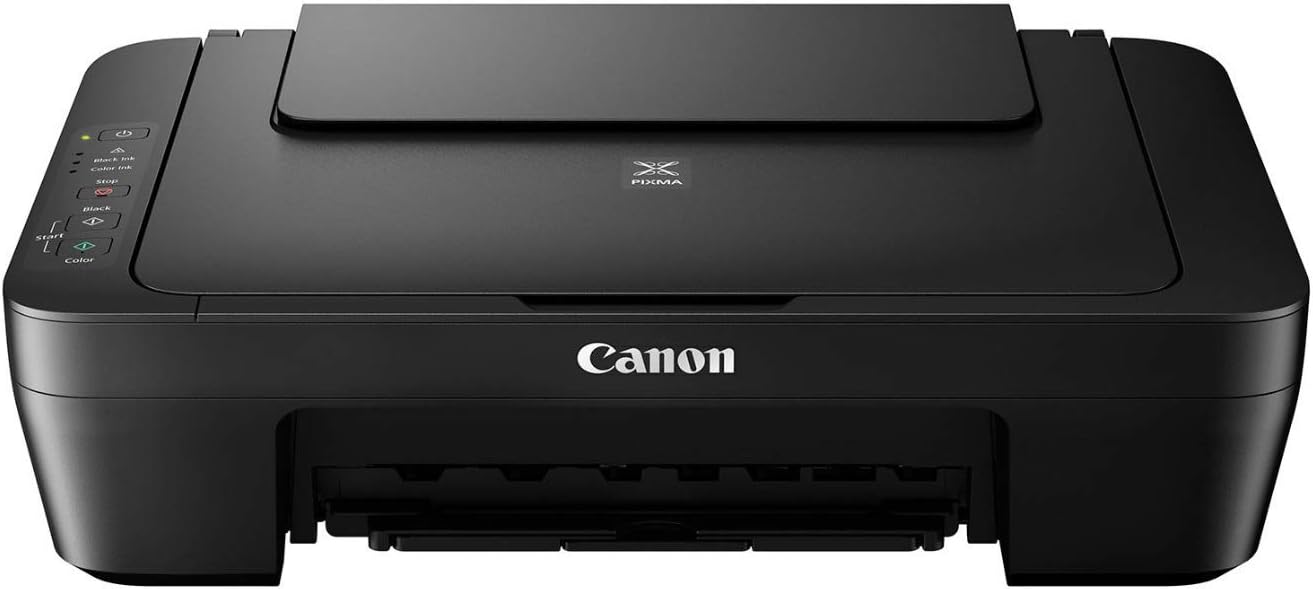
The Canon PIXMA MG2525 is a compact all-in-one inkjet printer designed for professionals who demand quality and efficiency. Featuring a 4-color hybrid ink system, USB 2.0 connectivity, and a 60-sheet rear tray, it delivers sharp prints, scans, and copies quietly and reliablyโperfect for home offices and creative projects.


| ASIN | B01LZ662EM |
| Additional Printer Functions | All In One |
| B&W Pages per Minute | 8 ppm |
| Best Sellers Rank | #192,128 in Office Products ( See Top 100 in Office Products ) #136 in Ink Tank Printers |
| Brand | Canon |
| Built-In Media | Printer, Power Cable |
| Color | black |
| Color Depth | 48 bits |
| Color Pages per Minute | 4 ppm |
| Compatible Devices | Laptops, PC |
| Connectivity Technology | USB |
| Control Method | App |
| Controller Type | USB controller |
| Customer Reviews | 4.0 out of 5 stars 3,536 Reviews |
| Display Type | LCD |
| Dual-sided printing | Yes |
| Duplex | Yes |
| Global Trade Identification Number | 00013803279153 |
| Hardware Interface | USB |
| Ink Color | Cyan, Magenta, Yellow |
| Item Dimensions D x W x H | 12.1"D x 16.8"W x 5.8"H |
| Item Weight | 7.6 Pounds |
| Manufacturer | CANON USA, INC. |
| Maximum Copies Per Run | [N/A: Estimated to be more than 1, but not specified in the product details] |
| Maximum Copy Resolution Black and White | 1200 x 600 dpi |
| Maximum Copy Resolution Color | 4800 x 600 dpi |
| Maximum Copy Speed Black and White | 8 ppm |
| Maximum Media Size | A4 |
| Maximum Print Resolution Black and White | 600 x 600 dpi |
| Maximum Sheet Capacity | 60 |
| Maximum print Resolution Color | 4800 x 600 dpi |
| Model Name | MG2525 |
| Model Number | MG2525 |
| Model Series | PIXMA |
| Number of Drivers | 1 |
| Number of Trays | 1 |
| Output sheet capacity | 60 |
| Paper Size | 4 inch x 6 Inches, 5 inch x 7 Inches |
| Power Consumption | 9 Watts |
| Print media | Envelopes, Glossy photo paper, Paper (plain) |
| Printer Connectivity Type | USB |
| Printer Output | Color |
| Printer Output Type | Color |
| Printer Type | Inkjet |
| Printing Technology | Inkjet |
| Processor Count | 1 |
| Resolution | 4800 x 600 |
| Scanner Type | Flatbed |
| Series Number | 25 |
| Specific Uses For Product | Office |
| Total USB 2.0 Ports | 1 |
| Total Usb Ports | 1 |
| UPC | 013803279153 |
| Unit Count | 1.0 Count |
| Warranty Type | limited warranty |
D**T
So Happy to have this Wonderful Printer
Used the PIXMA MG2522 for eight years and loved it. Updated to the 2525 version and love it too. What made it extremely important was the in between I tried another Canon that was impossible to download on Windows 11. 11 kept changing the download to another verison of a Canon printer as I never could find the drop down list and had to do it manually. Help from Cox Complete Care and two tech from Canon failed. Gave up and donated it to a charity and finally the 2525 was in stock. It comes with a disc, no download needed, and Windows 11 behaved perfectly! I won! Would love to bill Microsoft for my time spent on this issue.
L**O
Doesnโt take up much space
For a Printer this little sucker is great . Does just about everything a bigger one does but doesnโt need much space to do it in . Prints wireless, very quiet, can run around 100 sheets loaded and came with two ink cartridges. Was very easy to set up and loading those cartridges ( black and color) was a snap . Was really surprised at the fair $$ considering how well it is made . No problem with paper jaming either like those big bulky ones . Great purchase and product . Iโm a happy camper , thank you very much !!
A**R
Good Printer But Loud and Slow
I received my Canon Pixima MG2525 printer a few days ago. It's surprisingly light weight and easy to take out of the box. The box indicates that it does not include the USB cord, but disregard this as it is included in the box along with the power cord and two ink cartridges - black and color. Set up was not easy for me, it took about an hour. I found the included written instructions to be sparse. More detail would have been nice. I found a really great setup video for this printer on YouTube. It was much more helpful than the included directions. Like most people, I'm a visual learner so seeing the setup through a video was much more helpful to me than the written instructions. Please note that the orange error light will blink until you snap in the ink cartridges. The written instructions don't say this nor does the setup video. I thought I had done something wrong, until I added the ink cartridges and the orange light went out. This model prints well, but be forewarned that it's slow and loud. For home use it's great as my printing needs are minimal. If you need to print a lot daily, the noise and slowness will probably drive you crazy. I have yet to use the scanning feature, so I can't comment upon that. Overall, it's a decent, cost effective printer.
K**.
Purchased 3 since 2022
Bought one in March 2022. Price was right and the print quality excellent, so when the first one stopped working , in 2023 , I bought another because it was cheap, from Walmart. Then that one went and I bought another in 2024, again because of the price. Now that one stopped working as well, after replacing an ink cartridge that wasn't "Canon Fine print", but same model from another compatible brand, even though the ink cartridges are full . I had registered the last two with Canon, but when I went to their website, my account is there, but not the product registrations. I tried to reach a "live" customer service agent and you can't! You have to have a product registered with them to get ANY information at all! Canon service is next to impossible! Terrible ,no support ! For that reason, and the fact that 3 of them stopped working, I would NOT recommend!
K**E
Excellent printer, but replacing ink cartridges is tricky
This is an excellent printer for my pretty minimal uses. It was easy to put together & has worked very well this past year. Replacing the ink cartridges is a challenge. Open the front of the printer while the copier is on. The cartridge holders are moving. In my Cannon, they donโt stop like the YouTube video demonstration. So, I had to grab the units before they went to their โrestingโ positionโ behind the side. Once tackled, it was easy to pull out each cartridge & replace. Just remember, the black cartridge is on the right, color on the left. It took mine a few copies before it settled into the new cartridge.
A**.
!!!WARNING PLEASE READ BEFORE BUYING THIS!!!
I don't have any real issues with the printer as of yet, but wanted to warn anyone that buys it to please be careful where you download the drivers from. Most laptops don't have cdroms anymore, so you have to go online to download them. Inside of my printer box was a piece of paper with instructions for downloading the drivers, I should have been suspicious immediately, b/c instead of a booklet or quality sheet with a cannon logo, it was very cheap paper with no cannon logo on it, that told me to go to a website URL. (I accidentally threw it out or I would include the URL) I typed the URL into the URL bar, and no page came up, but on the search results page, an almost identical URL with the heading "Cannon drivers" came up. I didn't look closely at first, but the only difference was a "/" in the URL, instead of the "/" on the paper, The page itself said it was the driver download page for my model. again I should have know better b/c the page just said cannon in regular type, not the logo and it was poorly designed. But I wasn't thinking and I hit download. I kept getting an error saying I needed to call a number b/c there was an issue. I called the number and it was clearly an effort to hack into my laptop. The man (on a very bad line) said that error meant that I had a virus "on my network" and it must have been taking over my laptop at that very minute and he could fix it. I know this is a common scam where hackers get your info and get you to download software that lets them takeover. I hung up, but I did go back to the paper and double checked the URL provided multiple time and it did not exist. I have no idea how the paper got into the box, but I don't think cannon would take down a page that had its printer drivers. I also eventually found the right page, and it was on the cannon website, cannon logo and all. Shame on me for not catching it earlier, but there is clearly a fake cannon driver site aimed at hacking into people laptops. Please be careful
H**L
Works flawlessly!
best printer ever, always works even when low on ink, no subcription required. 245 and 246 ink by canon. don't even need to do the alignment that it request, you can skip it and it works fine!!!
A**A
perfect for a home office
I have bought three little Canon printers over the last 15 years (two of them this model). I only replaced them when the "ink absorber is full". It always happens around year 5. I couldn't clean the absorber myself because it's inaccessible. Ink cartridges can still be found for less than $20 (I only use black). Printer will not work without the color cartridge, so leave it in there even when it's empty. Printer comes with both cartridges at purchase! One of the print heads seem to go about year 4 but still legible and ok for my work. I print monthly reports. Very easy to set up although the cord it comes with is kind of short, maybe 3 feet. I used my own cord from my tower to the printer which is 5 feet because I have big desk with two monitors. Great value!
R**2
Great Printer
This is my second one. The first I bought 6 years ago and it got a LOT of use before it died. So, I was quite happy to find the exact same model still available and at a very reasonable price. Only had to reinstall the new software on disc, install and align the ink cartridges, and was up and running. I hope this one lasts as long.
D**E
A great printer.
It's inexpensive, it works great, and it only requires 2 ink cartridges.
A**R
Canon is OK
The MG2525 printer stopped warking altogether. Called Canon and explained the problem. Within 4 days I had a replacement. Very impressed.
K**I
Customer Service Plays Games
I bought this printer knowing it was basic. I knew there was no wifi connection. I knew it only worked via USB connection. With that in mind, I purchased it. Because I need a printer. Now, was I under the impression that through various USB adapters I would be able to connect my other devices to it? Yes. But I also have a desktop computer so the fact that I could only use it through desktop is inconvenient, yet still doable. With that in mind, I went through the set up CD steps as ive done numerous times before with various printers in my life. Yet it wouldnt work. Evidently, because I had a more advanced canon printer software already downloaded from previous printers, this model would not finish downloading its set up and as a result, I couldnt use it. I then went to the link provided in the instructions for the canon website to get the software online. The link wouldnt work. So I opted to return the printer as I couldnt get it set up. I was responded to the next day and the agent even remarked upon how other customers run into the same issues but "that is the model". Hmm. K. So when I went to print the return label, I come to find that it is NOT prepaid, but a standard "ship it back yourself" style label. I was miffed, because Amazon is supposed to provide free shipping up to 20$ on returns. I was left with the impression that I was not warranted a prepaid label, as they were claiming the printer wasnt inoperable but "that is the model" I ordered. So I took the hit for 18$ return fee and shipped it to the label the Amazon link gave me, which the return address was in Quebec. Now, I am not new to a return process. I shop on amazon a lot and any seasoned shopper knows you don't always get as advertised. I know how to access a return label. I know how to return a product. Cut to over 2 weeks later. My records show the printer had arrived in Quebec 8 days prior to me reaching out to inquire about my refund, as it had not yet been processed. I get, in my opinion, a condescending email from a different agent, claiming I had not followed the "step by step" directions from the previous agent, and had used an "incorrect shipping method" instead. They also claimed that they did send me a prepaid shipping label, and therefore they are not on the hook for refunding my shipping expense because I apparently elected not to use the correct label. I wasnt even asking them to refund my shipping, but yet they felt the need to add some salt to the wound. Now again, I know how returns work, it was NOT prepaid when it was printed. Even the person I had print for me (as I had no printer) commented on how it was NOT prepaid, because as an avid amazoner herself, she too was surprised. He issued the refund, and then I checked my return lable again as my return status had changed. NOW it was showing a prepaid label, this one was not going to Quebec, it was addressed within Ontario. Wtf. Like Im sorry but you can't just change the label type AND address and claim that *I* did it wrong and "didnt follow directions". Classic "covering their own butts" tactics here. Overall, printer was too out of date to be functional, and customer service gives you the runaround. I bought an Epson Ecotank from Staples instead. You get what you pay for!
J**R
Jโadore
Vraiment parfait
Trustpilot
2 months ago
1 week ago